
Увод
This manual provides comprehensive instructions for the Akko MG75 ABNT2 Mechanical Keyboard. Designed for efficiency and customization, this 75% layout keyboard features Akko Silver V3 Pro mechanical switches, full RGB backlighting, and hot-swappable switch sockets. Please read this manual carefully to ensure proper use and maintenance of your device.
1. Подешавање
1.1 Садржај пакета
- Akko MG75 ABNT2 Mechanical Keyboard
- USB-C Cable (Removable)
- Кеицап Пуллер
- Свитцх Пуллер
- Додатни прекидачи
- Кориснички приручник (овај документ)
1.2 Повезивање тастатуре
- Locate the USB-C port on the back of the keyboard.
- Connect the provided USB-C cable to the keyboard.
- Повежите други крај USB-C кабла са доступним USB портом на рачунару.
- Ваш оперативни систем ће аутоматски препознати тастатуру. За основне функционалности обично нису потребни додатни драјвери.

Image: USB-C port for connecting the keyboard.
1.3 Подешавање висине тастатуре
The Akko MG75 keyboard features three levels of adjustable height. Flip out the feet located on the underside of the keyboard to select your preferred typing angle.
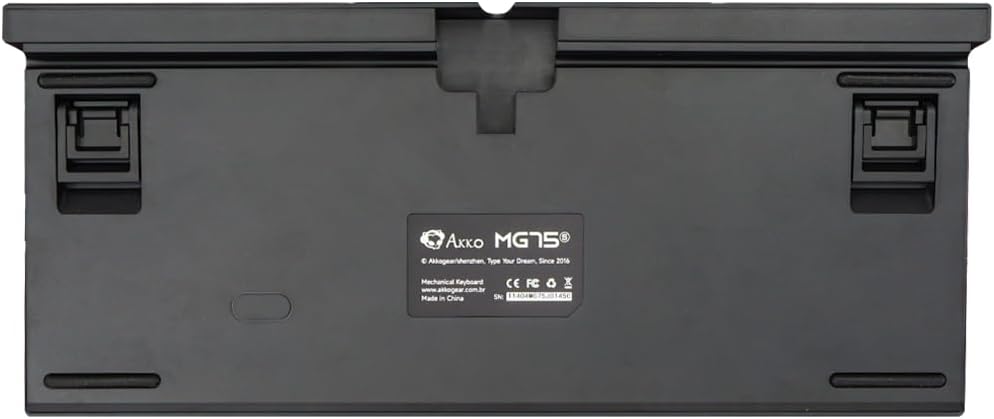
Image: Underside of the keyboard with adjustable feet.
2. Упутство за употребу
2.1 RGB контрола осветљења
The Akko MG75 keyboard features full RGB backlighting with multiple effects and customization options. Refer to the included quick guide or the official Akko software for detailed instructions on changing lighting modes, colors, and brightness. Typically, lighting effects can be cycled using specific key combinations (e.g., Fn + certain keys).
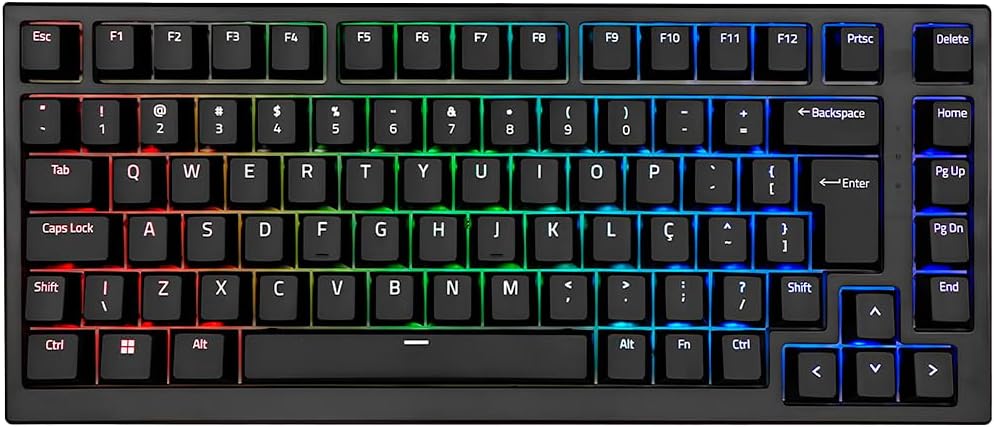
Image: Akko MG75 keyboard displaying RGB lighting.
2.2 Прекидачи са могућношћу замене током рада
The Akko MG75 supports hot-swappable mechanical switches, compatible with both 3-pin and 5-pin switches. This allows for easy customization of your typing experience without soldering.
Changing Switches:
- Use the provided switch puller to carefully remove the desired switch from the keyboard. Grip the switch firmly and pull straight up.
- Поравнајте пинове новог прекидача са отворима на штампаној плочи. Уверите се да су пинови прави.
- Gently press the new switch into place until it clicks securely. Do not force the switch if it does not go in easily; check pin alignment.

Image: Akko mechanical switches, illustrating their design for hot-swapping.
2.3 ABNT2 Layout
This keyboard features the ABNT2 layout, which includes specific keys for Portuguese language characters and punctuation, such as 'Ç' and dedicated keys for accents. This layout is standard for Brazilian Portuguese users.

Слика: Одозго надоле view of the Akko MG75 keyboard, highlighting the ABNT2 layout.
3. Одржавање
3.1 Чишћење тастатуре
- Искључите тастатуру из рачунара пре чишћења.
- Користите меку четку или компримовани ваздух да бисте уклонили прашину и прљавштину између тастера.
- For stubborn dirt, gently wipe the keycaps and keyboard surface with a slightly damp cloth (water only). Avoid excessive moisture.
- Не користите јаке хемикалије или абразивна средства за чишћење.
3.2 Замена капице тастера
To replace keycaps, use the provided keycap puller. Gently hook the puller onto the keycap and pull straight up. To install a new keycap, align it with the switch stem and press down firmly until it is seated.
КСНУМКС. Решавање проблема
4.1 Тастатура не реагује
- Уверите се да је USB-C кабл безбедно повезан и са тастатуром и са рачунаром.
- Try disconnecting and reconnecting the USB-C cable multiple times. Some users have reported this resolves initial connection issues.
- Test the keyboard on a different USB port on your computer.
- If possible, test the keyboard on another computer to rule out system-specific issues.
- Check if the cable itself is damaged by trying a different USB-C cable if available.
4.2 RGB Lighting Not Working Correctly
- Уверите се да је тастатура правилно повезана и да прима напајање.
- Refer to the quick guide for key combinations to cycle through lighting modes and adjust brightness.
- If using Akko software, ensure it is up-to-date and correctly configured.
5. Спецификације
| Феатуре | Детаљ |
|---|---|
| Бранд | Акко |
| Модел | МГ75 |
| Лаиоут | 75% ABNT2 |
| Прекидачи | Akko Silver V3 Pro Mechanical |
| Хот-Свап | Yes (3-pin and 5-pin compatible) |
| Повезивање | USB-C (Removable Cable) |
| Позадинско осветљење | РГБ |
| Анти-Гхостинг | N-keys Rollover |
| Кеицапс | ABS Laser |
| Подесива висина | Да, 3 нивоа |
| Компатибилни уређаји | PC |
| Боја | Црно |
| Број кључева | 84 |
| Бруто тежина | 1582 г |
| Нето тежина | 1451 г |
| Package Dimensions (L x H x D) | 350 мм к 250 мм к 50 мм |
6. Гаранција и подршка
6.1 Гаранција на производ
The Akko MG75 Mechanical Keyboard comes with a 12-месечна гаранција against manufacturing defects from the date of purchase. Please retain your proof of purchase for warranty claims. This warranty does not cover damage caused by misuse, accidents, unauthorized modifications, or normal wear and tear.
6.2 Корисничка подршка
For technical assistance, warranty claims, or further inquiries, please visit the official Akko website or contact your local retailer. You may find additional resources, FAQs, and software downloads on the manufacturer's support page.
Official Akko Webсајт: ввв.аккогеар.цом