
LEAUDIO XD-05T X24014
XDUOO XD05T Dual ES9039Q2M Portable DAC & Headphone Ampлифиер Упутство за употребу
Model: XD-05T X24014
1. Увод
The XDUOO XD05T is a high-fidelity portable DAC and headphone amplifier designed to deliver exceptional audio performance. It features dual ESS ES9039Q2M DAC chips and an XMOS XU316 USB chip, supporting high-resolution audio formats including PCM up to 768kHz and DSD512. Unique to the XD05T, it incorporates two miniature vacuum tubes from the 1960s in its amplification circuit, providing a warm, analog sound character.
This device offers versatile connectivity with multiple input and output interfaces, including USB, Coaxial/Optical, AUX, and Balanced I/O. It supports both portable use via its built-in 6000mAh battery and desktop use with DC power. The XD05T is compatible with various operating systems, including Windows, Linux, Mac OS, iOS, and Android.
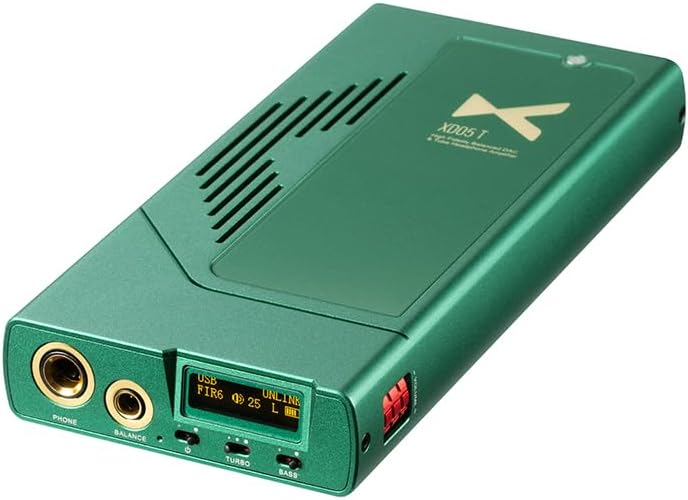
Figure 1: XDUOO XD05T Portable DAC and Headphone Amplifier, showing its sleek green design and front panel.
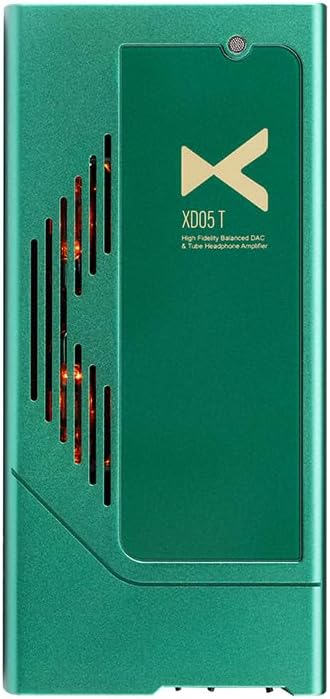
Слика 2: Врх view of the XDUOO XD05T, revealing the glowing vacuum tubes through the ventilation grille.

Figure 3: Diagram illustrating the "Classic Sound from the Flavor of Tubes" feature, highlighting the unique harmonic distortion characteristics of vacuum tubes.
2. Производ је готовview
2.1 Контроле и портови на предњој плочи
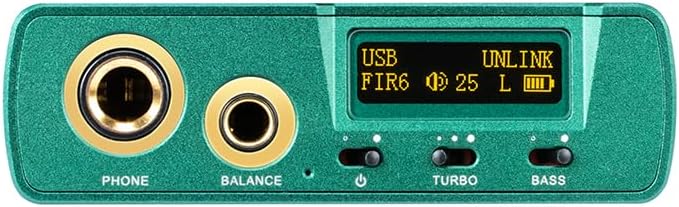
Слика 4: Крупни план view of the XDUOO XD05T front panel, showing headphone outputs, display, and control switches.
- PHONE (6.35mm) Output: Standard unbalanced headphone output.
- BALANCE (4.4mm) Output: Balanced headphone output for enhanced audio quality.
- Екран: Приказује тренутни улаз, sample rate, volume level, and battery status.
- Power/Input Switch: Toggles power and cycles through input sources.
- ТУРБО прекидач: Activates high-gain mode for demanding headphones.
- BASS Switch: Engages bass boost function.
- Контрола јачине звука: Digital volume adjustment with 99 levels.
2.2 Портови на задњој плочи
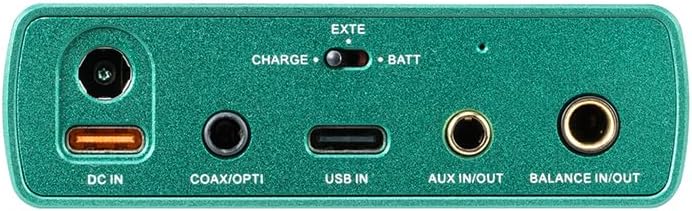
Слика 5: Крупни план view of the XDUOO XD05T rear panel, displaying various input and output ports.
- Једносмерна струја (12V): Power input for desktop use and charging.
- COAX/OPTI: Coaxial and Optical digital audio input.
- УСБ ИН: USB Type-C input for connecting to computers, smartphones, or tablets.
- АУКС ИН/ОУТ: 3.5mm analog auxiliary input/output.
- BALANCE IN/OUT: 4.4mm balanced analog input/output.
- CHARGE/BATT Switch: Selects between external power (CHARGE) and internal battery (BATT).
3. Подешавање
3.1 Укључивање и пуњење
The XD05T can be powered by its internal battery or an external 12V DC power adapter. Before first use, it is recommended to fully charge the device. Connect the included power adapter to the DC IN port. The charging time is approximately 3.5 hours for fast charging or 10 hours for slow charging.
- To use with battery power, ensure the CHARGE/BATT switch is set to "BATT".
- To use with external DC power and/or charge, set the CHARGE/BATT switch to "CHARGE".

Figure 6: Diagram illustrating the power selection switch and DC input port.
3.2 Повезивање аудио уређаја
The XD05T offers various connection options for different audio sources and output devices.

Figure 7: Comprehensive diagram showing how to connect the XD05T to various audio devices like phones, PCs, players, CD players, DACs, and active speakers.
- УСБ веза: Connect your computer (Windows, Linux, Mac OS), smartphone (iOS, Android), or tablet to the USB IN port using a compatible USB cable. The device will be recognized as an audio output device.
- Coaxial/Optical Connection: For digital audio sources like CD players or media streamers, connect to the COAX/OPTI port.
- АУКС ИН/ОУТ: Use a 3.5mm audio cable for analog input from devices like portable music players or for analog output to external ampлифиерс/звучници.
- Balanced IN/OUT: For high-fidelity analog connections, use a 4.4mm balanced cable to connect to compatible sources or output devices.
- Веза за слушалице: Plug your headphones into either the 6.35mm PHONE output (unbalanced) or the 4.4mm BALANCE output (balanced).
3.3 Блуетоотх упаривање
The XD05T features Bluetooth 5.1 connectivity with support for SBC, AAC, APTX, APTX LL, APTX HD, and LDAC codecs.
- Power on the XD05T.
- Cycle through the input modes using the Power/Input switch until "Bluetooth" or "BT" is displayed on the screen.
- On your source device (smartphone, tablet, etc.), enable Bluetooth and search for available devices.
- Select "XDUOO XD05T" from the list of found devices to pair.
- Once paired, the display will indicate a successful connection, and you can begin streaming audio wirelessly.
4. Упутство за употребу
4.1 Подешавање јачине звука
The XD05T features a precise digital volume control with 99 levels, allowing for fine-tuning of the sound output. Use the dedicated volume buttons or knob (if present) to adjust the loudness. Even with sensitive In-Ear Monitors (IEMs), the granular control prevents excessive volume.

Figure 8: Image highlighting the volume adjustment mechanism on the XD05T, emphasizing its 99-level precision.
4.2 Избор улаза
Press the Power/Input switch briefly to cycle through the available input sources (USB, Coaxial/Optical, AUX, Bluetooth). The current input will be displayed on the screen.
4.3 TURBO Mode
Engage the TURBO switch to activate the high-gain mode. This mode provides increased output power, which is beneficial for driving high-impedance or low-sensitivity headphones to their full potential. Be cautious when activating TURBO mode with sensitive headphones or IEMs, as it can lead to very high volume levels.
4.4 BASS Boost
Toggle the BASS switch to enable or disable the bass boost function. This feature enhances the low-frequency response, providing a more impactful bass experience. Use according to your personal preference and the characteristics of your audio content and headphones.
5. Спецификације
Below are the detailed technical specifications for the XDUOO XD05T:
| Категорија | Спецификација |
|---|---|
| ДАЦ Цхип | ESS ES9039Q2M*2 |
| УСБ чип | КСМОС КСУ316 |
| Формат подршке за УСБ | PCM 16-32Bit/44.1k - 768kHz, DSD64-512, MQA 1-8X |
| Блуетоотх чип | QCC5125, Bluetooth 5.1 |
| Блуетоотх формат | SBC/AAC/APTX/APTX LL /APTX HD/LDAC |
| Unbalanced Output Parameters | |
| Излазна снага (32Ω) | 750mW (THD+N<5%) |
| Излазна снага (300Ω) | 83mW (THD+N<5%) |
| Излазна импеданса | <0.2Ω |
| Пеак Волtage (TURBO) | 15Вп-п |
| Фреквенцијски одзив | 20Хз~20КХз (±0.5дБ) |
| Преслушавање | ≥КСНУМКС дБ |
| ТХД+Н | 0.5% |
| СНР | ≥114дБ |
| Balanced Output Parameters | |
| Излазна снага (32Ω) | 1500mW (THD+N<5%) |
| Излазна снага (300Ω) | 565mW (THD+N<5%) |
| Излазна импеданса | <0.2Ω |
| Пеак Волtage (TURBO) | 26Вп-п |
| Фреквенцијски одзив | 20Хз~60КХз (±0.5дБ) |
| Преслушавање | ≥КСНУМКС дБ |
| ТХД+Н | 0.5% |
| СНР | ≥116дБ |
| AUX OUT Parameters | |
| Оутпут Левел | 2.0В |
| ТХД+Н | 0.00065% |
| СНР | ≥120дБ |
| Преслушавање | ≥100дБ |
| BAL-LO Parameters | |
| Оутпут Левел | 4.0В |
| ТХД+Н | 0.00065% |
| СНР | ≥124дБ |
| Преслушавање | ≥100дБ |
| Применљив ОС | Windows, Linux, Mac OS, iOS, Android system |
| Заштитни кругови | Overheating /Overload /DC protection |
| Батерија | 3.7В/6000мАх |
| Трајање батерије | USB IN, SPDIF IN≥4H | AUX IN≥4.5H |
| Време пуњења | About 3.5 hours (fast charging) | 10 hours (slow charging) |
| Величина | 16.8 к 7.8 к 2.3 цм |
| Тежина | 0.4 кг (1.1 фунти) |
| Технологија повезивања | Жичани, Блуетоотх |
| Укључене компоненте | Кабл |
| Произвођач | LEAUDIO |
| Назив модела | XD-05T X24014 |
6. Одржавање
Proper care and maintenance will ensure the longevity and optimal performance of your XDUOO XD05T.
- Чишћење: Use a soft, dry, lint-free cloth to clean the exterior of the device. Do not use liquid cleaners, aerosols, or solvents.
- Складиштење: Чувајте уређај на хладном и сувом месту, даље од директне сунчеве светлости, екстремних температура и високе влажности.
- Руковање: Avoid dropping the device or subjecting it to strong impacts. Protect the ports from dust and debris when not in use.
- Одржавање батерије: For optimal battery life, avoid fully discharging the battery frequently. If storing for an extended period, charge the battery to about 50% and recharge every few months.
КСНУМКС. Решавање проблема
If you encounter issues with your XDUOO XD05T, refer to the following common problems and solutions:
- Нема излаза звука:
- Ensure headphones are securely plugged into the correct output port (PHONE or BALANCE).
- Check the volume level on the XD05T and your source device.
- Verify the correct input source is selected on the XD05T (USB, Coaxial/Optical, AUX, Bluetooth).
- If using USB, ensure the correct audio output device is selected in your computer's sound settings.
- Check if the headphones are functioning correctly with another device.
- Уређај се не укључује:
- Ensure the battery is charged or the device is connected to a working 12V DC power adapter.
- Check the CHARGE/BATT switch position.
- If using battery, the battery might be fully depleted; connect to power and wait a few minutes before attempting to power on.
- Проблеми са Блуетоотх везом:
- Ensure the XD05T is in Bluetooth input mode.
- Make sure the XD05T is discoverable and not already paired with another device.
- Try unpairing and re-pairing the device from your source's Bluetooth settings.
- Reduce the distance between the XD05T and your source device, and remove any obstacles.
- Изобличен звук:
- Check if the volume is too high, causing clipping.
- Уверите се да су сви каблови безбедно повезани.
- If using TURBO mode, try disabling it, especially with sensitive headphones.
- Verify the audio source is not distorted.
8. Гаранција и подршка
The XDUOO XD05T is manufactured by LEAUDIO. For specific warranty terms and conditions, please refer to the warranty card included with your product or visit the official LEAUDIO website. Typically, products come with a limited manufacturer's warranty covering defects in materials and workmanship.
If you require technical support, have questions about product operation, or need to initiate a warranty claim, please contact the seller or LEAUDIO customer service directly. Have your product model number (XD-05T X24014) and purchase information ready when contacting support.
For additional resources and updates, you may visit the manufacturer's official website or the product page where you purchased the device.
Повезани документи - XD-05T X24014
 |
XDUOO XA-02 High Performance Balanced DAC & Headphone Ampлифиер Упутство за употребу User manual for the XDUOO XA-02, a high-performance balanced DAC and headphone amplifier. It details features, specifications, operation, connectivity, and warranty information for this audio device. |
 |
xDuoo XA-02 High Performance Balanced DAC & Headphone Ampлифиер Упутство за употребу User manual for the xDuoo XA-02, a high-performance balanced DAC and headphone amplifier. Features XMOS XU316, ES9039Q2M DAC, Bluetooth 5.1, and Class A amplification. Details product features, controls, specifications, connections, and warranty. |
 |
XDUOO XD05T Portable DAC and Tube Headphone Ampлифиер Упутство за употребу Comprehensive user manual for the XDUOO XD05T, a portable high-fidelity DAC and tube balanced headphone amplifier. Learn about its features, specifications, operation, and troubleshooting. |
 |
TOPPING DX5 II Упутство за употребу: Hi-Fidelity DAC и слушалице Ampлифиер Гуиде Откријте TOPPING DX5 II, премиум десктоп DAC и слушалице ampживотник. Ово корисничко упутство детаљно описује његове напредне функције, могућности звука високе резолуције, опције повезивања и упутство за употребу за оптимално искуство слушања. |
 |
XDUOO Link2 Bal Max USB DAC Balanced Headphone Ampлифиер The xDuoo Link2 Bal Max is a portable USB DAC and balanced headphone amplifier featuring the CS43131*2 DAC chip. It supports PCM and DSD playback, offering high output power and excellent audio specifications like low THD+N and high SNR. The device is compact and lightweight, designed for audiophiles on the go. |
 |
XDUOO XD05 Basic User Manual and Product Information Comprehensive user manual for the XDUOO XD05 Basic portable DAC and headphone amplifier, detailing its features, specifications, and usage instructions. |
Ask a question about this manual
Ask about setup, troubleshooting, compatibility, parts, safety, or missing instructions. Manuals+ will review the question and use this page’s manual context to help answer it.