
АТ&Т ЕЛ51503
AT&T EL51503 DECT 6.0 бежични кућни телефон - упутство за употребу
Модел: ЕЛ51503
Увод
Welcome to your new AT&T EL51503 DECT 6.0 Cordless Home Phone system. This manual provides comprehensive instructions for setting up, operating, and maintaining your phone system. Designed for busy households, this system offers clear, interference-free communication with advanced features.

Image: The AT&T EL51503 cordless phone system, showing the main base unit with one handset and four additional charging cradles with handsets.
Кључне карактеристике
Your AT&T EL51503 cordless phone system comes equipped with several features designed for convenience and clarity.
Backlit Screen & Lighted Keypad

High-contrast text on the white backlit screen ensures easy readability of incoming caller ID or call history records. The lighted handset keypad allows for effortless dialing even in low-light conditions.
Екстра-велики екран

The large screen makes it easy to read information at a glance, improving user experience for all.
Биг Буттонс

Featuring large font and extra-large backlit keys, this design is particularly helpful for users with visual impairments, ensuring comfortable and accurate dialing.
ДЕЦТ 6.0 технологија
This cordless telephone transmits secure signals via DECT 6.0 channel, ensuring crystal clear sounds, interference-free communication, and a stable operation range up to 1000 ft outdoors.
Шта је у кутији
Проверите да ли ваш пакет садржи све ставке наведене у наставку:
- 1 Основна јединица
- 5 Телефони
- 4 Adaptors (for charging cradles)
- 5 батерије
- 1 кабл телефонске линије
- Водич за брзи почетак
Сетуп
1. Инсталација батерије
Each handset requires a battery pack for operation. Ensure correct polarity when inserting.
- Отворите поклопац одељка за батерије на задњој страни слушалице.
- Чврсто прикључите конектор батерије у прикључак унутар одељка.
- Ставите батеријски пакет у одељак.
- Затворите поклопац одељка за батерије.
2. Пуњење телефона
For optimal performance, charge each handset for at least 16 hours before initial use.
- Place each handset face forward into its respective charging cradle or the main base unit.
- The CHARGE light on the handset will illuminate, indicating proper charging.
3. Повезивање основне јединице
Connect the base unit to a power outlet and your telephone line.
- Укључите већи крај адаптера за напајање у електричну утичницу која није контролисана зидним прекидачем.
- Укључите мањи крај адаптера за напајање у POWER прикључак на задњој страни основне јединице.
- Укључите један крај телефонског кабла у TEL LINE прикључак на задњој страни базне јединице.
- Укључите други крај телефонског кабла у телефонску утичницу у зиду.
Важно: Use only the power adapter and telephone line cord provided with this product.
Управљање телефонским системом
Позивање и одговарање на позиве
- To make a call: Press ТЕЛЕФОН / ФЛАСХ or СПЕАКЕР, затим позовите број.
- To answer a call: Press ТЕЛЕФОН / ФЛАСХ or СПЕАКЕР када телефон зазвони.
- За завршетак позива: Притисните ОФФ/ЦАНЦЕЛ или вратите слушалицу у лежиште.
Коришћење спикерфона
The simulated full-duplex speakerphone allows for natural, two-way conversations.
- У току позива притисните СПЕАКЕР да бисте прешли на режим звучника.
- Притисните СПЕАКЕР again to switch back to handset mode, or press ОФФ/ЦАНЦЕЛ да прекинете позив.
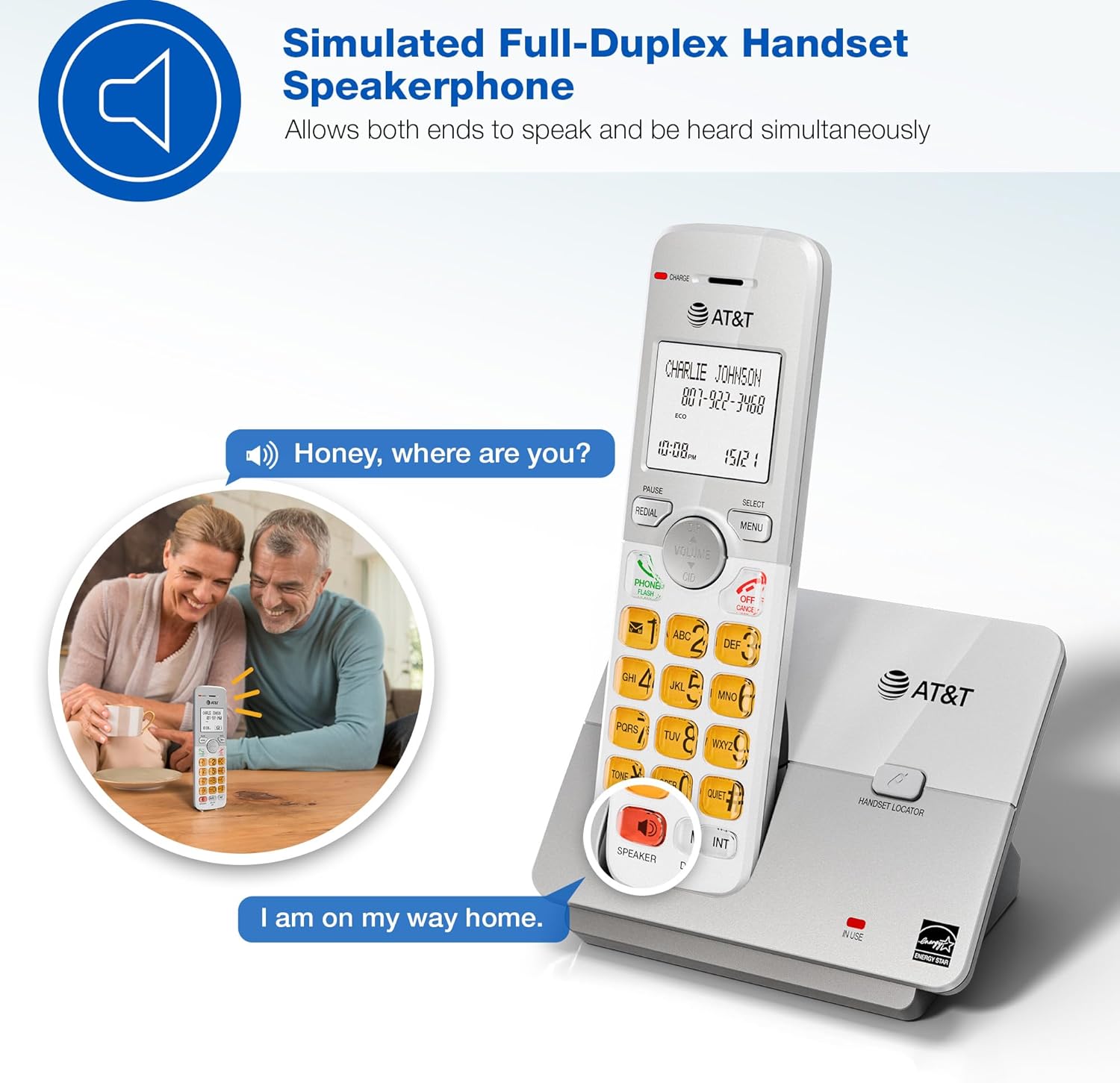
Image: A couple smiling while using the phone's speakerphone feature, demonstrating simultaneous speaking and hearing.
Телефонски именик
Сачувајте до 50 имена и бројева за брзо бирање.
- To add an entry: Press МЕНУ, navigate to "Phonebook", then "Add New Entry". Follow the on-screen prompts.
- To dial from phonebook: Press ДИР, scroll to the desired entry, then press ТЕЛЕФОН / ФЛАСХ or СПЕАКЕР.

Image: The phone's display showing a phonebook directory with contact names, illustrating the ability to store up to 50 names and numbers.
ИД позиваоца / Позив на чекању
View incoming caller information and manage multiple calls.
- Incoming calls display on the large, backlit LCD screen.
- То реview Caller ID history: Press ЦИД (up/down arrow) to scroll through recent calls.
- To call back a number from Caller ID: Select the entry and press ТЕЛЕФОН / ФЛАСХ.

Image: A close-up of the phone's LCD screen displaying an incoming caller's name and number, along with the current time and date.
Ецо Моде
The phone system features an ECO mode to manage power consumption, extending battery life and reducing energy use.
- ECO mode is typically activated automatically when the handset is close to the base unit.
- Look for the "ECO" indicator on the handset display.
Функција интерфона
Користите функцију интерфона за комуникацију између слушалица.
- To initiate an intercom call: Press ИНТ на било ком мобилном телефону.
- If you have multiple handsets, you may be prompted to select which handset to call.
- To end an intercom call: Press ОФФ/ЦАНЦЕЛ.
Куиет Моде
Temporarily silence the ringer on all handsets and the base unit for a set period.
- To activate Quiet Mode: Press МЕНУ, navigate to "Quiet Mode", and set the desired duration.
- Incoming calls will still be logged in Caller ID history.
Одржавање
Proper care ensures the longevity of your phone system.
- Чишћење: Обришите телефон и базну јединицу меком, благо длакомamp крпа. Не користите спрејеве за чишћење или јаке хемикалије.
- Одржавање батерије:
- Avoid overcharging by leaving handsets on the charger for extended periods after they are fully charged.
- If the phone will not be used for a long time, remove the battery from the handset.
- Replace batteries when performance degrades.
- Локација: Keep the phone away from heat sources, direct sunlight, and moisture.
Решавање проблема
If you experience issues with your phone system, try these common solutions:
| Проблем | Решење |
|---|---|
| Нема тона за бирање |
|
| Телефон се не пуни |
|
| Лош квалитет звука / Статични шумови |
|
| ИД позиваоца се не приказује |
|
Спецификације
| Феатуре | Детаљ |
|---|---|
| Број модела | ЕЛ51503 |
| Тип телефона | ДЕЦТ 6.0 бежични телефон |
| Број слушалица | 5 (прошириво) |
| Дисплаи | ЛЦД са позадинским осветљењем |
| Тастатура | Лигхтед |
| Спеакерпхоне | Симулирани дуплексни спикерфон |
| Капацитет именика | 50 имена и бројева |
| Цаллер ИД меморија | 50 позива |
| Ецо Моде | Да |
| Интерфон | Да |
| Извор напајања | Електрични са каблом (основна јединица) |
| Батерије | 5 батерије специфичне за производ (укључене) |
| Боја | Црно |
| Материјал | Пластика |
| Произвођач | ВТецх |
| Димензије производа (основа) | 4.76 к 3.29 к 6.81 инча (Д к Ш к В) |
| Тежина артикла | 3.16 фунти |
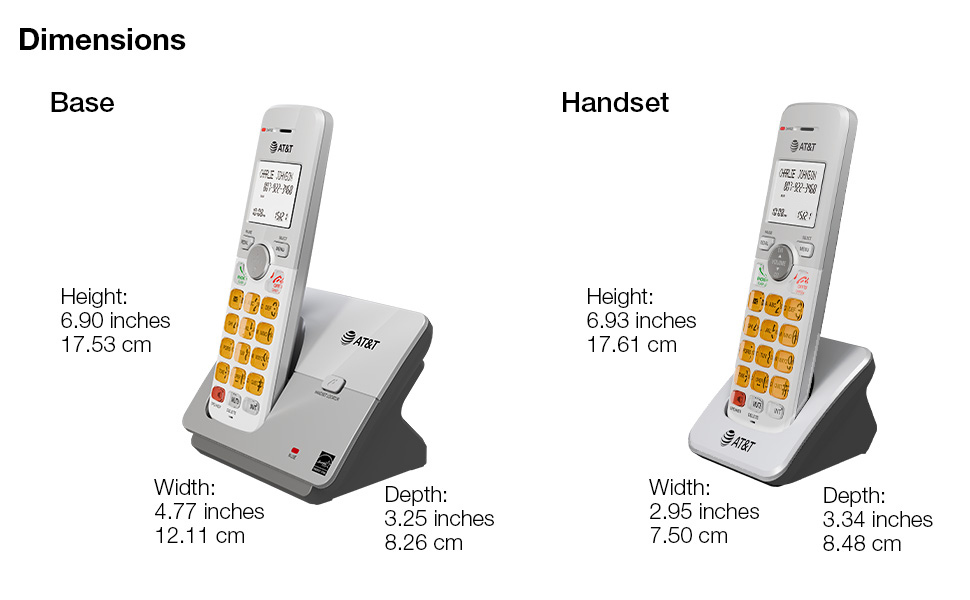
Image: A diagram illustrating the dimensions of both the base unit and a single handset, including height, width, and depth in inches and centimeters.
Гаранција и подршка
For warranty information and technical support, please refer to the quick start guide included in your package or visit the official AT&T support webсајту.
- Произвођач: ВТецх
- Бренд: АТ&Т
- Подршка на мрежи: Посетите AT&T продавницу на Амазону
Такође су доступни планови заштите за проширено покриће:
- Двогодишњи план заштите
- Двогодишњи план заштите
- Комплетна заштита (месечни план)
For details on these plans, please check the product listing or contact your retailer.
Ask a question about this manual
Ask about setup, troubleshooting, compatibility, parts, safety, or missing instructions. Manuals+ will review the question and use this page’s manual context to help answer it.