
1. Увод
This instruction manual provides comprehensive guidance for the assembly, operation, and maintenance of your TRYX LUCA L70 E-ATX Mid-Tower PC Case. The LUCA L70 is designed to accommodate a wide range of components, supporting E-ATX, ATX, Micro-ATX, and Mini-ITX motherboards. It features a 270° panoramic tempered glass panel for an unobstructed view of your internal components, a modular design for flexible power supply placement, and extensive cooling capabilities. Please read this manual carefully before beginning assembly to ensure proper installation and safe use.
2. Безбедносне информације
Увек се придржавајте следећих мера предострожности како бисте спречили повреде и оштећења ваших компоненти:
- Статички електрицитет: Always ground yourself before handling internal components to prevent electrostatic discharge (ESD) damage. Use an anti-static wrist strap if available.
- Искључивање струје: Ensure all power is disconnected from the power supply unit (PSU) and the wall outlet before installing or removing any components.
- Оштре ивице: Be cautious of sharp edges inside the case during installation.
- Тежина: The PC case, especially when fully assembled with components, can be heavy. Lift with care and seek assistance if necessary.
- вентилација: Ensure adequate airflow around the case to prevent overheating. Do not block ventilation openings.
- каљено стакло: Handle the tempered glass panels with extreme care. They are fragile and can shatter if dropped or subjected to impact. Avoid placing heavy objects on the glass.
3. Производ је готовview и карактеристике
The TRYX LUCA L70 PC case offers a blend of aesthetic design and functional features for high-performance PC builds.
3.1 Кључне карактеристике
- 270° Panoramic Tempered Glass: Front and side panels feature reinforced tempered glass for an unobstructed view ваших унутрашњих компоненти.
- Модуларни дизајн: The power supply unit (PSU) can be positioned at the top or bottom, offering flexibility for various build configurations and improved cable management.
- Excellent Cooling Support: Supports up to nine fans and radiators up to 420mm, ensuring optimal thermal performance for demanding systems.
- Простран ентеријер: Accommodates E-ATX motherboards (up to 280mm width), graphics cards up to 460mm in length, and CPU coolers up to 170mm in height. Rear cable management space up to 65mm.
- Опције складиштења: Features nine 2.5-inch drive bays and two 3.5-inch drive bays for ampле стораге.
- Advanced I/O Ports: Includes one USB 3.2 Gen2x2 Type-C port (20Gbps, 30W Power Delivery), two USB 3.0 Type-A ports, and one 3.5mm 4-pole TRRS audio jack.
- Филтери за прашину: Equipped with dust filters on the top and bottom to maintain a clean interior.
- Vertical GPU Mount Support: Ready for vertical GPU mounting (riser cable sold separately).
3.2 Визуелни прелазview

Figure 1: Stylish Design & Superior Performance. This image highlights the internal layout of the TRYX LUCA L70 PC case, showcasing its spacious interior, fan mounting options, and the 270-degree tempered glass panels. It also indicates a 19mm ultra-slim chassis, 4mm thick tempered glass, and an X-shaped floating foot construction that elevates the case by 40mm for improved airflow.
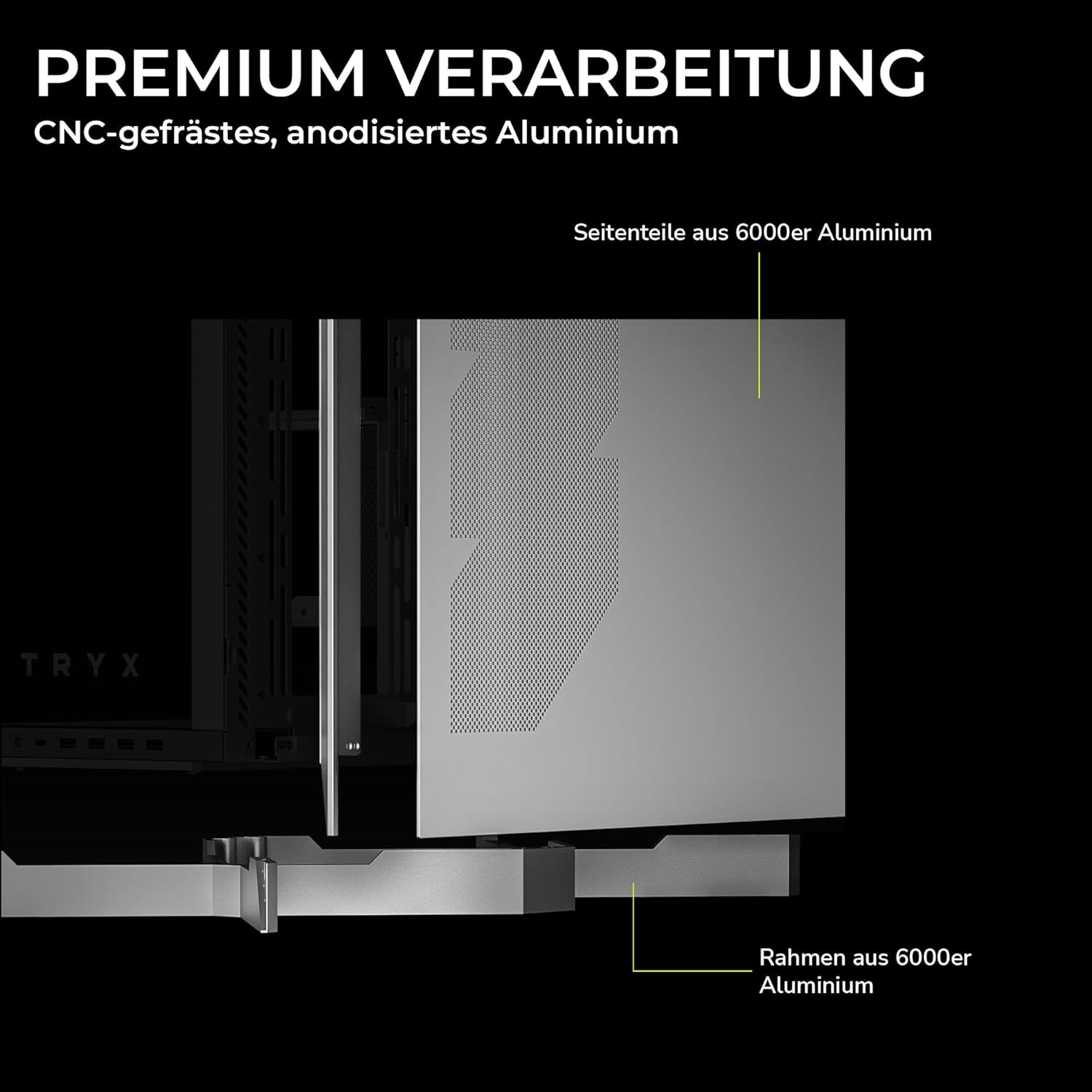
Figure 2: Premium Craftsmanship. This image details the construction materials, specifically highlighting the side panel made from 6000 series aluminum and the frame also constructed from 6000 series aluminum, emphasizing the case's durable and high-quality build.

Figure 3: Effortless Access with Swivel Front Panel. This image demonstrates the swing-out front panel feature, which allows for easy access to the front fan mounts and radiator space, simplifying installation and maintenance.

Figure 4: Modular Design. This illustration shows the flexible power supply unit (PSU) positioning (top or bottom) and the removable motherboard tray, which facilitates easier component installation and cable management. It also indicates various fan and radiator mounting points.

Figure 5: Extensive Connectivity Options. This image details the front I/O panel, including the microphone and speaker jacks, one USB-C 3.2 Gen 2x2 port (with 30W Power Delivery), and two USB-A 3.2 Gen 1 ports.

Слика 6: Димензије производа. This image provides a visual representation of the case's approximate dimensions: 26cm (width), 57cm (height), and 54cm (depth). Note that precise dimensions are listed in the specifications section.
4. Подешавање и инсталација
This section outlines the general steps for installing your PC components into the TRYX LUCA L70 case. Always refer to your individual component manuals for specific installation instructions.
4.1 Припрема случаја
- Поставите кућиште на равну, стабилну површину.
- Carefully remove the tempered glass side panel by unscrewing the thumb screws and gently pulling it away. Set it aside on a soft, non-abrasive surface.
- Remove any other panels or covers as needed for easier access to the interior.
4.2 Инсталација матичне плоче
- Инсталирајте процесор, хладњак процесора (ако је у питању ваздушни хладњак) и РАМ меморију на матичну плочу пре него што је ставите у кућиште.
- Ensure the correct standoffs are installed for your motherboard form factor (E-ATX, ATX, Micro-ATX, Mini-ITX).
- Carefully align your motherboard with the standoffs and the I/O shield opening at the rear of the case.
- Причврстите матичну плочу приложеним вијацима.
4.3 Инсталација јединице за напајање (ПСУ).
- Determine your preferred PSU mounting position (top or bottom) based on your modular design preference.
- Уметните напајање у његов предвиђени одељак са задње стране кућишта.
- Причврстите напајање завртњима са задње стране кућишта.
- Повежите потребне каблове за напајање са матичном плочом и осталим компонентама.
4.4 Инсталација уређаја за складиштење података
- 2.5-inch Drives: Locate the 2.5-inch drive mounts (up to 9 available). Secure SSDs or 2.5-inch HDDs using the provided screws or tool-less mechanisms.
- 3.5-inch Drives: Locate the 3.5-inch drive bays (up to 2 available). Install HDDs into the drive cages, typically using trays or screws.
4.5 Инсталација графичке картице (GPU)
- Уклоните потребне поклопце слотова за проширење на задњој страни кућишта.
- Insert your GPU into the appropriate PCIe slot on the motherboard.
- Secure the GPU with screws to the expansion slots.
- If using a vertical GPU mount (riser cable sold separately), follow the instructions provided with your vertical mount kit.
4.6 Уградња вентилатора и радијатора
The LUCA L70 supports extensive cooling configurations:
- Врх: Up to 2x 120mm / 140mm fans or radiators up to 420mm.
- страна: Up to 3x 120mm / 140mm fans or radiators up to 420mm.
- дно: Up to 3x 120mm / 140mm fans or radiators up to 360mm.
- позади: 1x 120 мм вентилатор.
Install fans and radiators using the appropriate screws, ensuring correct airflow direction.
4.7 Управљање кабловима
Искористите ample cable routing cutouts and tie-down points behind the motherboard tray to manage cables neatly. This improves airflow and aesthetics. The case offers up to 65mm of space for cable management.
4.8 Front I/O Connections
Connect the front panel cables (USB, audio, power switch, reset switch, LED indicators) to the corresponding headers on your motherboard. Refer to your motherboard manual for header locations.
5. Руковање кућиштем рачунара
Once all components are installed and cables are connected, replace all panels, including the tempered glass side panel. Connect your peripherals (monitor, keyboard, mouse) and power cable to the PSU.
- Укључено: Press the power button on the front I/O panel to turn on your PC.
- Искључивање: Shut down your operating system normally. You can also press and hold the power button for a few seconds for a forced shutdown (use only when necessary).
- Поново покрени: Use the reset button on the front I/O panel if available, or restart through your operating system.
6. Одржавање
Редовно одржавање помаже у обезбеђивању оптималних перформанси и дугог века трајања компоненти вашег рачунара.
- Филтери за прашину: The top and bottom dust filters should be regularly cleaned. Gently remove them and clean with compressed air or rinse with water (ensure they are completely dry before reinstallation).
- Спољно чишћење: Обришите спољашње површине, укључујући каљене стаклене плоче, меком,amp крпу. Избегавајте абразивна средства за чишћење или раствараче.
- Унутрашње чишћење: Periodically open the case and use compressed air to remove dust buildup from fans, heatsinks, and other components. Ensure the PC is powered off and unplugged before cleaning the interior.
КСНУМКС. Решавање проблема
Ако наиђете на проблеме, размотрите следеће уобичајене кораке за решавање проблема:
- Рачунар се не укључује:
- Check if the PSU is switched on at the back.
- Уверите се да су сви каблови за напајање (24-пински ATX, 8-пински CPU, GPU напајање) безбедно повезани.
- Проверите да ли је кабл прекидача за напајање на предњој плочи правилно повезан са прикључком на матичну плочу.
- Нема излаза на екран:
- Уверите се да је ваш монитор повезан са графичком картицом (не са I/O портом матичне плоче, осим ако не користите интегрисану графику).
- Поново инсталирајте графичку картицу и РАМ модуле.
- прегревање:
- Check fan connections and ensure they are spinning.
- Очистите филтере за прашину и унутрашње компоненте.
- Verify proper airflow direction within the case.
- УСБ портови не раде:
- Ensure the front panel USB cables are correctly connected to the motherboard headers.
- Check your motherboard's BIOS/UEFI settings for USB port configuration.
For more complex issues, consult your motherboard or component manuals, or seek professional assistance.
8. Спецификације
| Феатуре | Спецификација |
|---|---|
| Бранд | ТРИКС |
| Назив модела | LUCA L70 |
| Број модела | C-L700N-NN0H-G0W |
| Тип случаја | Мид-Товер |
| Боја | Бела |
| Компатибилност матичне плоче | Е-АТКС, АТКС, Мицро-АТКС, Мини-ИТКС |
| Димензије (ширина к висина к дубина) | 261.8mm x 540.4mm x 571.85mm (Approx. 10.3 x 21.3 x 22.5 inches) |
| Тежина | Прибл. 16.2 кг (35.7 лбс) |
| Материјали | Aluminum Alloy, SGCC Steel, Tempered Glass |
| Слотови за проширење | 7 |
| Максимална дужина ГПУ-а | 460мм |
| Максимална висина ЦПУ хладњака | 170мм |
| Мак ПСУ Ленгтх | 190mm (ATX) |
| Дриве Баис | 9x 2.5-inch, 2x 3.5-inch |
| Подршка навијача (горе) | 2к 120мм / 140мм |
| Носач вентилатора (са стране) | 3к 120мм / 140мм |
| Fan Support (Bottom) | 3к 120мм / 140мм |
| Носач вентилатора (задњи) | 1к 120мм |
| Носач радијатора (горњи) | До 420 мм |
| Носач радијатора (са стране) | До 420 мм |
| Radiator Support (Bottom) | До 360 мм |
| Предњи И / О портови | 1x USB 3.2 Gen2x2 Type-C (20Gbps, 30W PD), 2x USB 3.0 Type-A, 1x 3.5mm 4-pole TRRS Jack |
| Филтери за прашину | Врх, дно |
| Посебне карактеристике | 270° Tempered Glass, Modular Design, Vertical GPU Mount Ready |
| ГТИН | 06977029650209 |
9. Гаранција и подршка
9.1 Информације о гаранцији
The TRYX LUCA L70 PC Case comes with a 2 година гаранције from the date of purchase. This warranty covers defects in materials and workmanship under normal use. It does not cover damage caused by misuse, accident, modification, unauthorized repair, or improper installation. Please retain your proof of purchase for warranty claims.
9.2 Техничка подршка
For technical assistance, troubleshooting, or warranty inquiries, please contact TRYX customer support. Refer to the official TRYX website or your retailer's support channels for the most up-to-date contact information. When contacting support, please have your product model (LUCA L70) and proof of purchase ready.