
1. Производ је готовview
The ETOE Seal Pro A1363 is a 1080P Google TV projector designed for home entertainment. It features a built-in Google TV system, native 1080P resolution with 4K UHD decoding, auto-focus, auto-keystone correction, dual 10W speakers, and dual-band Wi-Fi connectivity. Its fully-sealed optical engine ensures a long, maintenance-free lifespan.
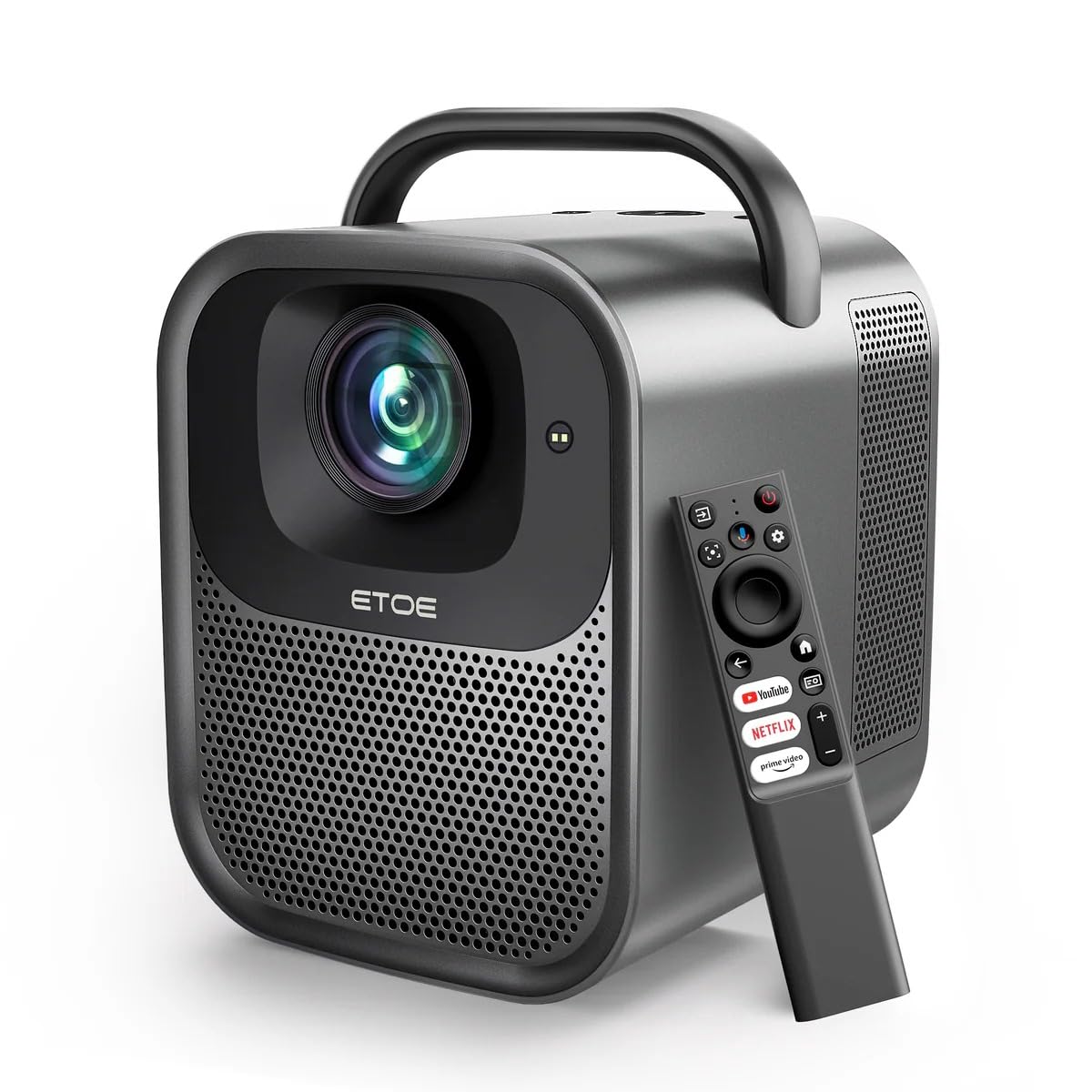
Слика 1.1: ETOE Seal Pro A1363 Projector. This image shows the front and side view of the projector, highlighting its compact design and lens.
Кључне карактеристике:
- Built-in Google TV System: Access streaming services like Netflix, YouTube, Prime Video, Disney+, and HBO directly.
- Native 1080P & 4K UHD Decoding: Delivers sharp visuals with 1920x1080 resolution and HDR enhancement.
- Auto-Focus and Keystone Correction: Ensures perfectly square and stable images from various angles.
- Имерзивни звук: Equipped with powerful 2x10W dual speakers and multiple audio modes.
- Двопојасни Ви-Фи: Supports 2.4G & 5G for stable wireless projection from Android, iOS, and PC devices.
- Издржљив дизајн: Features a dust-proof, fully-sealed optical engine for extended lifespan.
Видео производа прекоview:
Видео 1.1: ETOE Seal Pro Projector Features. This video provides a visual overview of the projector's main features and capabilities, including its Google TV integration, auto-focus, and sound system.
2. Шта је у кутији
Please check the contents of your package upon unboxing:
- ETOE Seal Pro A1363 Projector
- Повер Адаптер
- Повер Цорд
- Ремоте Цонтрол
- Кориснички приручник (овај документ)
3. Водич за подешавање
3.1 Почетно смештање
Place the projector on a stable, flat surface. Ensure there is adequate ventilation around the device. For optimal viewing, position the projector directly in front of the screen or wall.
3.2 Повезивање напајања
- Connect the power adaptor to the DC IN port on the projector.
- Plug the power cord into the power adaptor.
- Укључите кабл за напајање у зидну утичницу.
3.3 Повезивање екстерних уређаја
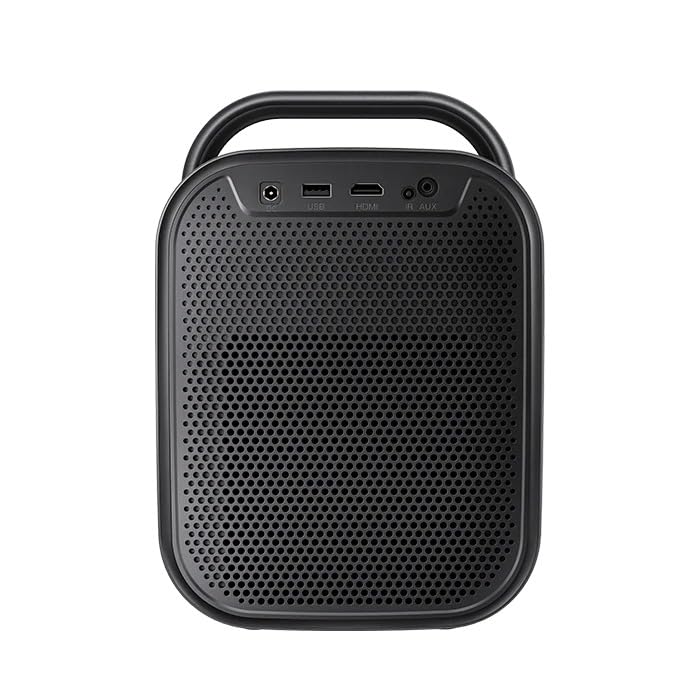
Слика 3.1: Позади view of the ETOE Seal Pro A1363 Projector, showing the DC IN, USB, HDMI, and AUX ports.
Пројектор нуди различите опције повезивања:
- ДВИ: Connect Blu-ray players, gaming consoles, laptops, or other HDMI-enabled devices.
- УСБ: Повежите УСБ дискове за репродукцију медија.
- АУКС: Повежите екстерне аудио уређаје или слушалице.
- Блуетоотх: Pair with Bluetooth speakers or headphones for wireless audio.
- Ви-Фи: Connect to your home network for online streaming and wireless projection.
4. Упутство за употребу
4.1 Укључивање/искључивање
- Press the Power button on the projector or the remote control to turn the device on.
- To turn off, press the Power button again and confirm the shutdown prompt on the screen.
4.2 Контроле прекоview
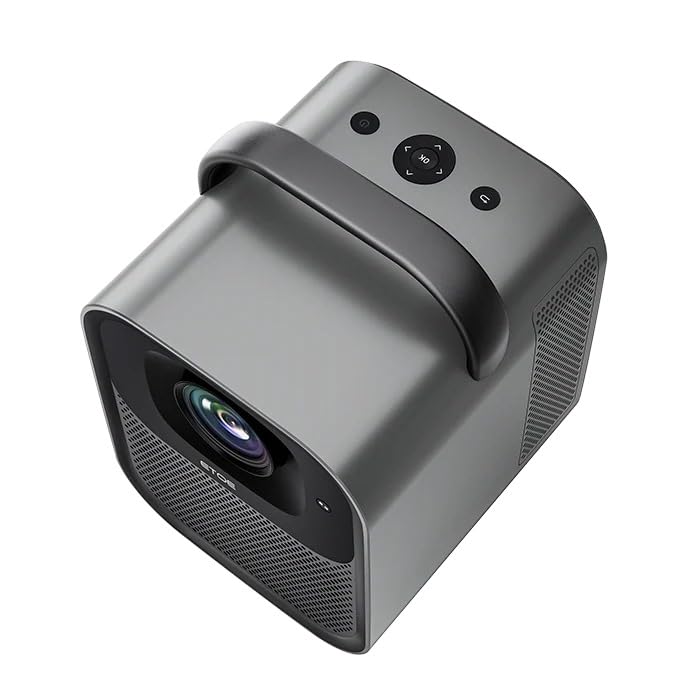
Слика 4.1: Врх view of the ETOE Seal Pro A1363 Projector, showing the power button, navigation controls, and back button.
The projector can be controlled using the buttons on the top panel or the included remote control.
- Дугме за напајање: Укључује или искључује пројектор.
- Навигациона дугмад (горе/доле/лево/десно): Користи се за навигацију кроз меније и избор опција.
- Дугме ОК: Потврђује изборе.
- Дугме за назад: Враћа се на претходни екран или мени.
4.3 Интерфејс Google TV-а
Upon powering on, the projector will display the Google TV home screen. You will need to log in with your Google account to access personalized content and streaming services.
- Пратите упутства на екрану да бисте се повезали са својом Wi-Fi мрежом.
- Пријавите се са својим Гоогле налогом.
- Install or access your preferred streaming applications (Netflix, YouTube, Prime Video, etc.).
- Use the remote control's navigation buttons and OK button to browse content.
- Utilize Google Assistant for voice commands by pressing the dedicated button on the remote.
4.4 Image Adjustment (Auto-Focus & Keystone)
The ETOE Seal Pro A1363 features automatic focus and keystone correction for a clear and properly shaped image.
- Ауто-фокус: The projector automatically adjusts the image focus when powered on or moved.
- Ауто-Кеистоне Цоррецтион: The projector automatically corrects distorted images to a rectangular shape, even if placed at an angle.
- Дигитални зум: If further adjustments are needed, navigate to the image settings in the Google TV menu to use the digital zoom feature (50% to 100%) to fine-tune screen size.
5. Одржавање
Правилно одржавање осигурава дуготрајност и оптималне перформансе вашег пројектора.
5.1 Чишћење пројектора
- Пре чишћења уверите се да је пројектор искључен и искључен из струје.
- Користите меку, суву крпу да обришете спољашњост пројектора.
- For the lens, use a lens cleaning cloth and specialized lens cleaning solution. Avoid abrasive materials.
- Do not spray cleaning liquids directly onto the projector.
5.2 Dust-Free Optical Engine
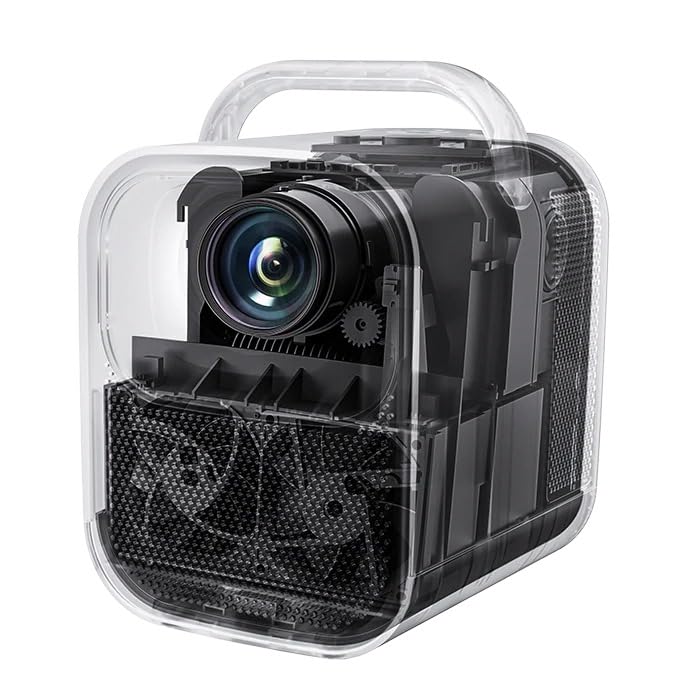
Слика 5.1: Унутрашње view of the ETOE Seal Pro A1363 Projector, highlighting the fully-sealed optical engine designed to prevent dust accumulation.
The ETOE Seal Pro A1363 features a fully-sealed optical engine, which significantly reduces dust accumulation and minimizes the need for internal cleaning. This design contributes to a maintenance-free lifespan of over 30,000 hours.
КСНУМКС. Решавање проблема
Ако наиђете на проблеме са пројектором, погледајте следеће уобичајене проблеме и решења:
- Нема напајања:
- Ensure the power cord is securely connected to the projector and the wall outlet.
- Проверите да ли је зидна утичница функционална.
- Проверите да ли је адаптер за напајање правилно повезан.
- Нема слике:
- Check the input source selection. Ensure it matches the connected device (e.g., HDMI).
- Verify the external device is powered on and sending a signal.
- Уверите се да је поклопац објектива уклоњен.
- Замућена слика:
- The projector has auto-focus. If the image is blurry, try moving the projector slightly or restarting it to trigger auto-focus.
- Уверите се да је површина пројекције равна и глатка.
- Distorted Image (Not Rectangular):
- The projector has auto-keystone correction. If distortion persists, try repositioning the projector or restarting it.
- Check for any manual keystone settings in the menu that might override auto-correction.
- Нема звука:
- Increase the volume on the projector and the connected source device.
- Проверите подешавања аудио излаза на изворном уређају.
- Ако користите спољне звучнике, уверите се да су правилно повезани и укључени.
- Проблеми са Ви-Фи везом:
- Уверите се да је пројектор у домету вашег Wi-Fi рутера.
- Проверите да ли је лозинка за Wi-Fi исправно унета.
- Restart your router and the projector.
7. Спецификације
| Феатуре | Спецификација |
|---|---|
| Бранд | etoe |
| Модел | А1363 |
| Нативе Ресолутион | 1920 к 1080 (1080П) |
| Резолуција декодирања | До 4К УХД |
| Осветљеност слике | КСНУМКС АНСИ Луменс |
| Однос контраста слике | 3000:1 |
| Дисплаи Тецхнологи | ЛЦД |
| Аспецт Ратио | 16:9 |
| Повезивање | Dual-Band Wi-Fi (2.4G & 5G), Bluetooth, USB, HDMI, AUX |
| Посебне карактеристике | Auto Focus, Auto Keystone Correction, Portable, Wireless |
| Звучници | 2 x 10W Dual Speakers |
| Optical Engine Lifespan | 30,000+ сати |
| Димензије производа | 53 к 34 к 59 цм |
| Тежина артикла | 3 кг |
| Волtage | 240 Волтс |
| Ватtage | 20 Ваттс |
| Рефресх Рате | 60 Хз |
8. Гаранција и подршка
For warranty information and customer support, please refer to the warranty card included with your product or contact the manufacturer directly.
Произвођач: JVDN International
Контакт информације: JVDN International (OPC) Private Limited, B-1122 Sun Westbank, Ashram Road, Ahmedabad, Gujarat, India, 380009. Contact person: JAYESH KUMAR JAGETIYA. Tel: +91 91361 87951. Email: jayesh@jvdninternational.com
Сачувајте доказ о куповини за гаранцијске захтеве.