
1. Подешавање
1.1. Садржај пакета
Уверите се да су све компоненте присутне у пакету:
- AUSDOM 108-Key Wireless Keyboard
- AUSDOM Wireless Mouse
- USB Receiver (stored in the mouse)
- УСБ-Ц кабл за пуњење
- Упутство за употребу
1.2. Connecting the Combo
- Пронађите УСБ пријемник: The 2.4GHz USB receiver is conveniently stored in a compartment on the underside of the wireless mouse. Gently slide open the battery cover to access it.
- Уметните пријемник: Plug the USB receiver into an available USB port on your computer (PC, laptop, or tablet). The system will automatically detect and install the necessary drivers.
- Уређаји за укључење: Ensure both the keyboard and mouse are switched to the 'ON' position. The power switch for the keyboard is located on its top edge, and for the mouse, it is on the underside.

1.3. Charging the Combo
Both the keyboard and mouse are equipped with built-in rechargeable Lithium Polymer batteries. Use the provided USB-C cable to charge them.
- Connect the USB-C end of the cable to the charging port on the keyboard (located on the top edge) or the mouse (located on the front).
- Повежите USB-A крај кабла са USB портом са напајањем на рачунару или са USB адаптером за зид.
- A full charge takes approximately 2 hours and provides up to 300 hours of standby time.

2. Упутство за употребу
2.1. Карактеристике тастатуре
The AUSDOM KAM200X keyboard features a full-size 108-key layout, including a dedicated numeric keypad and various function keys for enhanced productivity.
- Mechanical-Feel Keys: Experience tactile feedback similar to mechanical keyboards, combined with quiet scissor-switch mechanisms and a short 3.8mm key travel for comfortable and precise typing.
- Multimedia and Shortcut Keys: Utilize dedicated media controls (volume, play/pause) and app-switching shortcuts for streamlined workflow. Refer to the user manual for a complete list of function key combinations.
- Пребацивање оперативног система: Easily switch between Windows and macOS layouts using specific function key combinations (e.g., Fn + P for Windows, Fn + O for Mac).


2.2. Карактеристике миша
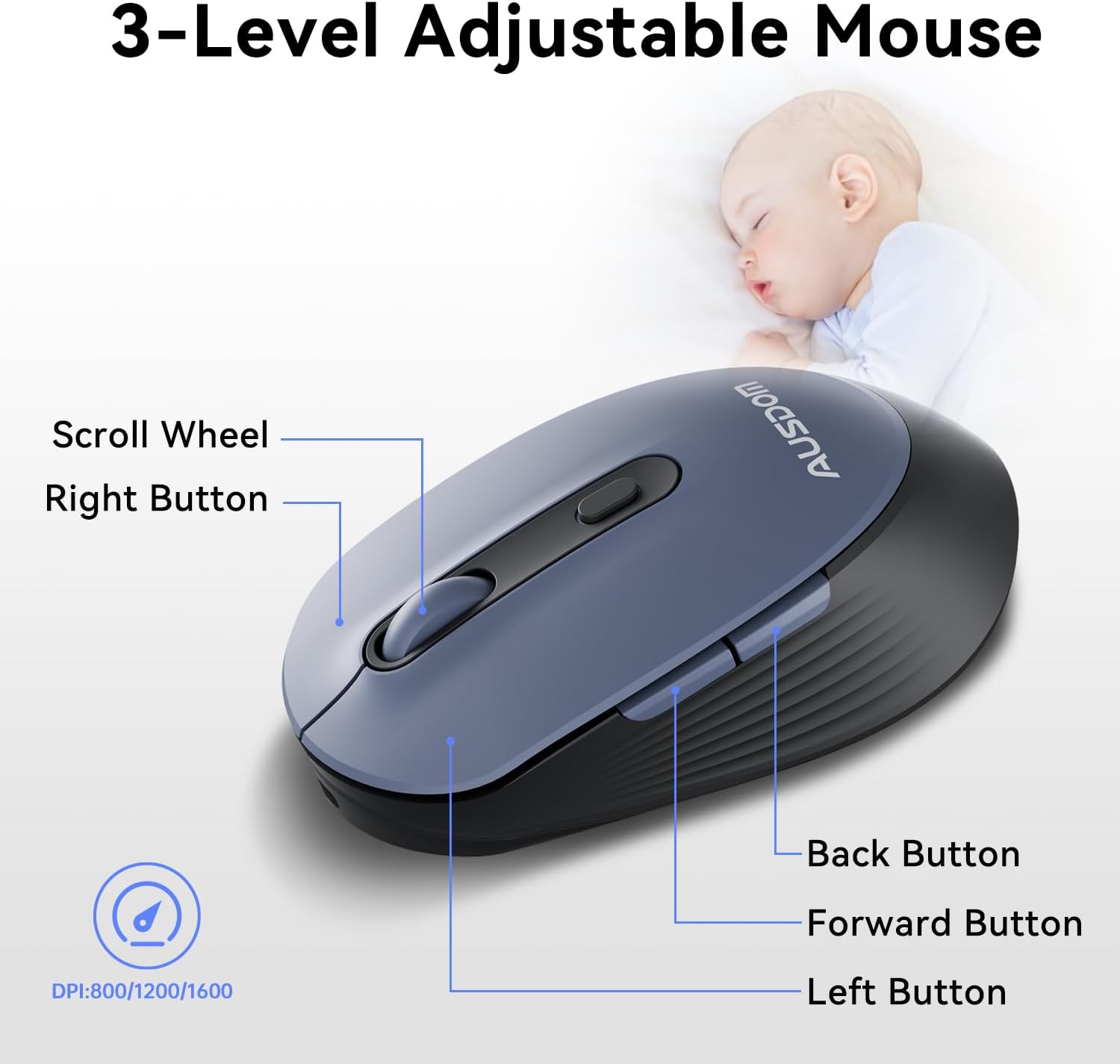
The ergonomic wireless mouse is designed for comfortable use and precise control.
- Подесиви ДПИ: Cycle through 3 DPI levels (800, 1200, 1600) using the dedicated DPI button to adjust cursor sensitivity for different tasks.
- Дугмад за напред/назад: Utilize the side buttons for quick navigation in web browsers and applications.
- Тихи кликови: The mouse features silent click buttons to minimize noise in quiet environments.
2.3. Широка компатибилност
The AUSDOM wireless combo is compatible with a broad range of operating systems and devices, ensuring seamless integration into your existing setup.
- Оперативни системи: Compatible with Windows XP/ME/Vista/7/8/10/11 and macOS.
- Уређаји: Works instantly with desktops, laptops, and other computers without requiring additional software or drivers.

3. Одржавање
3.1. Чишћење
To ensure the longevity and optimal performance of your AUSDOM combo, regular cleaning is recommended.
- Use a soft, dry, lint-free cloth to wipe down the surfaces of the keyboard and mouse.
- За тврдокорну прљавштину, благо дampen the cloth with water or a mild cleaning solution, ensuring no liquid enters the device openings.
- Избегавајте употребу јаких хемикалија, абразивних средстава за чишћење или растварача.
3.2. Складиштење
When not in use for extended periods, store the keyboard and mouse in a cool, dry place away from direct sunlight and extreme temperatures. The USB receiver can be stored inside the mouse to prevent loss.
КСНУМКС. Решавање проблема
4.1. Проблеми са повезивањем
- Проверите пријемник: Ensure the USB receiver is firmly plugged into a working USB port on your computer.
- Укључено: Verify that both the keyboard and mouse are switched to the 'ON' position.
- Ниво батерије: Confirm that both devices have sufficient battery charge. Recharge if necessary.
- Пробајте други порт: Прикључите УСБ пријемник у други УСБ порт на рачунару.
4.2. Lag or Unresponsiveness
- Смањите сметње: Move the keyboard and mouse closer to the USB receiver. Avoid placing large metal objects between the devices and the receiver.
- Check for Other Devices: Other 2.4GHz wireless devices might cause interference. Try to minimize their use or move them further away.
- допунити: Уверите се да су оба уређаја потпуно напуњена.
4.3. Keyboard Specific Issues
- Тастери не реагују: Gently clean around the affected keys to remove any debris.
- Нетачан излаз тастера: Check your computer's operating system settings to ensure the correct keyboard layout is selected.
4.4. Mouse Specific Issues
- Erratic Cursor: Clean the optical sensor on the underside of the mouse. Ensure you are using the mouse on a suitable, non-reflective surface.
- Подешавање ДПИ: Press the DPI button on the top of the mouse to cycle through the 800/1200/1600 DPI settings.
5. Спецификације производа
| Феатуре | Спецификација |
|---|---|
| Бранд | АУСДОМ |
| Број модела | KAM200X |
| Димензије производа | 17.44 к 5.31 к 0.79 инча |
| Тежина артикла | 1.8 фунти |
| Батерије | Потребна је 2 литијум-полимерска батерија (укључена) |
| Технологија повезивања | 2.4Гхз бежични |
| Посебне карактеристике | Lightweight, Rechargeable, Scissor Switch, Wireless |
| Компатибилни уређаји | Лаптоп, персонални рачунар, таблет |
6. Информације о гаранцији
For detailed warranty information regarding your AUSDOM KAM200X Wireless Keyboard and Mouse Combo, please refer to the official documentation included in your product packaging or visit the manufacturer's official webсајт. Услови гаранције могу се разликовати у зависности од региона и производа.
7. Корисничка подршка
If you encounter any issues or have questions about your AUSDOM KAM200X Wireless Keyboard and Mouse Combo, please contact AUSDOM customer support through their official channels. You can often find support contact information, FAQs, and additional resources on the AUSDOM Store Page или њихов службеник webсајту.