
Увод
Thank you for choosing the Care Bears Wireless LED Headphones. These Bluetooth-enabled headphones are designed for a fun and interactive audio experience, featuring light-up ears and earcups, an adjustable headband, and convenient on-ear controls. This manual will guide you through the setup, operation, and maintenance of your new headphones.
Садржај пакета
- Care Bears Wireless LED Headphones
- УСБ кабл за пуњење
- Упутство за употребу
Производ је завршенview
Familiarize yourself with the various components of your headphones:

Слика 1: Фронт view of the Care Bears Wireless LED Headphones, showcasing the adjustable headband, soft ear pads, and light-up ear features.
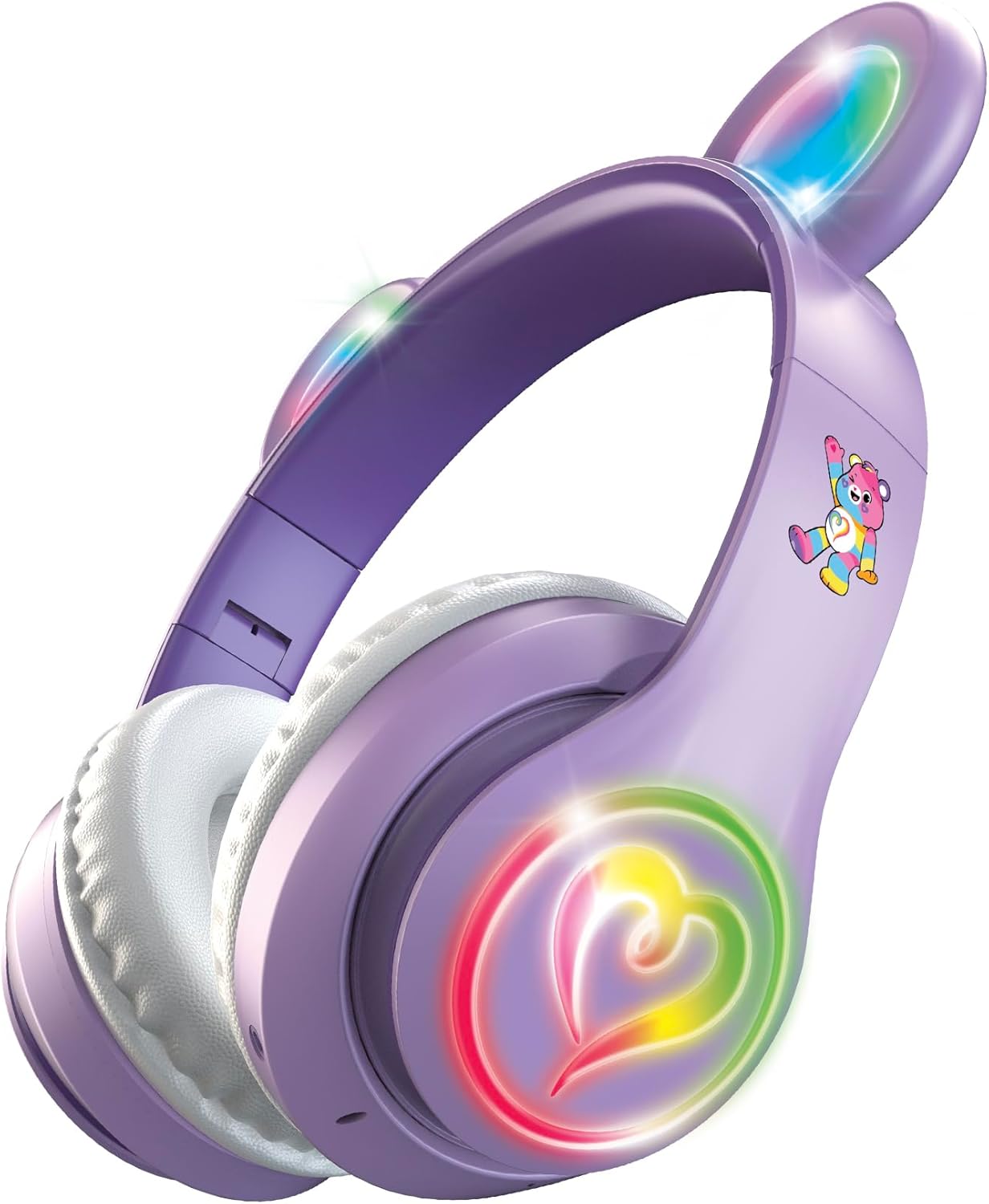
Слика 2: Англед view of the headphones with the multicolor LED lights activated on both the ears and the heart-shaped design on the earcups.
Кључне карактеристике:
- Подесива трака за главу: За удобно и сигурно приањање.
- Soft Ear Pads: Designed for extended listening comfort.
- Light-Up Ears and Earcups: Multicolor LED lights for a vibrant visual effect.
- On-Ear Control Panel: Buttons for power, play/pause, track navigation, and volume.
- микрофон: Интегрисано за позиве без употребе руку.
- Порт за пуњење: Микро УСБ порт за пуњење интерне батерије.
Сетуп
1. Пуњење слушалица
- Locate the Micro USB charging port on one of the earcups.
- Connect the provided USB charging cable to the headphones and a compatible USB power source (e.g., computer USB port, USB wall adapter).
- The LED indicator light will illuminate during charging and change color or turn off when fully charged.
- A full charge provides approximately 8 hours of continuous use.
2. Блуетоотх упаривање
- Уверите се да су слушалице потпуно напуњене.
- Press and hold the Power button on the earcup until the LED indicator light flashes, indicating pairing mode.
- На свом уређају (паметном телефону, таблету, рачунару) омогућите Блутут и потражите доступне уређаје.
- Select "Care Bears Headphones" (or similar name) from the list of found devices.
- Once paired, the LED indicator light will stop flashing and remain solid, or turn off, depending on the model.
- Слушалице ће аутоматски покушати да се поново повежу са последњим упареним уређајем када се укључе.
Упутство за употребу
Укључивање/искључивање
- За укључивање: Притисните и држите дугме за напајање док се ЛЕД индикатор не упали.
- За искључивање: Притисните и држите дугме за напајање док се ЛЕД индикатор не искључи.
Репродукција музике
- Пусти/паузирај: Притисните дугме Плаи/Паусе једном.
- Следећа нумера: Press the 'Next Track' button (often marked with a forward arrow or '+').
- Претходни запис: Press the 'Previous Track' button (often marked with a backward arrow or '-').
- Појачавање звука: Press and hold the 'Volume Up' button (often marked with '+').
- Смањивање јачине звука: Press and hold the 'Volume Down' button (often marked with '-').
Хандс-фрее позивање
- Одговори/заврши позив: Press the Play/Pause button once during an incoming call to answer, and once again to end the call.
- Одбиј позив: Press and hold the Play/Pause button for approximately 2 seconds during an incoming call.
- Поновно бирање последњег броја: Double-press the Play/Pause button when not on a call.
Контрола ЛЕД светла
The headphones feature multicolor LED lights on the ears and earcups. Refer to the specific button on your headphones, often labeled 'Light' or a light bulb icon, to cycle through light modes or turn them off.
Одржавање
- Чишћење: Користите меку, суву крпу за чишћење слушалица. Не користите абразивна средства за чишћење или раствараче.
- Складиштење: Слушалице чувајте на хладном и сувом месту, даље од директне сунчеве светлости и екстремних температура.
- Избегавајте воду: Ове слушалице нису водоотпорне. Избегавајте излагање води или прекомерној влази.
Решавање проблема
- Нема напајања: Уверите се да су слушалице потпуно напуњене.
- Не може се упарити: Make sure Bluetooth is enabled on your device and the headphones are in pairing mode. Move closer to your device.
- Нема звука: Check the volume level on both the headphones and your connected device. Ensure the headphones are properly paired.
- Светла не раде: Ensure the headphones are powered on and check if there is a dedicated button to activate the LED lights.
Спецификације
- Број модела: CBHPLEDGV101-MFN
- Повезивање: Блуетоотх 4.2
- Положај уха: Преко уха
- Трајање батерије: До 8 сати (просечно)
- Фреквенцијски опсег: 20Хз - 20,000Хз
- Метод контроле: Притисните дугме
- Материјал: Plastic, Fabric, Silicone
- Тежина артикла: 0.3 фунти
- Додатне карактеристике: Light-Up Ears and Earcups with Multicolor LED Lights
Информације о гаранцији
These headphones come with a 30-дневна ограничена гаранција from the manufacturer. Please retain your proof of purchase for any warranty claims. The warranty covers manufacturing defects but typically does not cover damage caused by misuse, accidents, or unauthorized modifications.
Подршка
For further assistance, troubleshooting, or warranty inquiries, please refer to the contact information provided on the product packaging or visit the official Care Bears product support webсајту.