
Увод
Welcome to the DOOGEE Blade10 Power user manual. This guide provides essential information for setting up, operating, maintaining, and troubleshooting your new rugged smartphone. The Blade10 Power is designed for durability and high performance, featuring a large battery, advanced camera, and robust protection against environmental elements.
Шта је у кутији
Carefully unpack your DOOGEE Blade10 Power and ensure all items are present:
- 1 x DOOGEE Blade10 Power Smartphone
- 1 к УСБ Типе-Ц кабл
- 1 к адаптер за напајање
- 1 x Pre-applied Screen Protector Film
- 1 x Thickened Screen Protector Film
- 1 к кутија за паковање
- 1 x Упутство за употребу (овај документ)

Image: Package contents for the DOOGEE Blade10 Power.
Сетуп
1. Инсталација SIM картице и TF картице
The DOOGEE Blade10 Power supports dual SIM cards and one TF (microSD) card for expanded storage. Locate the SIM card tray on the side of the device. Use the provided SIM ejector tool to open the tray. Insert your Nano-SIM cards and TF card into the designated slots as shown in the diagram. Ensure the tray is securely closed to maintain water and dust resistance.
2. Почетно пуњење и укључивање
Before first use, fully charge your device using the provided USB Type-C cable and power adapter. Connect the adapter to a power outlet and the cable to the phone's USB-C port. The charging indicator will show the charging status. Once charged, press and hold the Power button (usually on the side) until the DOOGEE logo appears to power on the device.
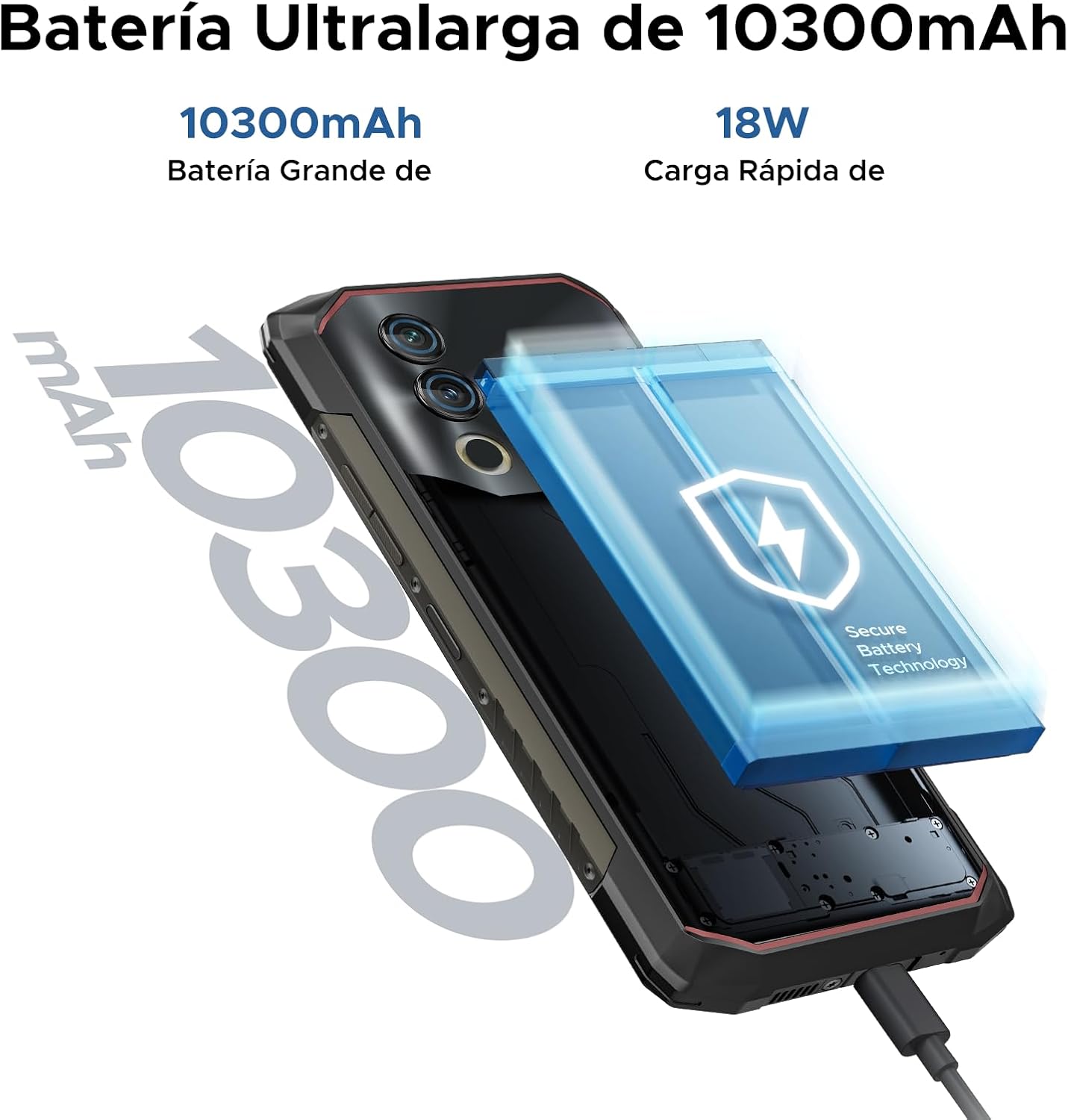
Image: The 10300mAh battery and 18W fast charging feature of the Blade10 Power.
Упутство за употребу
Основна навигација
Your DOOGEE Blade10 Power runs on Android 14, offering an intuitive user experience. Use gestures for navigation: swipe up from the bottom for the app drawer, swipe down from the top for notifications and quick settings, and tap icons to open applications.
Security Features: Fingerprint and Face ID
For enhanced security and quick access, set up Fingerprint Recognition and Face ID. The fingerprint sensor is located on the side of the device. Navigate to Подешавања > Безбедност > Откључавање отиском прста or Откључавање лицем to register your biometrics. The device offers ultra-fast unlocking in approximately 0.19 seconds.

Image: Facial Recognition and Side Fingerprint Sensor.
НФЦ функционалност
The integrated NFC (Near Field Communication) allows for quick and secure mobile payments with Google Pay and easy data transfer with compatible devices. Enable NFC in Settings > Connected devices > NFC.
Precise Navigation
The device supports multiple global navigation satellite systems including GPS, Glonass, Galileo, and Beidou, ensuring accurate positioning for navigation and location-based services.
Customizable Button and Gesture Control
Utilize the customizable button for quick access to frequently used functions or apps. Explore Smart Gesture Controls in settings for additional convenient interactions.
Режим рукавице
For users who need to operate the phone while wearing gloves, the Glove Mode feature ensures precise recognition of finger movements, providing a fluid and uninterrupted user experience. Activate this mode in Settings > Smart Assistant > Glove Mode.

Image: Glove Mode in action, allowing touch interaction while wearing gloves.
Карактеристике камере
The DOOGEE Blade10 Power is equipped with a 50MP AI main camera and an 8MP front camera, designed to capture clear and vibrant images and videos.
Задња камера
The 50MP main camera, enhanced with AI, delivers high-resolution photos with rich detail and accurate colors. It supports various modes including HDR and Panorama for diverse photographic scenarios. Rear flashes provide illumination in low-light conditions.
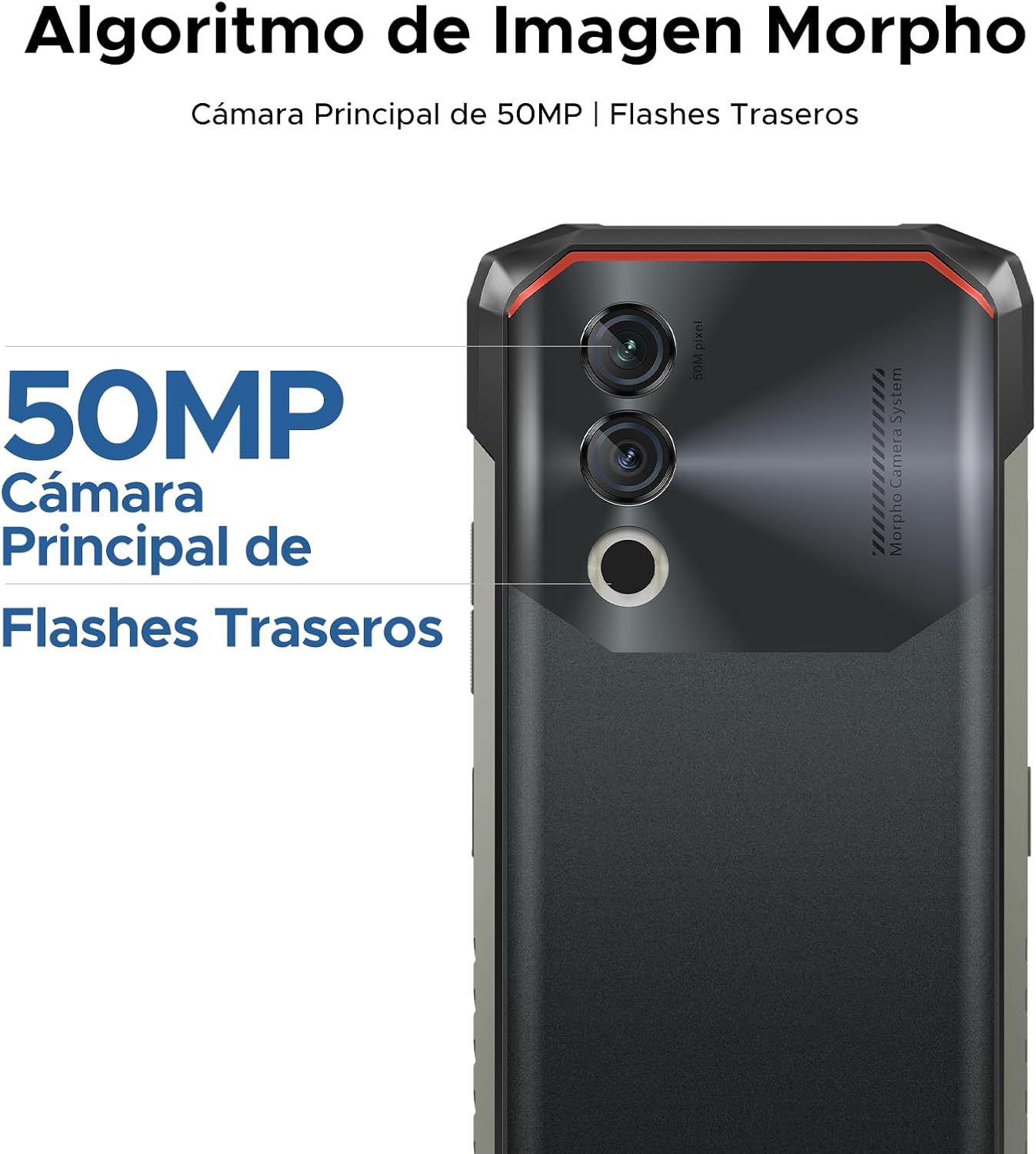
Image: 50MP Main Camera and Rear Flashes.
Предња камера
The 8MP front camera is ideal for selfies and video calls, capturing clear images.

Слика: прamples of photos taken with the 8MP Ultra Sharp Front Camera.
Режими фотографије
Explore various photography modes to enhance your shots:
- панорама: Capture wide landscapes.
- Портретни режим: Направите професионално изгледајуће фотографије са замућеним позадинама.
- Про режим: Manual control over camera settings for advanced users.
- ХДР режим: Improve dynamic range in challenging lighting conditions.

Image: Photography modes: Panorama, Portrait, Pro, and HDR.
Видео Рецординг
Record videos in 1080P at 30 frames per second, ensuring smooth and detailed footage.
Дисплаи Феатурес
The DOOGEE Blade10 Power features a 6.6-inch HD+ IPS display for a clear and immersive visual experience.
- Величина: 6.6 инча пуног форматаview Дисплаи
- Резолуција: 720*1612 HD+
- Брзина освежавања: 90Hz for smooth scrolling and gaming
- Боје: КСНУМКС милиона боја
- Осветљеност: 380cd/m² for visibility in various lighting conditions
- Однос контраста: 1500:1
- Однос екрана и тела: 84%

Image: 6.6-inch Ultra Sharp Notch-less Screen with 90Hz refresh rate.
Подршка за Вајдвајн Л1
With Widevine L1 certification, you can enjoy high-quality streaming content from platforms like Netflix and Amazon Prime Video in full HD resolution, without restrictions.

Image: Real 90Hz Smoothness and Widevine L1 Support.
Перформансе и складиштење
The Blade10 Power is engineered for smooth performance and ampкапацитет складиштења.
Процесор
Powered by an Octa-Core T615 processor, the device offers improved performance for multitasking and gaming. This processor provides a 19% improvement in single-core CPU performance, 5% in multi-core CPU performance, and 35% in GPU performance.

Image: Powerful Octa-core T615 Processor.
RAM and Storage
The phone features up to 24GB of RAM (6GB physical + 18GB expanded virtual RAM) and 256GB of internal storage. This ample memory ensures smooth operation across multiple applications. Storage can be further expanded up to 2TB using a TF (microSD) card, allowing you to store a vast amount of photos, videos, and files.
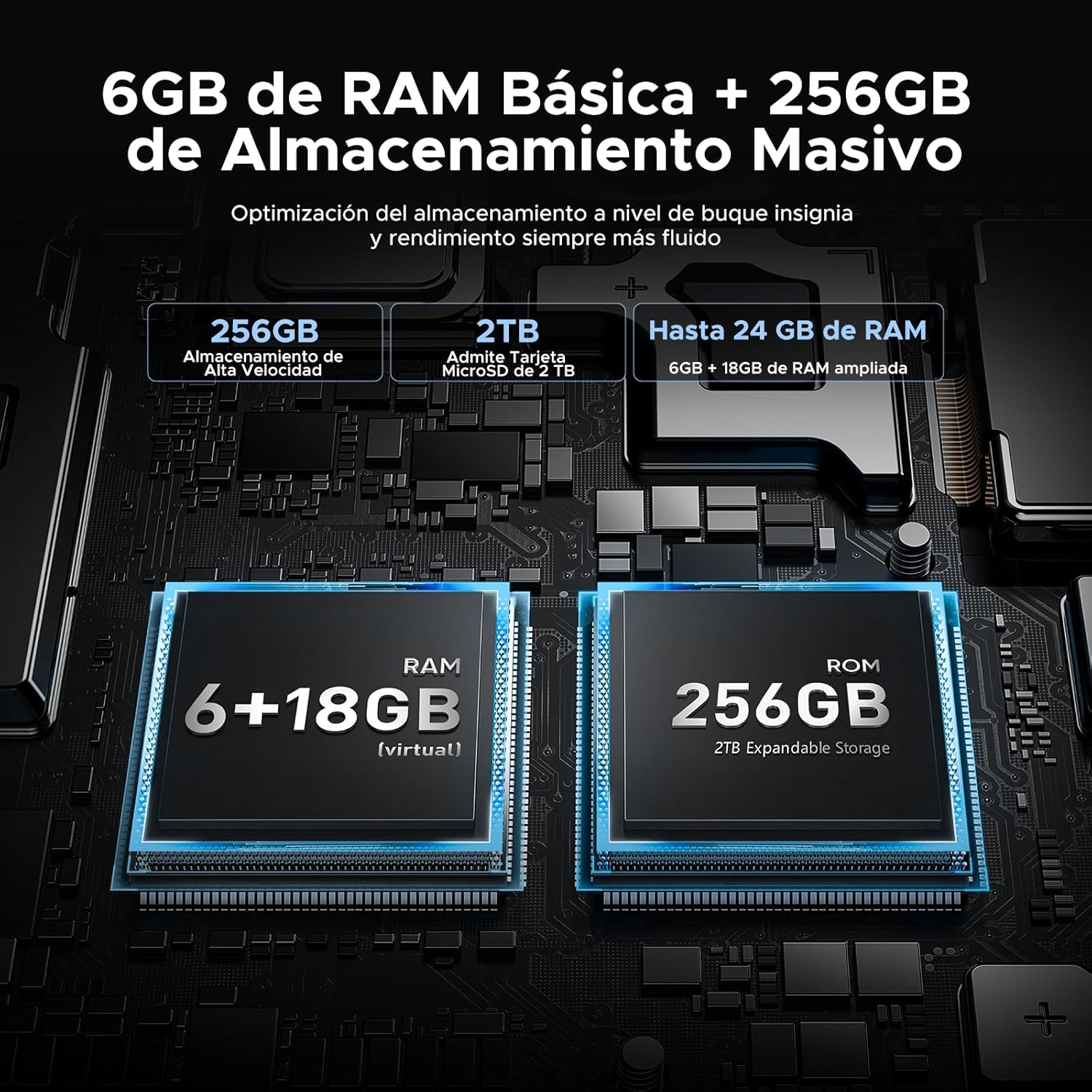
Image: 24GB RAM + 256GB Massive Storage with 2TB Expansion.
Трајност и заштита
The DOOGEE Blade10 Power is built to withstand harsh environments, featuring IP68/IP69K and MIL-STD-810H certifications.
- ИП68: Water and dust resistant, capable of immersion in water up to 1.5 meters for 30 minutes.
- ИП69К: Отпоран на млазеве воде под високим притиском и високом температуром.
- MIL-STD-810H: Military-grade durability against drops, shocks, and extreme temperatures. Withstands drops from up to 1.5 meters.
Its 360° comprehensive protection ensures reliable performance even in challenging outdoor or work environments.

Image: IP68, IP69K, and MIL-STD-810H certifications for drop, dust, and water resistance.
Робусна конструкција
The phone's construction includes a high-resistance cover, aviation-grade titanium alloy, aviation-grade alloy material, TPU protection, and a composite board, all contributing to its exceptional durability.

Слика: Детаљна view of the phone's layered construction for enhanced durability.
Карактеристике Андроида 14
The DOOGEE Blade10 Power runs on the latest Android 14 operating system, offering enhanced stability, fluidity, and overall performance compared to previous versions.
- Режим фокуса: Helps you concentrate by pausing distracting apps.
- Супер међуспремник: Advanced clipboard features for managing copied content.
- Lift to Wake: Automatically wakes the screen when you lift the phone.
- Режим двоструког система: Run two separate environments for work and personal use.
- Побољшање екрана: Optimized display settings for better viewинг.
- Pocket Mode: Prevents accidental touches when the phone is in your pocket.
- Screen Sensors: Improved sensor management for various functionalities.
- Контрола приватности: Enhanced privacy settings to manage app permissions and data access.
- Подели екран: Multitask efficiently by using two apps simultaneously.

Image: More Information About Android 14 features.
Одржавање
To ensure the longevity and optimal performance of your DOOGEE Blade10 Power, follow these maintenance guidelines:
- Чишћење: Regularly wipe the screen and body with a soft, damp cloth. For stubborn dirt, use a mild soap solution. Ensure all ports are dry before charging or connecting accessories.
- Изложеност води: While the phone is waterproof, avoid prolonged immersion in saltwater or chlorinated water. If exposed, rinse with fresh water and dry thoroughly. Ensure all port covers are sealed before water exposure.
- температура: Avoid exposing the phone to extreme temperatures (very hot or very cold) for extended periods, as this can affect battery life and internal components.
- Ажурирања софтвера: Keep your phone's software updated to the latest version to benefit from performance improvements, security patches, and new features. Check for updates in Подешавања > Систем > Ажурирање система.
- Одржавање батерије: Avoid completely draining the battery frequently. For optimal battery health, try to keep the charge between 20% and 80%.
Решавање проблема
If you encounter issues with your DOOGEE Blade10 Power, refer to the following common troubleshooting steps:
Уређај се не укључује
- Уверите се да је батерија напуњена. Повежите телефон са пуњачем најмање 30 минута.
- Притисните и држите дугме за напајање 10-15 секунди да бисте поново покренули рачунар.
Сцреен Унреспонсиве
- Поново покрените уређај држањем дугмета за напајање.
- Ако је екран физички оштећен, контактирајте корисничку подршку.
Poor Call Quality / Low Speaker Volume
- Проверите подешавања јачине звука током позива.
- Ensure the speaker and microphone are not obstructed by dirt or debris. Clean gently if necessary.
- Test with headphones to determine if the issue is with the phone's speaker/mic or the network.
Рушење или замрзавање апликација
- Затворите и поново отворите проблематичну апликацију.
- Обришите кеш меморију и податке апликације у Подешавања > Апликације > [Назив апликације] > Меморија > Обриши кеш/Обриши податке.
- Уверите се да је апликација ажурирана на најновију верзију.
- Ако проблем и даље постоји, деинсталирајте и поново инсталирајте апликацију.
Network Connectivity Issues (Wi-Fi/Mobile Data)
- Искључите и укључите Wi-Fi или мобилне податке.
- Рестартујте рутер због проблема са Wi-Fi мрежом.
- Check your SIM card insertion and ensure it's active with your carrier.
- Ресетујте мрежна подешавања у Подешавања > Систем > Опције ресетовања > Ресетуј Wi-Fi, мобилне уређаје и Bluetooth.
Фабричко ресетовање (последње средство)
If other troubleshooting steps fail, you may consider a factory reset. This will erase all data on your phone, so ensure you back up important information first. Go to Подешавања > Систем > Опције ресетовања > Обриши све податке (ресетовање на фабричка подешавања).
Спецификације
Below are the detailed technical specifications for the DOOGEE Blade10 Power smartphone:
| Феатуре | Спецификација |
|---|---|
| Број модела | Blade 10 Power |
| Димензије | 17.85 к 8.31 к 1.79 цм |
| Тежина | 560 г |
| Оперативни систем | Андроид 14 |
| Процесор | Осмојезгарни T615 (1.8 GHz) |
| РАМ | 24 GB (6 GB физичке + 18 GB виртуелне) |
| Интерна меморија | 256 ГБ |
| Екпандабле Стораге | До 2 ТБ (ТФ картица) |
| Величина екрана | 6.6 инча |
| Дисплаи Типе | HD+ IPS |
| Резолуција екрана | 720 к 1612 пиксела |
| Рефресх Рате | 90Хз |
| Главна камера | 50 МП |
| Предња камера | 8 МП |
| Видео Рецординг | 1080п @ 30фпс |
| Капацитет батерије | 10300 мАх (Ли-Ион) |
| Пуњење | 18W Fast Charging, USB Type-C, OTG Support |
| Мрежна технологија | 4Г ЛТЕ |
| Слотови за СИМ картице | Дуал СИМ |
| Повезивање | NFC, GPS (Glonass, Galileo, Beidou) |
| Безбедност | Face ID, бочни сензор отиска прста |
| Трајност | IP68, IP69K, MIL-STD-810H (водоотпоран, отпоран на прашину, отпоран на ударце) |
Гаранција и подршка
DOOGEE is committed to providing quality products and customer satisfaction.
- 30-дневна гаранција поврата новца: Ако нисте задовољни куповином, можете имати право на повраћај новца у року од 30 дана.
- 2-годишња ограничена гаранција: Your DOOGEE Blade10 Power comes with a 2-year limited warranty covering manufacturing defects. Please retain your proof of purchase.
- 24/7 подршка на мрежи: For any technical assistance or inquiries, DOOGEE offers 24/7 online support. Please visit the official DOOGEE webсајт за контакт информације и ресурсе за подршку.

Image: After-sales Support details.
Званични видео снимци производа
No relevant official product videos from the seller were found for embedding in this manual.