
1. Увод
This manual provides essential instructions for the safe and efficient operation, setup, and maintenance of your Displays2go Pedestal Display with Digital Sign (Model DF037NLB). Please read this manual thoroughly before using the product and retain it for future reference.
The DF037NLB is a versatile pedestal display featuring a 37-inch stretch LCD advertising screen, designed for indoor use. It includes a rear locking storage compartment for added functionality.
2. Безбедносне информације
- Овај производ је намењен за само за унутрашњу употребу. Do not expose to moisture, rain, or extreme temperatures.
- Уверите се да је уређај постављен на стабилну, равну површину како бисте спречили превртање.
- Не блокирајте отворе за вентилацију.
- Користите само испоручени адаптер за напајање.
- Искључите напајање пре чишћења или било каквог одржавања.
- Овај производ може да садржи хемикалије за које је држава Калифорнија утврдила да изазивају рак и урођене мане или друге репродуктивне штете (упозорење из Предлога 65).
3. Садржај пакета
Проверите да ли су све компоненте присутне у паковању:
- Pedestal Display Unit (DF037NLB)
- Повер Цабле
- Ремоте Цонтрол
- Set of Keys (for storage compartment)
- Кориснички приручник (овај документ)
4. Подешавање
4.1 Распакивање и постављање
- Carefully remove the pedestal display from its packaging.
- Place the unit on a flat, stable surface in your desired indoor location. Ensure adequate space around the unit for ventilation.
4.2 Прикључак за напајање
- Locate the power input port on the rear of the unit.
- Connect the provided power cable to the unit and then to a standard electrical outlet.
- The unit is now ready for initial power-on.
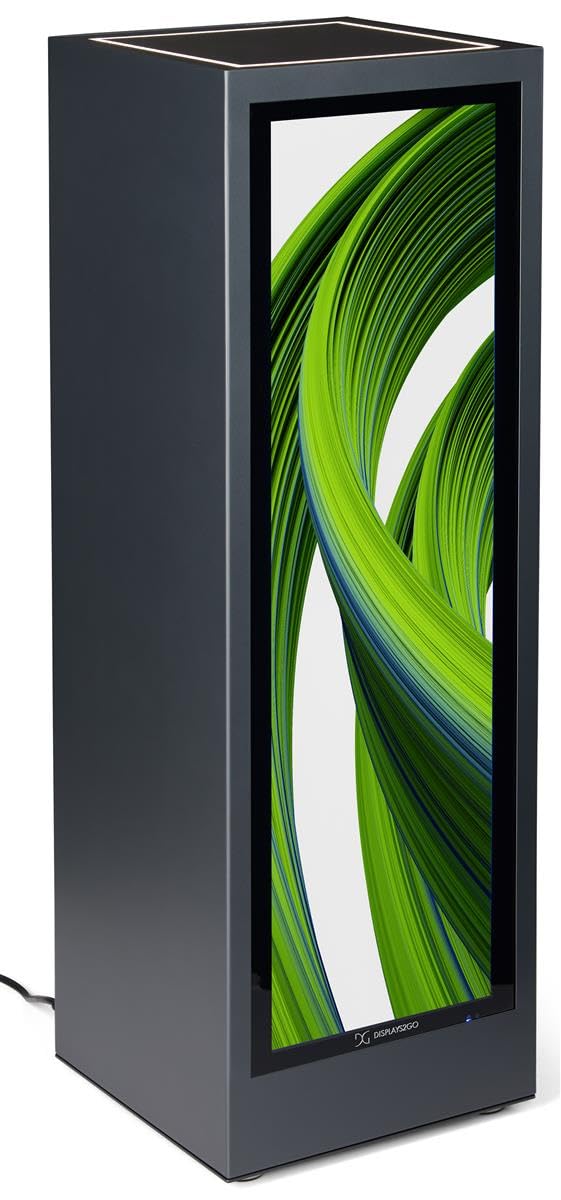
Слика 4.1: Предња страна view of the Displays2go Pedestal Display with Digital Sign.
5. Упутство за употребу
5.1 Digital Signage Operation
The pedestal display features a 37-inch stretch LCD screen for displaying various media content.
- Content Formatting: For optimal display, format your marketing materials to a resolution of 720 пиксела ширине к 2520 пиксела висине.
- USB Content Transfer: Use the USB ports located on the rear of the unit to transfer images, videos, and other content to the display's internal storage.
- Повезивање: The unit supports WiFi and Bluetooth connectivity. This allows for network access, content updates, and connection to external Bluetooth speakers or peripherals like a mouse and keyboard.
- Приступ Google Play-у: Access the Google Play app store to download and install business applications directly onto the display.
- аудио: The display includes two built-in speakers for audio playback.

Image 5.1: The digital display showcasing product advertisements for watches.

Image 5.2: The digital display showcasing product advertisements for headphones.

Image 5.3: The 37-inch diagonal measurement of the stretch LCD screen.
5.2 Rear Locking Storage Compartment
The unit features a rear-accessible storage compartment for securing personal items or product backstock.
- To open the compartment, insert one of the provided keys into the lock and turn.
- To lock, close the door, insert the key, and turn to secure. Remove the key to prevent unauthorized access.
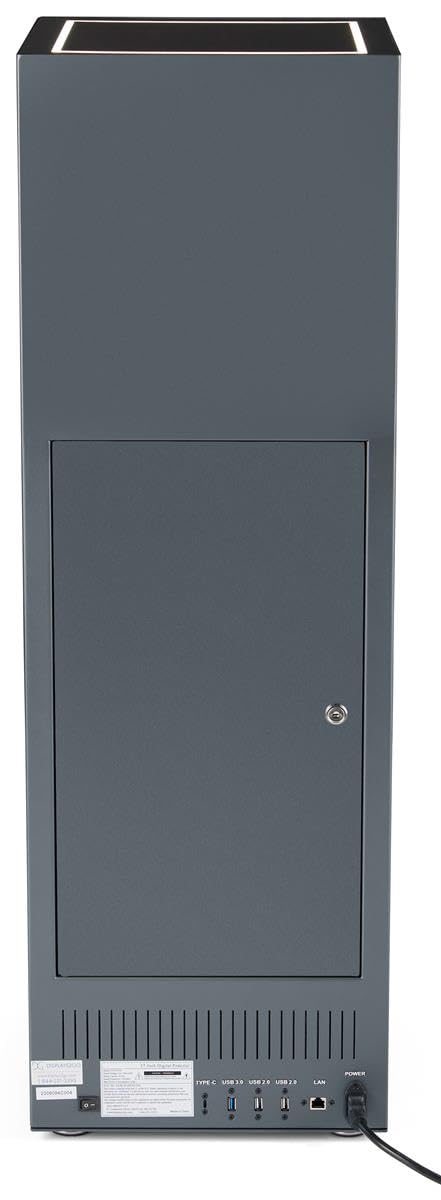
Слика 5.4: Позади view of the pedestal display showing the closed locking storage compartment and connectivity ports.

Слика 5.5: Позади view of the pedestal display with the locking storage compartment open, revealing interior space.
5.3 ЛЕД осветљење
The mirrored top surface of the pedestal features LED illumination to highlight products placed on top. This feature is integrated with the main power supply and activates when the unit is powered on.
6. Одржавање
6.1 Чишћење
- Увек искључите кабл за напајање пре чишћења.
- Use a soft, dry, lint-free cloth to clean the exterior surfaces of the pedestal.
- За екран користите средство за чишћење посебно за екране и крпу од микрофибера. Не прскајте течност директно на екран.
- Избегавајте абразивна средства за чишћење или раствараче, јер могу оштетити завршну обраду.
6.2 Ажурирања софтвера
Periodically check for software updates through the unit's operating system settings to ensure optimal performance and access to the latest features. Refer to the on-screen instructions for update procedures.
КСНУМКС. Решавање проблема
If you encounter issues with your pedestal display, refer to the following common problems and solutions:
| Проблем | Могући узрок | Решење |
|---|---|---|
| Екран се не укључује | Нема прикључка за напајање | Ensure power cable is securely connected to the unit and a working outlet. |
| Нема слике на екрану | Incorrect input source or no content loaded | Check display settings for input source. Ensure content is properly loaded via USB or network. |
| Нема звука из звучника | Јачина звука је прениска или је искључена | Adjust volume using the remote control or on-screen settings. Check if external Bluetooth speakers are connected and overriding internal speakers. |
| Не могу да се повежем са Wi-Fi/Bluetooth-ом | Network issues or incorrect settings | Verify Wi-Fi network is active and password is correct. Ensure Bluetooth device is in pairing mode and within range. |
8. Спецификације
| Феатуре | Детаљ |
|---|---|
| Број модела | ДФ037НЛБ |
| Димензије производа (Ш к Д к В) | 14 к 14 к 43 инча |
| Величина екрана | 37 инча (дијагонала) |
| Recommended Content Resolution | 720px (width) x 2520px (height) |
| Повезивање | WiFi, Bluetooth, USB ports (Type-C, USB 3.0, USB 2.0), LAN |
| Аудио | Уграђени звучници |
| Складиштење | Rear locking compartment |
| Оперативни систем | Access to Google Play App Store |
| Усаге Енвиронмент | Само за унутрашњу употребу |
9. Гаранција и подршка
For warranty information, technical support, or service inquiries, please contact Displays2go customer service. Refer to your purchase documentation or the Displays2go official webсајт за контакт детаље.