1. Производ је готовview
This manual provides instructions for the installation and maintenance of your replacement stylus needle. This stylus is designed for use with LP phonograph turntables and is compatible with various Audio Technica models, including ATN-13, ATN14, AT13, AT14, AT15, and equivalent models from Pathe Marconi, Sanyo, Siemens, and Thomson.
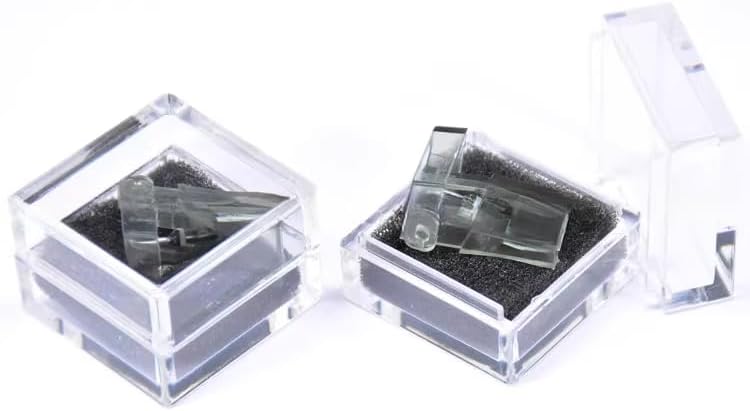
Image 1: The replacement stylus needle.
2. Подешавање и инсталација
Before proceeding, ensure your turntable is powered off and unplugged. Handle the stylus carefully to avoid damage.
2.1 Removing the Old Stylus
- Locate the small notch at the front of the existing stylus needle.
- Gently push down on this notch to release the stylus from the cartridge.
- Carefully pull the old stylus away from the cartridge.
Video 1: Demonstration of how to change the stylus needle. This video shows the process of removing an old needle and installing a new one on a turntable cartridge.
2.2 Installing the New Stylus
- Align the new stylus with the cartridge, ensuring the groove line on the stylus matches the cartridge.
- Gently push the stylus into the cartridge until it clicks securely into place. You may need to lift the top of the stylus slightly to ensure proper seating.
- Verify that the stylus is firmly attached and properly aligned.
Важна напомена: Ensure the replacement stylus looks exactly like the one you are replacing. If your cartridge has been changed, this stylus may not fit. If you are unsure, please do not purchase without verifying compatibility.
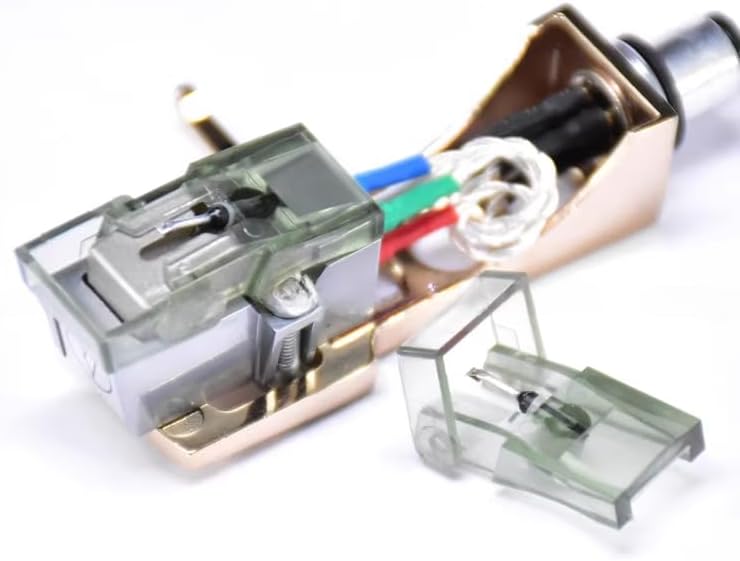
Слика 2: Крупни план view of the stylus being inserted into a turntable cartridge.
3. Упутство за употребу
Once the new stylus is installed, you can resume normal operation of your turntable. Ensure the tracking force and anti-skate settings of your tonearm are correctly adjusted according to your turntable's specifications for optimal sound quality and stylus longevity.
- Place your record on the turntable platter.
- Carefully lower the tonearm, allowing the stylus to gently rest in the record's groove.
- Begin playback.
4. Одржавање и њега
Proper maintenance extends the life of your stylus and preserves sound quality.
- Чишћење: Regularly clean the stylus tip using a soft brush designed for stylus cleaning. Brush gently from back to front.
- Заштита од прашине: Always use your turntable's dust cover when not in use to prevent dust accumulation on the stylus and record.
- Руковање: Avoid touching the stylus tip with your fingers, as oils and dirt can degrade performance.
- Замена: Stylus needles wear out over time. Replace your stylus every 500-1000 hours of playback, or sooner if you notice a degradation in sound quality.
КСНУМКС. Решавање проблема
| Проблем | Могући узрок | Решење |
|---|---|---|
| Poor sound quality (distortion, muffled sound) | Dirty or worn stylus, incorrect tracking force. | Clean the stylus. Check and adjust tracking force. Consider replacing the stylus if it's old. |
| Stylus not fitting the cartridge | Incompatible stylus or cartridge. | Verify that the stylus is the correct model for your specific cartridge. Refer to the compatibility list in Section 6. |
| Прескакање или скакање | Dirty record, incorrect tracking force, damaged stylus. | Clean the record. Adjust tracking force. Inspect stylus for damage; replace if necessary. |
6. Спецификације
- Тип производа: Replacement Stylus Needle
- Компатибилност: Audio Technica ATN-13, ATN14, AT13, AT14, AT15; Pathe Marconi ATN 13 E; Sanyo ST A 1 SD, MG A 1 SD AT 13; Siemens AT 13 E, ATN 13 E; Thomson AT 13 E, ATN 13 E.
- Боја: Тавни
- ASIN: B0DM1X54B5
- Датум прве доступности: 5. новембар 2024
7. Гаранција и подршка
Specific warranty information for this product is not provided in the available documentation. For support or further inquiries, please contact the seller directly through the platform where the purchase was made.
продавац: sunny_day


