
1. Увод
The MECCANIXITY MPPT Solar Charge Controller is designed to optimize the energy utilization efficiency of photovoltaic systems. It features a built-in maximum power tracking program to ensure your solar panels operate at their peak output point. This intelligent regulator is suitable for 12V/24V auto-adaptive systems and includes an LCD display for monitoring and configuration, along with dual USB ports for convenience.
2. Безбедносне информације
- Ensure the battery has sufficient voltage for the controller to recognize the correct battery type during first use.
- Only use photovoltaic panels as a charging source. Do not connect DC or other power sources.
- Always connect the battery to the charge controller first, then connect the solar panel. When disconnecting, disconnect the solar panel first, then the battery.
- Ensure all wiring connections are secure and properly insulated to prevent short circuits or damage to equipment.
- Avoid touching bare wires. If necessary, use electrical tape to cover exposed wire ends.
3. Производ је готовview

Слика 3.1: Предња страна view of the MECCANIXITY MPPT Solar Charge Controller 100A, showing the LCD display, control buttons, and dual USB ports.

Слика 3.2: Детаљно view of the controller's features, including the LCD display, Menu, Page Up, Page Down/Manual buttons, and 2 USB ports.
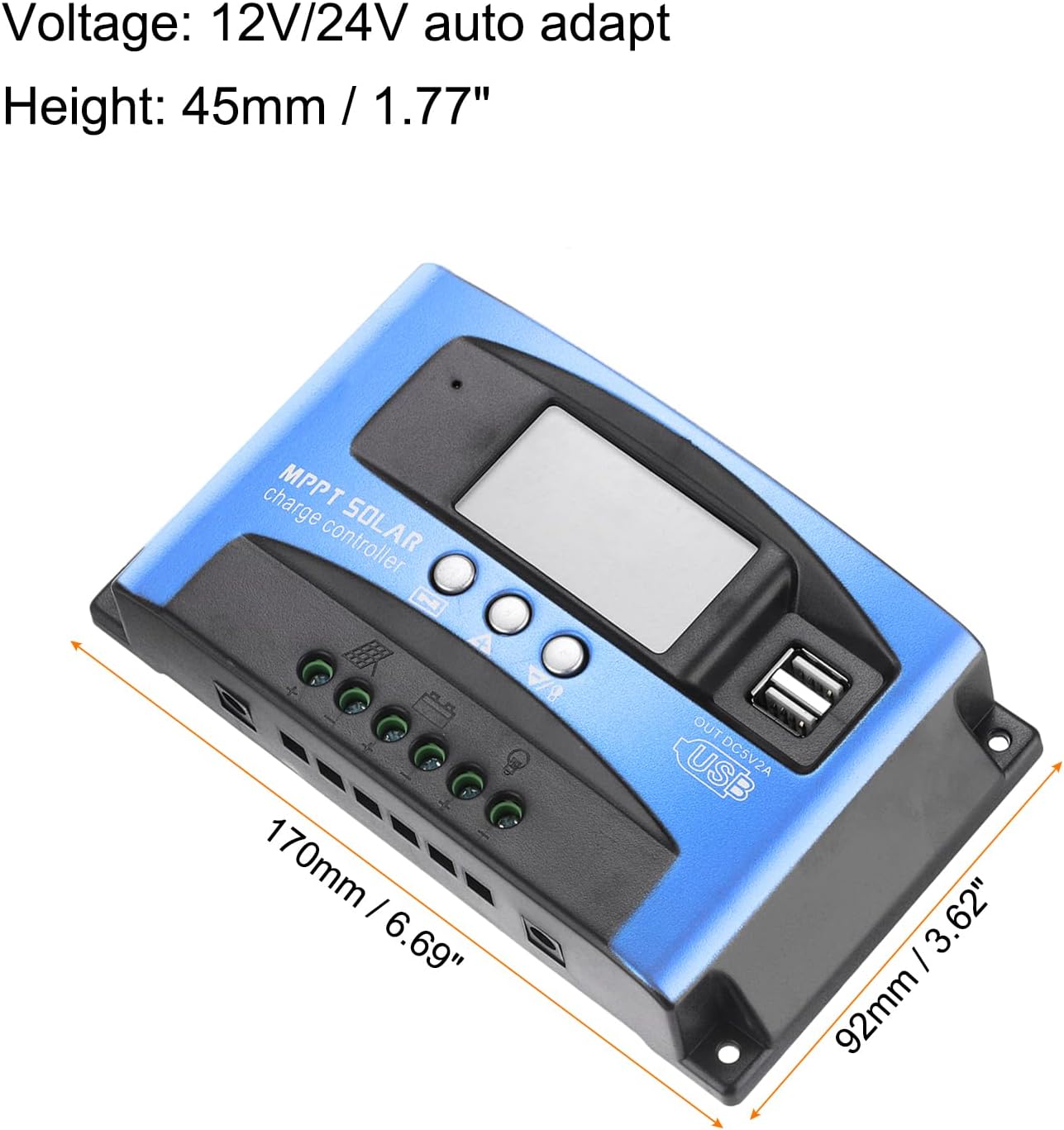
Figure 3.3: Dimensions of the MECCANIXITY MPPT Solar Charge Controller 100A, measuring 170mm (6.69") in length, 92mm (3.62") in width, and 45mm (1.77") in height.
Кључне карактеристике:
- МППТ технологија: Maximizes energy harvest from solar panels.
- ЛЦД екран: Provides real-time status and data, allowing for easy mode switching and parameter configuration.
- Двојни УСБ портови: 5V/2A Max output for charging external devices.
- Аутоматиц Волtagе Адаптација: Supports 12V/24V systems.
- Свеобухватна заштита: Укључује прекомјерну волtage, short circuit, overload, over-charge, and over-discharge protection.
4. Подешавање и инсталација
Дијаграм ожичења:

Figure 4.1: Wiring diagram illustrating connections for solar panel, battery, load, and inverter.
Кораци инсталације:
- Повежите батерију: Connect the battery to the charge regulator's positive and negative terminals first. Ensure correct polarity.
- Повежите соларну плочу: Connect the photovoltaic module (solar panel) to the charge regulator's positive and negative terminals.
- Connect the Load: Connect the consumer (load) to the charge regulator's positive and negative terminals.
Important: Always connect the battery first and disconnect the solar panel first to prevent damage to the controller.
Видео за инсталацију:
Video 4.1: This video demonstrates the proper installation sequence for the solar charge controller, emphasizing the importance of connecting the battery before the solar panel and disconnecting the solar panel first. It shows how to secure wiring and check connections.
5. Упутство за употребу
LCD дисплеј и функције дугмади:
The LCD display provides real-time information about your solar system. The control buttons (Menu, Page Up, Page Down/Manual) allow you to navigate through different screens and adjust parameters.
- Главни екран: Приказује тренутни капацитет батеријеtagе и статус пуњења.
- Флоат Волtage: Приказује волtage at which the battery is maintained after full charge (e.g., 13.7V for 12V systems).
- Поново повежите пражњење: Волtage at which the load will be reconnected after being disconnected due to low battery (e.g., 12.6V for 12V systems).
- Заустављање пражњења: Волtage at which the load will be disconnected to protect the battery from over-discharge (e.g., 10.7V for 12V systems).
- Тип батерије: Allows selection of battery type (e.g., Sealed, Gel, Flooded).
- Режим рада: Configures load output modes (e.g., 24-hour output, dusk-to-dawn, timed output).
Press the 'Menu' button to cycle through different display interfaces. Use the 'Page Up' and 'Page Down/Manual' buttons to adjust settings when in configuration mode (typically by long-pressing the 'Menu' button to enter setting mode).
6. Одржавање
- Regularly check all wiring connections for tightness and corrosion.
- Keep the controller clean and free from dust and debris to ensure proper heat dissipation.
- Ensure adequate ventilation around the controller.
- Monitor the LCD display for any error codes or unusual readings.
КСНУМКС. Решавање проблема
Уобичајени проблеми и решења:
- Нема дисплеја/Нема напајања: Проверите прикључке батерије и волtage. Ensure the battery has sufficient charge.
- Батерија се не пуни: Verify solar panel connections and ensure adequate sunlight. Check for shading on solar panels. Confirm correct battery type setting.
- Учитавање не ради: Check load connections. Ensure the battery voltage is above the discharge reconnect voltage. Verify load work mode settings.
- Овер-волtage/Over-current Protection: The controller will automatically disconnect to protect the system. Identify the cause (e.g., too many solar panels, incorrect battery voltage) and rectify it before restarting.

Figure 7.1: The controller features a 7-point security protection system, including short circuit, open circuit, over current, over charge, over voltage, over load, and over discharge protection.
8. Спецификације
| Параметар | Валуе |
|---|---|
| Волtage | 12V/24V Auto Adapt |
| Називна струја пуњења | 100А |
| Струја пражњења | 30А |
| Величина | 170*92*45 мм (6.69 x 3.62 x 1.77 инча) |
| Радна температура | -35-80℃ / -31°F-176°F |
| Флоат Цхарге Волtagе (12В/24В) | 13.8В / 27.6В |
| УСБ излаз | КСНУМКСВ / КСНУМКСА Мак |
| Тежина артикла | 10.1 унци |
9. Гаранција и подршка
For warranty information and technical support, please refer to the product packaging or contact MECCANIXITY customer service directly. Keep your purchase receipt for warranty claims.