
1. Увод
This manual provides detailed instructions for the FREEWOLF M68 60% Wireless Gaming Keyboard. Please read this manual carefully before using the product to ensure proper operation and longevity.

Figure 1: FREEWOLF M68 Wireless Gaming Keyboard (Shimmer color variant)
2. Производ је готовview
Кључне карактеристике:
- Тромодална повезаност: Supports wired (USB-C), 2.4GHz wireless, and Bluetooth 5.0 connections.
- Компатибилност са више уређаја: Connects to Windows, Mac, Linux, PC, Laptop, iPad, iOS, and Android devices.
- Компактни распоред од 60%: Features 67 keys, optimizing desktop space.
- ПБТ капице за тастатуре: Durable Polybutylene Terephthalate keycaps with clear legends.
- Дугино ЛЕД позадинско осветљење: Offers constant and breathing modes with adjustable brightness and speed.
- Дуготрајна батерија: Built-in 2000mAH battery provides extended usage.
- Ергономски дизајн: Double leg braces allow for three adjustable typing angles.
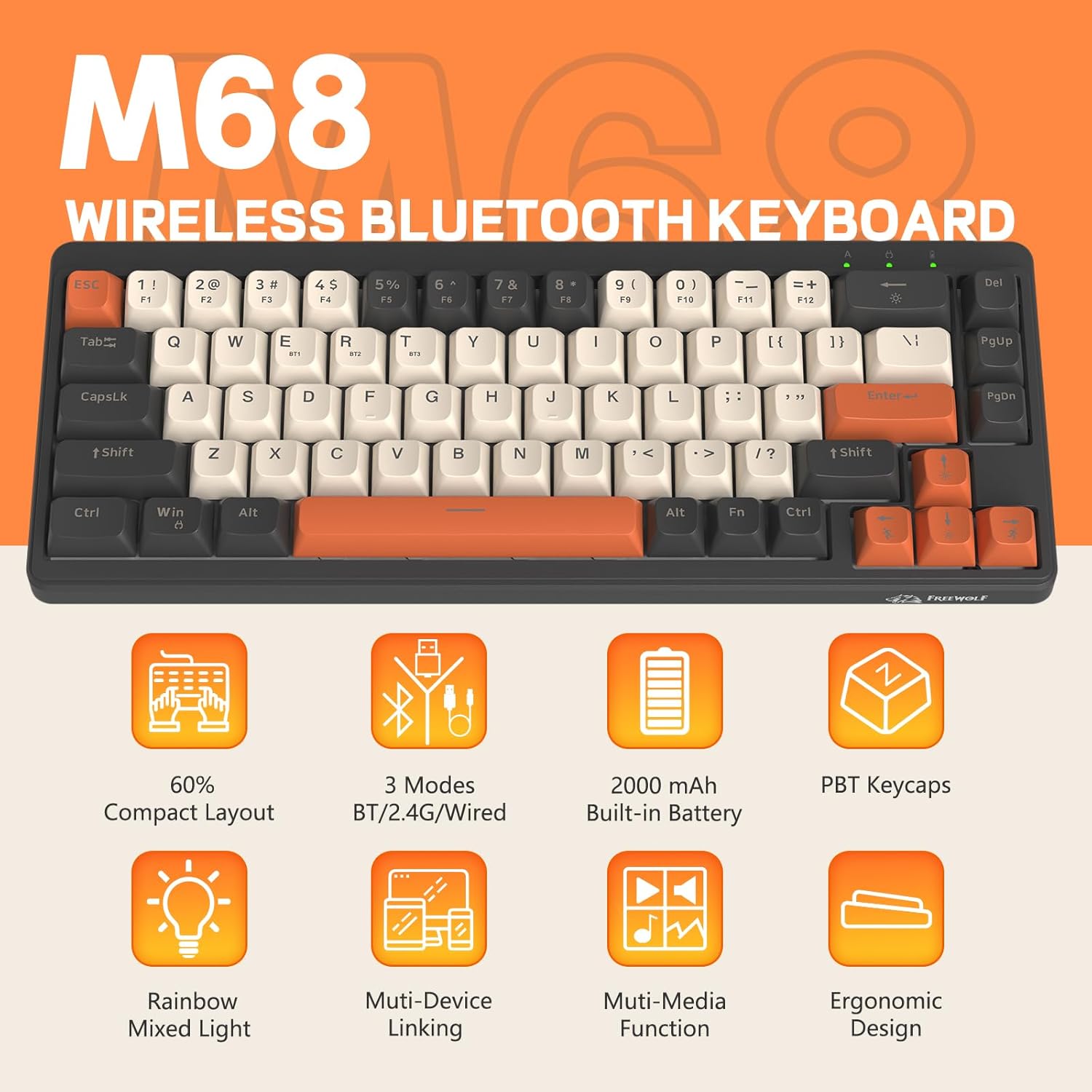
Слика 2: Завршеноview of FREEWOLF M68 key features.
3. Подешавање и повезивање
3.1. Tri-Mode Connection Overview
The M68 keyboard supports three connection methods: wired via USB-C, 2.4GHz wireless via a USB receiver, and Bluetooth 5.0. You can switch between these modes using the dedicated switch on the keyboard.

Слика 3: Детаљно view of the 3-mode connection options.
3.2. Жична веза
- Пронађите USB-C порт на тастатури.
- Connect the provided USB-C cable to the keyboard and the other end to your computer's USB port.
- Ensure the mode switch on the keyboard is set to the wired (USB) position.
- Ваш систем ће аутоматски препознати тастатуру.
3.3. Бежична веза од 2.4 GHz
- Locate the 2.4GHz USB receiver (often stored in a compartment on the keyboard).
- Укључите УСБ пријемник у слободан УСБ порт на рачунару.
- Set the mode switch on the keyboard to the 2.4GHz wireless position.
- Тастатура би требало да се аутоматски повеже. Ако се не повеже, притисните ФН + Р да започне упаривање.
3.4. Блуетоотх веза
The M68 can connect to up to three Bluetooth devices simultaneously.
- Set the mode switch on the keyboard to the Bluetooth position.
- To enter pairing mode for a specific channel (BT1, BT2, or BT3), press and hold ФН + К (за БТ1), ФН + В (за БТ2), или ФН + Е (for BT3) until the corresponding indicator light flashes rapidly.
- On your device (PC, laptop, tablet, phone), open Bluetooth settings and search for "FREEWOLF M68".
- Изаберите тастатуру за упаривање. Индикаторска лампица ће почети да светли континуирано када се повеже.
- Да бисте пребацивали између упарених Bluetooth уређаја, притисните FN + Q/W/E укратко.
4. Операција
4.1. Контрола позадинског осветљења
The M68 features customizable rainbow LED backlighting.
- FN + Backspace: Toggle backlight on/off or switch between constant and breathing modes.
- FN + стрелица улево: Смањите брзину позадинског осветљења.
- ФН + стрелица удесно: Повећајте брзину позадинског осветљења.
- ФН + стрелица нагоре: Повећајте осветљеност позадинског осветљења.
- ФН + стрелица надоле: Смањите осветљеност позадинског осветљења.

Figure 4: Backlight adjustment key combinations.
4.2. Ергономско подешавање
The keyboard includes double leg braces on the back to adjust the typing angle for comfort.
- Flip the keyboard over to access the leg braces.
- Adjust the two-stage leg braces to achieve your preferred typing angle (flat, one stage, or two stagес).

Figure 5: Ergonomic angle adjustments.
4.3. Управљање батеријом
The keyboard has a built-in 2000mAH rechargeable battery.
- Пуњење: Connect the keyboard via the USB-C cable to a power source (computer USB port or wall adapter). The charging indicator will show status.
- Трајање батерије: Up to 60 hours with backlight on, and up to 200 hours with backlight off.
- Штедња енергије: The keyboard will enter sleep mode after a period of inactivity to conserve battery. Press any key to wake it up.

Figure 6: Battery capacity information.
5. Одржавање
- Чишћење: Use a soft, dry cloth to clean the keyboard surface. For keycaps, you may use a slightly damp крпа. Избегавајте прекомерну влагу.
- Уклањање капице тастера: If necessary, use a keycap puller to carefully remove PBT keycaps for deeper cleaning or replacement.
- Складиштење: Чувајте тастатуру на хладном и сувом месту, даље од директне сунчеве светлости и екстремних температура.
- Избегавајте течности: Do not expose the keyboard to liquids to prevent damage to internal components.
КСНУМКС. Решавање проблема
| Проблем | Могући узрок | Решење |
|---|---|---|
| Тастатура не реагује (жичана) | Loose cable connection, incorrect mode. | Ensure USB-C cable is securely connected. Check if the mode switch is set to wired. Try a different USB port. |
| Keyboard not responding (2.4GHz) | USB receiver not connected, incorrect mode, pairing issue. | Ensure USB receiver is plugged in. Set mode switch to 2.4GHz. Re-pair by pressing ФН + Р. Try a different USB port for the receiver. |
| Тастатура не реагује (Блутут) | Not paired, incorrect mode, device Bluetooth off. | Ensure device Bluetooth is on. Set mode switch to Bluetooth. Enter pairing mode (FN + Q/W/E) and re-pair. Forget the device on your system and re-pair. |
| Позадинско осветљење не ради или је заглављено | Backlight off, low battery, software glitch. | Притисните ФН + Бацкспаце to toggle. Charge the keyboard. Try resetting the keyboard (refer to advanced functions if available, or disconnect/reconnect). |
| Тастери се не региструју или се куцају двапут | Dust/debris under keycap, switch issue. | Carefully remove keycap and clean. If issue persists, contact support. |
7. Спецификације
| Модел | М68 |
| Бранд | Слободни вук |
| Повезивање | Wired (USB-C), 2.4GHz Wireless, Bluetooth 5.0 |
| Распоред тастера | 60% (67 кључ) |
| Кеицап Материал | ПБТ (полибутилен терефталат) |
| Позадинско осветљење | Rainbow LED (RGB) |
| Капацитет батерије | 2000мАХ |
| Компатибилни уређаји | Laptop, PC, Tablet (Windows, Mac, Linux, iOS, Android) |
| Димензије производа | 32.51 к 12.5 к 3.99 цм |
| Тежина | 600 г |
| Посебне карактеристике | Ergonomic (adjustable angles), Backlit |
8. Гаранција и подршка
For warranty information, technical support, or customer service inquiries, please refer to the contact information provided with your purchase or visit the official FREEWOLF webсајту.
Молимо вас да сачувате доказ о куповини за евентуалне рекламације у вези са гаранцијом.