
Производ је завршенview
The XO BE18 is a stereo audio wireless Bluetooth headset featuring RGB lighting. It is designed for immersive listening experiences and convenient communication, offering multiple playback modes including Bluetooth, AUX, TF card, and FM radio.
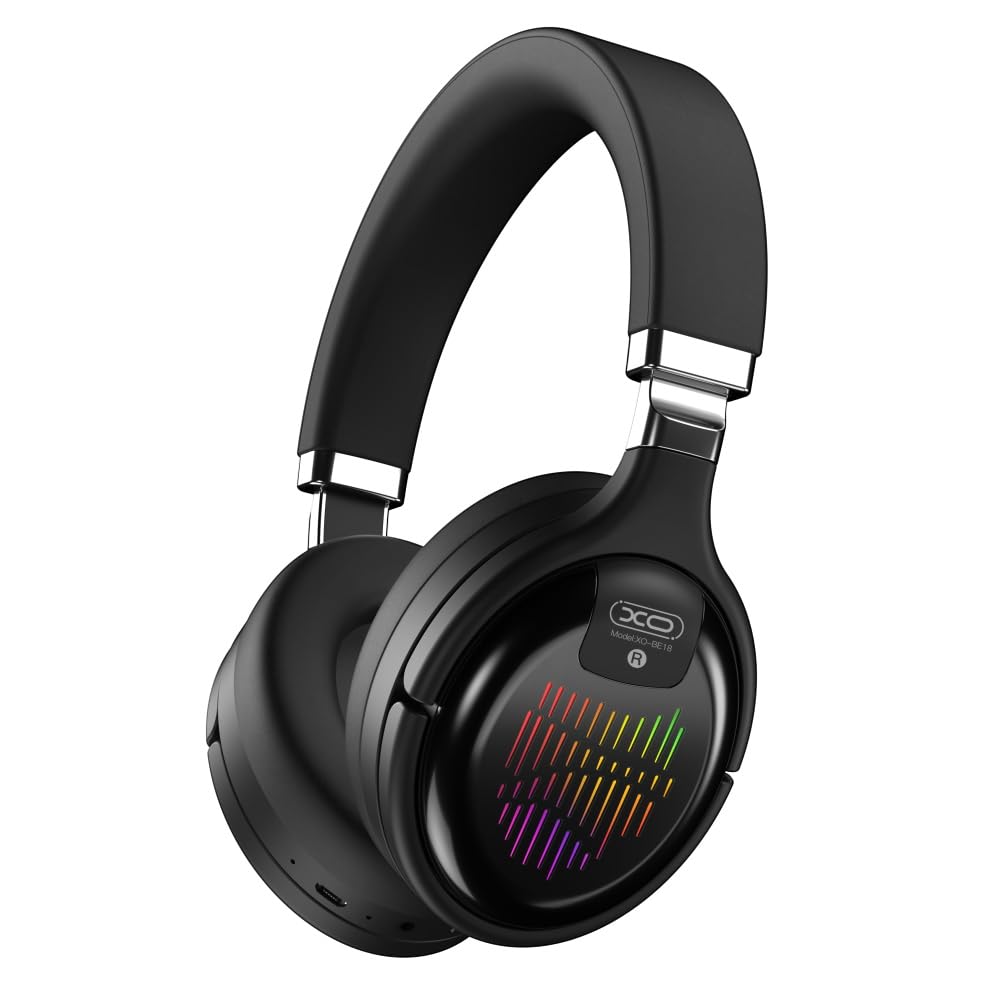
Image: The XO BE18 Wireless Bluetooth Headset, showcasing its over-ear design and integrated RGB lighting on the earcups.
Садржај пакета
Молимо вас да се уверите да су све ставке присутне у пакету:
- XO BE18 Wireless Bluetooth Headset
- Кабл за пуњење
- Кориснички приручник (овај документ)

Image: The XO BE18 headset shown within its retail packaging, indicating the included accessories.
Сетуп
Пуњење слушалица
- Пронађите прикључак за пуњење на слушалицама.
- Connect the provided charging cable to the headset and a compatible USB power source (e.g., computer USB port, USB wall adapter).
- The LED indicator on the headset will typically show a specific color (e.g., red) during charging and change (e.g., turn off or blue) when fully charged.
- Потпуно пуњење траје око 2.5 сата.
Укључивање/искључивање
- За укључивање: Press and hold the Power button for approximately 3-5 seconds until the LED indicator lights up and you hear an audible prompt.
- За искључивање: Press and hold the Power button for approximately 3-5 seconds until the LED indicator turns off and you hear an audible prompt.
Упутство за употребу
Блуетоотх упаривање
- Уверите се да су слушалице искључене.
- Press and hold the Power button for approximately 5-7 seconds until the LED indicator flashes rapidly (e.g., alternating blue and red), indicating pairing mode.
- На свом уређају (паметном телефону, таблету, рачунару) омогућите Блутут и потражите доступне уређаје.
- Select "XO BE18" from the list of found devices.
- Once paired, the LED indicator will typically flash slowly or turn solid blue, and you will hear a confirmation tone.
Основне контроле
The headset features various buttons for controlling audio playback and calls. Refer to the image below for button locations.

Слика: Крупни план view of the XO BE18 headset earcup, highlighting the control buttons and ports.
- Дугме за напајање: Притисните и држите да бисте укључили/искључили уређај. Кратко притисните да бисте репродуковали/паузирали музику или одговорили/завршили позиве.
- Јачина звука (+): Кратко притисните за повећање јачине звука. Дуго притисните за следећу нумеру.
- Утишавање (-): Кратко притисните за смањење јачине звука. Дуго притисните за претходну нумеру.
- Дугме за режим (М): Short press to switch between Bluetooth, AUX, TF card, and Radio modes.
РГБ осветљење
The headset features integrated RGB lighting on the earcups. This lighting typically activates automatically when the headset is powered on. Specific controls for the RGB lighting (if any) may be integrated with the mode button or a dedicated button not explicitly detailed.

Image: The XO BE18 headset displaying its colorful RGB lighting on the earcups.
Коришћење микрофона
The built-in microphone allows for hands-free calls. When a call comes in, press the Power button once to answer. Press again to end the call.
АУКС режим
Connect an audio cable (not included) from your device's 3.5mm audio jack to the headset's AUX port to use it in wired mode. The headset does not require power in AUX mode.
Режим ТФ картице
Уметните TF (microSD) картицу са аудио меморијом files into the designated slot. Use the Mode button to switch to TF card mode.
Радио Моде
Use the Mode button to switch to Radio mode. The headset will automatically scan for available FM radio stations.
Одржавање
- Чишћење: Користите меку, суву крпу за чишћење слушалица. Не користите абразивна средства за чишћење или раствараче.
- Складиштење: When not in use, store the headset in a cool, dry place. The headset features a portable folding design for compact storage.
- Одржавање батерије: Да бисте продужили век трајања батерије, избегавајте често потпуно пражњење батерије. Редовно пуните слушалице, чак и ако их не користите стално.
- Изложеност води: Ове слушалице нису водоотпорне. Избегавајте излагање води или прекомерној влази.

Image: The XO BE18 headset shown in its folded configuration, demonstrating its portable design.
Решавање проблема
| Проблем | Могуће решење |
|---|---|
| Слушалице се не укључују. | Ensure the headset is fully charged. Connect to a power source and try again. |
| Упаривање са уређајем није могуће. |
|
| Нема звука или је јачина звука ниска. |
|
| Микрофон не ради. |
|
| RGB осветљење не ради. | Ensure the headset is powered on. If the issue persists, contact customer support. |
Спецификације
| Феатуре | Детаљ |
|---|---|
| Назив модела | БЕ18 |
| Повезивање | Бежично (Bluetooth V5.0) |
| Домет | Око 10 метара |
| Аудио технологија | Hi-Fis Audio, Intelligent Noise Reduction |
| Постављање уха | Он Еар |
| Контрола буке | Звучна изолација |
| Микрофон | Уграђени |
| Капацитет батерије | 250мАх |
| Време репродукције музике | Око 4 сата |
| Време позива | Око 4 сата |
| Време пуњења | Око 2.5 сата |
| Време приправности | Long Standby Capability |
| Спеакер Повер | 3 мВ |
| Осетљивост | 94 ± 3 дБм |
| С/Н однос | >=75дБ |
| Радна фреквенција | 20Хз-20КХз |
| Режими репродукције | Bluetooth, AUX, TF Card, Radio |
| Блуетоотх протоколи | A2DP, HSP, HFP |
| Димензије (пакет) | 195 к 195 к 80 мм |
| Боја | Црно |

Image: A detailed table outlining the technical specifications and product information for the XO BE18 headset.
Гаранција и подршка
This product comes with a standard manufacturer's warranty. For specific warranty terms and conditions, please refer to the warranty card included in your product packaging or contact the retailer where you purchased the product.
For technical support or further assistance, please contact your retailer or visit the official XO webсајт (ако је доступан).