
Увод
This manual provides detailed instructions for the proper use and maintenance of your ACEFAST H2 Wireless Headset. Designed with advanced Active Noise Cancelling (ANC) technology and Bluetooth 5.3 connectivity, these headphones offer a high-quality audio experience. Please read this manual thoroughly before using the product to ensure optimal performance and longevity.
Садржај пакета
- ACEFAST H2 Wireless Headset
- УСБ-Ц кабл за пуњење
- 3.5 мм помоћни кабл
- Кориснички приручник (овај документ)
Производ је завршенview
Familiarize yourself with the components and controls of your ACEFAST H2 headset.
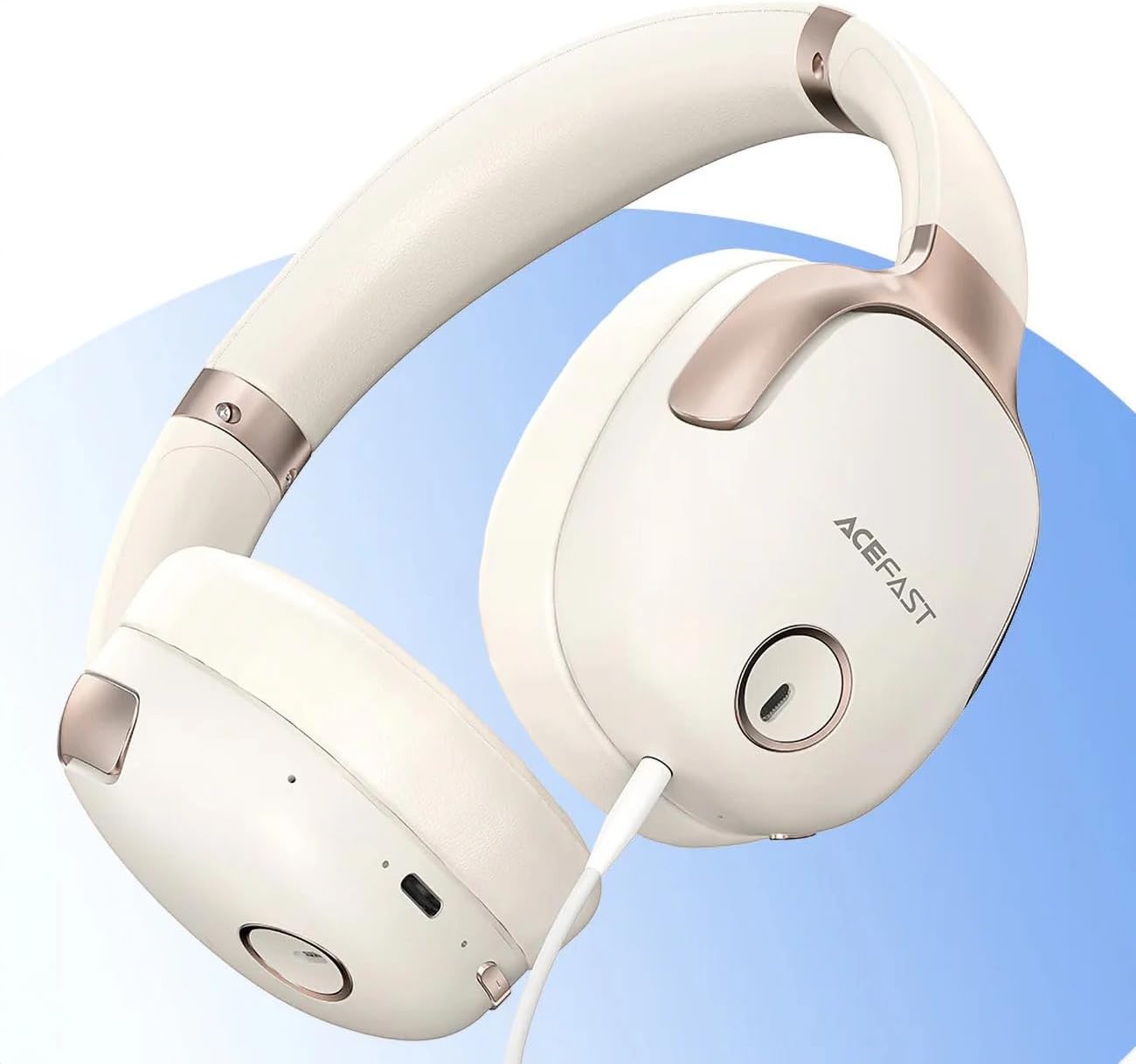
Слика 1: ACEFAST H2 Headset showing USB-C charging port, 3.5mm audio jack, and control buttons.
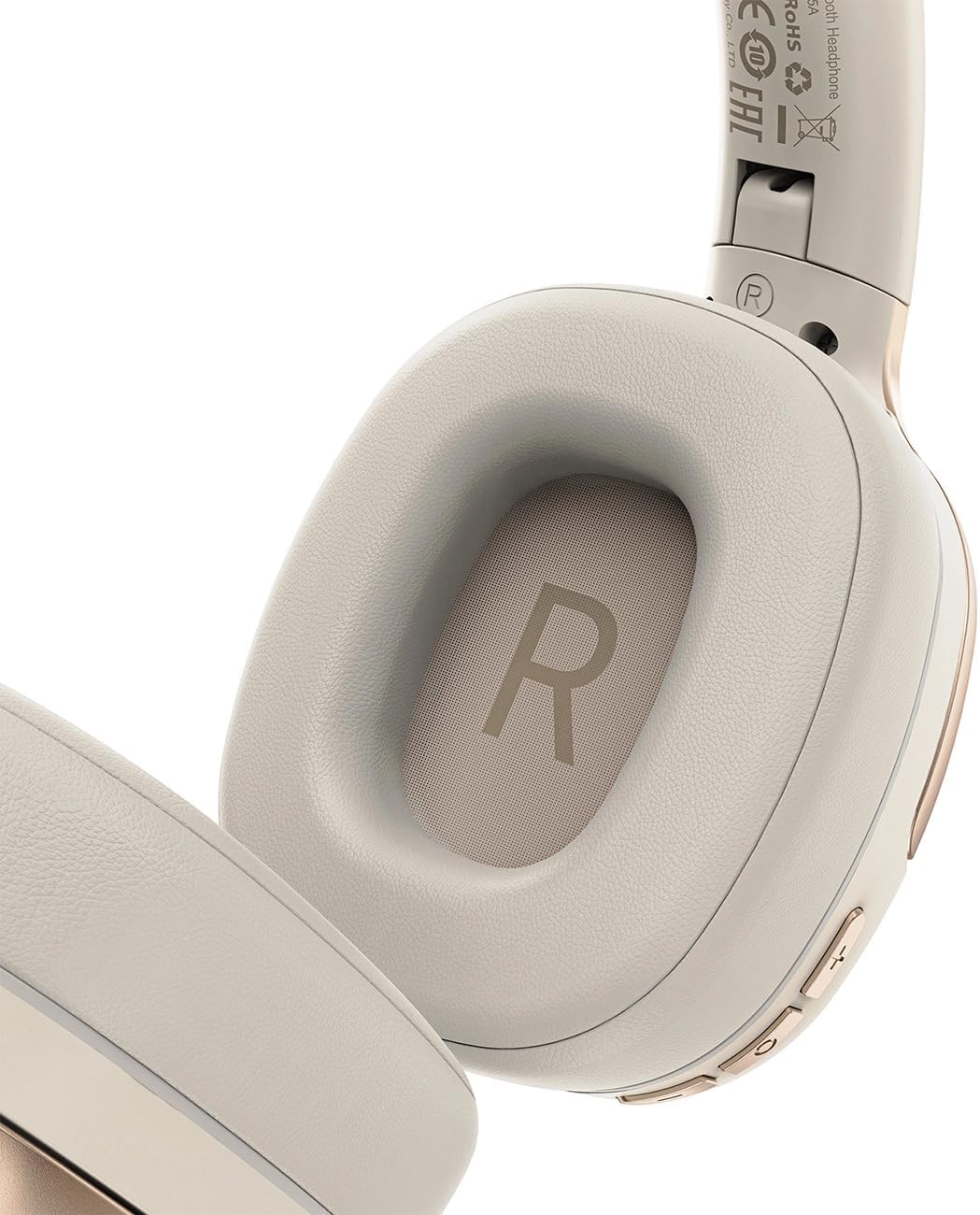
Слика 2: Interior of the right earcup, indicating proper orientation for wearing.

Слика 3: Headband adjustment mechanism and ear cup swivel for comfortable fit.

Слика 4: The foldable design of the headset for easy storage and transport.
Кључне компоненте:
- Дугме за напајање/вишефункционално дугме: Used for power on/off, play/pause, answer/end calls.
- Дугме за појачавање јачине звука/следећу нумеру: Притисните за повећање јачине звука, држите за следећу нумеру.
- Дугме за смањивање јачине звука/претходну нумеру: Притисните за смањење јачине звука, држите за претходну нумеру.
- АНЦ дугме: Активира или деактивира активно поништавање буке.
- УСБ-Ц прикључак за пуњење: За пуњење слушалица.
- 3.5 мм аудио прикључак: For wired connection using the Aux cable.
- микрофон: Built-in for calls.
- ЛЕД индикатор: Приказује статус напајања, пуњења и упаривања.
Сетуп
1. Пуњење слушалица
- Connect the provided USB-C charging cable to the headset's USB-C port.
- Повежите други крај кабла са УСБ адаптером за напајање (није укључен) или УСБ портом рачунара.
- ЛЕД индикатор ће приказивати статус пуњења (нпр. црвена током пуњења, плава када је потпуно напуњена).
- A full charge takes approximately 2 hours and provides up to 80 hours of music playback.
2. Укључивање/искључивање
- За укључивање: Press and hold the Power/Multi-function button for approximately 3 seconds until the LED indicator flashes.
- За искључивање: Press and hold the Power/Multi-function button for approximately 5 seconds until the LED indicator turns off.
3. Блуетоотх упаривање
- Уверите се да су слушалице искључене.
- Press and hold the Power/Multi-function button for about 5-7 seconds until the LED indicator flashes red and blue alternately, indicating pairing mode.
- На свом уређају (паметном телефону, таблету, рачунару) омогућите Блутут и потражите доступне уређаје.
- Select "ACEFAST H2" from the list of found devices.
- Једном упарени, ЛЕД индикатор ће полако трептати плаво.
- The headset will automatically connect to the last paired device when powered on, if within range.
4. Жична веза (помоћни режим)
- Connect one end of the 3.5mm Aux cable to the headset's 3.5mm audio jack.
- Connect the other end to your audio source's 3.5mm audio output.
- In wired mode, the headset functions passively, and Bluetooth features are disabled. ANC may still be active if powered on.
Упутство за употребу
Репродукција музике
- Пусти/паузирај: Кратко притисните дугме за напајање/вишефункционално дугме.
- Појачавање звука: Кратко притисните дугме за појачавање јачине звука.
- Смањивање јачине звука: Кратко притисните дугме за смањивање јачине звука.
- Следећа нумера: Дуго притисните дугме за појачавање јачине звука.
- Претходни запис: Дуго притисните дугме за смањивање јачине звука.
Телефонски позиви
- Одговори/заврши позив: Кратко притисните дугме за напајање/вишефункционално дугме.
- Одбиј позив: Дуго притисните дугме за напајање/вишефункционално дугме.
- Гласовни асистент: Double-press the Power/Multi-function button (if supported by your device).
Отказивање активне буке (АНЦ)
- Активирање/деактивирање ANC-а: Press the dedicated ANC button. The LED indicator will change to confirm status.
- ANC reduces ambient noise up to -40dB, providing a quieter listening environment.
Одржавање
- Чишћење: Користите меку, суву крпу за чишћење слушалица. Не користите абразивна средства за чишћење или раствараче.
- Складиштење: Store the headset in a cool, dry place away from direct sunlight and extreme temperatures. When not in use, it is recommended to fold the headset for compact storage.
- Отпорност на воду: The headset is IPX4 water-resistant, meaning it is protected against splashing water from any direction. It is not designed for submersion or exposure to heavy rain. Avoid exposing the charging port and audio jack to moisture.
- Одржавање батерије: To preserve battery life, charge the headset fully before long periods of storage and recharge it at least once every three months.
Решавање проблема
| Проблем | Могући узрок | Решење |
|---|---|---|
| Слушалице се не укључују. | Ниска батерија. | Потпуно напуните слушалице. |
| Упаривање са уређајем није могуће. | Слушалице нису у режиму упаривања; Bluetooth уређаја је искључен; превише је удаљен од уређаја. | Ensure headset is in pairing mode (flashing red/blue). Turn on device Bluetooth. Move headset closer to device (within 10 meters). |
| Нема звука или је квалитет звука лош. | Volume too low; headset not connected; interference; incorrect audio output selected. | Adjust volume on headset and device. Re-pair headset. Move away from sources of interference. Check device's audio output settings. |
| АНК не функционише ефикасно. | ANC није активиран; неправилно приањање. | Press the ANC button to activate. Adjust headset for a snug fit over your ears. |
Спецификације
| Назив модела | H2 |
| Технологија повезивања | Wireless (Bluetooth 5.3) / Wired (3.5mm Aux) |
| Блуетоотх домет | До 10 метара |
| Контрола буке | Active Noise Cancellation (ANC) up to -40dB, Environmental Noise Cancelling (ENC) for microphone |
| Трајање батерије | До 80 сати (репродукција музике) |
| Време пуњења | Приближно 2 сата (преко USB-C) |
| Отпорност на воду | ИПКС4 (отпоран на прскање) |
| Постављање уха | Он Еар |
| Материјал | акрилонитрил бутадиен стирен (АБС) |
| Боја | Беж |

Слика 5: Illustration of the dynamic HiFi audio driver components.
Информације о гаранцији
The ACEFAST H2 Wireless Headset comes with a 6-месечна гаранција произвођача од датума куповине. Ова гаранција покрива производне недостатке и недостатке у изради при нормалној употреби. Не покрива штету насталу услед злоупотребе, несрећа, неовлашћених модификација или нормалног хабања. Молимо вас да сачувате доказ о куповини за потребе подношења захтева за гаранцију.
Подршка
For further assistance, technical support, or warranty inquiries, please refer to the contact information provided by your retailer or visit the official ACEFAST website. Ensure you have your product model number (H2) and proof of purchase ready when contacting support.