
1. Увод
This manual provides detailed instructions for the assembly, installation, and maintenance of your NEWWAY NW1 PC Case. Designed for versatility and aesthetics, the NW1 supports ATX, Micro-ATX, and ITX motherboards, features a distinctive wooden front panel, and includes efficient cooling solutions. Please read this manual thoroughly before beginning installation to ensure proper setup and optimal performance.

Слика 1.1: Угаони предњи део view of the NEWWAY NW1 PC Case, showcasing the wooden front panel and tempered glass side panel.
2. Кључне карактеристике
- Компатибилност матичне плоче: Supports ATX, Micro-ATX, and ITX form factors.
- Елегантан дизајн: Features a genuine wooden front panel and a tempered glass side panel.
- Напредно хлађење: Compatible with watercooling systems up to 360mm. Includes three 140mm PWM fans for enhanced airflow.
- Component Clearance: Accommodates CPU coolers up to 181mm in height and graphics cards up to 410mm in length.
- Флексибилно складиштење: Offers three dedicated slots for 3.5" HDDs or 2.5" SSDs.
- Предњи И/О портови: Equipped with USB Type-C, USB 3.0, and audio ports for convenient connectivity.
- Димензије: L430mm x W235mm x H430mm.
- Тежина: 6.8 кг.
3. Подешавање и инсталација компоненти
Before installing any components, ensure the PC case is placed on a stable, flat surface.
3.1. Припрема случаја
- Carefully remove the tempered glass side panel by unscrewing the thumb screws at the rear of the case and sliding the panel off.
- Remove the rear panel if necessary for cable management access.
3.2. Инсталација матичне плоче
The NW1 case supports ATX, Micro-ATX, and ITX motherboards.
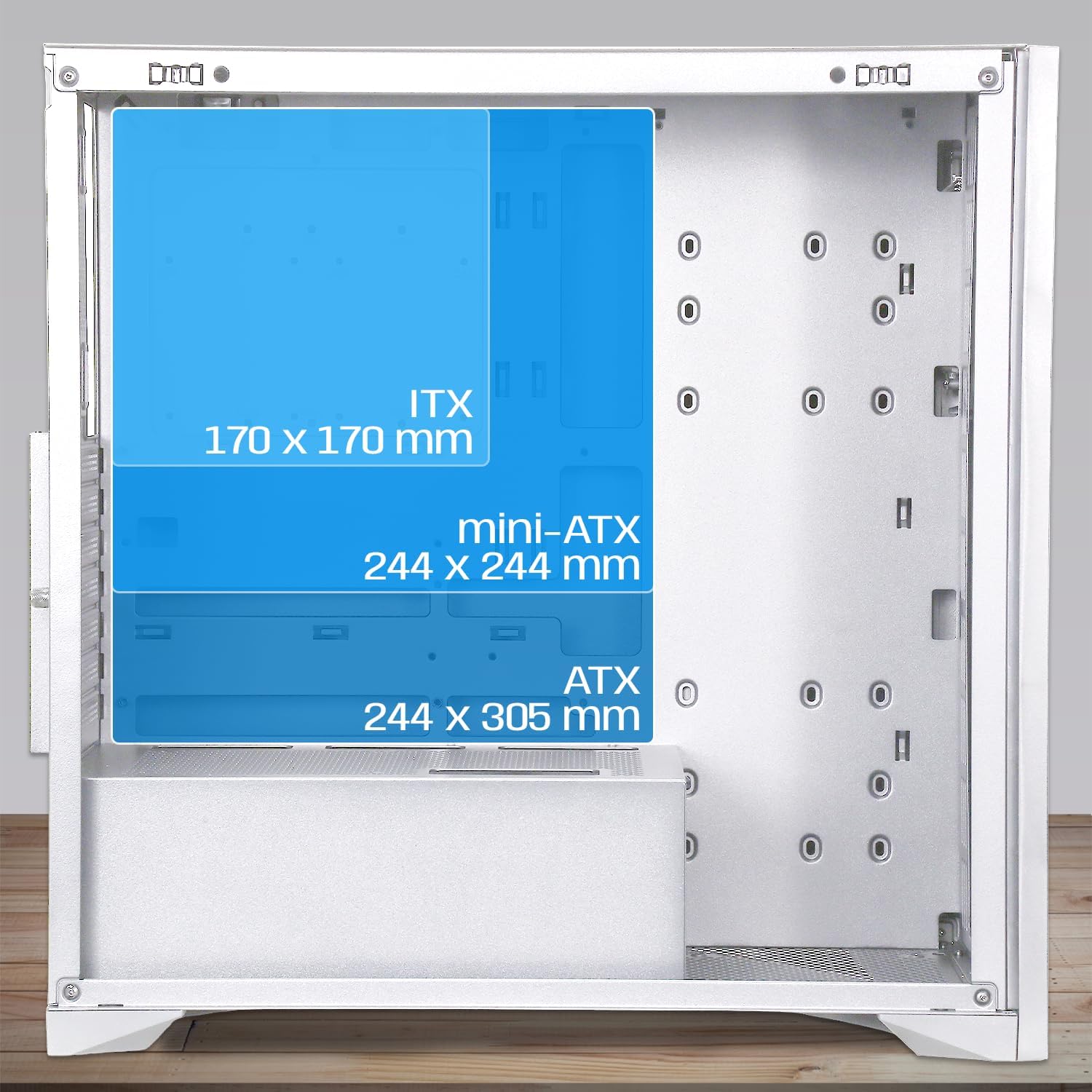
Image 3.1: Diagram illustrating motherboard compatibility and maximum dimensions for ATX, Micro-ATX, and ITX form factors within the case.
- Install the I/O shield into the designated slot at the rear of the case.
- Align your motherboard with the pre-installed standoffs. Ensure the standoffs match your motherboard's form factor.
- Причврстите матичну плочу приложеним вијацима.
3.3. CPU Cooler and Graphics Card Installation
The case provides ample space for large components.
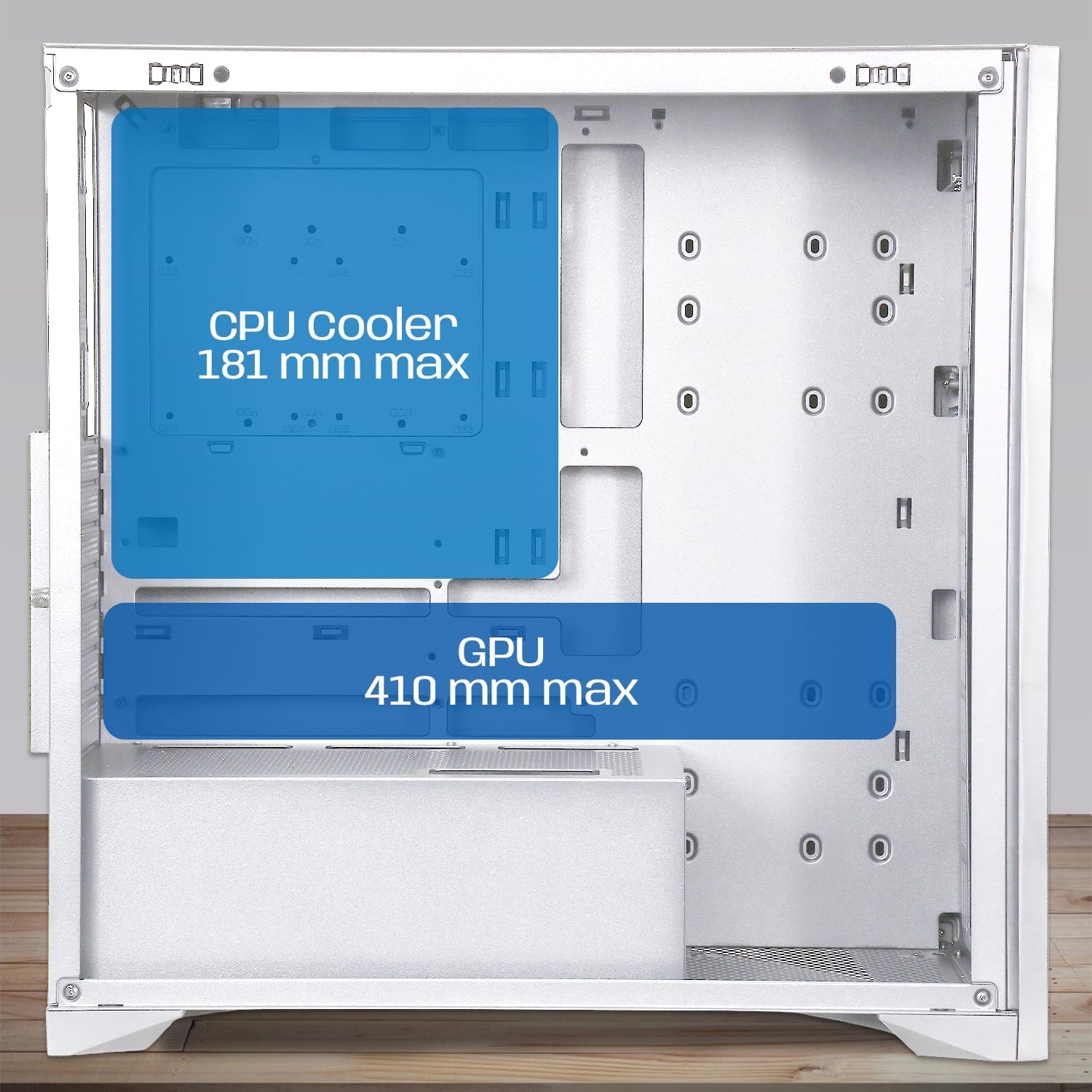
Image 3.2: Diagram showing maximum clearance for CPU coolers (181mm) and graphics cards (410mm) inside the NEWWAY NW1 case.
- ЦПУ хладњак: Install your CPU cooler according to its manufacturer's instructions. The case supports coolers up to 181mm in height.
- Графичка картица (GPU): Remove the necessary expansion slot covers at the rear. Insert your graphics card into the PCIe slot on your motherboard and secure it with screws. The case supports GPUs up to 410mm in length.
3.4. Инсталација уређаја за складиштење
The NW1 offers multiple storage options.

Image 3.3: Diagram illustrating the various mounting points for 2.5" SSDs and 3.5" HDDs within the case.
- Locate the 3.5" HDD/2.5" SSD drive bays.
- Mount your drives using the provided screws.
3.5. Инсталација јединице за напајање (PSU)
Напајање се монтира на дно кућишта.
- Уметните напајање у његов предвиђени одељак на доњем задњем делу кућишта.
- Причврстите напајање завртњима са задње стране кућишта.
3.6. Уградња вентилатора и радијатора
The case comes with three 140mm PWM fans pre-installed. Additional cooling can be added.

Image 3.4: Diagram indicating potential fan mounting locations, including the pre-installed front fans and a rear exhaust fan.
- Connect the pre-installed 140mm PWM fans to your motherboard's fan headers.
- For watercooling, install radiators up to 360mm in the designated mounting points (e.g., front or top, depending on size).
3.7. Connecting Front Panel I/O
Connect the front panel cables to the corresponding headers on your motherboard.
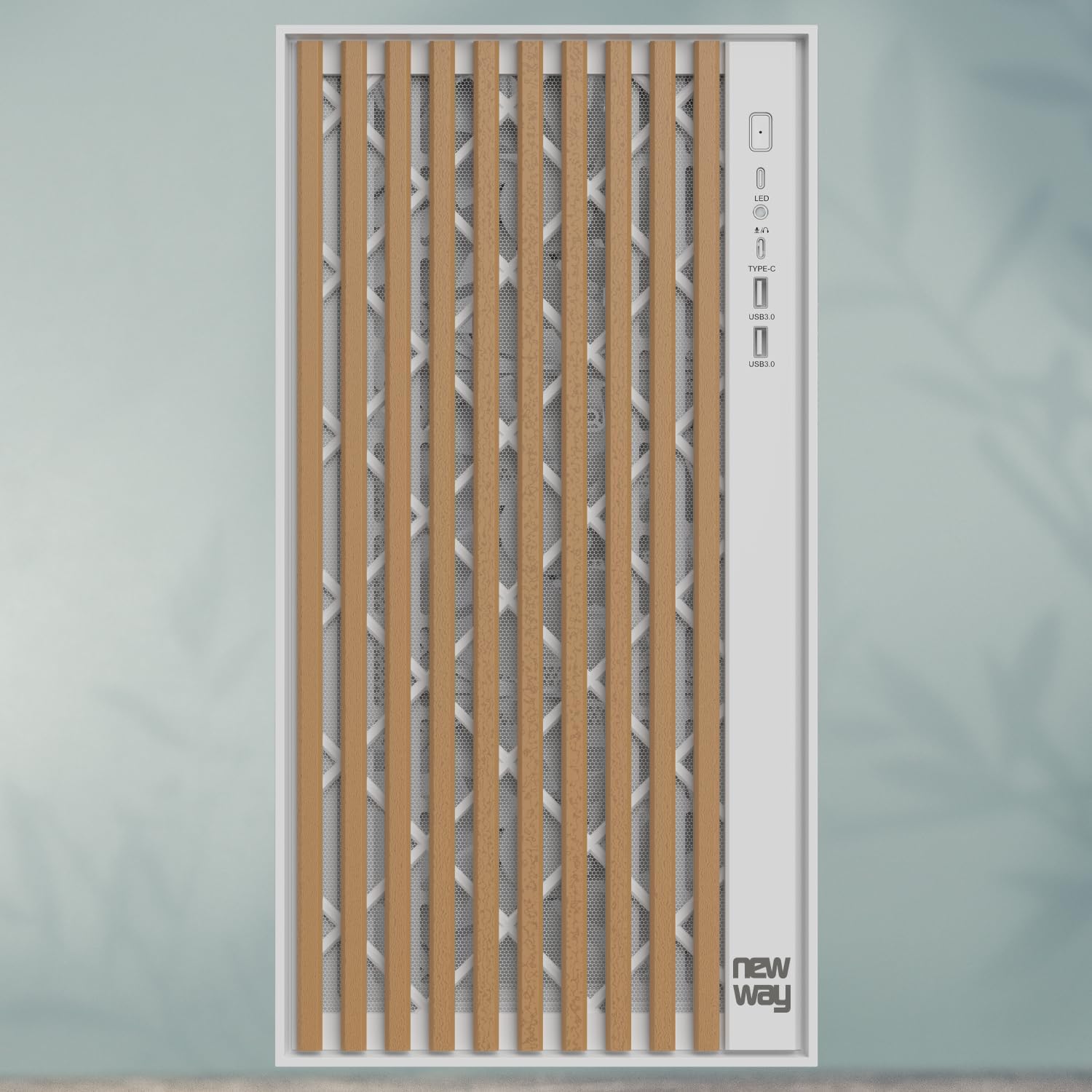
Слика 3.5: Крупни план view of the front panel I/O, showing the LED indicator, USB Type-C port, and USB 3.0 ports.
- Connect the USB Type-C cable to the motherboard's Type-C header.
- Connect the USB 3.0 cables to the motherboard's USB 3.0 headers.
- Повежите HD Audio кабл са аудио прикључком на матичној плочи.
- Connect the Power SW, Reset SW, HDD LED, and Power LED cables to the motherboard's front panel headers, ensuring correct polarity for LEDs.
3.8. Менаџмент каблова
Користите изрезе за усмеравање каблова и тачке за везивање иза лежишта матичне плоче да бисте уредно управљали кабловима. Ово побољшава проток ваздуха и естетику.
3.9. Завршна скупштина
- Once all components are installed and cables are managed, reattach the rear panel (if removed).
- Пажљиво поново поставите бочну плочу од каљеног стакла и причврстите је завртњима са палчатим дном.
4. Упутство за употребу
After completing the assembly, connect your peripherals (monitor, keyboard, mouse, power cable) to your system.
- Уверите се да су сви каблови безбедно повезани.
- Press the power button on the front panel to turn on your computer.
- The LED indicator on the front panel will illuminate when the system is powered on.
- To restart the system, press the reset button on the front panel.
5. Одржавање
Редовно одржавање помаже у обезбеђивању оптималних перформанси и дугог века трајања компоненти вашег рачунара.
- Филтери за прашину: The NW1 case is equipped with dust filters. Regularly clean these filters to maintain good airflow and prevent dust buildup inside the case. Gently remove the filters and clean them with compressed air or by rinsing with water (ensure they are completely dry before reinstallation).
- Спољно чишћење: Wipe the exterior surfaces, including the wooden front panel and tempered glass, with a soft, damp крпу. Избегавајте абразивна средства за чишћење или раствараче.
- Унутрашње чишћење: Periodically open the case and use compressed air to remove dust from internal components and fans.
КСНУМКС. Решавање проблема
Ако наиђете на проблеме, погледајте следеће уобичајене кораке за решавање проблема:
- Систем се не укључује:
- Check if the power supply unit (PSU) is switched on at the back.
- Уверите се да су сви каблови за напајање (24-пински ATX, 8-пински CPU, PCIe за GPU) безбедно повезани са матичном плочом и компонентама.
- Проверите да ли је кабл прекидача за напајање на предњој плочи правилно повезан са прикључком на матичну плочу.
- Вентилатори се не окрећу:
- Ensure fan cables are properly connected to the motherboard fan headers.
- Проверите подешавања BIOS/UEFI-ја за контролу вентилатора.
- Нема излаза на екран:
- Confirm your monitor cable is connected to the graphics card (not the motherboard, unless using integrated graphics).
- Поново поставите графичку картицу у њен PCIe слот.
- Check if the graphics card requires additional power cables from the PSU.
- УСБ портови не раде:
- Ensure the front panel USB cables are correctly connected to the motherboard's USB headers.
- Check motherboard drivers.
For further assistance, please contact NEWWAY customer support.
7. Техничке спецификације
| Назив модела | НВ1 |
| Број производа | ON-CA-2403 |
| Тип случаја | Мид-Товер |
| Компатибилност матичне плоче | ATX, Micro ATX, ITX |
| Материјал | Tempered Glass, Metal, Wood |
| Боја | Бела |
| Димензије (Д к Ш к В) | 430 мм к 235 мм к 430 мм |
| Тежина | 6.8 кг |
| Зазор ЦПУ хладњака | До 181 мм |
| Размак дужине ГПУ-а | До 410 мм |
| Watercooling Support | Up to 360mm radiators |
| Инцлудед Фанс | 3 x 140mm PWM fans |
| Стораге Баис | 3 x 3.5" HDD / 2.5" SSD |
| Предњи И / О портови | USB Type-C, USB 3.0, Audio |
| Монтажа напајања | Боттом Моунт |
8. Гаранција и подршка
The NEWWAY NW1 PC Case comes with a Двогодишња гаранција произвођачаОва гаранција покрива недостатке у материјалу и изради при нормалној употреби.
For warranty claims, technical support, or any inquiries, please contact NEWWAY customer service through their official webсајт или продавницу где је производ купљен.
Произвођач: OPTIMUM WAY
Земља порекла: Кина