
1. Производ је готовview
The EXVIST H.265 1080P 60fps PoE VGA Encoder is a high-performance device designed for converting VGA video signals into H.265/H.264 encoded streams. It supports various streaming protocols, including RTMP, RTSP, HLS, and UDP, making it suitable for live broadcasting, video conferencing, CCTV, and digital signage applications. With Power over Ethernet (PoE) capability and a VGA loopout, this encoder offers flexible installation and real-time monitoring.
2. Кључне карактеристике
- High-Quality H.264/H.265 Encoding: Supports 1080P resolution at 60fps with efficient compression for clear video and minimal bandwidth usage.
- Повер Овер Етхернет (ПоЕ): Powers the encoder directly through the Ethernet connection, simplifying setup and reducing cable clutter.
- VGA Loopout for Local Display: Provides a VGA output for direct connection to a local monitor, enabling real-time video monitoring.
- Multiple Protocols Supported: Compatible with RTSP, RTMP, HLS, and UDP protocols for versatile integration with various streaming platforms and systems.
- Широк спектар апликација: Ideal for IP television systems, live event broadcasts, digital signage, and CCTV monitoring across diverse environments.
3. Садржај пакета
- EXVIST H.265 1080P 60fps PoE VGA Encoder (Model ON-VGA-16DP)
- Упутство за употребу
- Power Adapter (if PoE is not used)
4. Изглед уређаја
Familiarize yourself with the ports and indicators on the encoder unit.

Слика 4.1: Front and Rear Panel of the EXVIST VGA Encoder. The front panel includes PWR (Power indicator), RUN (Operation indicator), Microphone input, VGA IN, and VGA OUT ports. The rear panel features a Reset button, DC12V power input, and a NETWORK port (supporting PoE).
- ПВР индикатор: Светли када је уређај укључен.
- РУН индикатор: Flashes during normal operation.
- Улаз за микрофон: 3.5mm audio input for external microphone.
- ВГА ИН: Connects to the VGA video source.
- VGA излаз: VGA loopout for connecting to a local display.
- Ресет: Притисните и држите да бисте вратили фабричка подешавања.
- ДЦ12В: Power input for standard power adapter (if PoE is not used).
- МРЕЖА: RJ45 Ethernet port for network connection and PoE power input.
5. Упутства за подешавање
5.1 Физичка веза
- Connect your VGA video source (e.g., computer, camcorder) to the ВГА ИН port on the encoder using a VGA cable.
- If local monitoring is required, connect a VGA display to the ВГА ОУТ port on the encoder using a VGA cable.
- Повежите Ethernet кабл са вашег мрежног прекидача (пожељно прекидача са омогућеним PoE-ом) на НЕТВОРК port on the encoder. If using a non-PoE switch, connect the provided DC12V power adapter to the ДЦ12В лука.
- Optionally, connect an external microphone to the Улаз за микрофон лука.
- Проверите да ли је ПВР indicator is illuminated and the РУН indicator is flashing, indicating the device is powered on and operating.
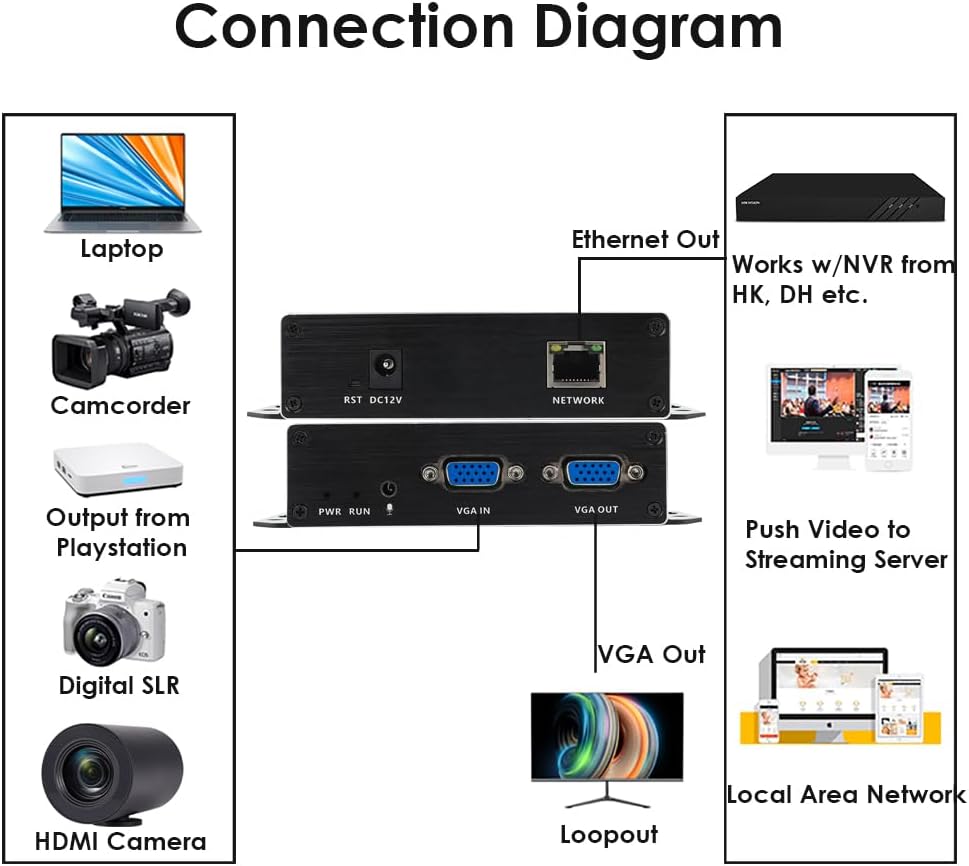
Слика 5.1: Typical Connection Diagram for the EXVIST VGA Encoder.
5.2 Network Configuration and Web Приступ интерфејсу
The encoder typically has a default IP address (e.g., 192.168.1.168). To access the web интерфејс:
- Ensure your computer is on the same network segment as the encoder. You may need to temporarily set your computer's IP address to be in the same subnet (e.g., 192.168.1.x).
- Отвори а web browser (e.g., Chrome, Firefox) and enter the encoder's default IP address (e.g., http://192.168.1.168) у траци за адресу.
- Log in using the default username and password (refer to the device label or included documentation for default credentials, commonly admin/admin or admin/123456).
- Once logged in, you can configure network settings (e.g., static IP, DHCP) to integrate the encoder into your existing network infrastructure.
6. Упутство за употребу
6.1 Video and Audio Settings
У оквиру web interface, navigate to the Video/Audio settings to configure input and output parameters.

Слика 6.1: Audio Settings in the Web Интерфејс.
- Аудио улаз: Select the desired audio source (e.g., VGA embedded audio, external microphone).
- Sampлес: Подесите аудио сampлинг рате.
- Codec type: Choose the audio encoding format (e.g., AAC).
- Брзина преноса: Set the audio bitrate for quality and bandwidth control.
- канал: Select audio channels (e.g., Stereo, Mono).
- Излазна јачина: Adjust the output audio level.
- Не заборавите да кликнете Сачувај after making changes.
6.2 Streaming Configuration (RTMP, RTSP, HLS, UDP)
The encoder supports various streaming protocols. Configure them under the 'Push' or 'Network' sections of the web интерфејс.

Слика 6.2: RTMP Streaming Settings in the Web Интерфејс.
- РТМП: For live streaming to platforms like YouTube, Facebook Live, Twitch. Enter the Stream Server URL and Stream Key in the 'Video push' field (e.g.,
rtmp://a.rtmp.youtube.com/live2/streamkey). Enable the stream and select the push mode. - РТСП: For surveillance systems or media servers. Configure the RTSP URL and stream mode (Complex, Video, Audio).
- HLS/UDP: Configure as per your specific application requirements.
- Always click Сачувај after modifying streaming settings.

Слика 6.3: Supported Protocols by the EXVIST VGA Encoder.
7. Одржавање
- Чишћење: Користите меку, суву крпу за чишћење уређаја. Избегавајте течна средства за чишћење или раствараче.
- вентилација: Ensure the encoder is placed in a well-ventilated area to prevent overheating. Do not block ventilation openings.
- Ажурирања фирмвера: Periodically check the EXVIST official webсајт за ажурирања фирмвера како би се осигурале оптималне перформансе и приступ новим функцијама.
- Управљање кабловима: Уверите се да су сви каблови безбедно повезани и да нису под напрезањем.
КСНУМКС. Решавање проблема
- Нема напајања: Check power connections. If using PoE, ensure the network switch port provides power. If using a power adapter, ensure it is correctly connected and the outlet is functional.
- No Video Output (Loopout): Verify VGA cable connections. Ensure the video source is active and outputting a signal.
- Нема мрежне везе: Check Ethernet cable. Verify network settings (IP address, subnet mask, gateway) in the encoder's web interface. Ensure your computer is on the same subnet for initial access.
- Проблеми са стримовањем: Double-check streaming protocol settings (RTMP URL, RTSP URL, etc.). Ensure internet connectivity and sufficient bandwidth. Verify firewall settings on your network.
- Forgot Password/Settings: Користите РЕСЕТ button on the rear panel to restore factory default settings. Note that this will erase all custom configurations.
9. Спецификације
| Феатуре | Спецификација |
|---|---|
| Број модела | ON-VGA-16DP |
| Видео улаз | 1к ВГА |
| Видео Оутпут | 1x VGA Loopout |
| Видео Енцодинг | Х.КСНУМКС / Х.КСНУМКС |
| Резолуција | Up to 1080P @ 60fps |
| Аудио улаз | 3.5mm Microphone, VGA Embedded Audio |
| Стреаминг Протоцолс | RTMP, RTSP, HLS, UDP, HTTP, Multicast, TS/SRT, ONVIF |
| нетворк интерфаце | 1x RJ45 Ethernet (PoE supported) |
| Повер Суппли | DC 12V or Power over Ethernet (PoE) |
| Димензије производа | 4.33 к 2.95 к 0.98 инча (110 к 75 к 25 мм) |
| Тежина артикла | 6.1 унце (173 грама) |
| Радна температура | 0°Ц до 50°Ц (32°Ф до 122°Ф) |
10. Информације о гаранцији
This EXVIST product comes with a Limited Warranty. Please refer to the warranty card included with your product or visit the official EXVIST webсајт за детаљне услове и одредбе у вези са гаранцијом и њеним трајањем.
11. Корисничка подршка
For technical assistance, troubleshooting, or product inquiries, please contact EXVIST customer support through their official website or the contact information provided in your product packaging. When contacting support, please have your product model number (ON-VGA-16DP) and purchase details ready.