
1. Увод
This manual provides detailed instructions for the setup, operation, and maintenance of your PUTRIMS S28 Projector. Please read this manual thoroughly before using the projector to ensure proper function and to extend the product's lifespan. Keep this manual for future reference.
2. Садржај пакета
Проверите да ли су све ставке присутне у пакету:
- PUTRIMS S28 Projector
- Ремоте Цонтрол
- ХДМИ кабл
- Повер Цорд
- Адаптер
- Кориснички приручник (овај документ)
3. Производ је готовview
Familiarize yourself with the components of your PUTRIMS S28 Projector.

Слика: Фронт view of the PUTRIMS S28 Projector, showcasing the lens and main body.
3.1. Кључне карактеристике
- Електрични фокус: Adjust image sharpness using the remote control.
- Ауто Кеистоне Цоррецтион: Automatically corrects image distortion for a rectangular display.
- 145° Adjustable Stand: Integrated stand allows for flexible projection angles, including ceiling projection.
- Dual-Band WiFi (5G+2.4G): For fast and stable wireless connectivity.
- Блуетоотх КСНУМКС: Connect external audio devices wirelessly.
- Short Throw Ratio (1.36:1): Projects a large screen from a shorter distance.
- Функција зумирања од 50%: Adjust image size without moving the projector.
- Fully Sealed Optical Engine: Designed to prevent dust accumulation and maintain brightness.
4. Водич за подешавање
4.1. Placement and Power Connection
- Place the projector on a stable, flat surface. Ensure adequate ventilation around the device.
- Прикључите кабл за напајање на пројектор, а затим на утичницу.
4.2. Подесиви сталак
The integrated 145° adjustable stand allows you to easily change the projection angle to suit your needs, whether projecting onto a wall or ceiling.
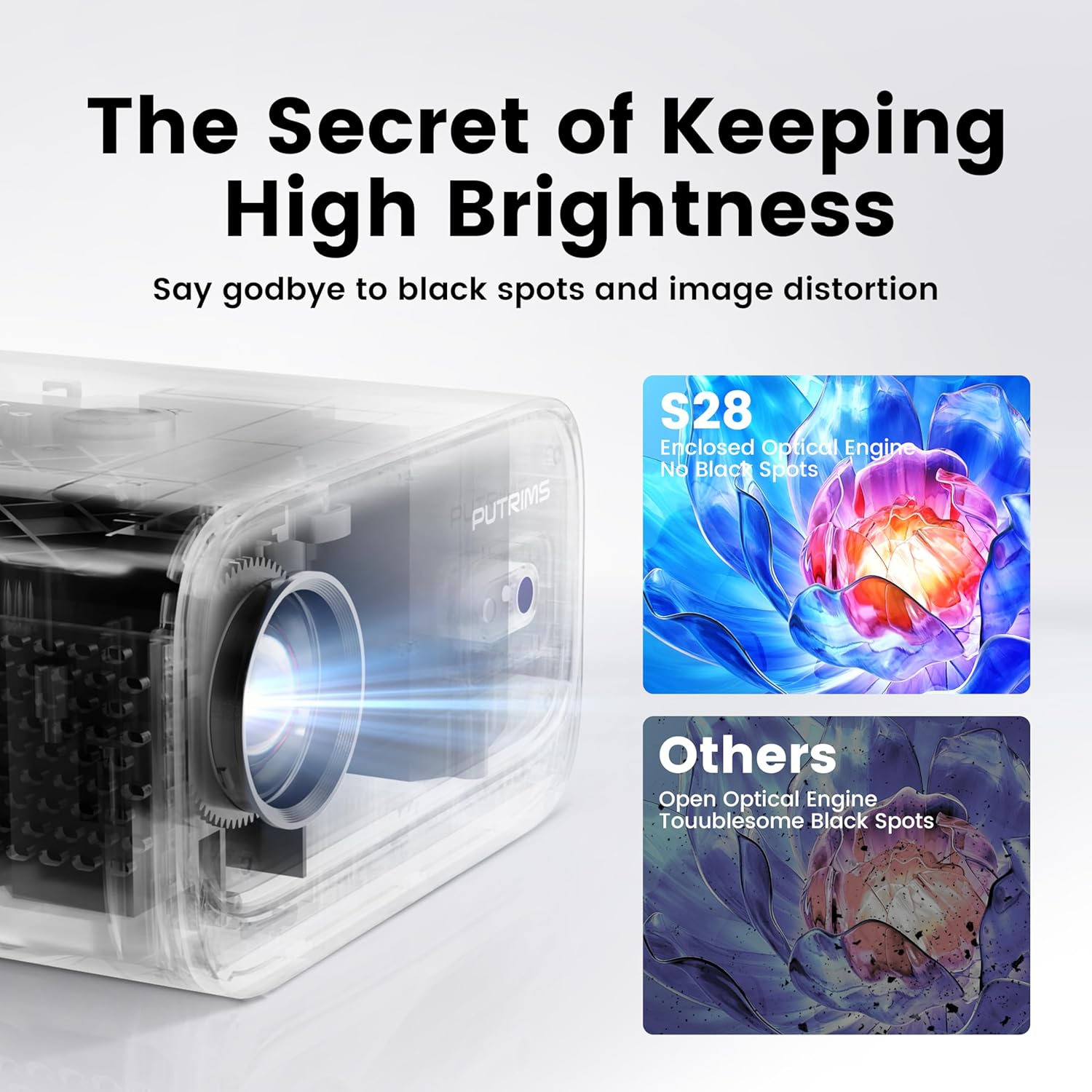
Image: The PUTRIMS S28 Projector positioned with its adjustable stand, demonstrating angle flexibility.
4.3. Focus Adjustment (Electric Focus)
The projector features electric focus for quick and precise image sharpness. Use the F+/F- buttons on the remote control to adjust the focus until the image is clear.

Image: A remote control highlighting the F+ and F- buttons used for electric focus adjustment, with a projected image in the background.
4.4. Keystone Correction (Automatic)
The S28 projector is equipped with automatic keystone correction (±30° auto / ±50° manual). When the projector is tilted, it will automatically adjust the image to a perfect rectangle within 1 second. Manual adjustment options are also available if needed.

Image: A visual representation of automatic keystone correction, demonstrating how a tilted projection is squared into a perfect rectangle.
5. Операција
5.1. Wireless Connectivity (WiFi & Bluetooth)
The projector supports both 5G and 2.4G WiFi for stable internet connection and Bluetooth 5.2 for audio output.

Image: An illustration depicting the projector's dual-band WiFi (5G and 2.4G) and Bluetooth 5.2 capabilities, connecting to a phone and external speaker.
- ВиФи конекција: Navigate to the projector's settings menu, select 'Network' or 'WiFi', and connect to your desired 5G or 2.4G network.
- Блуетоотх веза: In the settings menu, select 'Bluetooth', turn it on, and pair with your Bluetooth headphones, speakers, or AirPods.
5.2. Пресликавање екрана
The S28 supports wireless screen mirroring via Miracast and Airplay, and also wired screen mirroring for seamless content display from your devices.
- Бежично пресликавање: Ensure your smartphone or tablet is connected to the same WiFi network as the projector. Select the appropriate mirroring function (Miracast for Android, Airplay for iOS) on the projector and your device.
- Wired Mirroring: Connect your device directly to the projector using a compatible cable (e.g., USB-C to HDMI adapter, sold separately) for stable streaming.
5.3. Повезивање спољних уређаја
The projector features HDMI, USB, and 3.5mm audio output ports for compatibility with various devices.
- ДВИ: Connect devices such as TV Sticks, laptops, PCs, PS5, or Switch using an HDMI cable.
- УСБ: Insert USB drives to play media fileс директно.
- 3.5 мм аудио излаз: Connect wired external speakers or headphones.
5.4. Функција зумирања
The 100%-50% zoom function allows you to adjust the image size without physically moving the projector, providing flexibility in placement.

Image: A visual guide demonstrating the projector's ability to zoom out the projected image from 100% to 50% without moving the unit.
5.5. Auto Sleep Mode
The projector includes a sleep timer (60/120/180 minutes) that can be set to automatically turn off the device after a specified period.
6. Одржавање
6.1. Optical Engine Care
The PUTRIMS S28 features a fully sealed optical engine designed to effectively block dust and blue spots, ensuring consistent brightness and image quality over time. No special user maintenance is required for the optical engine itself.

Слика: Пресек view of the S28's enclosed optical engine, highlighting its dust-blocking design, contrasted with an open optical engine prone to black spots.
6.2. Генерално чишћење
- Користите меку, суву крпу за чишћење спољашњости пројектора.
- За сочиво користите специјализовану крпу и раствор за чишћење сочива како бисте избегли огреботине.
- Ensure ventilation ports are clear of dust and obstructions.
КСНУМКС. Решавање проблема
Ако наиђете на проблеме, погледајте следећа уобичајена решења:
- No Signal/Picture: Ensure all cables are securely connected. Verify the correct input source is selected on the projector.
- Нема звука: Check the projector's volume settings and ensure any external audio devices are properly connected and powered on. Verify Bluetooth connection if using wireless audio.
- Проблеми са повезивањем преко WiFi/Bluetooth мреже: Restart the projector and your device. Ensure you are within range of the WiFi router or Bluetooth device.
- Замућена слика: Adjust the electric focus using the remote control (F+/F- buttons). Ensure the projection surface is flat.
- Изобличење слике: The auto keystone correction should resolve most distortions. If not, check for manual keystone adjustment options in the settings.
- Streaming Service Limitations: Due to HDCP copyright restrictions, streaming services like Netflix and Disney+ may require a TV stick (sold separately) for playback. The projector itself does not bypass these restrictions.
- Projector Not Powering On: Ensure the power cord is firmly connected and the power outlet is functional. The projector is not battery-powered and must be plugged in during use.
Ако проблеми и даље постоје, обратите се корисничкој подршци.
8. Спецификације
| Феатуре | Детаљ |
|---|---|
| Број модела | С28 |
| Бранд | ПУТРИМС |
| Резолуција екрана | 1280 x 720 (изворно) |
| Технологија повезивања | HDMI, USB, 3.5mm Audio Out, WiFi (5G+2.4G), Bluetooth 5.2 |
| Посебне карактеристике | Electric Focus, Auto Keystone, 145° Adjustable Stand, Built-in WiFi, Built-in Bluetooth, Built-in Speaker |
| Тежина артикла | 1.76 фунти |
| Димензије производа | 7.87 к 7.08 к 7.87 инча |
| Боја | Бела |
| Препоручена употреба | Пословање, образовање, игре, кућни биоскоп |
9. Гаранција и подршка
PUTRIMS is committed to providing excellent customer service and product support.
- Гаранција поврата новца: 2-year money-back guarantee.
- Repair Coverage: 3-year repair coverage.
- техничка помоћ: Доживотна техничка подршка.
- Служба за кориснике: 24/7 email support.
For any questions, technical support, or assistance, please contact us at:
Емаил: суппорт@путримс.цом

Image: A graphic representing customer support, with text indicating 24/7 availability and the support email address.