
1. Увод
This manual provides detailed instructions for the safe and effective use of the SEQURE HT140 2-IN-1 Portable Hot Tweezers Soldering Iron Kit. The HT140 is designed for precision soldering and desoldering tasks, particularly for Surface Mount Devices (SMD). Please read this manual thoroughly before operating the device.
2. Безбедносне информације
- Увек носите одговарајућу заштиту за очи приликом лемљења.
- Обезбедите одговарајућу вентилацију у радном простору како бисте избегли удисање испарења од лема.
- The soldering tips reach high temperatures. Avoid direct contact with skin to prevent burns.
- Place the device on the provided stand when not in use to prevent accidental contact or damage.
- Do not use the device near flammable materials or liquids.
- Disconnect power when changing tips or performing maintenance.
- Чувати ван домашаја деце.
3. Садржај пакета
Проверите да ли су све ставке наведене у наставку укључене у ваш пакет:
- HT140 Host (Main Unit) x 1
- Hot Tweezers Desoldering Tip (IS type) x 2
- HT Station (Stand with cleaning sponge) x 1
- Accessory Package (Hex keys, spare screws) x 1
- Торба за складиштење к 1
- 1.5m PD 240W Silicone Wire (USB-C to USB-C) x 1
- PD 65W Fast Charging Adapter (US + EU plug) x 1

4. Производ је готовview
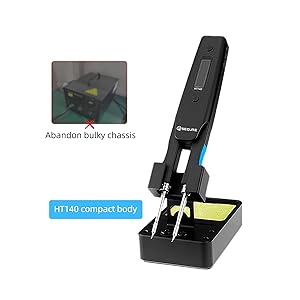
The SEQURE HT140 is an innovative 2-in-1 tool that functions as both a soldering iron and hot tweezers. It features rapid heating, precise temperature control, and a compact design suitable for various electronic repair and SMD work.
4.1 Кључне карактеристике
- 2-у-1 функционалност: Operates as a single-sided soldering iron or double-sided hot tweezers.
- Брзо загревање: Melts solder in approximately 2 seconds.
- Широк температурни опсег: Adjustable from 50°C to 500°C (122°F to 932°F).
- Унапред подешене температуре: Three customizable temperature settings for efficiency.
- Паметни систем управљања: Features temperature calibration, compensation, auto sleep, and auto standby.
- ОЛЕД екран: High-definition display for clear temperature and status indication.
- Двоструки улаз за напајање: Supports Type-C (PD3.1/3.0/2.0, QC3.0/2.0) and DC5525 (5V-28V, max 140W).
- Компактан и преносив: Designed for ease of transport and use in various environments.

4.2 Функционалност 2 у 1
The HT140 can be configured for two primary modes of operation:
- Soldering Iron Mode: Utilizes single-sided heating for precise soldering of individual components.
- Hot Tweezers Mode: Employs double-sided heating for efficient desoldering and removal of SMD components.

5. Подешавање
5.1 Installing Soldering Tips
- Ensure the HT140 is powered off and cool.
- Loosen the small set screws on the tip holders using the provided hex key.
- Carefully insert the desired C120 hot tweezers cartridge tips into the holders. Ensure they are fully seated.
- Tighten the set screws to secure the tips. Do not overtighten.
5.2 Повезивање напајања
The HT140 supports both Type-C (USB-C) and DC5525 power inputs.
- Using Type-C: Connect the provided 1.5m PD 240W Silicone Wire to the Type-C port on the HT140 and to a compatible PD (Power Delivery) charger (e.g., the included 65W adapter).
- Using DC5525: Connect a compatible DC power adapter (5V-28V) to the DC5525 port.
Note: For optimal performance and rapid heating, use a power source capable of delivering at least 65W, ideally up to 140W.
6. Операција
6.1 Укључивање/искључивање
Connect the device to a power source. The OLED display will illuminate. To power off, disconnect the power source.
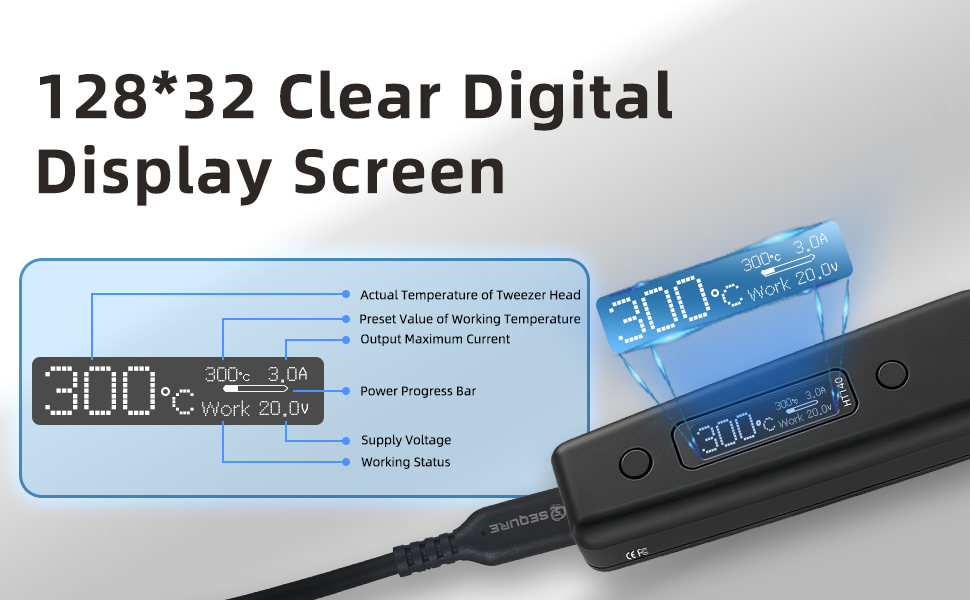
6.2 ОЛЕД екран
The OLED display provides real-time information about the device's status:
- Actual Temperature of Tweezer Head
- Унапред подешена вредност радне температуре
- Излазна максимална струја
- Трака напретка напајања
- Суппли Волtage
- Воркинг Статус
6.3 Подешавање температуре
The temperature can be adjusted from 50°C to 500°C. Use the control buttons on the device to increase or decrease the target temperature. The display will show the current and target temperatures.

6.4 Preset Temperatures (TurboSet Mode)
The HT140 supports three groups of default heating temperatures for quick access:
- SetTemp 1: 280°C (Adjustable)
- SetTemp 2: 320°C (Adjustable)
- SetTemp 3: 380°C (Adjustable)
Refer to the device's menu for instructions on how to select and customize these preset temperatures.
6.5 Auto Sleep & Standby
To conserve energy and reduce tip wear, the HT140 features adjustable auto sleep and standby modes:
- Adjustable Sleep Time: Configurable from 5s to 360s of inactivity.
- Adjustable Sleep Temperature: Set between 50°C and 500°C.
- Аутоматско стање приправности: Enters standby mode after a default of 5 minutes following sleep mode (adjustable).

6.6 Power Input Compatibility
The HT140 is compatible with a wide range of power sources, supporting 5V-28V DC input with a maximum power of 140W. This includes PD chargers, power adapters, and 3S-6S LiPo batteries.

6.7 Надоградња фирмвера
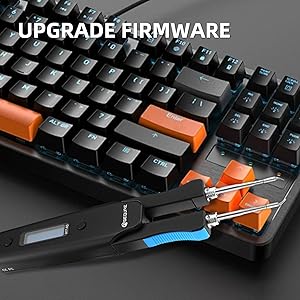
The HT140 supports firmware upgrades to enhance functionality and performance. Connect the device to a computer via the USB-C port and follow the instructions provided on the SEQURE official website for the upgrade process.
7. Одржавање
7.1 Чишћење врха
Regularly clean the soldering tips to ensure optimal performance and longevity. Use the included cleaning sponge (dampened, not wet) or brass wool to wipe off excess solder and oxidation.
7.2 Калајисање врхова
After cleaning and before storage, always tin the tips with a thin layer of fresh solder. This prevents oxidation and prolongs tip life.
7.3 Складиштење
When not in use, store the HT140 in its provided storage bag to protect it from dust and physical damage.
КСНУМКС. Решавање проблема
- Уређај се не укључује: Ensure the power cable is securely connected and the power source is functioning correctly and providing sufficient wattage.
- Tips not heating: Check if the tips are correctly installed and the set screws are tightened. Verify the power input.
- Нетачно очитавање температуре: Perform a temperature calibration as described in the device's menu settings.
- Poor solder wetting: Clean and re-tin the tips. Ensure the correct temperature is set for the solder type being used.
9. Спецификације
| Феатуре | Спецификација |
|---|---|
| Модел | ХТ140 |
| Повер Инпут | Type-C (PD3.1/3.0/2.0, QC3.0/2.0), DC5525 |
| Волtagе Распон | КСНУМКСВ-КСНУМКСВ ДЦ |
| Мак Повер | 140В |
| Температурни опсег | 50°C - 500°C (122°F - 932°F) |
| Време загревања (30°C до 300°C) | As fast as 2 seconds (with 140W input) |
| Дисплаи | HD OLED |
| Компатибилни савети | C120 Hot Tweezers Cartridge Tips |
| Ауто Слееп | Adjustable (5s-360s) |
| Ауто Стандби | Adjustable (default 5 minutes after sleep) |
| Материјал | Метал, Пластика |
| Дужина ставке | 6.3 инча |
| Тежина артикла | 1.76 унци |

10. Гаранција и подршка
For warranty information and technical support, please refer to the official SEQURE webсајт или контактирајте продавца. Сачувајте рачун као доказ о куповини.