
Jonsbo D32 PRO
JONSBO D32 PRO Micro-ATX PC кућиште - упутство за употребу
Model: D32 PRO
1. Производ је готовview
The JONSBO D32 PRO is a compact and highly compatible Micro-ATX PC case, designed to offer flexibility and optimized performance for various hardware configurations. Its innovative A/B mode allows for different motherboard layouts, catering to both standard and back-connect motherboards. This case is engineered for efficient cooling and easy installation, making it suitable for building powerful mini desktop systems.

Слика 1.1: Предња страна view of the JONSBO D32 PRO case with internal components illuminated.
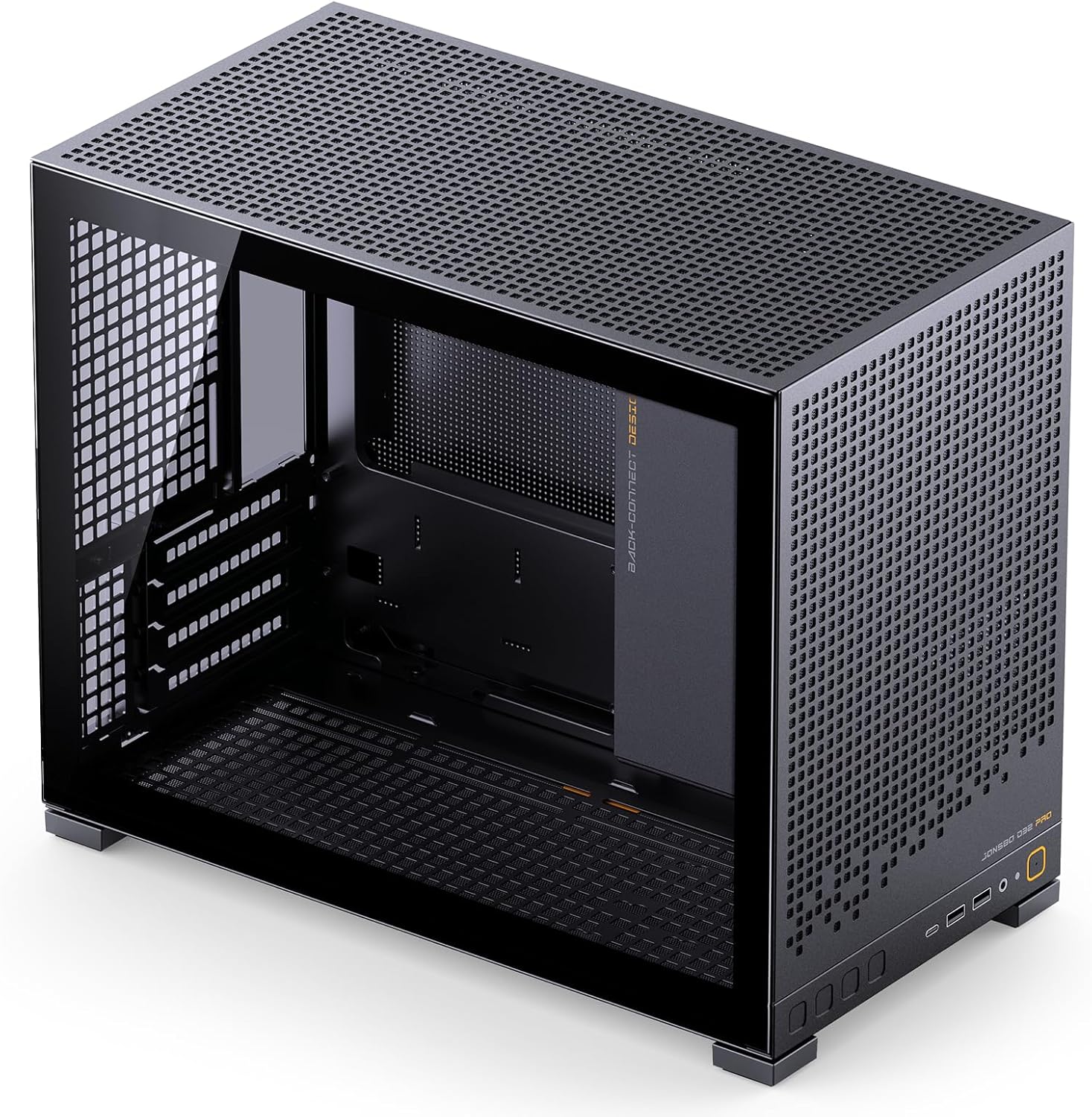
Слика 1.2: Под углом view highlighting the internal structure and space of the D32 PRO case.
2. Кључне карактеристике
- Висока компатибилност: Supports Micro-ATX and Mini-ITX motherboards, including MATX back-connect/BTF motherboards.
- Компактан дизајн: 24L volume mini desktop case with dimensions of D396×W207×H314mm (foot included).
- Размак ГПУ-а: Погодан за графичке картице дужине до 365 мм.
- Подршка за хлађење: Supports 240mm AIO liquid coolers and air coolers up to 163mm (AMD CPU) or 164mm (Intel CPU) in B mode, and 169mm (AMD CPU) or 170mm (Intel CPU) in A mode.
- Подршка за напајање: Compatible with ATX/SFX-L/SFX PSUs (Max. L200mm, not compatible with 16A plugs).
- Опције складиштења: Up to 4 x 2.5" drives or 2 x 2.5" + 2 x 3.5" drives (configurations depend on other hardware).
- Оптимизован проток ваздуха: Supports up to 6 cooling fans: Top (2x 120mm/140mm), Rear (1x 120mm), Bottom (3x 120mm/2x 140mm).
- Предњи И/О портови: Includes 2x USB3.2 Gen1 Type-A, 1x USB3.2 Gen 2 Type-C, 1x AUDIO, 1x MIC.
- Visual Optimization: Tempered glass side panel and adjustable motherboard cable management cover for a clean interior.
- Једноставна инсталација: Detachable PCI-E position for unobstructed graphics card insertion.

Figure 2.1: Internal component layout highlighting key areas for installation.
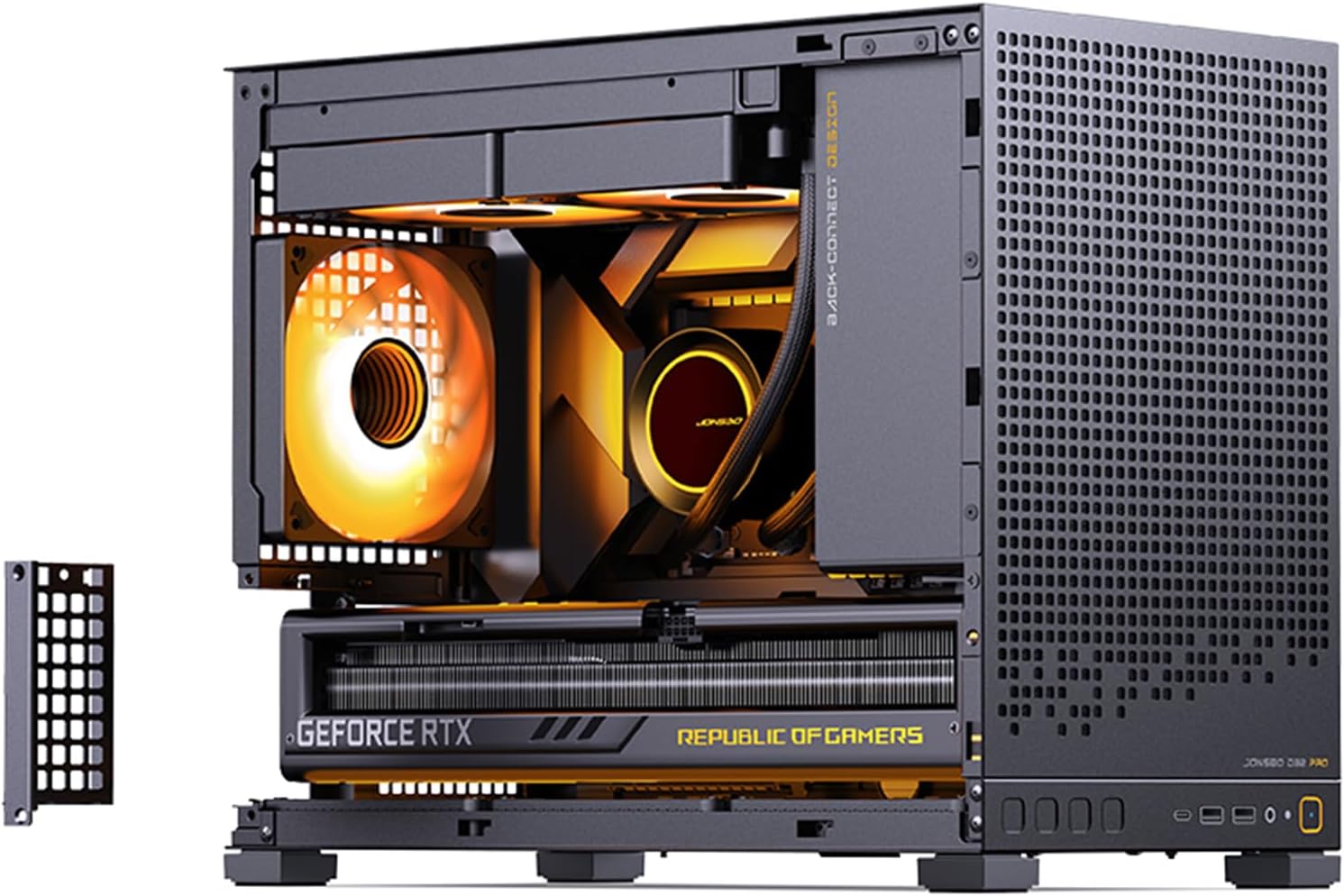
Figure 2.2: Detachable PCI-E bracket for simplified graphics card installation.

Figure 2.3: Included adjustable graphics card support bracket to prevent GPU sag.
3. Подешавање и инсталација
Careful planning is essential before beginning your PC build. The JONSBO D32 PRO offers two motherboard modes (A/B) to optimize compatibility and cable management. Ensure you select the correct mode for your motherboard type.
3.1. Motherboard Mode Selection (A/B Mode)
The D32 PRO features a switchable motherboard compartment to support both standard Micro-ATX and back-connect Micro-ATX motherboards. This affects the available space for CPU coolers and cable routing.
- A Mode (Factory Default): Compatible with ordinary motherboards, providing ample space for air-cooled heat sinks (up to 170mm Intel CPU / 169mm AMD CPU) and graphics cards. This mode is ideal for traditional builds.
- Б режим: Designed for back-connect motherboards, offering increased space for rear-mounted cables. In this mode, CPU air cooler clearance is slightly reduced (up to 164mm Intel CPU / 163mm AMD CPU). Manual switching of the chassis structure is required for B mode.

Figure 3.1: A/B Mode diagram showing space differences for CPU cooler and cable management.
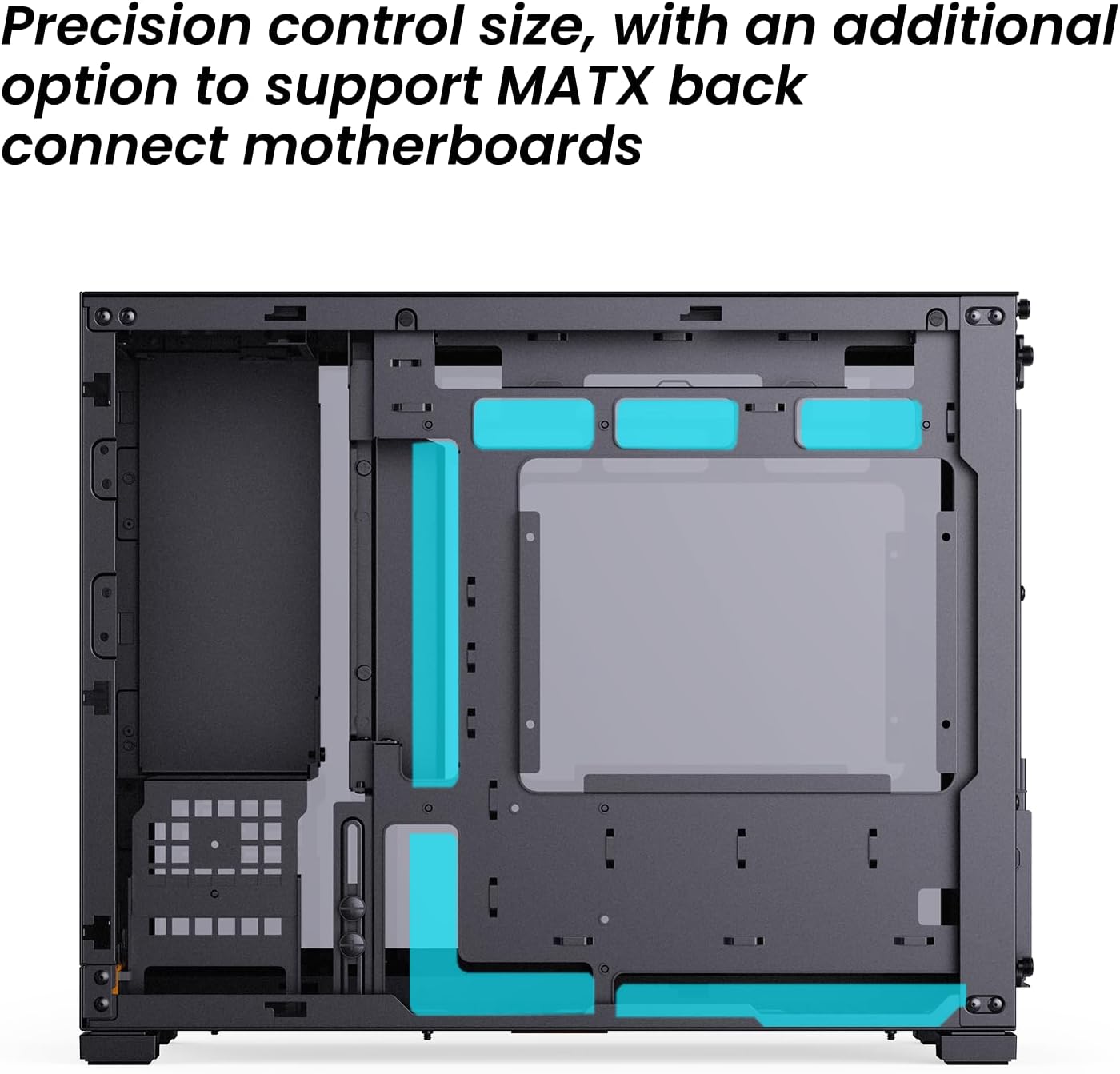
Figure 3.2: Precision control size with an additional option to support MATX back-connect motherboards.
3.2. Component Installation Steps
- Припремите случај: Remove side panels and any necessary internal brackets to facilitate installation.
- Инсталирајте матичну плочу: Secure your Mini-ITX or Micro-ATX motherboard into the selected A or B mode position. Ensure all standoffs are correctly aligned.
- Инсталирање хладњака процесора: Depending on your chosen motherboard mode, install your air cooler or AIO radiator. For AIOs, the top supports up to 240mm radiators.
- Инсталирајте напајање (PSU): The D32 PRO supports ATX, SFX-L, and SFX PSUs. The power compartment partition is adjustable. If your GPU length is ≤ 286mm and the partition is removed, the PSU length is limited to 200mm. SFX power supplies require an SFX adapter bracket.
- Инсталирајте графичку картицу (GPU): The case supports GPUs up to 365mm in length. Utilize the detachable PCI-E position for easier insertion. Use the included adjustable graphics card support bracket to prevent sag for longer cards.
- Инсталирајте дискове за складиштење: Install 2.5" SSDs or 3.5" HDDs in the designated drive bays. The case offers flexible storage configurations.
- Install Case Fans: Optimize airflow by installing fans in the top (2x 120mm/140mm), rear (1x 120mm), and bottom (3x 120mm/2x 140mm) positions.
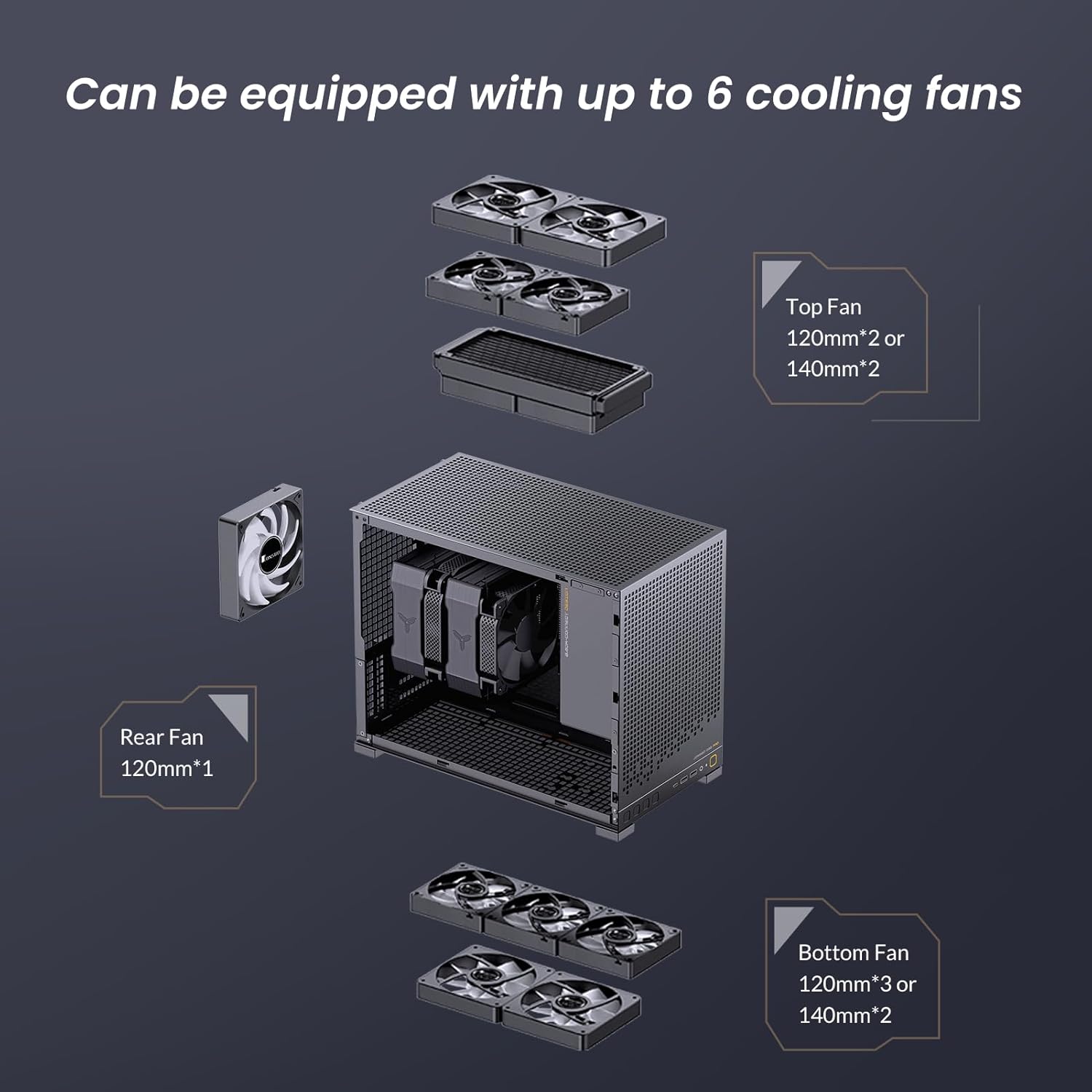
Figure 3.3: Fan configuration options for optimal cooling within the D32 PRO case.
3.3. Менаџмент каблова
The D32 PRO includes an adjustable motherboard cable management cover to conceal complex wires, enhancing the visual appeal of your build. Utilize cable ties and routing channels to maintain a tidy interior, which also improves airflow.
4. Оперативна разматрања
Once assembled, ensure all connections are secure and the case panels are properly reinstalled. The perforated panels on the top, bottom, and side (depending on model) are designed for optimal airflow. Monitor component temperatures, especially during initial operation, to ensure adequate cooling.
5. Одржавање
Regular maintenance helps prolong the life of your components and ensures optimal performance.
- Чишћење прашине: Periodically clean dust filters located on the top, bottom, and side panels. These can be removed and cleaned with compressed air or a soft brush.
- Унутрашње чишћење: Use compressed air to remove dust from internal components such as CPU cooler fins, GPU heatsinks, and fan blades. Ensure the system is powered off and unplugged before cleaning.
- Panel Care: Clean the tempered glass side panel with a soft, lint-free cloth and a mild glass cleaner. Avoid abrasive materials that could scratch the surface.
КСНУМКС. Решавање проблема
This section addresses common issues that may arise during or after building your PC in the JONSBO D32 PRO case.
- Компоненте које не одговарају:
- GPU too long: Verify your GPU length does not exceed 365mm. Ensure the power compartment partition is adjusted or removed if necessary.
- CPU Cooler too tall: Check if you are in the correct A/B mode for your cooler height. A mode supports up to 170mm, B mode up to 164mm.
- PSU not fitting: Ensure your PSU length is within 200mm. Note that 16A plugs are not compatible.
- Слаб проток ваздуха/Високе температуре:
- Verify all fans are installed correctly and spinning in the intended direction (intake/exhaust).
- Ensure dust filters are clean and not obstructing airflow.
- Check for proper cable management to avoid blocking airflow paths.
- Предњи И/О портови не раде:
- Confirm that all front I/O cables (USB, Audio) are securely connected to the correct headers on your motherboard.
7. Спецификације
| Феатуре | Спецификација |
|---|---|
| Назив модела | Д32 ПРО |
| Димензије шасије (Д×Ш×В) | 396mm × 207mm × 314mm (Foot included) |
| Подршка матичне плоче | MINI-ITX / MICRO-ATX standard / MICRO-ATX (Back-connect, requires B mode) |
| ГПУ Цлеаранце | Max. 365mm length |
| CPU Air Cooler Clearance (A Mode) | H170mm (Intel CPU) / 169mm (AMD CPU) |
| CPU Air Cooler Clearance (B Mode) | H164mm (Intel CPU) / 163mm (AMD CPU) |
| АИО подршка за радијаторе | Врх: до 240 мм |
| ПСУ Цлеаранце | Max. L200mm (not compatible with 16A plugs) |
| Дриве Баис | 2.5": Up to 4 (depends on config), 3.5": Up to 2 (shared with 2.5" mounts, depends on config) |
| Подршка обожаватеља | Top: 2x 120mm / 2x 140mm Задни: КСНУМКСк КСНУМКСмм Bottom: 3x 120mm / 2x 140mm |
| Предњи И/О порт | USB3.2 Gen1 Type-A*2 / USB3.2 Gen 2 Type-C*1 / AUDIO*1 / MIC*1 |
| Материјал шасије | SPCC steel plate (thickness 0.7mm/0.8mm) |
| Тежина артикла | 11.97 фунти |
8. Видео демонстрација
Watch the official product video for a visual guide on the JONSBO D32 PRO Micro ATX PC Case features and design.
Video 8.1: Official JONSBO D32 PRO Micro ATX PC Case overview. This video demonstrates the case's features, compatibility, and design aspects.
9. Гаранција и подршка
For warranty information and technical support, please refer to the official JONSBO webсајт или директно контактирајте њихову корисничку службу. Сачувајте рачун као доказ о куповини за евентуалне рекламације по гаранцији.
Official JONSBO Store: JONSBO Amazon Store
Ask a question about this manual
Ask about setup, troubleshooting, compatibility, parts, safety, or missing instructions. Manuals+ will review the question and use this page’s manual context to help answer it.