
1. Увод
Хвала вам на куповиниasing the LONPOO LP-816 Compact Micro HiFi System. This manual provides essential information for the safe and efficient operation of your new audio system. Please read this manual thoroughly before use and retain it for future reference.
2. Безбедносна упутства
- Извор напајања: Уверите се да је напајање волtage matches the rating indicated on the unit.
- вентилација: Не блокирајте вентилационе отворе. Оставите довољно простора око уређаја за правилан проток ваздуха.
- Вода и влага: Не излажите уређај киши, влази или капању/прскању течности. Не стављајте предмете напуњене течношћу, као што су вазе, на уређај.
- топлота: Држите уређај даље од извора топлоте као што су радијатори, грејни уређаји, шпорети или други уређаји (укључујући ampлифиерс) који производе топлоту.
- Чишћење: Искључите уређај из зидне утичнице пре чишћења. Користите само меку, суву крпу. Не користите течна средства за чишћење или аеросолна средства за чишћење.
- Сервисирање: Не покушавајте сами да сервисирате овај производ. Све сервисирање препустите квалификованом сервисном особљу.
- Пласман: Поставите уређај на стабилну, равну површину како бисте спречили његов пад.
3. Садржај пакета
Проверите да ли су све ставке наведене у наставку укључене у ваш пакет:
- LONPOO LP-816 Micro HiFi System Unit
- Ремоте Цонтрол
- Повер Адаптер
- ФМ антена
- Кориснички приручник (овај документ)
4. Производ је готовview
4.1 Front and Rear Panel Controls
Familiarize yourself with the various buttons, ports, and indicators on your LP-816 system.
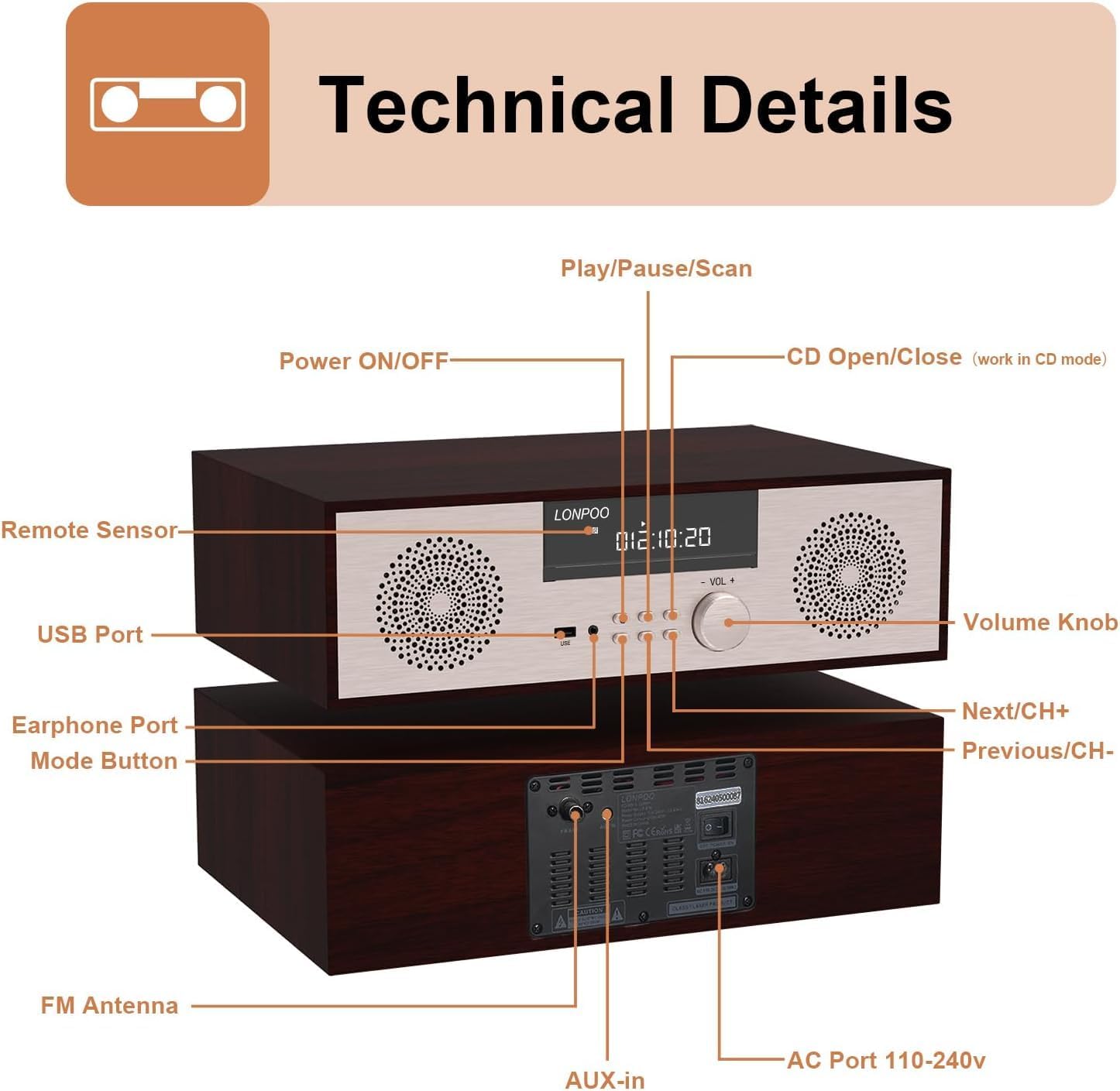
Слика: Предња и задња страна view of the LONPOO LP-816 system, highlighting the LCD display, control buttons, volume knob, USB port, earphone port, mode button, remote sensor, CD compartment, AUX-in, FM antenna port, and AC power port.
- Укључивање/искључивање: Укључује или искључује јединицу.
- ЛЦД екран: Shows current mode, track information, frequency, and time.
- Преграда за CD-ове: За уметање аудио ЦД-ова.
- УСБ порт: Connect USB flash drives for audio playback.
- Порт за слушалице: 3.5 мм прикључак за повезивање слушалица.
- Дугме за режим: Switches between CD, FM, Bluetooth, AUX, and USB modes.
- Play/Pause/Scan Button: Controls playback and initiates FM scan.
- Next/CH+ Button: Skips to the next track or FM preset.
- Previous/CH- Button: Skips to the previous track or FM preset.
- Дугме за јачину звука: Подешава јачину звука.
- Даљински сензор: Прима сигнале са даљинског управљача.
- АУКС улаз: 3.5 мм прикључак за повезивање екстерних аудио уређаја.
- ФМ антена: Connects the included FM antenna for radio reception.
- AC Port 110-240V: Повезује адаптер за напајање.
4.2 Даљински управљач
The remote control provides convenient access to all functions of the LP-816 system.

Image: Close-up of the LONPOO LP-816 remote control, showing various buttons for power, mode selection, volume, track control, EQ, and numeric input.
Уметните две ААА батерије (нису укључене) у даљински управљач, водећи рачуна о исправном поларитету.
5. Подешавање
5.1 Постављање
Place the LP-816 system on a flat, stable surface. Ensure there is adequate space around the unit for proper ventilation. Avoid placing it near strong magnetic fields or direct sunlight.
5.2 Повезивање FM антене
Connect the supplied FM antenna to the 'FM Antenna' port on the rear of the unit. Extend the antenna fully for optimal FM reception.
5.3 Прикључак за напајање
Connect the power adapter to the 'AC Port 110-240V' on the rear of the unit, then plug the adapter into a wall outlet.
6. Упутство за употребу
6.1 Укључивање/искључивање
Press the 'Power ON/OFF' button on the front panel or the remote control to turn the unit on or off.
6.2 Репродукција ЦД-а
To play an audio CD:
- Press the 'Mode' button until 'CD' mode is selected on the display.
- Press the 'CD Open/Close' button (if available on the unit or remote) or gently insert the CD into the slot. The unit will automatically load the CD.
- The CD will begin playing automatically. If not, press the 'Play/Pause' button.
- Use the 'Next/CH+' and 'Previous/CH-' buttons to skip tracks.
- Press 'Play/Pause' to pause or resume playback.

Image: The LONPOO LP-816 system with its CD player compartment open, ready to accept a disc.
6.3 ФМ Радио
Да бисте слушали ФМ радио:
- Press the 'Mode' button until 'FM' mode is selected.
- Аутоматско скенирање: Press and hold the 'Play/Pause/Scan' button to automatically scan and save available FM stations.
- Ручно подешавање: Use the 'Next/CH+' and 'Previous/CH-' buttons to manually tune to a specific frequency.
- Избор пресета: Use the 'Next/CH+' and 'Previous/CH-' buttons (short press) to cycle through saved preset stations.

Image: The LONPOO LP-816 system displaying an FM radio frequency (87.50 MHz) on its screen, with a visual representation of the FM band.
6.4 Блуетоотх веза
Да бисте повезали Блуетоотх уређај:
- Press the 'Mode' button until 'BT' (Bluetooth) mode is selected. The display will show 'BT' and the unit will enter pairing mode.
- On your Bluetooth-enabled device (e.g., smartphone), enable Bluetooth and search for available devices.
- Select 'LP-816' from the list of devices.
- Once paired, the unit will indicate a successful connection, and you can play audio from your device through the LP-816.

Image: The LONPOO LP-816 system displaying 'BT' on its screen, with a smartphone nearby showing a successful Bluetooth connection to 'LP-816'.
6.5 Повезивање са AUX улазом
To play audio from an external device via AUX-in:
- Connect a 3.5mm audio cable (not included) from the headphone jack or line-out of your external device to the 'AUX-in' port on the rear of the LP-816.
- Press the 'Mode' button until 'AUX' mode is selected.
- Play audio from your external device. The sound will be output through the LP-816 speakers.
6.6 Репродукција са УСБ-а
За репродукцију звука files from a USB flash drive:
- Insert a USB flash drive into the 'USB Port' on the front panel.
- Press the 'Mode' button until 'USB' mode is selected.
- Уређај ће аутоматски детектовати и почети да репродукује компатибилан аудио fileс са УСБ диска.
- Use the 'Next/CH+' and 'Previous/CH-' buttons to skip tracks.

Image: A close-up of the LONPOO LP-816 system's front panel, showing a USB flash drive inserted into the USB port.
6.7 Излаз за слушалице
Connect standard 3.5mm headphones to the 'Earphone Port' on the front panel for private listening. When headphones are connected, sound will no longer be output from the main speakers.
7. Одржавање
7.1 Чишћење
To clean the unit, first unplug it from the power outlet. Use a soft, dry, lint-free cloth to wipe the exterior surfaces. Do not use abrasive cleaners, waxes, or solvents as they may damage the finish.
7.2 Одржавање CD плејера
Handle CDs by their edges to avoid fingerprints and scratches. If a CD is dirty, wipe it gently with a soft, dry cloth from the center outwards. Do not use solvents or abrasive cleaners on CDs.
КСНУМКС. Решавање проблема
| Проблем | Могући узрок | Решење |
|---|---|---|
| Нема струје | Кабл за напајање није повезан; Утичница није активна | Уверите се да је кабл за напајање безбедно повезан. Покушајте са другом утичницом. |
| Нема звука | Volume too low; Mute function active; Incorrect mode selected; Headphones connected | Increase volume. Deactivate mute. Select correct input mode. Disconnect headphones. |
| CD се не репродукује | CD inserted incorrectly; CD is dirty or scratched; CD format not supported | Reinsert CD correctly. Clean or replace CD. Ensure CD is an audio CD. |
| Блуетоотх се не повезује | Bluetooth not in pairing mode; Device too far; Device already connected to another unit | Ensure unit is in BT pairing mode. Move device closer. Disconnect from other devices. |
| Лош ФМ пријем | Antenna not extended; Weak signal; Interference | Extend and adjust FM antenna. Relocate unit for better signal. |
9. Спецификације
- Модел: ЛП-816
- Димензије производа (Д к Ш к В): 15.8 к 10.5 к 4.5 инча
- Тежина артикла: 11.57 фунти
- Технологија повезивања: Помоћни, Блутут, УСБ
- Тип звучника: Стерео
- Аудио излаз: 40 вати РМС
- Карактеристике: CD Player, FM Radio, Bluetooth, AUX-in, Headphone Output, DSP Technology
10. Гаранција и подршка
LONPOO products are designed and manufactured to the highest quality standards. For warranty information and technical support, please refer to the warranty card included with your product or visit the official LONPOO webсајт. Сачувајте рачун као доказ о куповини.