
1. Увод
Хвала вам на куповиниasing the MLWSHR Digital LED Alarm Clock Model 8808. This device combines a digital alarm clock with a thermo-hygrometer, offering dual alarms, snooze function, date and year display, 12/24 hour switch, weekday settings, Daylight Saving Time (DST) functionality, auto-dimmable display with three brightness levels, and a convenient 5V1A USB output for charging other devices. Please read this manual carefully to ensure proper use and maintenance of your new alarm clock.
2. Безбедносне информације
- Држите уређај даље од воде и окружења са високом влажношћу.
- Не излажите уређај екстремним температурама или директној сунчевој светлости током дужег периода.
- Use only the provided USB Type-C cable for power.
- Не покушавајте сами да растављате или поправљате уређај. Уколико се појаве проблеми, обратите се корисничкој подршци.
- Ensure proper ventilation when using the USB output to charge other devices.
3. Садржај пакета
- MLWSHR Digital LED Alarm Clock Model 8808
- УСБ кабл за напајање типа Ц
- Упутство за употребу
4. Производ је готовview
Упознајте се са главним компонентама и контролама вашег будилника.
This image displays the front of the MLWSHR Digital LED Alarm Clock, highlighting the time display, weekday indicators, temperature in Celsius, humidity percentage, and dual alarm icons. It also points to the Daylight Saving Time (DST) indicator.

This image illustrates the side and back of the alarm clock, detailing the USB Type-C input for primary power, the battery compartment for 3x AAA backup batteries (not included), and the USB-A output (5V1A) for charging other devices. It also shows the control buttons located on the top edge.
Контроле:
- СЕТ дугме: Enters setting mode for time, date, and alarms.
- Дугме ГОРЕ (+): Increases values during setting, adjusts brightness.
- Дугме НАДОЛЕ (-): Decreases values during setting, adjusts brightness.
- SNOOZE/LIGHT Button: Activates snooze, adjusts display brightness.
- Дугме АЛАРМ 1: Activates/deactivates Alarm 1, enters Alarm 1 setting.
- Дугме АЛАРМ 2: Activates/deactivates Alarm 2, enters Alarm 2 setting.
- Дугме 12/24 сата: Пребацује се између 12-часовног и 24-часовног формата времена.
- Дугме °Ц/°Ф: Switches between Celsius and Fahrenheit temperature display.
5. Подешавање
5.1 Напајање
The MLWSHR Digital LED Alarm Clock can be powered in two ways:
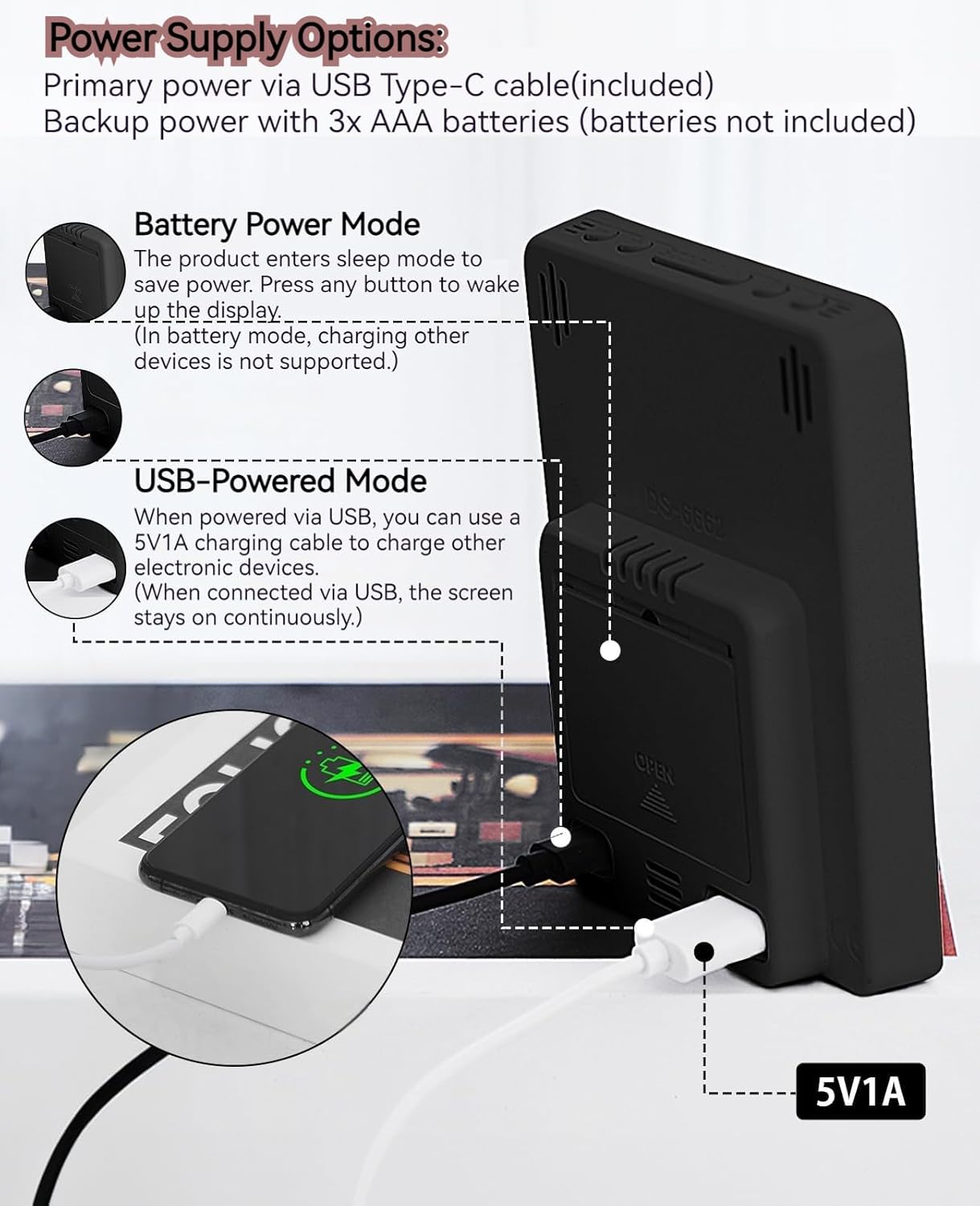
- Primary Power (USB Type-C): Connect the provided USB Type-C cable to the clock's input port and plug the other end into a 5V1A USB power adapter (not included). When powered via USB, the display will remain continuously on.
- Backup Power (3x AAA Batteries): Insert 3 AAA batteries (not included) into the battery compartment on the back of the clock. In battery-only mode, the display will enter sleep mode to conserve power. Press any button to temporarily activate the display. Note that the USB output for charging other devices is not supported when operating on battery power alone.
5.2 Почетно подешавање времена и датума
After connecting power, the clock will typically display a default time. To set the correct time and date:
- Притисните и држите СЕТ дугме 3 секунде да бисте ушли у режим подешавања времена. Цифре за сате ће трептати.
- Користите ГОРЕ (+) or ДОЛЕ (-) дугмад за подешавање сата.
- Притисните СЕТ поново да бисте потврдили сат и прешли на подешавање минута. Цифре за минуте ће трептати.
- Користите ГОРЕ (+) or ДОЛЕ (-) дугмад за подешавање минута.
- Наставите да притискате СЕТ to cycle through and set the Year, Month, and Day using the ГОРЕ (+) or ДОЛЕ (-) buttons for adjustment.
- Након подешавања дана, притисните СЕТ још једном да бисте изашли из режима подешавања.
6. Упутство за употребу
6.1 Пребацивање формата 12/24 сата
Притисните тастер 12/24ХР button to toggle between 12-hour (with AM/PM indicator) and 24-hour time formats.
This video demonstrates various features of the MLWSHR Digital LED Alarm Clock, including the time, temperature, humidity, weekday display, auto/manual brightness adjustment, 12/24 hour switch, and the easy-to-use buttons and USB-C input/USB-A output.
6.2 Setting Alarms (Alarm 1 & Alarm 2)
The clock features two independent alarms. Each alarm can be set for specific days of the week (Monday-Friday, Monday-Saturday, or Monday-Sunday).

This image illustrates the dual alarm functionality, showing how each alarm can be customized to ring on specific days of the week: Monday to Friday, Monday to Saturday, or every day. It highlights the alarm icons and weekday indicators on the display.
- Притисните тастер АЛАРМ 1 or АЛАРМ 2 button to select the desired alarm. The alarm icon will appear on the display.
- Притисните и држите изабрано АЛАРМ дугме 3 секунде да бисте ушли у режим подешавања аларма. Цифре за сате ће трептати.
- Користите ГОРЕ (+) or ДОЛЕ (-) дугмад за подешавање сата аларма.
- Притисните тастер АЛАРМ button again to confirm the hour and move to minute setting.
- Користите ГОРЕ (+) or ДОЛЕ (-) дугмад за подешавање минута аларма.
- Притисните тастер АЛАРМ button again to set the alarm frequency (e.g., Mon-Fri, Mon-Sat, Mon-Sun). Use ГОРЕ (+) or ДОЛЕ (-) да изаберете.
- Притисните тастер АЛАРМ button one last time to exit alarm setting mode.
- To turn an alarm ON or OFF, simply press the corresponding АЛАРМ 1 or АЛАРМ 2 button briefly. The alarm icon will appear (ON) or disappear (OFF) from the display.
6.3 Функција одлагања
When an alarm sounds, you can activate the snooze function for a temporary delay.

This image shows the clock's snooze button and how it functions. When the alarm rings, a brief press of the snooze button will delay the alarm for 5 minutes. Holding the button for more than two seconds will turn off the alarm for that day.
- Када аларм зазвони, притисните СНООЗЕ / СВЕТЛО button briefly. The alarm will pause and ring again after 5 minutes.
- To turn off the alarm for the current day, press and hold the СНООЗЕ / СВЕТЛО button for more than 2 seconds, or press any other button (except СНООЗЕ / СВЕТЛО).
6.4 Подешавање осветљености
The clock features an auto-dimmable display and three manual brightness levels.
- Аутоматско затамњивање: The built-in light sensor automatically adjusts the display brightness based on ambient light conditions. This is the default setting.
- Ручно подешавање осветљености: Кратко притисните СНООЗЕ / СВЕТЛО button to cycle through 3 manual brightness levels (L-01, L-02, L-03).
- To return to auto-dimmable mode, continue pressing the СНООЗЕ / СВЕТЛО button until 'L-AU' appears on the display.
6.5 Thermometer & Hygrometer
The clock displays indoor temperature and humidity levels.

This image highlights the temperature and humidity readings on the clock's display. It also provides guidance on ideal humidity levels and suggests actions (humidifier/dehumidifier) if levels are too low or too high. The temperature detection range is 23°F to 122°F (-5°C to 50°C) with an error margin of ±2°F.
- Прекидач јединице температуре: Притисните тастер ° Ц/° Ф button to switch between Celsius and Fahrenheit temperature display.
- The temperature range is 23°F to 122°F (-5°C to 50°C) with an error margin of ±2°F.
- The humidity measurement error is within ±5%.
6.6 USB Power Output (5V1A)
The clock features a USB-A output port (5V1A) that can be used to charge other electronic devices.

This image demonstrates the use of the clock's USB-A output port to charge a smartphone. The clock provides a 5V1A output, making it a convenient charging station. This feature is only available when the clock is powered via its USB Type-C input.
- Connect your device's charging cable to the USB-A output port on the back of the alarm clock.
- Ensure the alarm clock is powered via its USB Type-C input for this feature to function. The USB output is not active when the clock is running on battery power alone.
6.7 Летње рачунање времена (DST)
The clock supports Daylight Saving Time adjustment.
- To activate or deactivate DST, press and hold the ДСТ button (if available, or refer to the SET button sequence for DST in specific models). The DST indicator will appear or disappear.
7. Одржавање
- Очистите сат меком, сувом крпом. Не користите абразивна средства за чишћење или раствараче.
- If the clock will not be used for an extended period, remove the AAA batteries to prevent leakage.
- Keep the USB ports free from dust and debris.
КСНУМКС. Решавање проблема
| Проблем | Могући узрок | Решење |
|---|---|---|
| Display is off or intermittent. | Running on battery power in sleep mode, or no power. | Press any button to activate display in battery mode. Connect USB Type-C cable for continuous display. Check USB power source. |
| USB output not charging devices. | Clock is running on battery power, or USB cable is faulty. | Ensure the clock is connected to primary USB Type-C power. Try a different USB cable. |
| Аларм се не оглашава. | Аларм није активиран или је погрешно подешен. | Check if the alarm icon is displayed. Re-set the alarm time and frequency. |
| Очитавање температуре је нетачно. | Environmental factors or sensor error. | Allow time for the sensor to stabilize. Ensure the clock is not near heat sources or vents. Note the ±2°F error margin. |
| Cannot set time/date. | Not in setting mode, or buttons are unresponsive. | Press and hold the SET button for 3 seconds. Ensure the clock has stable power. |
9. Спецификације
- Бренд: MLWSHR
- Број модела: 8808
- Тип приказа: ЛЕД
- Извор напајања: USB Type-C (5V1A) / 3x AAA Batteries (backup)
- Димензије производа: 3.54" Ш x 4.72" В
- Карактеристике: Dual Alarms, Snooze, Thermo-Hygrometer, Date & Year Display, 12/24 Hour Switch, Weekdays, DST, Auto Dimmable (3 levels), USB Output (5V1A)
- Материјал: Eco-friendly Plastic
- Унутрашња/спољна употреба: Индоор
10. Гаранција и подршка
The MLWSHR Digital LED Alarm Clock Model 8808 comes with a 2-годишња гаранција од датума куповине. Ова гаранција покрива производне недостатке и кварове при нормалној употреби.
For technical support, warranty claims, or any questions regarding your product, please contact MLWSHR customer service through the retailer's platform or visit our official website for contact information. Please have your purchase receipt and model number ready when contacting support.


