
Hy-T26
Hy-T26 Pro бежичне Bluetooth слушалице за превођење, упутство за употребу
Model: Hy-T26
Производ је завршенview
The Hy-T26 Pro Wireless Bluetooth Translation Earbuds are designed to facilitate seamless communication across language barriers, offering real-time two-way translation. These earbuds also provide high-quality audio for music and calls, featuring a comfortable ear-hanging design and extended battery life.
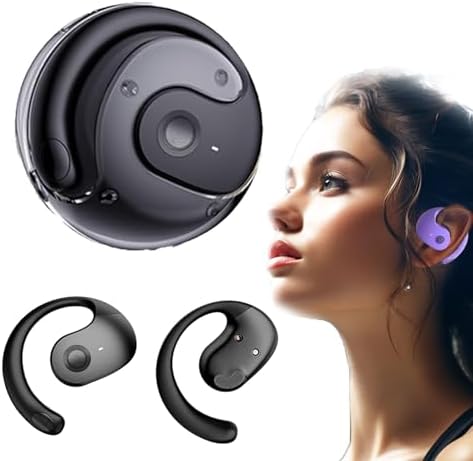
Image: Hy-T26 Pro Earbuds and their compact charging case, showcasinг елегантни црни дизајн.
Key features include Bluetooth 5.3 connectivity, IPX5 waterproof rating, and a 300mAh charging compartment capacity for extended use. The earbuds are equipped with 16mm dynamic speakers for 360° Hi-Fi stereo sound and noise reduction technology for clear audio.
Водич за подешавање
Follow these steps to set up your Hy-T26 Pro Translation Earbuds for first-time use.
1. Пуњење слушалица и футроле
- Пре прве употребе, потпуно напуните кућиште за пуњење и слушалице.
- Повежите кабл за пуњење типа C са портом за пуњење на кућишту и извором напајања.
- Индикаторска светла на кућишту ће показивати статус пуњења.
- A full charge for the case takes approximately 2 hours.

Image: Visual representation of the Hy-T26 Pro earbuds and charging case, highlighting battery duration: 4.5 hours use time, 2 hours charging time, and 15 hours total playtime with the charging case.
2. Downloading the Companion Application
For full translation functionality, it is essential to download the dedicated companion application. Based on user feedback, the application is named NebulaBudsAPP. Тражи this application on your device's app store (Android or iOS).
- Open your smartphone's app store (Google Play Store for Android or Apple App Store for iOS).
- Тражи "NebulaBudsAPP".
- Преузмите и инсталирајте апликацију.
3. Упаривање са вашим уређајем
- Уверите се да су слушалице напуњене и стављене у кутијицу за пуњење.
- Отворите кућиште за пуњење. Слушалице ће аутоматски ући у режим упаривања.
- On your smartphone or tablet, go to Bluetooth settings and turn Bluetooth on.
- Select "Hy-T26 Pro" from the list of available devices to connect.
- Када се повежу, чуће се звук потврде и слушалице ће бити спремне за употребу.

Image: A visual guide demonstrating the smart pairing connection process: Download App, Headphones pairing, Connect Bluetooth, Open App, Set Target language, and Start conversation.
Упутство за употребу
Learn how to use your Hy-T26 Pro Earbuds for various functions, including translation, audio playback, and calls.
1. Using the Translation Function
The core feature of the Hy-T26 Pro is its real-time translation capability, which requires the companion app.
- Ensure your earbuds are connected to your device via Bluetooth.
- Отворите NebulaBudsAPP на вашем паметном телефону.
- Within the app, select the source language (the language being spoken) and the target language (the language you want to hear/see the translation in).
- Choose the desired translation mode (e.g., two-way conversation, lecture mode, or text/picture translation).
- Speak clearly into the earbud's microphone. The app will process your speech and provide real-time translation through the earbuds and/or display it on your screen.
- For two-way conversations, the other party can speak into their earbud (if they also have one paired to their device and app) or into your phone's microphone, and the translation will be provided to both parties.

Image: Depicts the cross-language communication feature, showing real-time translation of speech and text/picture translation capabilities on a laptop and smartphone screen.
The earbuds are designed for efficient communication anytime, anywhere, making them suitable for travel, professional use, and sports.

Image: The Hy-T26 Pro earbuds and charging case positioned near a smartphone, symbolizing efficient communication capabilities in various settings.
2. Audio Playback and Calls
- Репродукција музике: Once connected, your earbuds will automatically play audio from your device. Use your device's controls to play, pause, skip tracks, and adjust volume.
- Упућивање/примање позива: When a call comes in, the earbuds will ring. Tap the control button on either earbud to answer or end a call. Press and hold to reject a call.
- Контрола гласом: The earbuds support voice control. Refer to the app or your device's settings for specific voice command functionalities.

Image: A man wearing the Hy-T26 Pro earbuds, illustrating the comfortable ear-hanging style that allows ears to breathe freely and ensures a stable, non-in-ear fit.
Одржавање
Proper maintenance ensures the longevity and optimal performance of your Hy-T26 Pro Earbuds.
- Чишћење: Редовно бришите слушалице и кућиште за пуњење меком, сувом крпом која не оставља влакна. Не користите абразивна средства за чишћење или раствараче.
- Складиштење: Када се не користе, чувајте слушалице у њиховој футроли за пуњење како бисте их заштитили и одржали напуњеним.
- Отпорност на воду: The earbuds have an IPX5 waterproof level, meaning they are resistant to splashes and sweat. Do not submerge them in water or expose them to heavy rain. Dry them thoroughly if they get wet.
- Пуњење: Use only the provided Type-C cable for charging. Avoid using damaged cables or chargers.
Решавање проблема
If you encounter issues with your Hy-T26 Pro Earbuds, refer to the following common solutions.
| Проблем | Могући узрок / решење |
|---|---|
| Слушалице се не упарују/не повезују. |
|
| Функција превођења не ради. |
|
| Лош квалитет звука или прекиди везе. |
|
| Слушалице се не пуне. |
|
Спецификације
| Феатуре | Детаљ |
|---|---|
| Назив модела | Hy-T26 |
| Технологија повезивања | бежични (Блуетоотх) |
| Блуетоотх верзија | 5.3 |
| Трансмиссион Дистанце | 10 метара |
| Водоотпорни ниво | ИПКС5 |
| Тип употребе | Ear-hanging type |
| Интерфејс за пуњење | Типе-Ц |
| Капацитет одељка за пуњење | 300мАх |
| Use Time (Earbuds) | 4.5 сата |
| Време пуњења (футрола) | 2 сата |
| Укупно време репродукције са футролом | 15 сата |
| Тип аудио драјвера | Динамички возач |
| Величина аудио драјвера | 16 милиметара |
| Тип контроле | Воице Цонтрол |
| Укључене компоненте | Футрола за бежично пуњење |
| Тежина артикла | 3.53 унци |
| Димензије пакета | 3.94 к 3.94 к 1.97 инча |
| Произвођач | Генериц |
| Земља порекла | Кина |
Гаранција и подршка
For warranty information and customer support, please refer to the documentation included with your purchase or contact the seller directly. The manufacturer, Generic, typically provides support for product defects and operational issues.
Препоручује се да сачувате доказ о куповини за евентуалне рекламације у вези са гаранцијом.
Ask a question about this manual
Ask about setup, troubleshooting, compatibility, parts, safety, or missing instructions. Manuals+ will review the question and use this page’s manual context to help answer it.