
1. Увод
This manual provides detailed instructions for the proper use, setup, and maintenance of your Caliber Scientific Calculator, Model 297208. Designed for students, engineers, and professionals, this calculator offers 240 functions for a wide range of mathematical and scientific calculations.
Please read this manual thoroughly before using the calculator to ensure optimal performance and longevity.
2. Безбедносне информације
- Keep the calculator away from extreme temperatures, direct sunlight, and high humidity.
- Избегавајте испуштање калкулатора или његово излагање јаким ударцима.
- Do not attempt to disassemble or modify the calculator. This will void the warranty.
- Use only the specified battery type. Incorrect battery usage may cause leakage or explosion.
- Упозорење о батерији: Држите батерије даље од деце и кућних љубимаца. Батерије могу бити штетне ако се прогутају. Ако дете или кућни љубимац прогута батерију, одмах потражите медицинску помоћ.
3. Садржај пакета
Upon opening your Caliber Scientific Calculator package, please verify that all items are present and in good condition:
- Caliber Scientific Calculator (Model 297208)
- Protective Hard Sliding Cover
- One AG10 Button Cell Battery (pre-installed or included separately)
- Кориснички приручник (овај документ)

Image 1: Caliber Scientific Calculator in retail packaging, showing key features.
4. Подешавање
4.1. Извор напајања
The Caliber Scientific Calculator operates on dual power sources: solar power and battery power. The solar panel provides power in well-lit environments, while the battery ensures operation in low-light conditions.
4.2. Инсталација/замена батерије
Your calculator includes one AG10 button cell battery. If battery replacement is needed:
- Уверите се да је калкулатор искључен.
- Пронађите одељак за батерије на задњој страни калкулатора.
- Using a small screwdriver, carefully open the battery compartment cover.
- Remove the old battery and insert a new AG10 button cell battery, ensuring the correct polarity (+/-).
- Вратите поклопац одељка за батерије и причврстите га завртњем.
Note: Some models may require a AAA battery. Refer to the specific markings on your calculator's battery compartment if different from AG10.
5. Key Functions Overview
The calculator features a 10-digit LCD display and 240 functions. Familiarize yourself with the key layout:
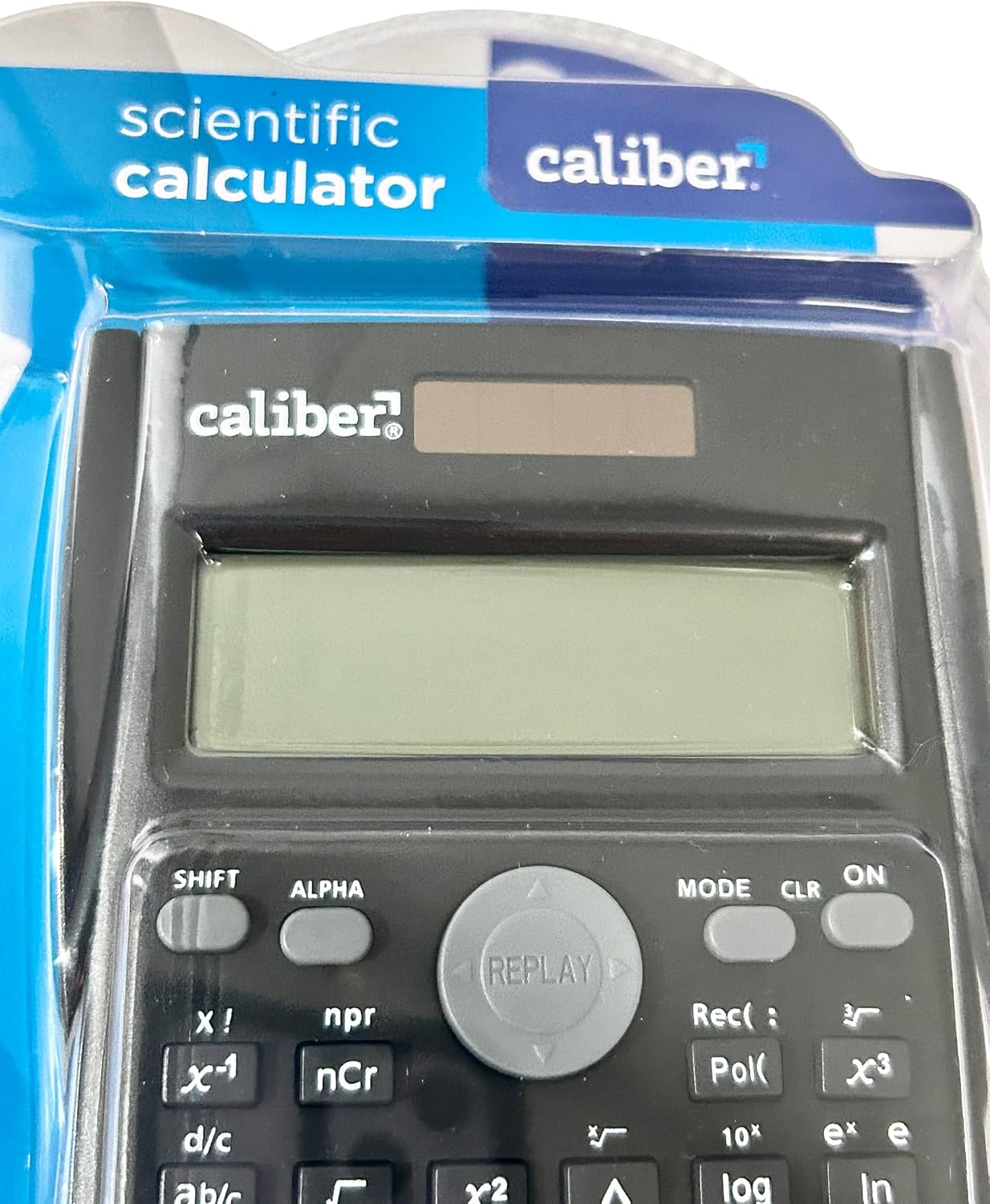
Image 2: Close-up of the calculator's display and key layout.
- Приказ: 10-digit LCD for clear viewing of inputs and results.
- УКЉУЧЕНО/ИСКЉУЧЕНО: Power on/off the calculator.
- СХИФТ: Accesses secondary functions printed above the keys (typically in yellow or orange).
- АЛФА: Accesses alpha characters and variables (typically in red or green).
- НАЧИН: Changes calculation modes (e.g., COMP, STAT, EQN).
- ЦЛР: Clears memory or settings.
- ДЕЛ: Deletes the last entered digit.
- АЦ: Clears all entries and resets the calculation.
- Стрелице: Navigate through entries and results.
- = (једнако): Executes the calculation.
6. Упутство за употребу
6.1. Basic Calculations
Да бисте извршили основне аритметичке операције:
- Притисните тастер ON key to turn on the calculator.
- Enter the first number.
- Press the desired operation key (+, -, ×, ÷).
- Унесите други број.
- Притисните тастер = key to display the result.
6.2. Напредне функције
The calculator supports 240 functions, including trigonometric, logarithmic, statistical, and more. To access secondary functions (printed above keys), press the СХИФТ тастер испред жељеног функцијског тастера.
- Тригонометријске функције: грех, цос, тан и њихове инверзне функције (СХИФТ + sin⁻¹, итд.).
- Логаритамске функције: лог (база 10), ln (природни логаритам).
- Функције степена и корена: x², √, xʸ.
- Меморијске функције: Користите СТО (Продавница) и РЦЛ (Recall) to save and retrieve values.
- Статистички прорачуни: Ентер МОДЕ and select STAT mode for statistical computations.
For detailed instructions on specific functions, refer to the comprehensive instructions enclosed with your product (if applicable) or consult online resources for scientific calculator usage.
7. Одржавање
7.1. Чишћење
To clean your calculator:
- Обришите спољашњост меком, сувом крпом.
- За тврдокорну прљавштину, благо дampобришите крпу водом и благим сапуном, а затим одмах обришите сувим.
- Do not use abrasive cleaners, solvents, or alcohol, as these can damage the casinг или приказ.
7.2. Складиштење
When not in use, store the calculator in a cool, dry place, away from direct sunlight and extreme temperatures. Always use the protective hard sliding cover to prevent damage to the keys and display.

Image 3: Packaging detail showing features including the hard sliding cover and dual power.
КСНУМКС. Решавање проблема
| Проблем | Могући узрок | Решење |
|---|---|---|
| Калкулатор се не укључује. | Insufficient light for solar power, or dead battery. | Move to a brighter area or replace the AG10 button cell battery. |
| Display shows "ERROR". | Mathematical error (e.g., division by zero, invalid input). | Притисните AC to clear the error and re-enter the calculation correctly. |
| Нетачни резултати прорачуна. | Incorrect mode selected, or input error. | Проверите тренутни режим (МОДЕ key) and ensure correct data entry. Clear all memory (СХИФТ + ЦЛР) ако је неопходно. |
9. Спецификације
| Број модела | 297208 |
| Бранд | Калибар |
| Дисплаи Типе | 10-цифрени ЛЦД |
| Број функција | 240 |
| Тип калкулатора | инжењерство/научна |
| Извор напајања | Dual Power (Solar & Battery) |
| Тип батерије | 1 x AG10 Button Cell (included) or 1 x AAA (may vary by model) |
| Величина екрана | 3 инча |
| Димензије (Д к Ш) | 6 cm x 3 cm |
| Материјал кућишта | Пластика |
| УПЦ | 050428205495 |
10. Гаранција и подршка
10.1. Информације о гаранцији
This product is subject to a return policy. For details regarding returns, exchanges, or warranty claims, please refer to the retailer's return policy where the product was purchased.
10.2. Корисничка подршка
For further assistance, technical support, or inquiries not covered in this manual, please contact Caliber customer service through their official webсајт или продавца од кога сте купили производ.