
Гоогле Пикел Ватцх 2
Google Pixel Watch 2 User Manual
Model: Pixel Watch 2
Увод
This manual provides essential information for the setup, operation, maintenance, and troubleshooting of your Google Pixel Watch 2. Designed for seamless integration with Android devices, the Pixel Watch 2 offers advanced health and fitness tracking, smart notifications, and safety features.
Шта је у кутији
- Google Pixel Watch 2 Body
- Кабл за пуњење
- Active Band (Obsidian)

Image: The Google Pixel Watch 2, featuring a matt black aluminum case and an obsidian active band, shown with its display active.
Сетуп
1. Почетно пуњење
Before first use, fully charge your Pixel Watch 2. Connect the charging cable to the watch's magnetic charging port and a compatible USB power adapter. A full charge takes approximately 75 minutes.
2. Упаривање са телефоном
- Ensure your Android phone is running the latest version of Android and has Bluetooth enabled.
- Download and open the Google Pixel Watch app from the Google Play Store.
- Follow the on-screen instructions in the app to pair your watch. This typically involves scanning a QR code displayed on the watch or manually selecting your watch from a list of nearby devices.
- Complete the setup process, including signing into your Google account and granting necessary permissions.
3. Подешавање траке
The active band is designed for comfort and secure fit. Adjust the band to ensure the watch sits snugly on your wrist, allowing the sensors to maintain proper contact with your skin for accurate readings.
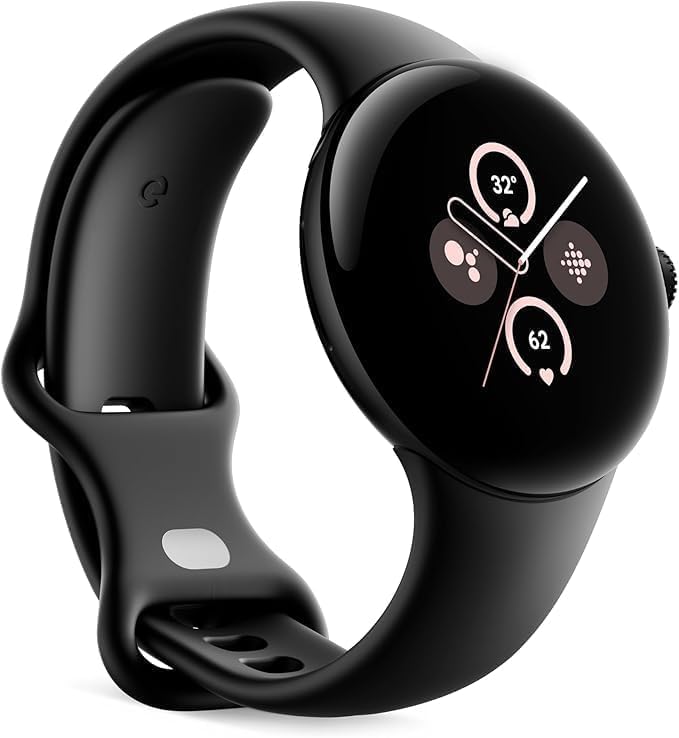
Слика: Страна А view of the Google Pixel Watch 2, highlighting the design of the active band and the crown on the right side of the watch face.
Operating Your Pixel Watch 2
Навигација и контроле
- екран осетљив на додир: Swipe left, right, up, or down to navigate through tiles, notifications, and quick settings. Tap to select items.
- круна: Rotate the crown to scroll through lists or adjust volume. Press the crown to return to the watch face or open the app launcher.
- Бочно дугме: Press the side button to access recent apps or activate Google Assistant.
Кључне карактеристике
- Праћење откуцаја срца: The all-new heart rate sensor provides accurate heart rate data for fitness and health monitoring.
- Управљање стресом: Utilize Fitbit's body-response feature to identify and manage potential signs of stress.
- Праћење спавања: Праћење снаtages, skin temperature variations, and blood oxygen levels to understand sleep patterns.
- Сигурносне карактеристике:
- Хитан СОС: Quickly alert emergency services or trusted contacts.
- Детекција пада: Automatically detects hard falls and can initiate an emergency call if you are unresponsive.
- Безбедносна провера: Alerts close contacts if you do not respond to a set check-in timer.
- Трајање батерије: The enhanced battery provides up to 24 hours of use with the always-on display enabled.
Одржавање
Чишћење сата
Regularly clean your Pixel Watch 2 to ensure optimal performance and hygiene. Use a soft, lint-free cloth slightly dampened with water. Avoid using harsh chemicals or abrasive materials. Pay attention to the sensors on the back of the watch and the band.
Баттери Царе
To prolong battery lifespan, avoid extreme temperatures. Charge the watch using only the provided charging cable. While the watch supports fast charging, avoid frequently draining the battery completely before recharging.
Ажурирања софтвера
Keep your Pixel Watch 2's software updated to ensure access to the latest features, security enhancements, and performance improvements. Updates are typically managed through the Google Pixel Watch app on your paired phone.
Решавање проблема
| Иссуе | Могуће решење |
|---|---|
| Сат се не пуни | Ensure the charging cable is properly aligned with the magnetic charging port on the watch. Check the USB power adapter and power source. Try a different USB port or adapter. |
| Сат се не упарује са телефоном | Verify Bluetooth is enabled on your phone. Restart both the watch and the phone. Ensure the Google Pixel Watch app is updated. Reset network settings on your phone if necessary. |
| Нетачна очитавања откуцаја срца | Ensure the watch is worn snugly on your wrist, not too loose or too tight. Clean the sensors on the back of the watch. Avoid excessive movement during readings. |
| Кратко трајање батерије | Disable always-on display if not needed. Reduce screen brightness. Limit background app refresh. Turn off unnecessary notifications. Ensure software is updated. |
For further assistance, refer to the official Google Pixel Watch support website or contact Google support.
Спецификације
- Модел: Пикел Ватцх 2
- Димензије: 1.77 к 1.5 к 0.55 инча
- Тежина: 4.2 унци
- Величина екрана: 41 Millimeters (Round AMOLED display)
- Меморија: 32 ГБ
- Оперативни систем: Android (Wear OS 4)
- Капацитет батерије: 306 Милиamp Hours (up to 24 hours with always-on display)
- Повезивање: Блутут, уграђени ГПС
- Сензори: Heart Rate Monitor, Accelerometer, Body Temperature Monitor, ECG, Stress Tracking (cEDA)
- Материјал кућишта: 100% recycled light aluminum
Гаранција и подршка
This Google Pixel Watch 2 is a renewed product. Please refer to the specific warranty terms provided by the seller or renewed program. Typically, renewed products come with a limited warranty. For detailed warranty information and support, please contact the vendor from whom you purchased this renewed device.
For general product information, software updates, and advanced troubleshooting guides, visit the official Google Pixel Watch support webсајт: support.google.com/pixelwatch