
Увод
Thank you for choosing the Walfront Smart Thermostat TRV Valve. This device is designed to provide intelligent temperature control for your home, offering convenience through app and voice control, multiple operating modes, and programmable schedules. Please read this manual carefully before installation and operation to ensure proper use and optimal performance.
Безбедносне информације
- Уверите се да је напајање искључено пре инсталације или одржавања.
- Овај уређај је намењен само за унутрашњу употребу.
- Не излажите уређај води или прекомерној влажности.
- Чувати ван домашаја деце.
- Користите само наведени тип батерија (2 x AA батерије).
Садржај пакета
Проверите да ли су све ставке присутне у пакету:
- 1 x Thermostatic Valve
- 10 x Installation Accessories
- 1 к Сцрев
- 1 к матица
- 1 x Упутство за употребу (овај документ)
Напомена: A Zigbee hub is required for smart functionality and app control. The Zigbee hub is not included and must be purchased separately.
Производ је завршенview
The Walfront Smart Thermostat TRV Valve features an integrated display and control knob for easy interaction. Below is a diagram illustrating the key components and display indicators:

слика: Фронт view of the Walfront Smart Thermostat TRV Valve, highlighting its display and various indicators for modes, settings, and battery status.
- Приказ температуре: Приказује тренутну или подешену температуру.
- Индикатор браве за децу: Appears when the child lock function is active.
- Индикатор нивоа батерије: Displays the remaining battery power.
- Стрелице горе и доле: Used for adjusting temperature or navigating settings.
- Manual Mode Indicator: Shows when the thermostat is in manual control.
- Programming Mode Indicator: Indicates an active programmed schedule.
- Holiday Mode Indicator: Activates during holiday settings.
- Comfort Mode Indicator: Engaged for comfort temperature settings.
- ECO Mode Indicator: Shows when energy-saving mode is active.
- Energy Saving Mode Indicator: Indicates energy-saving operation.
Спецификације
| Феатуре | Спецификација |
|---|---|
| Врста ставке | Термостатски вентил |
| Материјал | АБС, ПЦ |
| Повер Суппли | 3V, 2 x AA Batteries (not included) |
| Макимум Строке | Приближно 5.5 мм / 0.22 инча |
| Прецизност | ±0.5℃ |
| Подесите распон температуре | 5 до 45℃ |
| Приказ опсега температуре | 0 до 70℃ |
| Радна температура | 0 до 45℃ |
| Радна влажност | 5 до 95% РХ (без кондензације) |
| Температура складиштења | -5 до 45 ℃ |
| Временска грешка | 1% |
| Ниво | ИП20 |
| Дугме | Дугме за ротацију |
| Компатибилност апликација | Tuya, Smart Life App |

слика: Detailed dimensions of the Walfront Smart Thermostat TRV Valve.
Motor Characteristics:
- Ultra quiet: Motor sound less than 25 decibels.
- Ultra large stroke: The motor stroke is 5.5mm / 0.22in.
- Extra large diameter: The motor rod diameter is 8mm / 0.31in.
- Штедња енергије: The standby power consumption of the motor is very small.
Сетуп
1. Инсталација батерије
- Gently twist and remove the top cover of the thermostatic valve.
- Insert two AA batteries (not included) into the battery compartment, ensuring correct polarity (+/-).
- Replace the top cover, twisting it until it clicks securely into place.
2. Физичка инсталација
The Walfront Smart Thermostat TRV Valve is designed for easy installation on various radiator valves. Use the provided installation accessories to match your specific valve type.
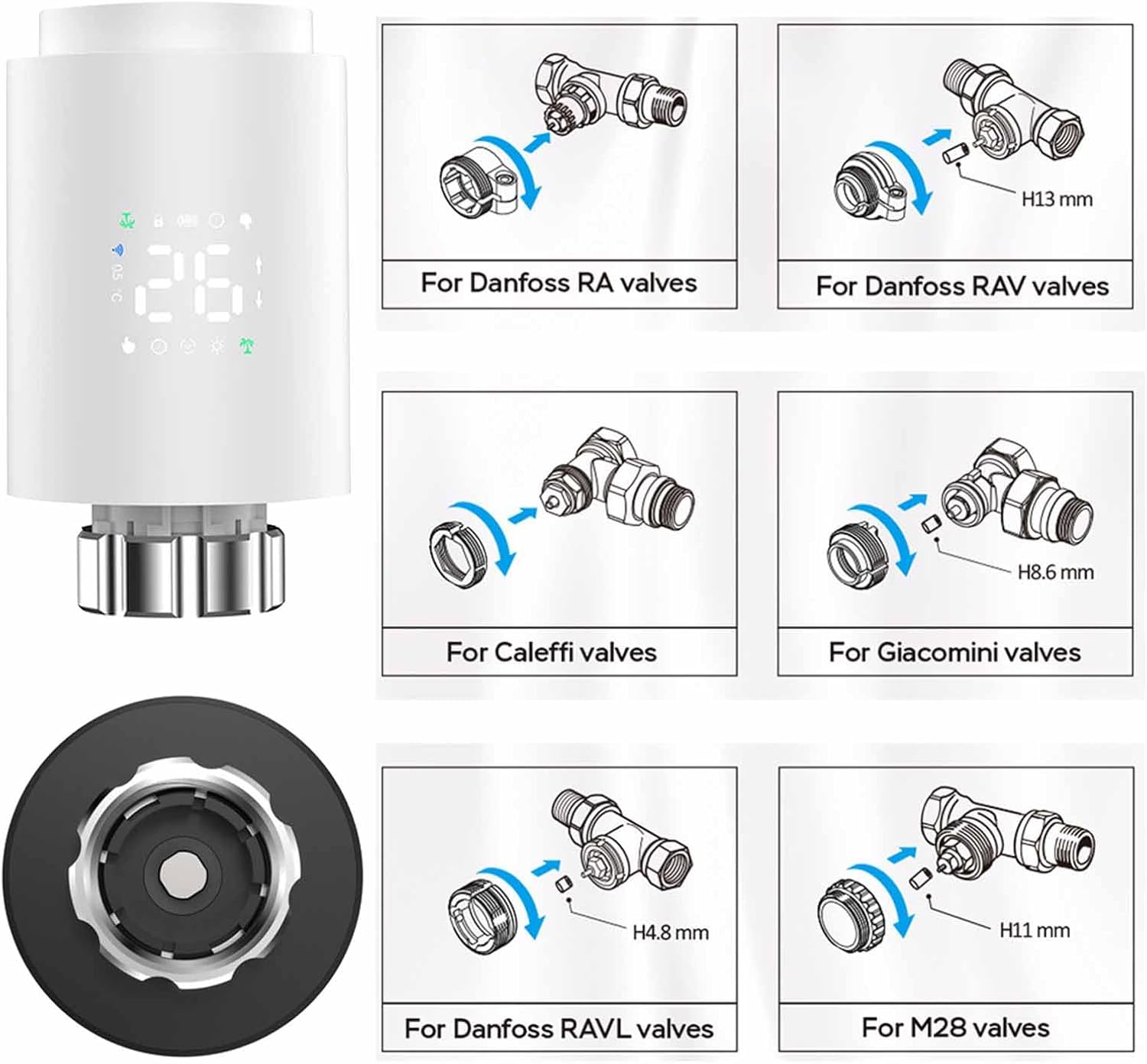
слика: Installation guide for various radiator valve types, including adapters for Danfoss, Caleffi, Giacomini, and M28 valves.
- Identify your existing radiator valve type.
- Select the appropriate adapter from the installation accessories.
- Attach the adapter to your radiator valve as shown in the diagrams.
- Screw the Walfront Smart Thermostat TRV Valve onto the adapter until it is firmly secured.
3. App Installation and Pairing (Requires Zigbee Hub)
To utilize the smart features of your thermostat, you need to connect it to a Zigbee hub via the Tuya or Smart Life app.

слика: Visual representation of the Zigbee pairing process between the thermostat, a Zigbee gateway, and the mobile app.
- Преузмите Туиа Смарт or Смарт Лифе апликацију из продавнице апликација на вашем паметном телефону (iOS или Android).
- Региструјте се или се пријавите на свој налог.
- Ensure your Zigbee hub is powered on and connected to your home Wi-Fi network.
- In the app, tap 'Add Device' or the '+' icon.
- Select 'Gateway' or 'Zigbee Gateway' and follow the on-screen instructions to add your Zigbee hub.
- Once the Zigbee hub is added, select it and then choose 'Add sub-device'.
- Follow the app's instructions to put the TRV valve into pairing mode (usually by pressing and holding a button on the device until an indicator flashes).
- The app will detect and add the TRV valve. You can then rename the device for easy identification.
Упутство за употребу
1. Basic Operation (Manual Control)
- Подешавање температуре: Rotate the knob on the thermostat to increase or decrease the desired temperature. The new set temperature will be displayed.
- Ручни режим: The thermostat will maintain the set temperature until changed manually or a programmed schedule takes over.
2. Контрола апликација
Once paired with the Tuya or Smart Life app, you can control your thermostat remotely.

слика: Mobile app interface demonstrating temperature control and device status.
- Open the Tuya Smart or Smart Life app and select your TRV valve.
- Можеш view the current room temperature and adjust the set temperature directly from the app.
- Access various operating modes and programming options through the app interface.
3. Радни режими
The thermostat offers several modes to suit your needs:

слика: App screenshots showing mode selection, weekly programming, and general settings.
- Ручни режим: Одржава константну температуру коју је подесио корисник.
- Аутоматски режим: Прати програмирани недељни распоред.
- Комфорни режим: Sets the temperature to a predefined comfortable level.
- ЕКО режим (штедња енергије): Sets the temperature to an energy-efficient level.
- Режим одмора: Maintains a lower, energy-saving temperature for extended periods when you are away.
- Vent Open Mode (Window Check): Automatically detects open windows/vents and temporarily suspends heating to save energy.
4. Weekly Programmable Schedules
Create personalized heating schedules for maximum convenience and energy efficiency.
- The thermostat supports 5+2 (weekdays/weekend), 6+1 (weekdays/Saturday/Sunday), or 7-day programming options.
- You can set up to six time slots per day, each with its own desired temperature.
- Access and configure schedules through the Tuya or Smart Life app under the 'Weekly Program' section.
5. Брава за децу
Activate the child lock feature via the app settings to prevent unauthorized changes to the thermostat settings.
6. Управљање гласом
The thermostat supports voice control through compatible smart home assistants (e.g., Amazon Alexa, Google Assistant) when integrated with the Tuya/Smart Life app. Refer to your smart assistant's instructions for connecting Tuya/Smart Life devices.
7. Sharing Device
You can share control of the thermostat with family members through the Tuya or Smart Life app.

слика: Illustration of sharing device control with multiple family members via the app.
- In the app, navigate to the device settings for your TRV valve.
- Look for the 'Share Device' option.
- Follow the prompts to invite family members to control the device. They will need their own Tuya/Smart Life accounts.
Одржавање
- Замена батерије: When the battery indicator shows low power, replace the two AA batteries promptly to ensure continuous operation.
- Чишћење: Обришите уређај меком, сувом крпом. Не користите абразивна средства за чишћење или раствараче.
- Складиштење: Ако складиштите уређај дуже време, извадите батерије.
Решавање проблема
- Уређај се не укључује: Проверите постављање батерија и уверите се да су батерије свеже.
- Не могу да се повежем са апликацијом: Ensure a Zigbee hub is present and properly connected to your Wi-Fi. Confirm the thermostat is in pairing mode. Check Wi-Fi signal strength.
- Temperature not adjusting: Verify the device is not in child lock mode. Check if the valve is physically obstructed.
- Нетачна очитавања температуре: Ensure the thermostat is not exposed to direct sunlight or drafts, which can affect readings.
- App shows device offline: Check the Zigbee hub's connection to the internet and ensure the thermostat is within range of the hub.
Гаранција и подршка
За информације о гаранцији и техничку подршку, погледајте документацију која је достављена приликом куповине или контактирајте корисничку службу компаније Walfront. Сачувајте рачун као доказ о куповини.
Одлагање
This product contains electronic components and batteries. Do not dispose of it with general household waste. Please follow local regulations for the proper disposal of electronic waste and batteries to protect the environment.