
1. Увод
Thank you for choosing the AZIMOM 2-in-1 Twinkle Meteor Fiber Optic Starlight Headliner Kit. This innovative lighting system is designed to transform your car interior or home ceiling into a mesmerizing starry night sky with both twinkling stars and dynamic shooting meteor effects. Featuring advanced control options via a remote and a dedicated mobile application, this kit offers unparalleled customization and an immersive visual experience.
Please read this manual thoroughly before installation and operation to ensure proper use and to maximize the lifespan of your product.
2. Садржај пакета
Пажљиво распакујте кутију и уверите се да су све ставке наведене у наставку присутне и у добром стању. Ако неке ставке недостају или су оштећене, обратите се корисничкој подршци.
- 1 x Meteor Twinkle Light Box (LED Light Engine)
- Fiber Optic Cables (for twinkle stars)
- 12pcs Shooting Star Fiber Cables
- 1 x 28-Key RF Remote Controller
- 1 x Power Adapter Cord
- 1 x Car Plug Adapter
- Монтажни завртњи
- Упутство за употребу
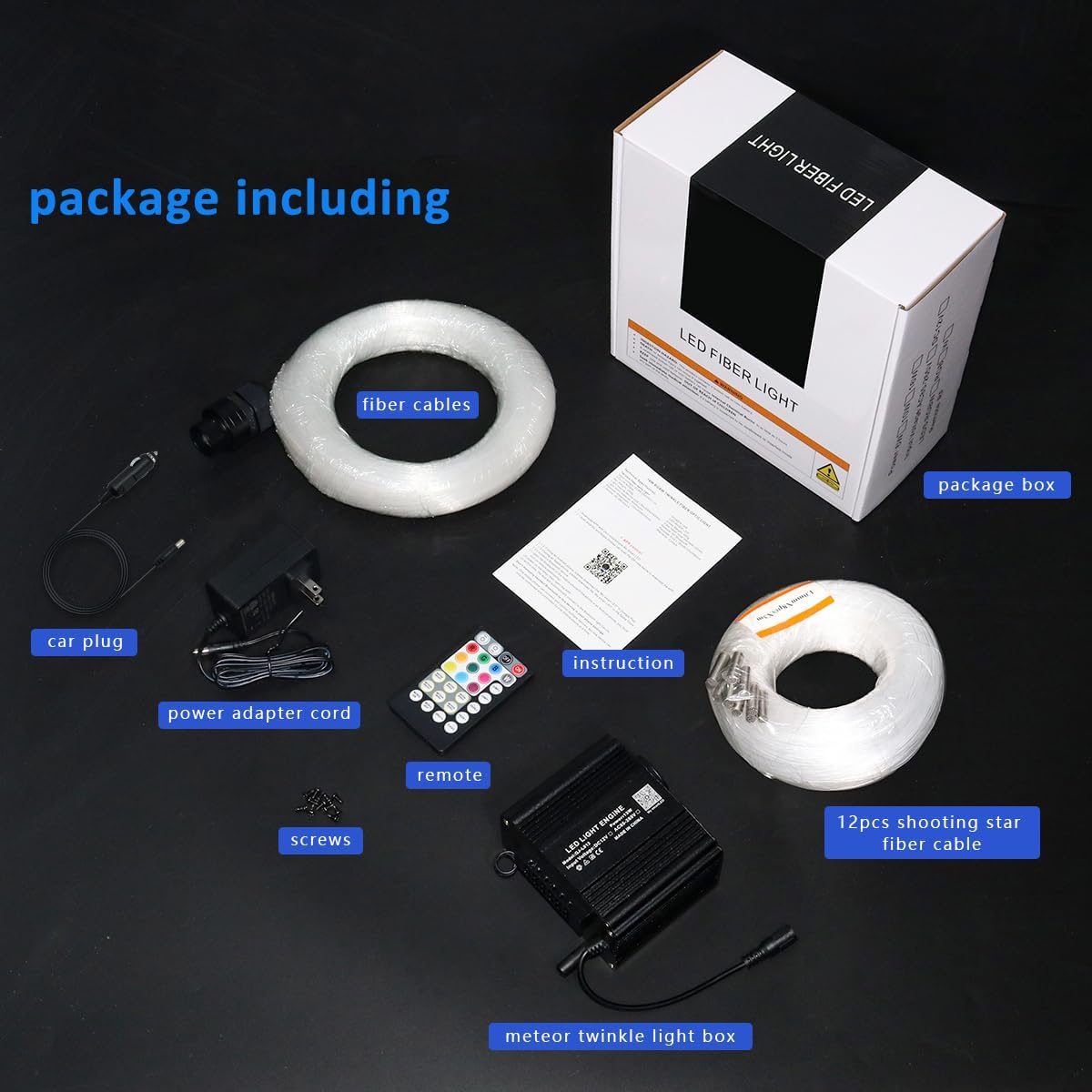
Слика: Све компоненте су укључене у пакет производа.
3. Спецификације
| Феатуре | Опис |
|---|---|
| Број модела | QJ-L012 |
| Тип извора светлости | 2-IN-1 10W Starlight Box (Twinkle & Meteor) |
| Боја | Gray (Light Engine) |
| Материјал | Алуминијум, Пластика |
| Извор напајања | Цордед Елецтриц |
| Волtage | 12 Волтс |
| Број извора светлости | 2 (Twinkle port, Meteor port) |
| Димензије производа | 4.1"L x 3.4"W x 2.4"H (Light Engine) |
| Тежина артикла | 2.2 фунти |
| Батерија за даљински управљач | 1 литијум-метална батерија (укључена) |

Image: Detailed dimensions of the light engine.
4. Подешавање и инсталација
Installation of the fiber optic starlight kit requires careful planning and execution. It is recommended to take your time to achieve the best results.
4.1 Planning the Layout
- Determine the desired pattern for your twinkling stars and shooting meteors on the ceiling or headliner.
- Consider the length of the fiber optic cables and the placement of the light engine. The light engine should be placed in a discreet location with access to power.
- For shooting star effects, plan the paths for the 12 shooting star fiber cables. Each meteor port on the light engine supports 15 individual shooting star cables, allowing for long lines, short lines, or other dynamic shapes like fireworks.
4.2 Кораци инсталације
- Припремите површину: If installing in a car, carefully remove the headliner. For home ceilings, ensure the surface is clean and accessible.
- Избушене рупе: Using an electric drill, create small holes in the ceiling or headliner according to your planned star pattern. The size of the holes should be just large enough to allow the fiber optic strands to pass through.
- Insert Fiber Optic Strands: Begin inserting the individual fiber optic strands through the drilled holes from the back side of the headliner/ceiling. For the twinkling stars, distribute the fibers evenly to create a dense star field.
- Connect Twinkle Fibers: Gather all the twinkle fiber optic strands and insert them into the 20mm diameter light port on one side of the light engine. Secure them in place, often with glue or a provided connector.
- Install Shooting Star Fibers: For the shooting star effect, insert the 12 shooting star fiber cables into the 12 LED meteor ports (5mm per port) on the other side of the light engine. Route these cables to create the desired meteor trails. Ensure one fiber from each loom is used for proper stepping of the shooting star effect.
- Безбедна влакна: Once all fibers are in place, use glue or other securing methods to prevent them from slipping. Trim any excess fiber length on the visible side of the headliner/ceiling.
- Mount Light Engine: Securely mount the light engine in its chosen hidden location using the provided screws. Ensure it is well-ventilated.
- Прикључите напајање: Connect the power adapter cord to the light engine and then to either the car plug adapter (for car installation) or the standard power outlet (for home installation).

Image: Installation diagrams for various shooting star effects.

Image: Light engine showing twinkle and meteor outputs.
5. Операција
Your AZIMOM Starlight Headliner Kit can be controlled using the included RF remote or the 'My SmartLED' mobile application via Bluetooth.
5.1 Remote Control (28-Key RF Remote)
The 28-key remote provides quick access to various lighting modes and settings.
- УКЉУЧЕНО/ИСКЉУЧЕНО: Укључите или искључите уређај.
- Статичке боје: Select from a range of preset static colors (e.g., Red, Green, Blue, White, etc.).
- Динамички режими: Choose from various dynamic effects such as Jump (RGB, seven color), Fade (RGB, seven color), Flash (seven color), and Breath (seven color).
- Подешавање брзине/осветљености: Increase or decrease the speed of dynamic modes or the brightness of static colors.
- Shooting Star Control: Buttons labeled 'METEOR ON/OFF', 'METEOR MODE', 'METEOR SPEED' control the shooting star effects.
- Контрола гласом: 'MUSIC ON' activates the sound-activated mode, where lights respond to music/sound. 'MUSIC OFF' deactivates it.

Image: Functions of the 28-key RF remote control.
5.2 APP Control ('My SmartLED' via Bluetooth)
For advanced customization and control, download the 'My SmartLED' app from your device's app store and connect via Bluetooth.
- Millions of Colors: Access a full color wheel to select from over 16 million colors.
- Динамички режими: Explore 20 kinds of dynamic modes, with adjustable speed and brightness.
- Shooting Star Modes: Choose from 20 kinds of pure white shooting star modes.
- Twinkle Speed: Adjust the twinkle effect with 4 different speed settings.
- Режим активиран звуком: Utilize the 'Music Sync' or 'Mic Mode' to make the lights dance to the rhythm of your music. Adjust sound sensitivity within the app.
- Прилагођавање: Create and save your own custom color combinations and lighting sequences.

Image: 'My SmartLED' app interface for Bluetooth control.

Слика: Прекоview of APP control features.
6. Одржавање
To ensure the longevity and optimal performance of your AZIMOM Starlight Headliner Kit, follow these simple maintenance guidelines:
- Чишћење: Gently wipe the light engine and exposed fiber ends with a soft, dry cloth. Avoid using abrasive cleaners or solvents.
- вентилација: Ensure the light engine has adequate ventilation to prevent overheating. Do not block any vents.
- Нега влакана: Avoid bending or kinking the fiber optic cables sharply, as this can damage the light transmission.
- Даљинска батерија: If the remote control's range or responsiveness decreases, replace the Lithium Metal battery (CR2025 or CR2032, as specified on the remote).
КСНУМКС. Решавање проблема
If you encounter any issues with your starlight kit, refer to the following common problems and solutions:
| Проблем | Могући узрок | Решење |
|---|---|---|
| Нема излаза светлости | Power not connected; Light engine off; Remote battery dead; Loose fiber connection. | Check power connection; Press ON button on remote/app; Replace remote battery; Ensure fibers are securely inserted into ports. |
| Даљински не реагује | Remote battery dead; Obstruction between remote and light engine; Remote out of range. | Replace remote battery; Remove obstructions; Move closer to the light engine. |
| APP not connecting via Bluetooth | Bluetooth off on device; App not paired; Light engine off. | Ensure Bluetooth is enabled; Restart app and light engine; Re-pair device in app settings. |
| Shooting star effect not working | Meteor mode off; Incorrect fiber connection for meteor. | Activate meteor mode via remote/app; Verify shooting star fibers are correctly inserted into the meteor ports. |
| Светла се не синхронизују са музиком | Sound-activated mode off; Microphone sensitivity too low. | Enable 'MUSIC ON' on remote or 'Music Sync/Mic Mode' in app; Adjust microphone sensitivity in the app. |
8. Гаранција и подршка
AZIMOM products are designed for quality and durability. For specific warranty information and customer support, please refer to the warranty card included in your package or visit the official AZIMOM website. If you have any questions or require assistance, do not hesitate to contact our support team.
Контакт информације: Please refer to the contact details provided on the product packaging or the official AZIMOM webсајт за најновије информације о подршци.