
IPASON G-SLIM
IPASON G-SLIM Desktop PC User Manual
Model: G-SLIM | Brand: IPASON
1. Производ је готовview
The IPASON G-SLIM Desktop PC is a high-performance, space-saving computer designed for both personal and business use. It features a slim tower design, powered by a 12th Gen Intel Core i3 processor, and equipped with a high-speed NVMe M.2 SSD for rapid data access and system responsiveness. This PC comes pre-installed with Windows 11, offering the latest operating system features and security.

Слика 1: Предња страна view of the IPASON G-SLIM Desktop PC, showcasinг његов компактан и елегантан дизајн.
Key features include a functional slim design with conveniently located front USB and headphone jacks, eliminating the need for extended cables. It boasts robust performance suitable for multi-tasking, thanks to its ample memory and the high-speed NVMe SSD, which offers significantly faster transfer speeds compared to traditional SATA SSDs.
2. Key Features and Design
2.1 Slim and Functional Design
The G-SLIM PC is engineered with a focus on functional beauty and space efficiency. Its compact dimensions make it ideal for various environments, from home offices to business settings, without compromising on performance.

Figure 2: Detailed dimensions of the IPASON G-SLIM Desktop PC, illustrating its compact form factor (100mm width x 336mm depth x 350mm height).
2.2 High Performance for Business and Personal Use
Equipped with a balanced CPU (Intel Core i3 12th Gen) and ample memory, the G-SLIM ensures stable high performance for various applications, from daily productivity tasks to more demanding business scenarios. The large capacity memory allows for comfortable multi-tasking, handling numerous applications simultaneously with ease.

Figure 3: The IPASON G-SLIM Desktop PC integrated into a business environment, demonstrating its suitability for professional use.
2.3 Advanced Storage and Operating System
The PC utilizes a PCIe Gen3 NVMe SSD, providing significantly faster data transfer speeds compared to traditional SATA SSDs, ensuring quick boot times and application loading. It comes with the latest Windows 11 operating system, offering a refreshed user interface, enhanced multitasking features like Snap Layouts, and improved widget functionality.
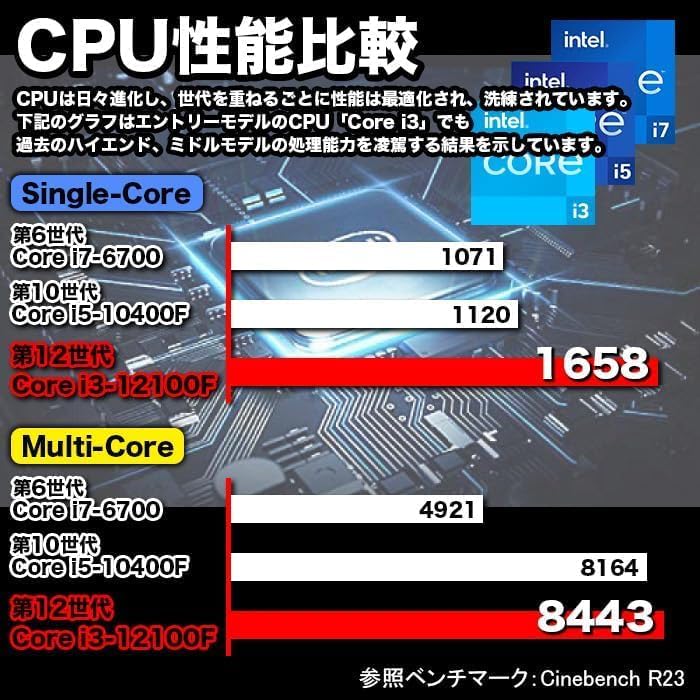
Figure 4: A visual representation of the Windows 11 operating system, highlighting its modern interface and features.
2.4 Performance Benchmarks and Quality Assurance
The G-SLIM's CPU performance is optimized for efficiency. IPASON ensures product reliability through rigorous testing, including 3C Certification, 6-sided drop tests, compatibility tests, degradation/durability tests, and high-load temperature control and noise tests, all conducted under strict standards.

Figure 5: A chart comparing CPU performance (Single-Core and Multi-Core) across different generations of Intel Core processors, demonstrating the G-SLIM's capabilities.

Figure 6: Visual representation of the strict quality control tests the IPASON G-SLIM undergoes, ensuring reliability and stability.
3. Водич за подешавање
Follow these steps to set up your IPASON G-SLIM Desktop PC:
- Распакивање: Carefully remove the PC and all accessories from the packaging. Ensure all components listed in the packing list are present.
- Пласман: Place the PC on a stable, flat surface with adequate ventilation. Avoid placing it in direct sunlight or near heat sources.
- Повежите периферне уређаје:
- Connect your monitor to the appropriate video output port (e.g., HDMI, DisplayPort) on the back of the PC.
- Повежите тастатуру и миш са доступним УСБ портовима.
- Ако користите жичну мрежу, повежите Етернет кабл са ЛАН портом.
- Повежите звучнике или слушалице на аудио излаз.
- Прикључак за напајање: Connect the provided power cable to the power input on the back of the PC, then plug the other end into a power outlet.
- Прво покретање: Press the power button on the front of the PC. The system will boot into Windows 11. Follow the on-screen instructions for initial setup, including language, region, and network configuration.
Напомена: The PC comes with Windows 11 pre-installed and WPS Office for productivity tasks, offering high compatibility with Microsoft Office formats.
4. Упутство за употребу
Your IPASON G-SLIM PC is ready for use after initial setup. Here are some general operating guidelines:
- Укључивање/искључивање: Press the power button to turn on the PC. To shut down, click the Start button in Windows 11, then select Power > Shut down.
- Портови на предњој плочи: Utilize the conveniently located USB ports and headphone jack on the front panel for easy access to connect external devices like USB drives, external hard drives, or headphones.
- Мултитаскинг: Узми адванtage of Windows 11's enhanced multitasking features, such as Snap Layouts, to efficiently arrange multiple application windows on your screen.
- Канцеларија ВПС-а: The pre-installed WPS Office suite provides essential word processing, spreadsheet, and presentation tools. It is fully compatible with Microsoft Office file формати.
- Интернет конекција: Connect to the internet via the wired LAN port for stable and high-speed network access.
5. Одржавање
Regular maintenance helps ensure the longevity and optimal performance of your IPASON G-SLIM PC:
- Чишћење:
- Keep the PC case and vents free from dust. Use a soft, dry cloth to wipe external surfaces.
- For dust accumulation in vents, use compressed air to gently clear them. Ensure the PC is powered off before cleaning.
- Ажурирања софтвера: Regularly check for and install Windows updates to ensure your system has the latest security patches and performance improvements.
- Антивирусна заштита: Maintain up-to-date antivirus software to protect against malware and other security threats.
- Резервна копија података: Периодично правите резервне копије важних података на екстерни диск или складиште у облаку како бисте спречили губитак података.
- вентилација: Ensure the PC has adequate airflow around it. Do not block the ventilation openings.
КСНУМКС. Решавање проблема
If you encounter issues with your IPASON G-SLIM PC, refer to the following common troubleshooting steps:
| Проблем | Могући узрок | Решење |
|---|---|---|
| Рачунар се не укључује. | Кабл за напајање лабав; проблем са утичницом. | Проверите везе кабла за напајање. Покушајте са другом утичницом. |
| Нема приказа на монитору. | Кабл монитора лабав; монитор искључен; нетачан унос. | Ensure monitor is powered on and connected. Check monitor input source. |
| Систем је спор или не реагује. | Too many programs running; low disk space. | Close unnecessary applications. Free up disk space. Restart the PC. |
| Нема интернет везе. | Ethernet cable disconnected; network driver issue. | Check Ethernet cable connection. Restart router/modem. Update network drivers. |
If the issue persists after trying these steps, please contact IPASON customer support for further assistance.
7. Спецификације
| Феатуре | Детаљ |
|---|---|
| Бранд | ИПАСОН |
| Серија модела | G-SLIM |
| Оперативни систем | Виндовс 11 |
| Бранд ЦПУ | Intel (12th Gen Core i3) |
| Брзина процесора | 2.5 ГХз |
| РАМ капацитет | 16 ГБ ДДР4 |
| Тип складиштења | НВМе М.2 ССД |
| Капацитет складиштења | 500 ГБ |
| Графички акцелератор | Intel UHD Graphics 620 (интегрисана) |
| Максимална резолуција | 1920 к 1080 |
| УСБ 2.0 портови | 3 |
| УСБ 3.0 портови | 5 |
| Жичани ЛАН порт | Да |
| Оптицал Дриве | Није укључено |
| Повер Суппли | 300В СФКС |
| Димензије (Ш к Д к В) | 100 мм к 336 мм к 350 мм |
8. Гаранција и подршка
IPASON is committed to providing high-quality products. This product is manufactured in an ISO9001 certified factory, ensuring stringent quality control.
гаранција: Your IPASON G-SLIM Desktop PC comes with a 1 година гаранције against manufacturing defects from the date of purchase. Please retain your proof of purchase for warranty claims.
Подршка: For technical assistance, troubleshooting beyond this manual, or warranty inquiries, please contact IPASON customer support through the vendor's official channels or the platform where the product was purchased. Refer to your purchase documentation for specific contact information.
Напомена: Гаранција не покрива штету насталу услед злоупотребе, несрећа, неовлашћених модификација или природних катастрофа.
Ask a question about this manual
Ask about setup, troubleshooting, compatibility, parts, safety, or missing instructions. Manuals+ will review the question and use this page’s manual context to help answer it.