
NIMO Nimo N153
NIMO 15.6" FHD IPS Business Gaming Laptop User Manual
Model: Nimo N153
Увод
This manual provides essential information for the setup, operation, and maintenance of your NIMO 15.6" FHD IPS Business Gaming Laptop. Designed for both productivity and light gaming, this laptop features an AMD Ryzen 5 6600H processor, 32GB DDR5 RAM, and a 1TB PCIe SSD, ensuring fast performance and ample storage. Please read this manual thoroughly to ensure proper use and longevity of your device.
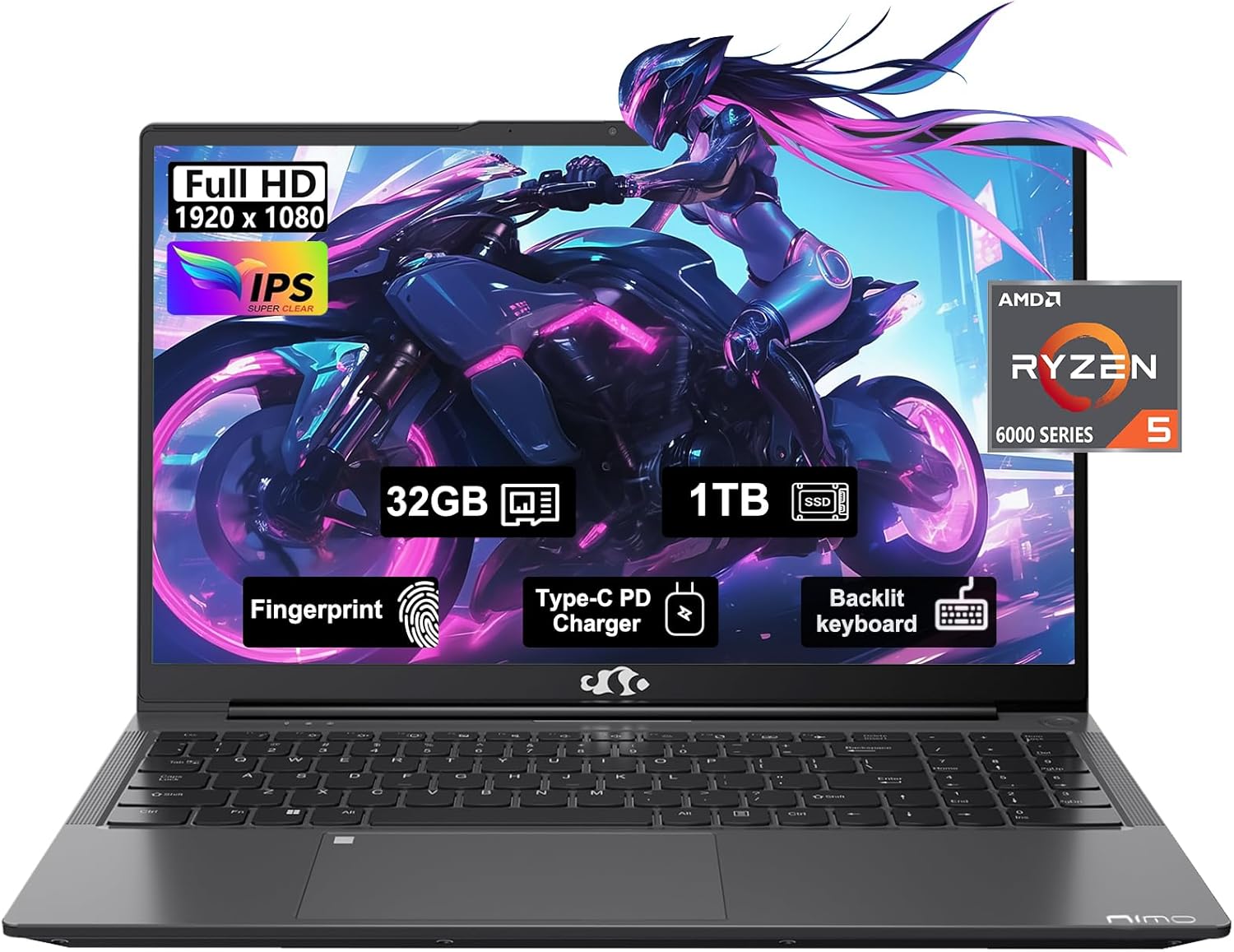
Figure 1: NIMO 15.6" FHD IPS Business Gaming Laptop overview.
Сетуп
1. Распакивање и први преглед
Пажљиво извадите све компоненте из паковања. Кутија треба да садржи:
- 1 x Nimo N153 Laptop
- 1 x Type-C 100W PD Fast Charger
- 1 к Упутство за употребу
Inspect the laptop and accessories for any signs of damage. If any components are missing or damaged, contact customer support immediately.
2. Прво укључивање и пуњење
Before first use, it is recommended to fully charge the laptop.
- Connect the Type-C 100W PD Fast Charger to the laptop's Type-C port (Multifunction) and to a power outlet.
- The charge LED indicator will illuminate. Allow the laptop to charge until the LED indicates a full charge.
- Притисните дугме за напајање да бисте укључили лаптоп.

Figure 2: Connecting the Type-C 100W PD Fast Charger.
3. Operating System Setup (Windows 11)
Follow the on-screen prompts to complete the initial setup of Windows 11. This typically includes:
- Избор региона и распореда тастатуре.
- Повезивање на Ви-Фи мрежу.
- Пријављивање са или креирање Microsoft налога.
- Подешавање ПИН-а или лозинке.
- Configuring privacy settings.
Управљање лаптопом
1. Тастатура и тачпед
The NIMO laptop features a full-size backlit keyboard and a large touchpad for comfortable and efficient input.
- Тастатура са позадинским осветљењем: Use the function keys (Fn + F-key combination, typically F3 or F4) to adjust keyboard backlight brightness.
- Тоуцхпад: Подржава вишеструки додир за навигацију. Погледајте подешавања система Windows за прилагођавање.
- Читач отиска прста: Located on the touchpad, allows for secure login via Windows Hello.

Figure 3: Laptop keyboard layout with backlit keys and integrated fingerprint reader.
2. Портови и повезивање
Your NIMO laptop is equipped with various ports for versatile connectivity:
- УСБ 2.0 портови: 1 port for connecting peripherals.
- УСБ 3.0 портови: 2 ports for high-speed data transfer.
- Type-C Ports (Multifunction): 2 ports supporting power delivery (PD) and data.
- ХДМИ порт: За повезивање са екстерним екранима.
- Слушалице: За аудио излаз.
- Утор за микро СД картицу: За проширење меморије или пренос података са меморијских картица.
- Utor za Kensington Lock: За физичко обезбеђење.
- Бежична повезаност: Supports Wi-Fi 802.11a/b/g/n/ac and Bluetooth 5.2.

Слика 4: Завршеноview of laptop ports for various connections.
3. Дисплеј
The laptop features a 15.6" FHD IPS (1920x1080) Anti-Glare Display with an 85% screen-to-body ratio. This display is designed to provide clear visuals and reduce eye strain during extended use.

Figure 5: The 15.6-inch Full HD IPS display.
4. Перформансе
Powered by an AMD Ryzen 5 6600H processor (6 Cores, 12 Threads, up to 4.5 GHz) and 32GB DDR5 RAM, the laptop delivers robust performance for business tasks, content creation, and light gaming. The integrated AMD Radeon 660M GPU handles graphics processing efficiently.

Figure 6: AMD Ryzen 5 6600H processor, central to the laptop's performance.
The 1TB PCIe SSD provides fast boot times and rapid data access, enhancing overall system responsiveness.
Одржавање
1. Чишћење лаптопа
- Користите меку крпу која не оставља длачицеampводом или средством за чишћење екрана да бисте очистили екран.
- За тастатуру и кућиште користите меку крпу. Избегавајте јаке хемикалије или абразивне материјале.
- Користите компримовани ваздух да периодично очистите прашину из вентилационих отвора и отвора.
2. Ажурирања софтвера
Редовно проверавајте и инсталирајте ажурирања за Windows и ажурирања драјвера како бисте осигурали оптималне перформансе и безбедност.
- Иди на Подешавања > Windows Update to check for OS updates.
- Visit the NIMO support webсајт за најновија ажурирања драјвера.
3. Управљање складиштем
To maintain performance, regularly manage your 1TB SSD storage:
- Обришите непотребно fileс и апликације.
- Користите складиште у облаку за велике files.
- Periodically run Disk Cleanup (built-in Windows tool).
4. Брига о батерији
Да бисте максимално повећали век трајања батерије:
- Избегавајте екстремне температуре.
- Не остављајте лаптоп укључен у струју са 100% напуњености дуже време ако га не користите.
- Повремено калибришите батерију тако што ћете је потпуно испразнити и поново напунити.
5. Memory and Storage Upgrades
The NIMO laptop supports dual-channel memory upgrades (up to 2 x 16GB DDR5 RAM) and features an upgradable PCIe SSD. Consult a qualified technician for hardware upgrades to avoid voiding your warranty.
Решавање проблема
Овај одељак се бави уобичајеним проблемима на које можете наићи.
Лаптоп се не укључује
- Ensure the charger is securely connected to both the laptop and a working power outlet.
- Проверите да ли је утичница функционална тако што ћете укључити други уређај.
- Покушајте да држите дугме за напајање 15-20 секунди да бисте извршили хард ресетовање.
- Ако је батерија потпуно испражњена, оставите је да се пуни најмање 30 минута пре него што покушате да је укључите.
Screen Remains Blank
- Check if the laptop is powered on (listen for fan noise or look for indicator lights).
- Connect an external monitor via the HDMI port to check if the display output works.
- Поново покрените лаптоп.
Споро перформансе
- Затворите непотребне апликације које раде у позадини.
- Проверите и инсталирајте све чекајуће надоградње за Windows.
- Ensure there is sufficient free space on your SSD.
- Покрените скенирање вируса.
Проблеми са Wi-Fi повезивањем
- Уверите се да је Wi-Fi омогућен у подешавањима система Windows.
- Рестартујте рутер и модем.
- Ажурирајте управљачке програме за бежични мрежни адаптер.
- Заборавите мрежу и поново се повежите.
За проблеме који нису овде обрађени, погледајте одељак Гаранција и подршка за контакт информације.
Спецификације
| Феатуре | Детаљ |
|---|---|
| Бранд | NIMO |
| Назив модела | Nimo N153G |
| Величина екрана | 15.6 инча |
| Резолуција екрана | 1920 x 1080 pixels (FHD IPS Anti-Glare) |
| Процесор | AMD Ryzen 5 6600H (6 Cores, 12 Threads, up to 4.5 GHz) |
| РАМ | 32GB DDR5 (Dual-channel, upgradable to 2x16GB) |
| Хард Дриве | 1TB PCIe SSD |
| Грапхицс Цопроцессор | AMD Integrated graphics (Radeon 660M GPU) |
| Оперативни систем | Виндовс 11 |
| Вирелесс Типе | 802.11a/b/g/n/ac (Wi-Fi 5), Bluetooth 5.2 |
| Портс | 1x USB 2.0, 2x USB 3.0, 2x Type-C (Multifunction), 1x HDMI, 1x Headphone Jack, 1x Micro SD Slot |
| Посебне карактеристике | Fingerprint Reader, HD Audio, Backlit Keyboard, Numeric Keypad |
| Извор напајања | Battery Powered, Type-C 100W PD Fast Charger |
| Просечно трајање батерије | 5 сата |
| Тежина артикла | 6 фунти |
| Димензије производа | 14.07 к 8.98 к 0.76 инча |
| Боја | Спаце Греи |
Гаранција и подршка
Гаранција произвођача
Your NIMO laptop is covered by a comprehensive 2-годишња гаранција произвођача offered by Nimo Direct Inc. This warranty covers defects in materials and workmanship under normal use.
Additionally, Nimo Direct Inc. offers 90-Day Hassle-Free Returns. If you encounter any concerns or issues with your product within this period, please contact customer support for assistance with resolution or replacement.
Контактирајте подршку
For technical assistance, warranty claims, or return inquiries, please contact NIMO customer support. Refer to the contact information provided on the official NIMO webсајт или документацију која је приложена уз ваш производ.
Please have your product model number (Nimo N153) and purchase details ready when contacting support.
Ask a question about this manual
Ask about setup, troubleshooting, compatibility, parts, safety, or missing instructions. Manuals+ will review the question and use this page’s manual context to help answer it.