1. Увод
Thank you for choosing the FLYLINKTECH 5000A Jump Starter. This portable device is designed to provide instant power to jump-start 12V vehicles, charge electronic devices, and offer emergency lighting. Please read this manual thoroughly before use to ensure safe and optimal performance.
2. Важне информације о безбедности
- Увек се уверите да је стартер потпуно напуњен пре употребе.
- Не покушавајте да покренете замрзнути акумулатор помоћу помоћних каблова.
- Повежите цлamps correctly: red to positive (+), black to negative (-). Reverse polarity can cause damage.
- Не спајајте црвену и црну цлampс заједно.
- Чувати ван домашаја деце.
- Користите у добро проветреном простору.
- Избегавајте излагање уређаја екстремним температурама или директној сунчевој светлости током дужег периода.
- If the device becomes excessively hot during use, disconnect it immediately.
- Погледајте упутство за употребу вашег возила за специфичне поступке покретања помоћу кабла.
3. Садржај пакета
Проверите да ли су све ставке присутне у вашем пакету:
- FLYLINKTECH 5000A Jump Starter (Model BD10)
- Смарт Јумпер каблови
- УСБ-Ц кабл за пуњење
- ЕВА кутија за складиштење
- Упутство за употребу

Image: Contents of the FLYLINKTECH 5000A Jump Starter package, including the jump starter unit, smart jumper cables, USB-C charging cable, and EVA storage case.
4. Производ је готовview
Familiarize yourself with the components and ports of your jump starter:
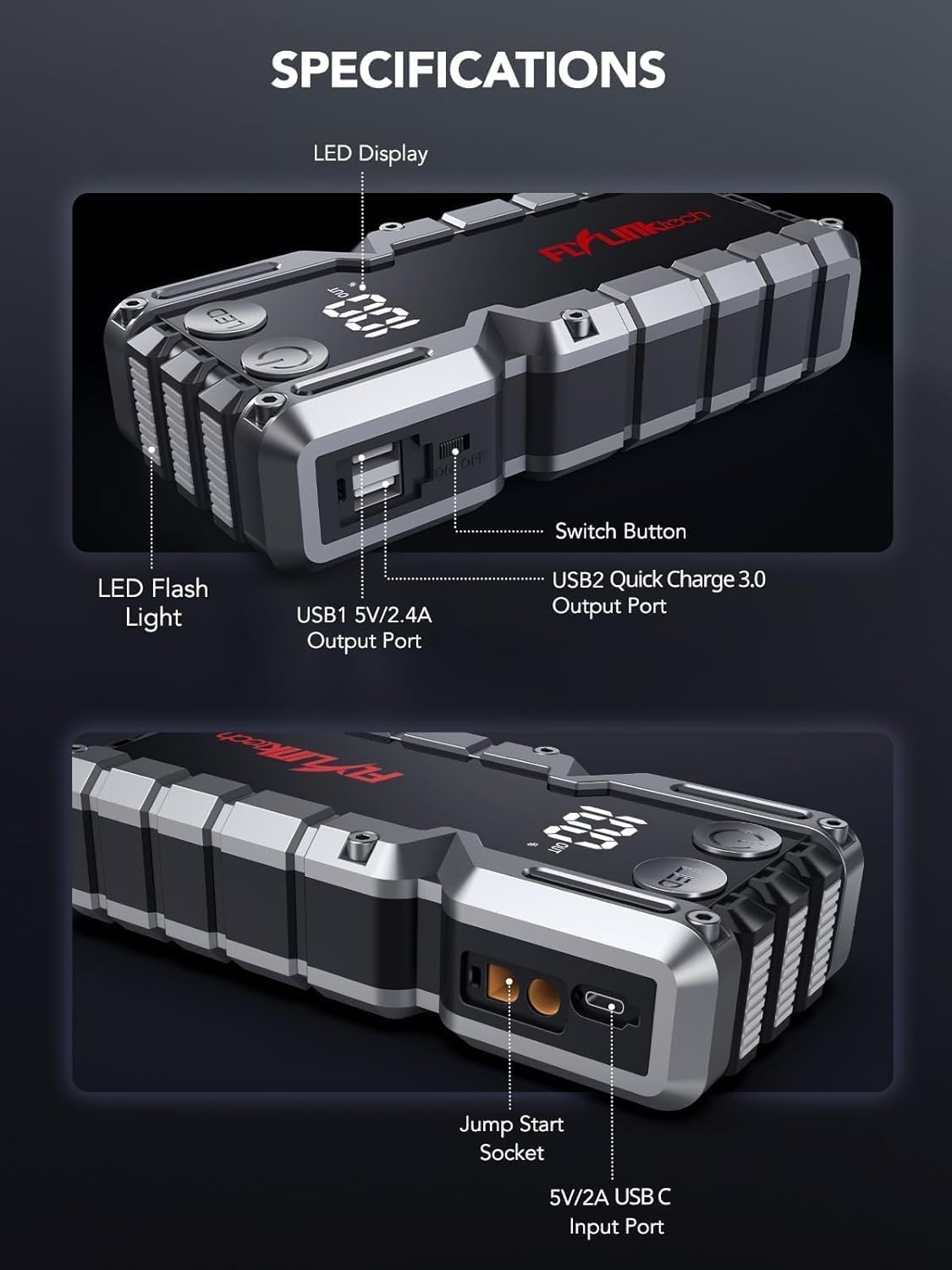
Слика: Детаљна view of the jump starter showing the LED display, LED flashlight, power button, switch button, USB1 5V/2.4A output port, USB2 Quick Charge 3.0 output port, Jump Start Socket, and 5V/2A USB-C input port.
- ЛЕД дисплеј: Показује проценат батеријеtage.
- ЛЕД лампа: Обезбеђује осветљење са више режима.
- Дугме за напајање: Activates the device and controls flashlight modes.
- Дугме за пребацивање: Main power control.
- USB1 излаз (5V/2.4A): Standard USB charging port.
- USB2 Output (QC3.0): Quick Charge 3.0 port for faster charging.
- Утичница за покретање: Connects to the smart jumper cables.
- USB-C Input (5V/2A): Used to recharge the jump starter.
5. Пуњење стартера
Before first use, fully charge the jump starter. It is recommended to recharge the unit every 3-6 months to maintain battery health.
- Connect the provided USB-C charging cable to the USB-C input port on the jump starter.
- Connect the other end of the USB-C cable to a 5V/2A USB wall adapter (not included) or a car charger.
- ЛЕД дисплеј ће приказивати напредак пуњења. Уређај је потпуно напуњен када дисплеј приказује 100%.

Image: The jump starter connected via USB to charge a smartphone and a tablet, demonstrating its power bank functionality.
6. Jump Starting Your Vehicle
Follow these steps carefully to safely jump-start your 12V vehicle:
- Припремите џамп стартер: Ensure the jump starter is at least 50% charged. Turn off your vehicle's ignition and all accessories (headlights, radio, etc.).
- Повежите паметне каблове за скакање: Insert the blue plug of the smart jumper cables into the Jump Start Socket on the jump starter. Ensure a firm connection. The indicator light on the smart clamp will flash red and green.
- Повезивање са акумулатором возила:
- Причврстите црвена (+) clamp на позитивни пол акумулатора вашег возила.
- Причврстите црна (-) clamp на негативни терминал акумулатора вашег возила.
Once connected correctly, the indicator light on the smart clamp постаће чврсто зелено.
- Покрените возило: Go into your vehicle and start the engine. If the vehicle does not start immediately, wait 30 seconds and try again. If it still doesn't start, press the "BOOST" button on the smart clamp for 3 seconds until the green light turns solid, then try starting the car again within 30 seconds.
- Уклоните каблове: Once the engine starts, immediately remove the smart jumper cables from the vehicle battery, then disconnect them from the jump starter.

Image: Visual guide for jump-starting: 1. Insert jump clamp into booster. 2. Connect clamps to car battery. 3. Start your car. 4. Remove clamps.

Image: The smart clamps connected to the jump starter, illustrating the 10-layer safety protections including short circuit, reverse charge, over charge, reverse polarity, over discharge, over current, reverse connection, and high temperature protection.
7. Коришћење као преносне батерије
The jump starter can also be used to charge your electronic devices.
- Connect your device's USB charging cable to either the USB1 (5V/2.4A) or USB2 (QC3.0) output port on the jump starter.
- Јумп стартер ће аутоматски почети да пуни ваш уређај.
- The LED display will show the remaining battery capacity of the jump starter.

Image: The jump starter functioning as a portable power bank, with two USB output ports (5V/2.4A and Quick Charge 3.0) actively charging a smartphone and a tablet.
8. Коришћење ЛЕД батеријске лампе
The built-in 600-lumen LED flashlight has three modes for various situations:
- Да бисте укључили/искључили: Press and hold the LED button for 3 seconds.
- За циклус режима: Once the light is on, short press the LED button to switch between:
- Константно укључено: За опште осветљење.
- СОС режим: Flashes the international SOS signal for emergencies.
- Стробе режим: Rapid flashing for warning or signaling.

Image: The jump starter with its LED flashlight active, illustrating the three available modes: standard flashlight, SOS signal, and strobe light for emergencies.
9. Одржавање
- Чишћење: Wipe the unit with a soft, dry cloth. Do not use harsh chemicals or abrasive materials.
- Складиштење: Store the jump starter in its EVA case in a cool, dry place away from direct sunlight. Ensure it is charged to at least 50% before storing for extended periods. Recharge every 3-6 months.
- Одржавање батерије: The internal lithium-ion battery is designed for long life. Avoid fully discharging the unit frequently.

Water-resistant design.

Rugged ABS shell for drop resistance.

Operates in extreme temperatures (-4°F to 140°F).
КСНУМКС. Решавање проблема
| Проблем | Могући узрок | Решење |
|---|---|---|
| Vehicle won't start after connecting. | Jump starter battery too low; incorrect clamp connection; vehicle battery completely dead. | Ensure jump starter is fully charged. Check clamp connections (red to +, black to -). Press the "BOOST" button on the smart clamp for 3 seconds and try again. |
| Смарт цлamp indicator light is red/flashing. | Reverse polarity; short circuit; over-temperature. | Дисцоннецт цлamps and re-connect correctly. Check for any short circuits. Allow unit to cool down if overheated. |
| Jump starter not charging. | Faulty charging cable or adapter; loose connection. | Ensure USB-C cable and adapter are working and connected securely. Try a different cable or adapter. |
| ЛЕД батеријска лампа не ради. | Not activated correctly; low battery. | Press and hold the LED button for 3 seconds to activate. Ensure the jump starter has sufficient charge. |
11. Спецификације
| Феатуре | Детаљ |
|---|---|
| Пеак Цуррент | 5000А |
| Капацитет батерије | 18000мАх (66.6Вх) |
| Старт Волtage | 12В |
| Компатибилност мотора | До 9.0 литара бензина / 8.0 литара дизела |
| УСБ излаз 1 | 5В/2.4А |
| УСБ излаз 2 | КЦ3.0 |
| УСБ-Ц улаз | 5В/2А |
| ЛЕД лампа | 600-Lumen (Constant, SOS, Strobe) |
| Радна температура | -4°Ф до 140°Ф (-20°Ц до 60°Ц) |
| Димензије | 4.2 к 9 к 19 цм |
| Тежина | 540 г (1.19 лбс) |
| Сигурносна заштита | 10-Layer (Short Circuit, Reverse Polarity, Over-Current, etc.) |
12. Гаранција и подршка
The FLYLINKTECH 5000A Jump Starter comes with an industry-leading 3 година гаранције од датума куповине. Ова гаранција покрива производне недостатке и обезбеђује поуздан рад.
For technical support, warranty claims, or any questions regarding your product, please contact FLYLINKTECH customer service through the retailer's platform or visit our official webсајту.
Молимо вас да сачувате доказ о куповини ради потврде гаранције.