
1. Увод
Хвала вам на куповиниasing the XO F41 Mirror Bluetooth Speaker. This device combines a digital clock display with a portable Bluetooth speaker, offering multiple playback options including Bluetooth, TF card, and FM radio. Please read this manual carefully before use to ensure proper operation and to maximize your experience with the product.

Image 1.1: The XO F41 Mirror Bluetooth Speaker in use, showing its digital clock display.
2. Карактеристике производа
- Блуетоотх 5.3 повезивање: For stable and efficient wireless audio streaming.
- Приказ огледала: Clear digital time display with adjustable brightness.
- Вишеструки режими репродукције: Supports Bluetooth, TF card, and FM radio.
- Интегрисани микрофон: За позивање без употребе руку.
- Дуго време репродукције: Up to 8 hours at 50% volume, 5 hours at 100% volume.
- Компактан и преносив дизајн: Easy to carry and place anywhere.
- УСБ-Ц пуњење: Модеран и практичан порт за пуњење.
3. Садржај пакета
Молимо вас да проверите пакет за следеће ставке:
- XO F41 Mirror Bluetooth Speaker
- УСБ-Ц кабл за пуњење
- Упутство за употребу

Image 3.1: The XO F41 Mirror Bluetooth Speaker packaging.
4. Распоред и контроле уређаја
Упознајте се са дугмадима и портовима звучника:
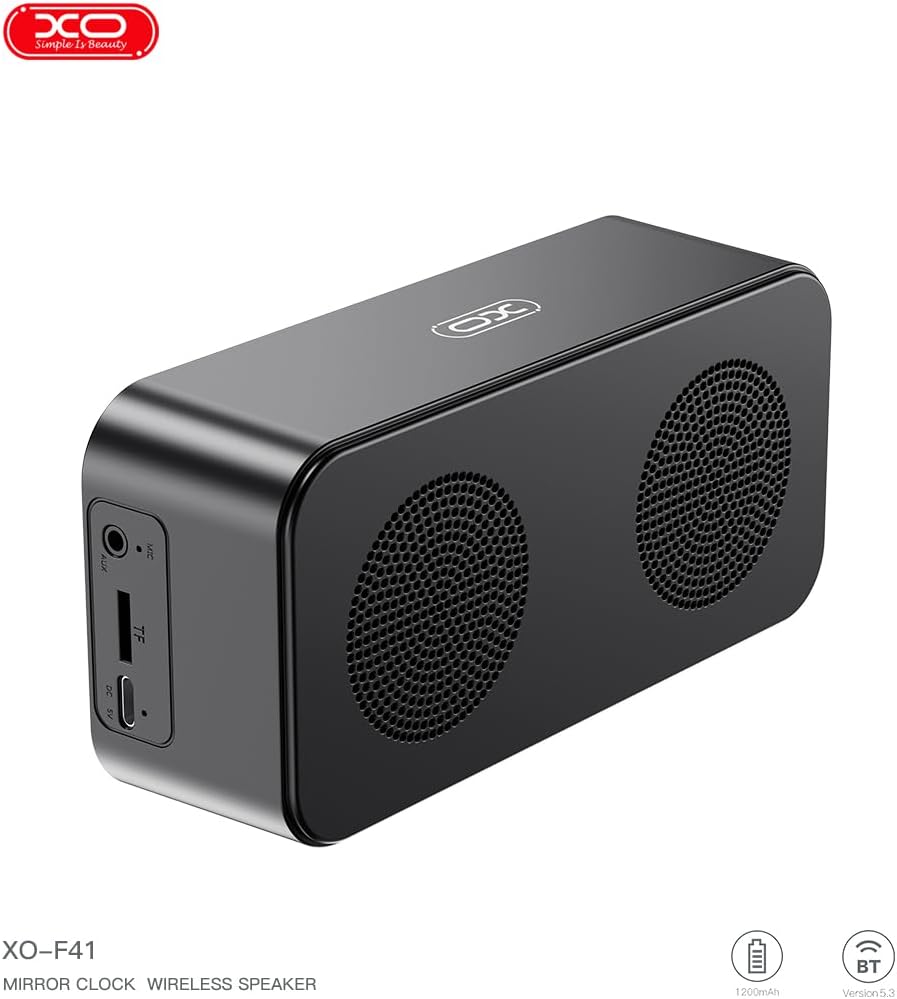
Слика 4.1: Бочна страна view of the XO F41 with ports labeled.
- Дугме за напајање: Притисните и држите да бисте укључили/искључили уређај. Кратко притисните да бисте променили режим.
- Дугме за репродукцију/паузу: Play or pause audio. Answer/end calls.
- Појачавање/следећа нумера: Кратак притисак за појачавање јачине звука, дуг притисак за следећу нумеру.
- Смањивање јачине звука/претходна нумера: Кратак притисак за смањивање јачине звука, дуг притисак за претходну нумеру.
- УСБ-Ц порт: За пуњење уређаја.
- Слот за ТФ картицу: Insert a TF (MicroSD) card for local music playback.
- АУКС порт: За жични аудио улаз.
5. Подешавање
5.1 Пуњење звучника
- Connect the provided USB-C cable to the charging port on the speaker.
- Повежите други крај кабла са УСБ адаптером за напајање (није укључен) или УСБ портом рачунара.
- The charging indicator will illuminate. It takes approximately 3 hours for a full charge.
- The indicator will turn off or change color once fully charged.
5.2 Укључивање/искључивање
- За укључивање: Press and hold the Power button for approximately 3 seconds. You will hear an audible prompt.
- За искључивање: Press and hold the Power button for approximately 3 seconds. You will hear an audible prompt.
6. Упутство за употребу
6.1 Блуетоотх упаривање
- Ensure the speaker is powered on and in Bluetooth mode. If not, short press the Power button to cycle through modes until "BT" or a Bluetooth icon appears on the display.
- На свом мобилном уређају омогућите Блуетоотх и потражите доступне уређаје.
- Select "XO-F41" from the list of devices.
- Once paired, the speaker will indicate a successful connection, and you can begin playing audio from your device.
6.2 TF Card Mode
- Уметните TF (MicroSD) картицу са MP3 аудио записом fileс у отвор за ТФ картицу.
- The speaker will automatically switch to TF card mode and begin playing music. If not, short press the Power button to cycle to TF card mode.
- Use the Volume Up/Down buttons for track navigation and the Play/Pause button for playback control.
6.3 Режим ФМ радија
- Short press the Power button to switch to FM radio mode. The display will show the FM frequency.
- Дуго притисните дугме Репродукција/Пауза да бисте аутоматски скенирали и сачували доступне ФМ станице.
- Short press the Volume Up/Down buttons to switch between saved stations.
6.4 Clock and Alarm Settings
The XO F41 features a digital clock display. Specific instructions for setting the time and alarm are typically found in the detailed manual included with the product. Generally, a dedicated 'M' (Mode) or 'Set' button is used to enter time/alarm setting mode, and volume buttons are used to adjust values.

Image 6.1: The XO F41 speaker functioning as a bedside clock.
6.5 Подешавање осветљености екрана
The display brightness is adjustable. Look for a dedicated button (often labeled with a sun icon or similar) or a combination of button presses (e.g., double-pressing the Power button) to cycle through brightness levels. Refer to the included quick start guide for exact steps.
7. Одржавање
- Чишћење: Користите меку, суву крпу за чишћење површине звучника. Не користите абразивна средства за чишћење или раствараче.
- Складиштење: Чувајте звучник на хладном и сувом месту, даље од директне сунчеве светлости и екстремних температура када се не користи дуже време.
- Отпорност на воду: Овај уређај није водоотпоран. Избегавајте излагање води или прекомерној влази.
- Одржавање батерије: Да бисте продужили век трајања батерије, избегавајте често потпуно пражњење батерије. Редовно пуните уређај, чак и ако га не користите стално.
КСНУМКС. Решавање проблема
| Проблем | Могући узрок | Решење |
|---|---|---|
| Звучник се не укључује. | Ниска батерија. | Пуните звучник најмање 30 минута. |
| Није могуће упаривање преко Bluetooth-а. | Speaker not in pairing mode; Bluetooth disabled on device; too far from device. | Ensure speaker is in Bluetooth mode. Enable Bluetooth on your device. Move speaker closer to your device (within 10 meters). |
| No sound from TF card. | TF card not inserted correctly; unsupported file формат; нема звука files on card. | Поново уметните ТФ картицу. Уверите се files are in MP3 format. Verify audio fileс су присутни на картици. |
| Слаб ФМ радио пријем. | Слаб сигнал; сметње из околине. | Move the speaker to a different location. Re-scan for stations. |
9. Спецификације
| Феатуре | Детаљ |
|---|---|
| Број модела | XO-F41 |
| Блуетоотх верзија | Блуетоотх В5.3 |
| Блуетоотх фреквенција | 2.402 ГХз-2.480 ГХз |
| Капацитет батерије | 1200мАх |
| Улаз за пуњење | УСБ-Ц, ДЦ5В/0.5А |
| Време пуњења | Отприлике 3 сата |
| Плаи Тиме | 8H (50% volume); 5H (100% volume) |
| Ефективна удаљеност | Мање од 10 метара |
| Максимална снага | 5W |
| Јединица звучника | 52мм |
| Однос сигнала и шума | >80дБ |
| Димензије производа | 15 x 3.81 x 11 цм (приближно 150 x 45 x 72 мм) |
| Тежина производа | 320 g (approx. 0.28 kg) |
| Материјал | Пластика |
| Посебна карактеристика | Подесива осветљеност |

Image 9.1: Detailed product parameters.
10. Информације о гаранцији
The XO F41 Mirror Bluetooth Speaker comes with a standard manufacturer's warranty. Please refer to the warranty card included in your package for specific terms, conditions, and duration. Keep your purchase receipt as proof of purchase for any warranty claims.
11. Корисничка подршка
For further assistance, technical support, or inquiries regarding your XO F41 Mirror Bluetooth Speaker, please contact the retailer or manufacturer's customer service department. Contact details are typically provided on the product packaging or the official brand webсајту.