
1. Увод
The Reyke Air Tracker Smart Tag is designed to help you locate your valuable items quickly and efficiently. Utilizing the Apple Find My network, this smart tag allows you to track keys, wallets, backpacks, luggage, and more directly from your Apple device. This manual provides detailed instructions for setup, operation, and maintenance to ensure optimal performance of your Reyke Air Tracker.

Image: Reyke Air Tracker Smart Tags in various colors.
2. Садржај пакета
Your Reyke Air Tracker package includes the following items:
- Reyke Air Tracker Smart Tags (4 units: Baby Blue, Pink, Yellow, Green)
- Keychains (4 units, one for each tag)
- Lithium Metal Batteries (4 units, pre-installed)
- Упутство за употребу

Image: Contents of the Reyke Air Tracker package, including four tags and keychains.
3. Подешавање
To begin using your Reyke Air Tracker, follow these steps:
- Укључено: The Reyke Air Tracker tags come with pre-installed batteries. To activate, ensure the battery is properly seated.
- Download the Find My App: Open the App Store on your Apple device (iPhone, iPad, Mac, or Apple Watch) and search for the "Find My" app. Download and install it if you don't already have it.
- Повежите свој локатор ставки:
- Open the "Find My" app.
- Додирните картицу „Ставке“ на дну екрана.
- Tap the "+" icon and select "Add Other Item".
- Follow the on-screen instructions to pair your Reyke Air Tracker. This typically involves pressing the button on the tracker to make it discoverable.
- Once detected, name your item and assign an emoji to easily identify it.
- Attach to Your Item: Use the provided keychain to attach the Reyke Air Tracker to your keys, backpack, luggage, wallet, or any other item you wish to track.
Напомена: The Reyke Air Tracker is compatible with iOS 14.5 or higher and is not designed for Android devices.

Image: Pairing the Reyke Air Tracker with the Apple Find My app on an iPhone.
4. Упутство за употребу
The Reyke Air Tracker offers several features to help you keep track of your belongings:
4.1 Find Nearby
When your item is within Bluetooth range (up to 180 feet), you can trigger the built-in speaker to emit a loud beep (up to 100dB) to help you pinpoint its exact location.
- Open the "Find My" app.
- Идите на картицу „Ставке“.
- Select the Reyke Air Tracker you wish to locate.
- Tap "Play Sound". The tag will emit a sound until you tap "Stop Sound" or it is found.

Image: Using the 'Play Sound' feature in the Find My app to locate a nearby item.
4.2 Left-Behind Remind
Receive instant notifications on your iPhone if you leave your Reyke Air Tracker behind and it goes out of Bluetooth range. You can then view its last known location on a map within the Find My app.
- In the "Find My" app, select your Reyke Air Tracker.
- Under "Notifications", toggle on "Notify When Left Behind".
- You can also set up specific locations where you don't want to be notified (e.g., your home).
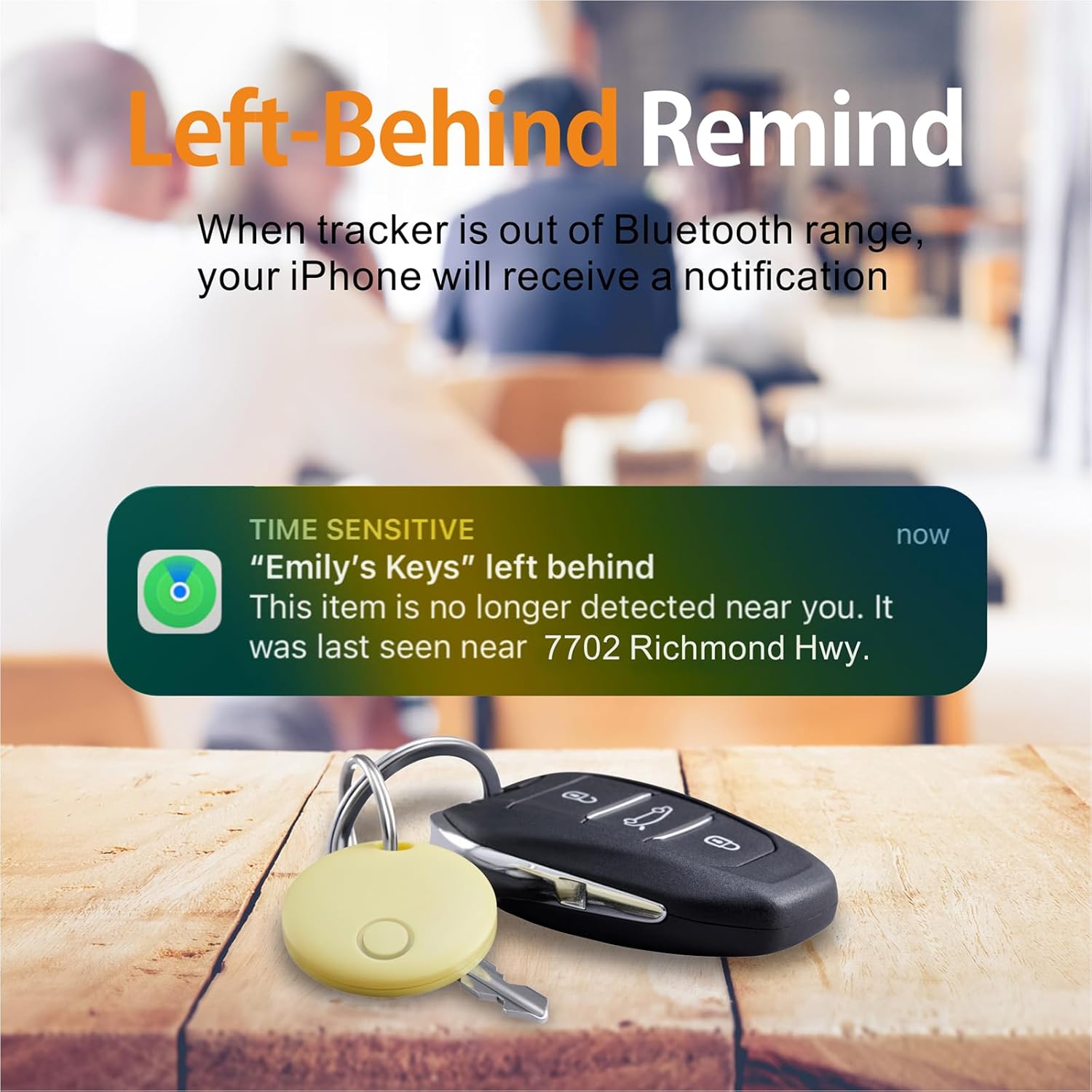
Image: An iPhone notification for a left-behind Reyke Air Tracker.
4.3 Lost Mode
If your item is truly lost, activate Lost Mode to leverage the vast Apple Find My network. Hundreds of millions of Apple devices worldwide can anonymously detect your tag and relay its location to you.
- In the "Find My" app, select your Reyke Air Tracker.
- Under "Lost Mode", tap "Enable".
- Follow the prompts to enter your contact information. If your tag is found by someone, they can use an NFC-enabled smartphone to view ваше контакт податке.
- You will receive a notification when your lost item is detected by an Apple device in the network.
4.4 Share This Item (iOS 17+ only)
With iOS 17 or later, you can share the location of your Reyke Air Tracker with up to 5 other Apple users. This is ideal for shared items like family car keys or luggage when traveling together.
- Ensure your Apple device is updated to iOS 17 or later.
- In the "Find My" app, select your Reyke Air Tracker.
- Tap "Share This Item" and follow the instructions to add borrowers.
- Borrowers will be able to see the item's location on a map and will not receive tracking notifications as the item moves with them.
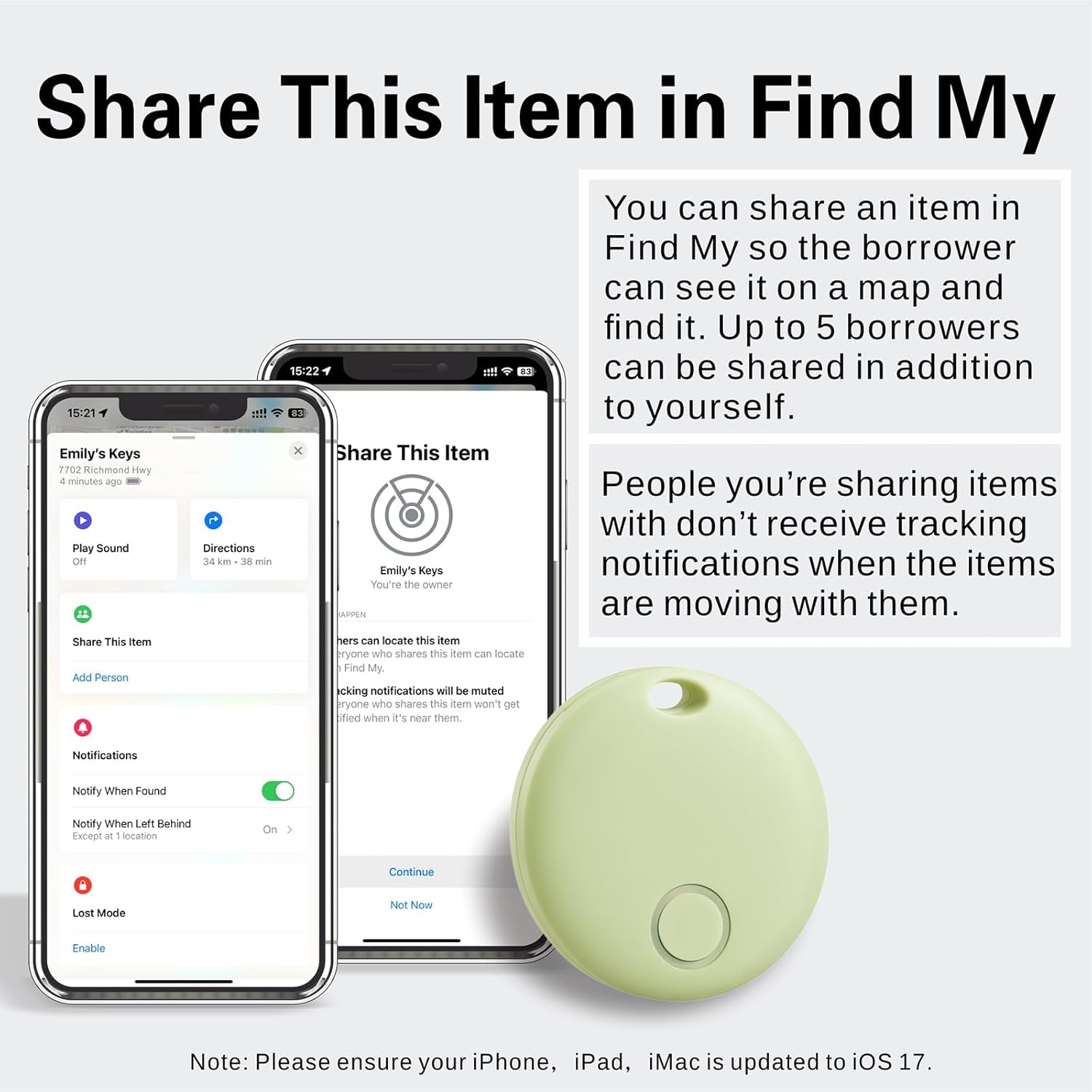
Image: Sharing a Reyke Air Tracker's location with others via the Find My app.
5. Замена батерије
The Reyke Air Tracker uses a replaceable CR2032 Lithium Metal battery, which typically lasts up to 1 year depending on usage and environmental factors.
- Identify the Battery Compartment: Locate the small slot on the side of the Reyke Air Tracker.
- Отворите Ц.asing: Use a small, flat tool (like a coin or the provided key-like tool if available) to gently pry open the casing at the slot. The two halves of the tag will separate.
- Уклоните стару батерију: Carefully remove the old CR2032 battery from its compartment.
- Уметните нову батерију: Place a new CR2032 battery into the compartment with the positive (+) side facing up.
- Затворите Цasing: Align the two halves of the Reyke Air Tracker and press them firmly together until they snap securely into place. Ensure the O-ring seal is properly seated to maintain water resistance.
Напомена: Истрошене батерије одлажите одговорно у складу са локалним прописима.
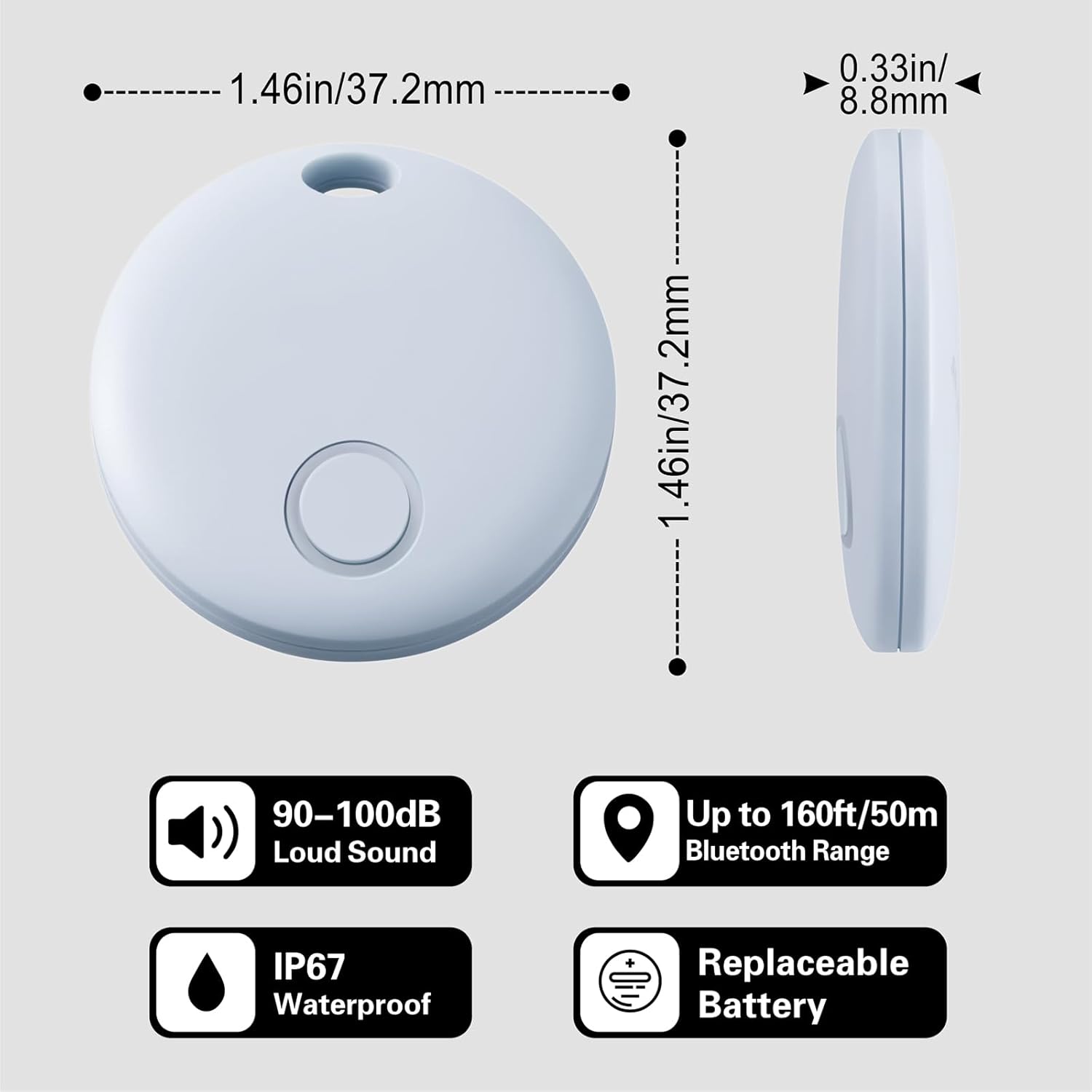
Image: Key features of the Reyke Air Tracker, including replaceable battery.
6. Нега и одржавање
To ensure the longevity and optimal performance of your Reyke Air Tracker, follow these care guidelines:
- Отпорност на воду и прашину: Тхе tag has an IP67 rating, meaning it can withstand immersion in water up to 3 feet (1 meter) for 30 minutes. While it is resistant to splashes and rain, prolonged submersion or exposure to high-pressure water jets is not recommended.
- Чишћење: Обришите tag меком, сувом крпом. Избегавајте употребу јаких хемикалија или абразивних материјала.
- температура: Избегавајте излагање tag to extreme temperatures (hot or cold) as this can affect battery life and performance.
- Складиштење: Чувајте tag на хладном и сувом месту када се не користи.

Image: The Reyke Air Tracker demonstrating its IP67 waterproof capability.
КСНУМКС. Решавање проблема
If you encounter issues with your Reyke Air Tracker, try the following solutions:
- Tag Не повезује се:
- Уверите се да је Bluetooth омогућен на вашем Apple уређају.
- Проверите да ли је tag's battery needs replacement.
- Померите tag closer to your Apple device.
- Поново покрените свој Apple уређај и покушајте поново да га упарите.
- Sound Not Playing:
- Потврдите tag налази се у домету Bluetooth-а вашег уређаја.
- Check the battery level of the tag.
- Уверите се да је јачина звука на вашем уређају појачана.
- Left-Behind Notifications Not Working:
- Confirm that "Notify When Left Behind" is enabled in the Find My app settings for the specific tag.
- Check your device's notification settings to ensure Find My notifications are allowed.
- Уверите се да је оперативни систем вашег уређаја ажуриран.
- Location Not Updating:
- Тхе tag's location updates when it comes within range of any Apple device in the Find My network. If it's in a remote area, updates may be less frequent.
- Ensure Lost Mode is activated if the item is truly lost.
8. Спецификације
| Број модела | ХБ02 |
| Димензије | 1.46 к 1.46 к 0.33 инча (37.2 к 37.2 к 8.8 мм) |
| Тежина | 2.39 унци |
| Повезивање | Блуетоотх |
| Блуетоотх домет | До 180 стопе (приближно 55 метара) |
| Отпорност на воду | IP67 (Waterproof up to 3 feet for 30 minutes) |
| Тип батерије | CR2032 Lithium Metal (replaceable) |
| Трајање батерије | До 1 године |
| Компатибилност | Apple devices with iOS 14.5 or later (not for Android) |
9. Гаранција и подршка
For warranty information, technical support, or further assistance, please refer to the product packaging or contact Reyke customer service through the official website or your retailer. Keep your purchase receipt for warranty claims.