
1. Увод
This manual provides detailed instructions for the setup, operation, maintenance, and troubleshooting of your ATTACK SHARK X66 Gasket Wireless Mechanical Keyboard. Please read this manual thoroughly before using the product to ensure optimal performance and longevity.

Слика: Одозго надоле view of the ATTACK SHARK X66 Gasket Wireless Mechanical Keyboard, showcasinг његов компактан распоред и дизајн тастера.
2. Производ је готовview
2.1 Кључне карактеристике
- 60% компактан дизајн: Features 66 keys and a volume knob, optimizing desktop space while maintaining portability.
- Upgraded Gasket Mount: Incorporates 5 layers of sound insulation (PORON Sandwich Foam, Foamed IXPE Under Shaft Pads, PET Acoustic Premium Pads, Shaft Seat Sound Deadening Foam, Customized Bottom Foams) for reduced noise and a smooth typing experience.
- Троструки режим повезивања: Supports Bluetooth, 2.4GHz wireless, and USB-C wired connections.
- Multi-Device Tasking: Three Bluetooth channels (FN+Q/FN+W/FN+E) for efficient switching between devices.
- Дуготрајна батерија: Equipped with a 3000mAh large-capacity rechargeable battery.
- Hot Swappable Switches: Full hot-swappable design compatible with 3-pin/5-pin switches, featuring pre-lubed Strawberry switches for a creamy sound and smooth keystroke.
- Динамичко RGB позадинско осветљење: Offers 9 backlight colors and 18 lighting effects with 16 million LED colors, customizable via software.
- Издржљиве капице за тастере: Features side-printed gradient PBT keycaps that are resistant to oiling, non-slip, and wear-resistant.

Слика: Прекоview of the X66 keyboard highlighting key features such as RGB Backlight, Triple Mode Connectivity, Hot Swappable switches, PBT Keycaps, 60% Layout, 3000mAh Battery, and Gasket Structure.
2.2 Садржај пакета
- ATTACK SHARK X66 Mechanical Keyboard
- USB-C Cable (1.5 meters)
- 2-in-1 Key Puller and Switch Puller
- Additional Strawberry Switches (2 pieces)
- Упутство за употребу
3. Подешавање
3.1 Режими повезивања
The X66 keyboard supports three connection modes: 2.4GHz wireless, Bluetooth, and USB-C wired.

Image: Diagram illustrating the three connectivity modes: Bluetooth 5.0, 2.4GHz Wireless with a USB dongle, and Type-C Wired connection.
- 2.4ГХз бежична веза:
- Locate the 2.4GHz USB receiver.
- Укључите рисивер у слободан УСБ порт на рачунару.
- On the keyboard, slide the mode switch to the '2.4G' position. The keyboard will automatically connect.
- Блуетоотх веза:
- On the keyboard, slide the mode switch to the 'BT' position.
- Да бисте ушли у режим упаривања, притисните и држите ФН + К, ФН + В, или ФН + Е for 3-5 seconds until the corresponding key's backlight flashes rapidly.
- On your device (PC, Mac, Tablet), search for Bluetooth devices and select 'ATTACK SHARK X66' to pair.
- Once paired, the key's backlight will stop flashing and remain steadily lit. You can pair up to three Bluetooth devices and switch between them using FN + Q/W/E.
- Жична веза преко USB-C порта:
- Повежите приложени USB-C кабл са USB-C портом тастатуре.
- Повежите други крај кабла са доступним УСБ портом на рачунару.
- Тастатура ће се аутоматски пребацити у жични режим и почети са пуњењем.
3.2 Промена оперативног система
The keyboard features a dedicated switch for Windows and Mac operating systems.
- Locate the 'Win/Mac' switch on the side or back of the keyboard.
- Slide the switch to the appropriate operating system setting for optimal key mapping.
4. Упутство за употребу
4.1 Функционалност дугмета за јачину звука
The aluminum CNC metal knob provides convenient control over audio.
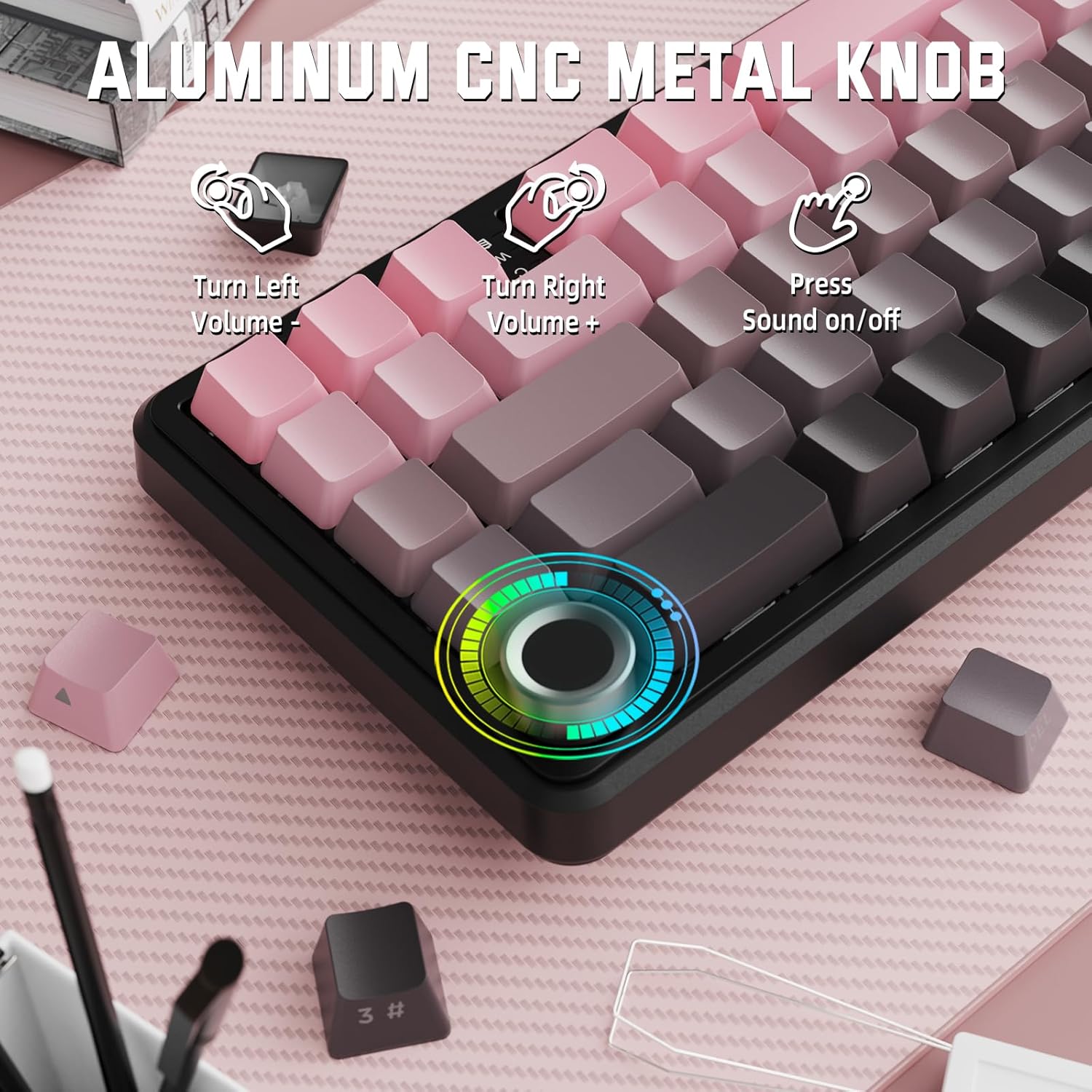
Image: Close-up of the volume knob with icons indicating its functions: Turn Left (Volume -), Turn Right (Volume +), Press (Sound on/off).
- Скрените лево: Смањите јачину звука.
- Скрените десно: Повећајте јачину звука.
- Притисните: Искључи/укључи звук.
4.2 Function Key Combinations (FN Key)
Due to the compact 60% layout, some functions are accessed via the FN key.
| Комбинација | Функција |
|---|---|
| FN + Q/W/E | Switch between Bluetooth devices 1, 2, and 3 |
| ФН + Бацкспаце | Проверите капацитет батерије |
| FN + 1-0 (top row) | F1-F10 functions (e.g., FN+1 for F1) |
| FN + -/= | F11/F12 functions |
| ФН + \| | Избриши |
| ФН + П | Принт Сцреен |
| ФН + [ { | Хоме |
| ФН + ] } | Крај |
| ФН + ; : | Паге Уп |
| FN + ' " | Паге Довн |
| FN + тастери са стрелицама | Navigation (e.g., FN+Up Arrow for Page Up) |
5. Прилагођавање
5.1 RGB Backlight Settings
The keyboard features dynamic RGB backlighting with multiple effects and colors.

Image: Visual representation of RGB backlight controls including turning on/off, changing lighting mode, speed, direction, brightness, and color, often in combination with the FN key.
- Turn on/off Lighting / Power Saving Mode: Specific key combination (refer to keyboard legends or software).
- Режим осветљења: Cycle through 18 lighting effects.
- Брзина осветљења: Подесите брзину динамичких светлосних ефеката.
- Смер осветљења: Change the direction of certain lighting effects.
- Јачина осветљења: Adjust the intensity of the backlight.
- Боја осветљења: Select from 9 preset backlight colors or customize via software.
5.2 Програмирање софтвера
For advanced customization of RGB modes, macros, and key remapping, dedicated software is available.
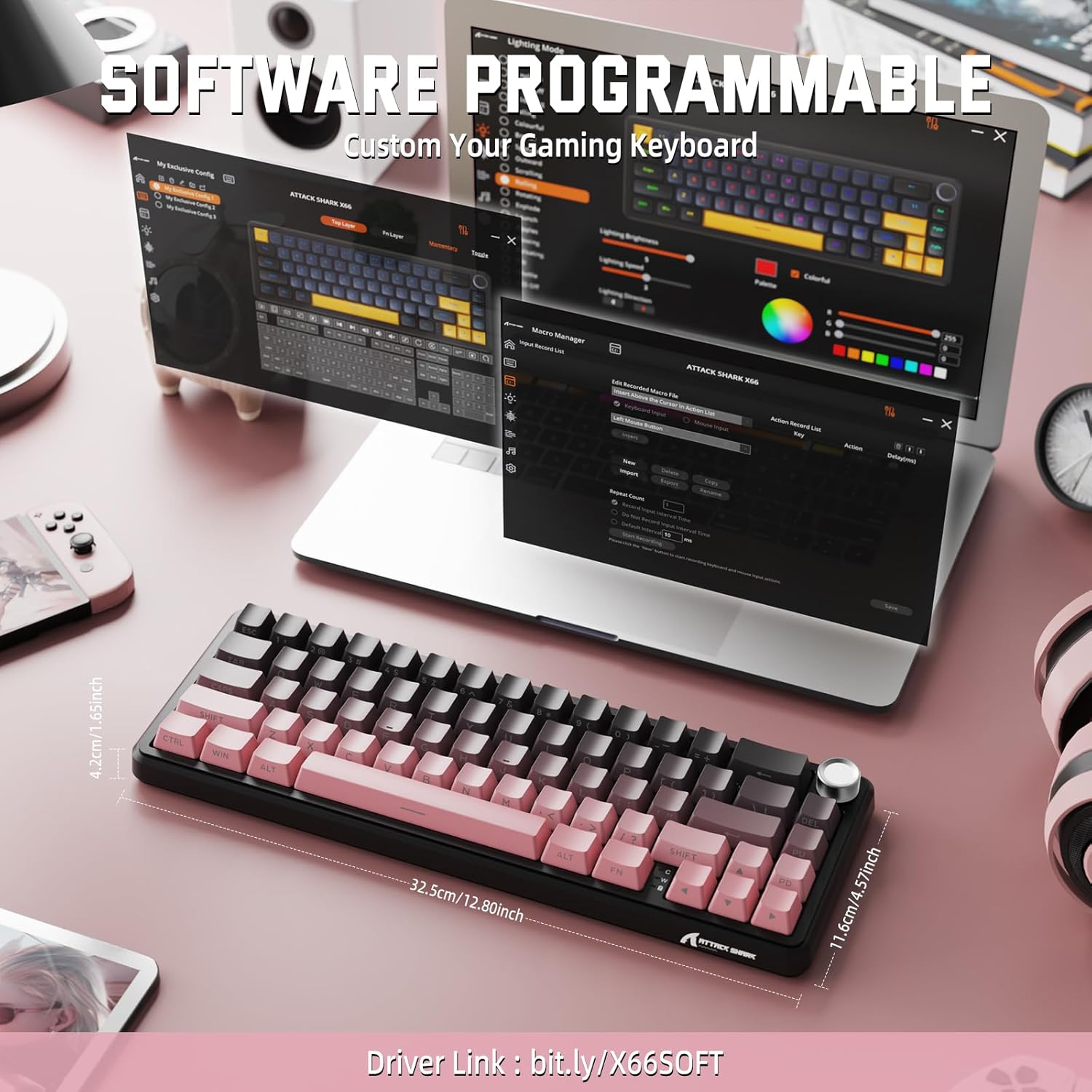
Image: Screenshot of the keyboard's software interface, showing options for custom key assignments, macro recording, and RGB lighting customization. A driver link is provided for download.
Download the official software from the manufacturer's webсајт. Софтвер вам омогућава да:
- Прилагодите RGB светлосне ефекте и боје.
- Program macros for complex key sequences.
- Пренамените појединачне тастере на различите функције.
- Креирајте и сачувајте више професионалацаfileза различите апликације или игре.
6. Одржавање
6.1 Чишћење тастатуре
- Искључите тастатуру из свих извора напајања пре чишћења.
- Користите меку крпу која не оставља длачицеampводом или благим раствором за чишћење да бисте обрисали капице тастера и кућиште.
- За прашину и остатке између тастера користите компримовани ваздух.
- Избегавајте употребу јаких хемикалија, абразива или растварача.
6.2 Hot Swappable Switch Replacement
The keyboard's hot-swappable design allows for easy switch replacement without soldering.

Image: Illustration showing how to remove and insert mechanical switches on the X66 keyboard, highlighting compatibility with 3-pin and 5-pin switches.
- Користите приложену алатку за извлачење капица тастера да бисте нежно уклонили жељену капицу тастера.
- Користите приложену алатку за извлачење прекидача да пажљиво ухватите горњу и доњу копчу прекидача и повуците га право нагоре.
- Поравнајте пинове новог прекидача са отворима на штампаној плочи. Уверите се да су пинови прави како бисте избегли савијање.
- Пажљиво притисните нови прекидач на место док не кликне чврсто.
- Поново причврстите поклопац тастера.
6.3 Управљање батеријом
The keyboard is equipped with a 3000mAh rechargeable battery.

Image: Visual guide on how to check the battery capacity using FN + Backspace, showing different battery level indicators (30%, 50%, 100%) with corresponding key light patterns.
- Пуњење: Connect the keyboard via the USB-C cable to a computer or a USB power adapter. The charging indicator will show the charging status.
- Провера нивоа батерије: Притисните ФН + Бацкспаце to display the current battery capacity via the key backlights.
- Трајање батерије: A full charge provides long-lasting usage, but actual duration varies based on RGB lighting usage and connection mode.
КСНУМКС. Решавање проблема
| Проблем | Могући узрок | Решење |
|---|---|---|
| Тастатура не реагује | Low battery, incorrect connection mode, driver issue. | Charge the keyboard. Ensure the mode switch is set correctly (2.4G, BT, or Wired). Reconnect the USB receiver/cable. Re-pair Bluetooth. Try a different USB port. |
| Блуетоотх веза је нестабилна | Interference, distance, low battery. | Ensure no strong interference sources nearby. Move closer to the device. Charge the keyboard. Re-pair the Bluetooth connection. |
| 2.4GHz wireless not connecting | Receiver not plugged in, incorrect mode, interference. | Ensure the 2.4GHz receiver is securely plugged in. Set the keyboard mode switch to '2.4G'. Try a different USB port for the receiver. |
| RGB осветљење не ради или је неисправно | Lighting settings, software issue. | Check lighting control key combinations (FN + lighting keys). Ensure software is installed and updated. Reset lighting settings via software. |
| Тастери се не региструју или се куцају двапут | Неисправан прекидач, остаци испод тастера. | Remove keycap and clean around the switch. If issue persists, replace the switch using the provided switch puller and spare switches. |
| Volume knob not functioning | Software conflict, physical obstruction. | Ensure no software is overriding media controls. Check for any physical debris around the knob. Restart the computer. |
8. Спецификације
| Феатуре | Детаљ |
|---|---|
| Број модела | Кс66 |
| Лаиоут | 66 Keys, 60% Compact QWERTY |
| Повезивање | Bluetooth (5.0), 2.4GHz Wireless, USB-C Wired |
| Прекидачи | Hot Swappable (3-pin/5-pin compatible), Pre-lubed Strawberry Mechanical Switches |
| Кеицапс | Side-printed Gradient PBT |
| Позадинско осветљење | RGB (16+ Million Colors, 9 preset colors, 18 effects) |
| Капацитет батерије | 3000мАх |
| Компатибилни уређаји | Windows, Mac OS, Laptop, PC, Tablet |
| Материјал | Полибутилен терефталат, поликарбонат |
| Тежина артикла | 2 фунти (приближно 0.91 кг) |
| Димензије пакета | 14.02 x 6.54 x 2.05 инча (приближно 35.6 x 16.6 x 5.2 цм) |
| Произвођач | АТТАЦК СХАРК |
9. Гаранција и подршка
For warranty information and technical support, please refer to the official ATTACK SHARK webсајт или контактирајте продавца. Сачувајте рачун за куповину за потребе гаранције.
Произвођач: АТТАЦК СХАРК
продавац: MAGIC-REFINER US
10. Видео о производу
Видео: Званична видео презентација производаasing the features and design of the ATTACK SHARK X66 Gasket Wireless Mechanical Keyboard, including its compact size, RGB lighting, hot-swappable switches, and multi-mode connectivity. The video highlights the keyboard's aesthetic appeal and functional aspects.