1. Увод
This manual provides detailed instructions for the installation, operation, and maintenance of your Xigmatek Aqua V AIR Arctic Mid-Tower PC Case. Please read this manual thoroughly before beginning any installation to ensure proper setup and safe operation. Retain this manual for future reference.
2. Безбедносне информације
Придржавајте се следећих безбедносних мера предострожности током инсталације и рада:
- Увек искључите напајање из зидне утичнице пре инсталирања или уклањања било којих компоненти.
- Wear an anti-static wrist strap to prevent electrostatic discharge (ESD) damage to sensitive components.
- Handle components carefully. Avoid touching pins or circuit boards directly.
- Ensure proper ventilation around the PC case to prevent overheating.
- Држите мале делове и алате даље од деце.
- Do not attempt to modify the case or its components, as this may void your warranty and pose safety risks.
3. Садржај пакета
Проверите да ли су све ставке присутне у пакету:
- Xigmatek Aqua V AIR Arctic Mid-Tower PC Case
- Комплет додатне опреме (шрафови, одстојници, кабловске везице)
- Кориснички приручник (овај документ)
If any items are missing or damaged, contact your retailer or Xigmatek support.
4. Производ је готовview
The Xigmatek Aqua V AIR Arctic is a mid-tower PC case designed for high-performance gaming configurations. It features tempered glass panels for component visibility and optimized airflow with pre-installed ARGB fans.

Слика 4.1: Напред лево view of the Xigmatek Aqua V AIR Arctic PC case, showcasing the tempered glass front and side panels, and the pre-installed ARGB fans.

Слика 4.2: Задња страна view of the PC case, showing the I/O shield cutout, expansion slots, and rear fan mount.
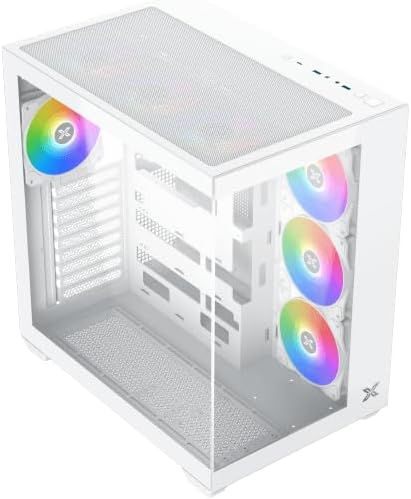
Слика 4.3: Угао одозго надоле view, highlighting the top mesh panel for additional cooling and the internal layout.
5. Подешавање и инсталација
Follow these steps to install your PC components into the Xigmatek Aqua V AIR Arctic case.
5.1. Припрема случаја
- Поставите кућиште на равну, стабилну површину.
- Remove the tempered glass side panel by unscrewing the thumb screws at the rear and carefully sliding it off. Place it on a soft, non-abrasive surface to prevent scratches.
- Remove the opposite steel side panel by unscrewing the thumb screws and sliding it off.
5.2. Инсталација матичне плоче
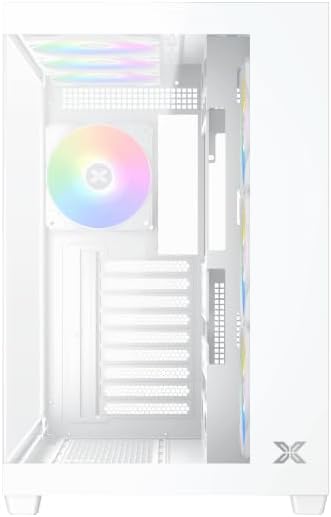
Слика 5.1: Унутрашњост view of the case, illustrating the motherboard mounting area and cable routing cutouts.
- Инсталирајте И/О штит у изрез на задњој страни кућишта.
- Align your motherboard with the pre-installed standoffs. Ensure the standoffs match your motherboard's form factor (ATX, Micro ATX).
- Secure the motherboard using the provided screws from the accessory kit. Do not overtighten.
5.3. Инсталација јединице за напајање (PSU)
- Locate the PSU mounting bracket at the bottom rear of the case.
- Уметните свој PSU у предвиђени одељак са задње стране кућишта.
- Secure the PSU to the case using the screws provided with your power supply.
5.4. Инсталација уређаја за складиштење података
The case supports multiple storage drives:
- 2.5" SSD дискови: Mount directly to the SSD trays located behind the motherboard tray. Secure with screws.
- 3.5" HDD-ови: Install into the drive cage located beneath the PSU shroud. Slide the drive into the tray and secure with screws.
5.5. Инсталација графичке картице (GPU) и картице за проширење
- Уклоните потребне поклопце слотова за проширење на задњој страни кућишта.
- Insert your graphics card or other expansion cards into the appropriate PCIe slots on the motherboard.
- Secure the cards with the provided screws.
5.6. Менаџмент каблова
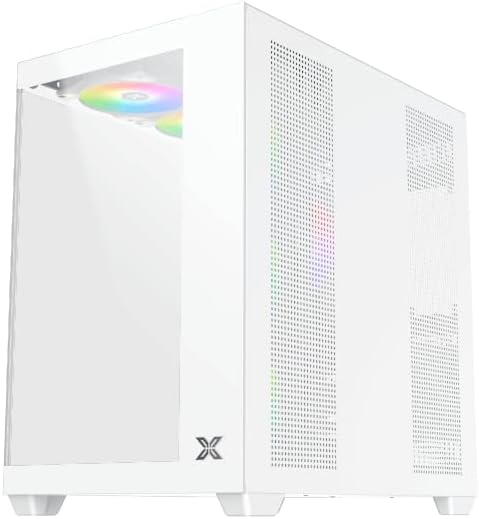
Слика 5.2: View behind the motherboard tray, illustrating the ample space and tie-down points for effective cable management.
Користите изрезе за усмеравање каблова и тачке за везивање иза лежишта матичне плоче да бисте организовали каблове. Ово побољшава проток ваздуха и естетику.
- Connect all necessary power cables from the PSU to the motherboard, GPU, and storage drives.
- Connect front panel cables (USB, audio, power/reset switches, LED indicators) to the corresponding headers on your motherboard. Refer to your motherboard manual for specific header locations.
- Connect the ARGB fan cables to the integrated fan controller or directly to your motherboard's ARGB headers if available.
5.7. Носач вентилатора и радијатора
The Xigmatek Aqua V AIR Arctic comes with 7 pre-installed 120mm ARGB fans. Additional cooling options are available:
- Фронт: Supports up to 3 x 120mm or 2 x 140mm fans / 240mm, 280mm, 360mm radiators.
- Врх: Supports up to 3 x 120mm or 2 x 140mm fans / 240mm, 280mm, 360mm radiators.
- позади: Supports 1 x 120mm fan.
- дно: Supports up to 3 x 120mm fans.
Ensure proper fan orientation for optimal airflow (intake at front/bottom, exhaust at rear/top).
6. Оперативни
Once all components are installed and cables are connected, replace the side panels. Connect your monitor, keyboard, mouse, and power cable. Press the power button on the front panel to start your system.
The pre-installed ARGB fans can be controlled via the integrated controller (if present) or through compatible motherboard software, allowing customization of lighting effects and fan speeds.
7. Одржавање
Редовно одржавање помаже у обезбеђивању оптималних перформанси и дугог века трајања компоненти вашег рачунара.
- Чишћење прашине: Periodically clean dust filters (top, front, bottom) to maintain good airflow. Use compressed air to remove dust from inside the case and components.
- Спољно чишћење: Обришите спољашње површине меком, дamp крпу. Избегавајте абразивна средства за чишћење или раствараче.
- Провера управљања кабловима: Повремено проверите усмеравање каблова како бисте били сигурни да ниједан кабл не омета вентилаторе или проток ваздуха.
КСНУМКС. Решавање проблема
Ако наиђете на проблеме, погледајте следеће уобичајене кораке за решавање проблема:
- Систем се не укључује:
- Уверите се да је напајање укључено и правилно прикључено на зидну утичницу.
- Verify all power cables (24-pin ATX, 8-pin CPU, PCIe, SATA) are securely connected.
- Check front panel power switch connections to the motherboard.
- Нема излаза на екран:
- Ensure the monitor cable is connected to the graphics card (not the motherboard I/O if using a dedicated GPU).
- Поново инсталирајте графичку картицу и РАМ модуле.
- Fans not spinning or ARGB not working:
- Check fan power connections to the motherboard or fan controller.
- Verify ARGB connections to the controller or motherboard headers.
- Ensure any fan control software or BIOS settings are correctly configured.
For more complex issues, consult your component manuals or contact Xigmatek technical support.
9. Спецификације
| Феатуре | Детаљ |
|---|---|
| Назив модела | Aqua V AIR Arctic |
| Број модела | ЕН45837 |
| Тип случаја | Мид-Товер |
| Компатибилност матичне плоче | АТКС, Мицро АТКС |
| Материјал | Steel Alloy, Tempered Glass |
| Боја | Бела |
| Унапред инсталирани вентилатори | 7 к 120 мм АРГБ вентилатора |
| Максимална дужина ГПУ-а | 410 мм |
| УСБ портови | 3 |
| Тежина | 8.8 килограма |
10. Гаранција и подршка
Xigmatek products are manufactured to high quality standards. For warranty information, please refer to the warranty card included with your product or visit the official Xigmatek website. For technical support or inquiries, please contact Xigmatek customer service through their official channels.
Службено Webсајт: ввв.кигматек.цом