
BYTECH BC-AU-BE-146-WT
User Manual: BYTECH TWS Earbuds
Model: BC-AU-BE-146-WT
Увод
Thank you for choosing the BYTECH TWS Earbuds. This manual provides essential information for setting up, operating, and maintaining your new wireless earbuds. Please read this manual carefully before use to ensure optimal performance and longevity of your device.
These earbuds feature advanced Bluetooth 5.3 technology and True Wireless Stereo (TWS) connectivity, offering a seamless audio experience.
Шта је у кутији?
- BYTECH TWS Earbuds (Left and Right)
- Футрола за бежично пуњење
- Кориснички приручник (овај документ)
- (Note: Charging cable may be included but not explicitly listed in product specifications. Please check packaging.)
Производ је завршенview

Слика 1: The BYTECH TWS Earbuds in their open wireless charging case. The case features a digital display indicating the battery level, and the earbuds are white with a sleek design. The case also shows subtle color gradients, possibly from an LED indicator.
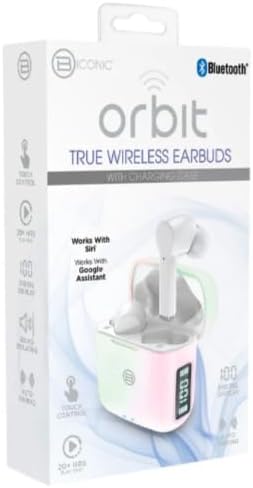
Слика 2: Retail packaging for the BYTECH Orbit True Wireless Earbuds. The box highlights key features such as Bluetooth connectivity, touch control, 20+ hours of play, auto pairing, and compatibility with Siri and Google Assistant.
Сетуп
1. Пуњење слушалица и футроле
Before first use, fully charge the earbuds and the charging case. Place the earbuds into the charging case. The case is equipped with wireless charging capability. Connect the charging case to a power source using a compatible charging cable (not explicitly listed as included, please check your package) or place it on a wireless charging pad.
- Дигитални дисплеј на кућишту за пуњење ће приказивати ниво напуњености батерије.
- Ensure the earbuds are properly seated in their slots for charging.
2. Упаривање са вашим уређајем (Bluetooth)
- Уверите се да су слушалице напуњене.
- Open the charging case. The earbuds will automatically enter pairing mode (indicated by flashing lights on the earbuds, if applicable).
- На паметном телефону или уређају који подржава Bluetooth, идите на подешавања Bluetooth-а.
- Укључите Блуетоотх.
- Тражи new devices. You should see "BYTECH BC-AU-BE-146-WT" or a similar name appear in the list of available devices.
- Select the device name to connect. Once connected, a voice prompt will confirm the successful pairing, and the indicator lights on the earbuds will stop flashing.
- For subsequent uses, the earbuds will automatically connect to the last paired device when taken out of the case, provided Bluetooth is enabled on your device.
These earbuds support True Wireless Stereo (TWS) connectivity, meaning both earbuds connect to each other wirelessly to provide a stereo sound experience.
Управљање слушалицама
The BYTECH TWS Earbuds feature intuitive touch controls for various functions. While specific touch gestures are not detailed in the product description, common functions typically include:
- Пусти/паузирај: Један додир на обе слушалице.
- Следећа нумера: Двапут додирните десну слушалицу.
- Претходни запис: Двапут додирните леву слушалицу.
- Одговори/заврши позив: Једном додирните било коју слушалицу током долазног позива.
- Одбиј позив: Притисните и држите било коју слушалицу 2 секунде током долазног позива.
- Активирање гласовног помоћника: Triple tap or press and hold (check specific model behavior) to activate Siri (for iOS devices) or Google Assistant (for Android devices).
- Контрола јачине звука: Some models allow volume adjustment via touch (e.g., tap and hold left for volume down, right for volume up). If not, adjust volume directly on your connected device.
Please refer to the quick start guide included in your packaging for precise touch control instructions specific to your BC-AU-BE-146-WT model.
Одржавање
Правилно одржавање осигурава дуготрајност и оптималне перформансе ваших слушалица.
- Чишћење: Regularly clean the earbuds and charging case with a soft, dry, lint-free cloth. Do not use abrasive cleaners, alcohol, or chemical solvents. Gently remove any earwax or debris from the earbud tips and speaker mesh using a small, soft brush or cotton swab.
- Складиштење: Када се не користе, увек чувајте слушалице у њиховој футроли за пуњење како бисте их заштитили од прашине, прљавштине и физичких оштећења. Чувајте футролу на хладном и сувом месту, даље од директне сунчеве светлости и екстремних температура.
- Одржавање батерије: Да бисте сачували век трајања батерије, избегавајте често потпуно пражњење слушалица и футроле. Редовно их пуните, чак и ако се не користе дуже време.
- Отпорност на воду: Ове слушалице нису означене као водоотпорне. Избегавајте излагање води, зноју и високој влажности да бисте спречили оштећења.
Решавање проблема
If you encounter issues with your BYTECH TWS Earbuds, try the following solutions:
- Слушалице се не упарују са уређајем:
- Уверите се да су слушалице напуњене и ван кућишта.
- Искључите и укључите Блутут на свом уређају.
- Forget the device ("BYTECH BC-AU-BE-146-WT") from your device's Bluetooth settings and try pairing again.
- Уверите се да ниједан други уређај није повезан са слушалицама.
- Само једна слушалица ради:
- Вратите обе слушалице у кућиште за пуњење, затворите поклопац, сачекајте неколико секунди, а затим их поново извадите.
- Уверите се да су обе слушалице напуњене.
- Try resetting the earbuds (refer to quick start guide for specific reset procedure).
- Нема звука или је јачина звука ниска:
- Проверите ниво јачине звука и на повезаном уређају и на слушалицама.
- Уверите се да су слушалице правилно постављене у ушима.
- Очистите мрежицу звучника слушалица од свих остатака.
- Проблеми са пуњењем:
- Ensure the charging cable (if used) is securely connected and functional.
- If using wireless charging, ensure the case is correctly placed on the charging pad.
- Проверите да ли има остатака у порту за пуњење на кућишту.
Ако проблеми и даље постоје, обратите се корисничкој подршци.
Спецификације
| Феатуре | Спецификација |
|---|---|
| Бранд | БИТЕЦХ |
| Назив модела | BC-AU-BE-146-WT |
| Број модела | BC-AU-BE-146-WT |
| Технологија повезивања | Блуетоотх 5.3 |
| Форм Фацтор | In-Ear (Intraurales) |
| Боја | Бела |
| Укључене компоненте | Футрола за бежично пуњење |
| Произвођач | Biconic |
| ASIN | B0DPRCBT76 |
| Први доступан датум | 6. децембра 2024. године |
Гаранција и подршка
For warranty information and customer support, please refer to the documentation included with your product packaging or visit the official BYTECH webсајт. Услови гаранције могу се разликовати у зависности од региона и продавца.
Сачувајте доказ о куповини за евентуалне рекламације у вези са гаранцијом.
Ask a question about this manual
Ask about setup, troubleshooting, compatibility, parts, safety, or missing instructions. Manuals+ will review the question and use this page’s manual context to help answer it.