
1. Увод
Welcome to the user manual for your Nothing Phone (3a). This guide provides detailed instructions on setting up, operating, maintaining, and troubleshooting your device to ensure optimal performance and user experience.

Figure 1.1: The Nothing Phone (3a) showcasing its unique transparent back design and Glyph Interface.
2. Подешавање
2.1. Распакивање и први преглед
Upon receiving your Nothing Phone (3a), carefully open the packaging and inspect the contents. Ensure all items listed in the "What's in the Box" section are present and undamaged.
- Nothing Phone (3a) device
- УСБ-Ц кабл
- Избацивач СИМ лежишта
- Pre-applied Screen Protector
2.2. Уметање СИМ картице
- Пронађите лежиште за СИМ картицу са стране телефона.
- Уметните алат за избацивање лежишта СИМ картице у мали отвор поред лежишта и чврсто притисните док лежиште не искочи.
- Ставите своју Nano-SIM картицу (картице) у лежиште са златним контактима окренутим надоле.
- Пажљиво вратите лежиште за СИМ картицу у телефон док не кликне на своје место.
2.3. Почетно укључивање и чаробњак за подешавање
Press and hold the power button on the right side of the phone until the Nothing logo appears. Follow the on-screen instructions to complete the initial setup, including language selection, Wi-Fi connection, Google account sign-in, and data transfer.
3. Operating Your Nothing Phone (3a)
3.1. Nothing OS 3.1 Overview
The Nothing Phone (3a) runs on Nothing OS 3.1, an intuitive and customizable Android-based operating system. It features functional adaptations for an optimized user experience.

Figure 3.1: Visual representation of Nothing OS 3.1's customizable interface.
3.2. Систем камера
The Nothing Phone (3a) is equipped with an advanced camera system designed to capture high-quality photos and videos.
- Главна камера: 50-MP OIS (Optical Image Stabilization) main camera for detailed and stable shots.
- Телефото камера: 50-MP telephoto lens with up to 30x Ultra Zoom for capturing distant subjects.
- Ултраширока камера: 8-MP ultra-wide-angle lens for expansive landscape and group shots.
- Предња камера: 32-MP front camera for sharp selfies and video calls.

Figure 3.2: Detailed breakdown of the Phone (3a)'s Elite Camera System components.

Figure 3.3: Illustration of the telephoto zoom lens technology and its capability to capture distant scenes.
3.3. Essential Key and Essential Space
The Essential Key is a new physical button on the side of your device. A short press captures screen content, while a long press allows you to record voice notes, ideas, and inspirations. The Essential Space organizes your captures and provides personalized suggestions.

Figure 3.4: The Essential Key and its integration with the Essential Space for content organization.
3.4. Глипх Интерфаце
The Glyph Interface on the back of the phone provides unique LED light and sound notifications for calls, messages, and other alerts, offering a distinct visual and auditory experience.

Figure 3.5: The Glyph Interface on the rear of the Nothing Phone (3a), demonstrating its illuminated patterns.
4. Одржавање
4.1. Управљање батеријом
The Nothing Phone (3a) features a 5,000 mAh battery with 50W fast charging. To maximize battery lifespan:
- Избегавајте екстремне температуре.
- Користите приложени USB-C кабл за пуњење.
- Избегавајте често потпуно пражњење батерије.

Figure 4.1: Visual representation of the 5,000 mAh battery capacity.
4.2. Чишћење уређаја
Use a soft, lint-free cloth to clean the screen and back of your phone. For stubborn smudges, slightly dampИсперите крпу водом. Избегавајте употребу јаких хемикалија или абразивних материјала.
4.3. Ажурирања софтвера
Редовно проверавајте и инсталирајте ажурирања софтвера како бисте били сигурни да ваш уређај има најновије функције, безбедносне закрпе и побољшања перформанси. Идите до Подешавања > Систем > Ажурирање софтвера да проверите ажурирања.
КСНУМКС. Решавање проблема
5.1. Уобичајени проблеми и решења
| Иссуе | Могући узрок | Решење |
|---|---|---|
| Телефон се не укључује | Слаба батерија, пад софтвера | Charge the phone for at least 30 minutes. Perform a forced restart by holding the power button for 10-15 seconds. |
| Апликације се руше или замрзавају | App bug, insufficient RAM, outdated software | Clear app cache/data. Close background apps. Update the app or phone software. |
| Лош век трајања батерије | High screen brightness, background apps, network issues | Adjust screen brightness. Close unused apps. Disable unnecessary features like GPS/Bluetooth. |
5.2. Фацтори Ресет
If issues persist, a factory reset may be necessary. This will erase all data on your phone, so ensure you have backed up important information. Navigate to Подешавања > Систем > Опције ресетовања > Обриши све податке (ресетовање на фабричка подешавања).
6. Спецификације
Key technical specifications for the Nothing Phone (3a) (Model: A059).
| Феатуре | Детаљ |
|---|---|
| Назив модела | Ништа Телефон (3а) |
| Број модела | А059 |
| Оперативни систем | Android 15, Nothing OS 3.1 |
| Дисплаи | 6.77-inch Flexible FHD+ AMOLED, 120 Hz, 1.07 billion colors |
| Процесор | Snapdragon 7s Gen 3 (2.5 GHz, 8-core) |
| РАМ | 12 GB (up to 20GB RAM Boost) |
| Складиштење | 256 ГБ |
| Главна камера | 50-MP OIS |
| Телефото камера | 50-MP (30x Ultra Zoom) |
| Ултраширока камера | 8-МП |
| Предња камера | 32-МП |
| Батерија | 5,000 mAh (50W Fast Charging) |
| Димензије | 7.75 к 0.83 к 16.35 цм |
| Тежина | 201 грама |
| Отпорност на воду/прашину | ИП64 |
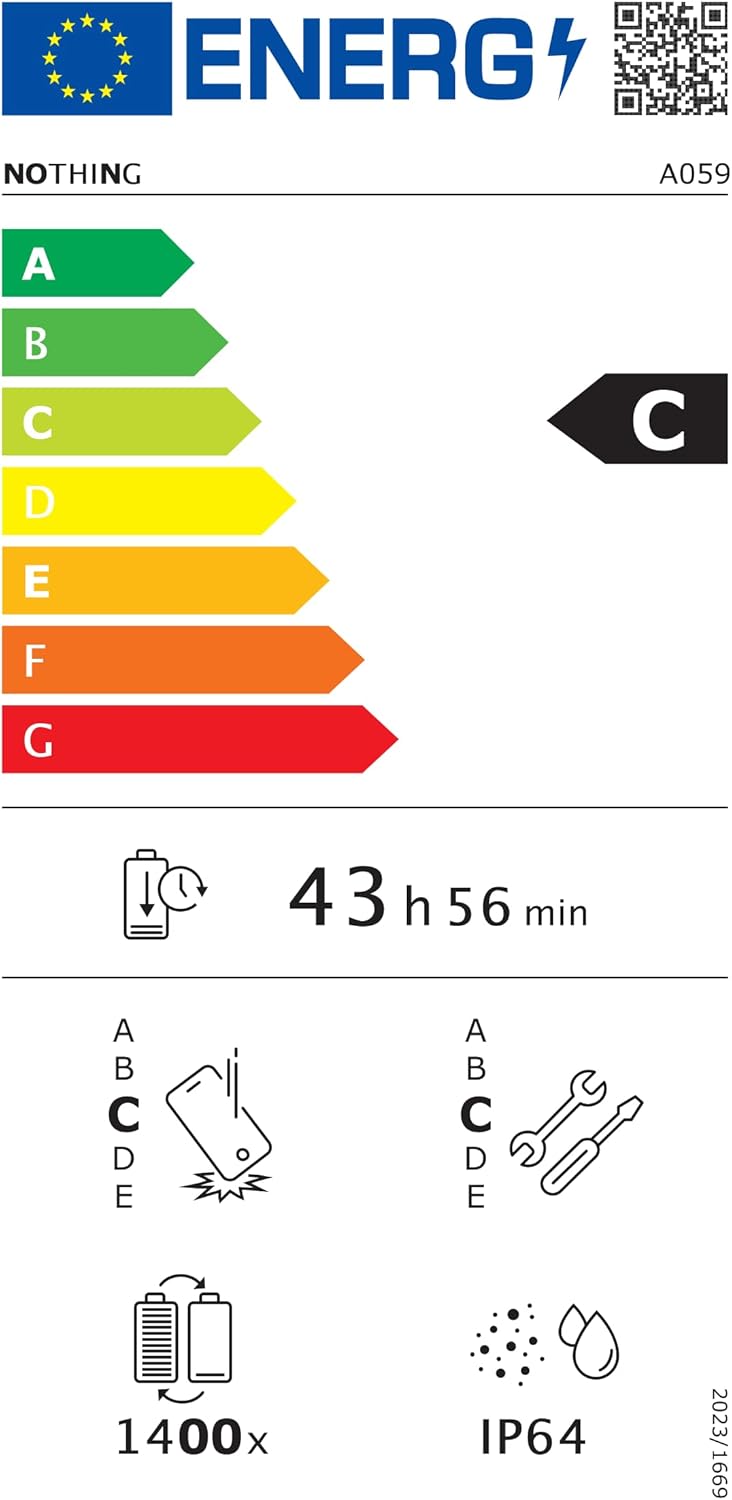
Figure 6.1: EU Energy Label for Nothing Phone (3a), indicating energy efficiency and IP64 rating. More details available at епрел.ец.еуропа.еу/кр/2179652.
7. Гаранција и подршка
Your Nothing Phone (3a) comes with a manufacturer's warranty. Please refer to the warranty card included in your product packaging for specific terms and conditions.
For further assistance, technical support, or warranty claims, please visit the official Nothing support webсајту или контактирајте њихову корисничку службу. Више информација можете пронаћи на Nothing Store on Amazon.