
Goldtouch GTC-ELITE
Goldtouch Elite Numeric Keypad User Manual
Model: GTC-ELITE
Производ је завршенview
The Goldtouch Elite Numeric Keypad is a compact, wired numeric keypad designed to enhance data entry efficiency for both PC and Mac users. It features industry-leading Cherry MX Red mechanical keys for a tactile and responsive typing experience. Its plug-and-play USB connectivity ensures easy setup and immediate use.

Слика 1: Одозго надоле view of the Goldtouch Elite Numeric Keypad, showcasinг његов компактан дизајн и распоред тастера.
Сетуп
The Goldtouch Elite Numeric Keypad is designed for simple plug-and-play installation. No additional drivers are typically required for basic functionality on compatible operating systems.
Повезивање тастатуре
- Locate the USB-A to USB-C cable included with your keypad.
- Connect the USB-C end of the cable to the USB-C port on the Goldtouch Elite Numeric Keypad.
- Повежите USB-A крај кабла са доступним USB-A портом на рачунару (PC или Mac).
- For Mac users, ensure the switch on the side of the keypad is set to 'MAC'. For PC users, set it to 'PC'.
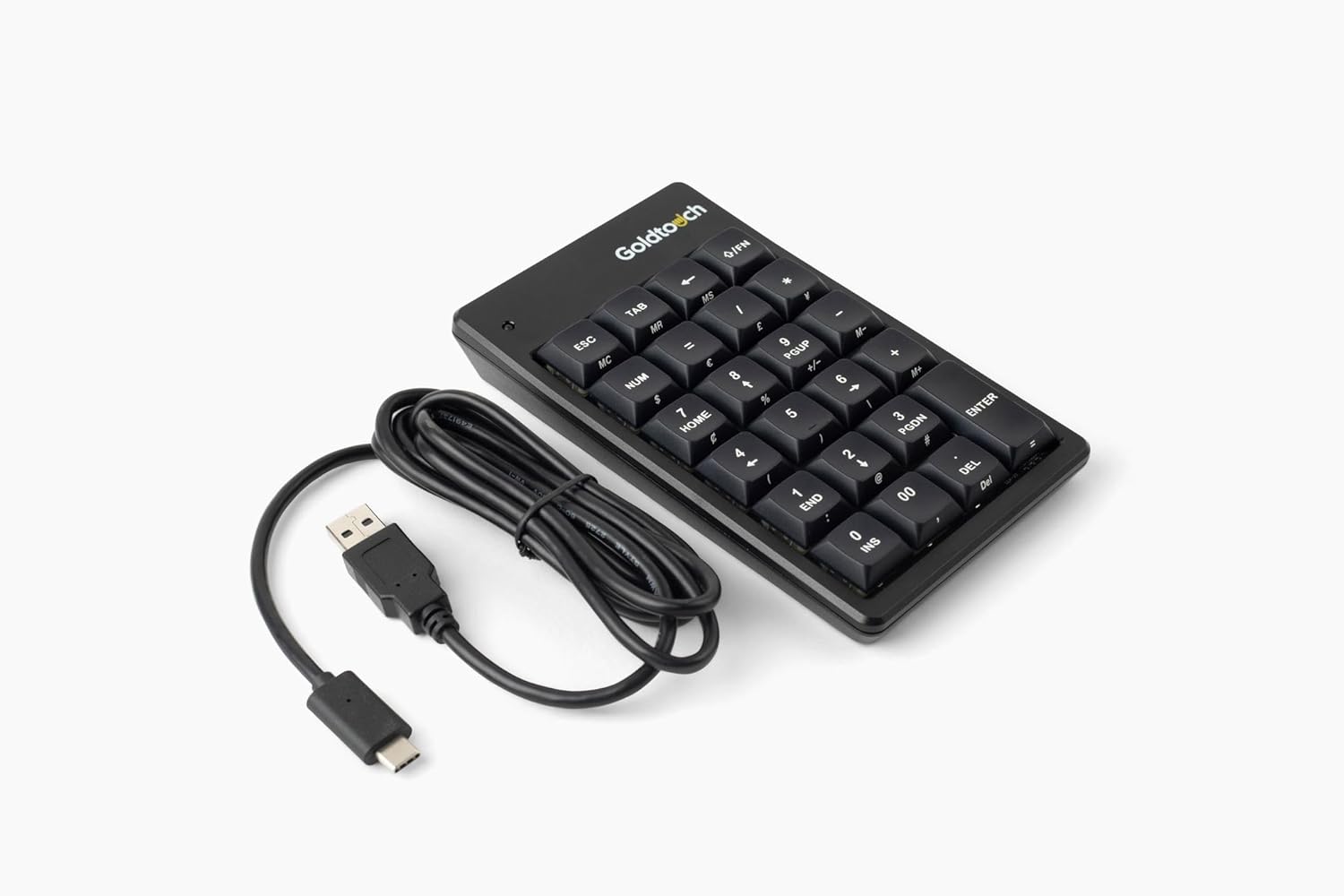
Figure 2: The Goldtouch Elite Numeric Keypad connected via its USB-A to USB-C cable.
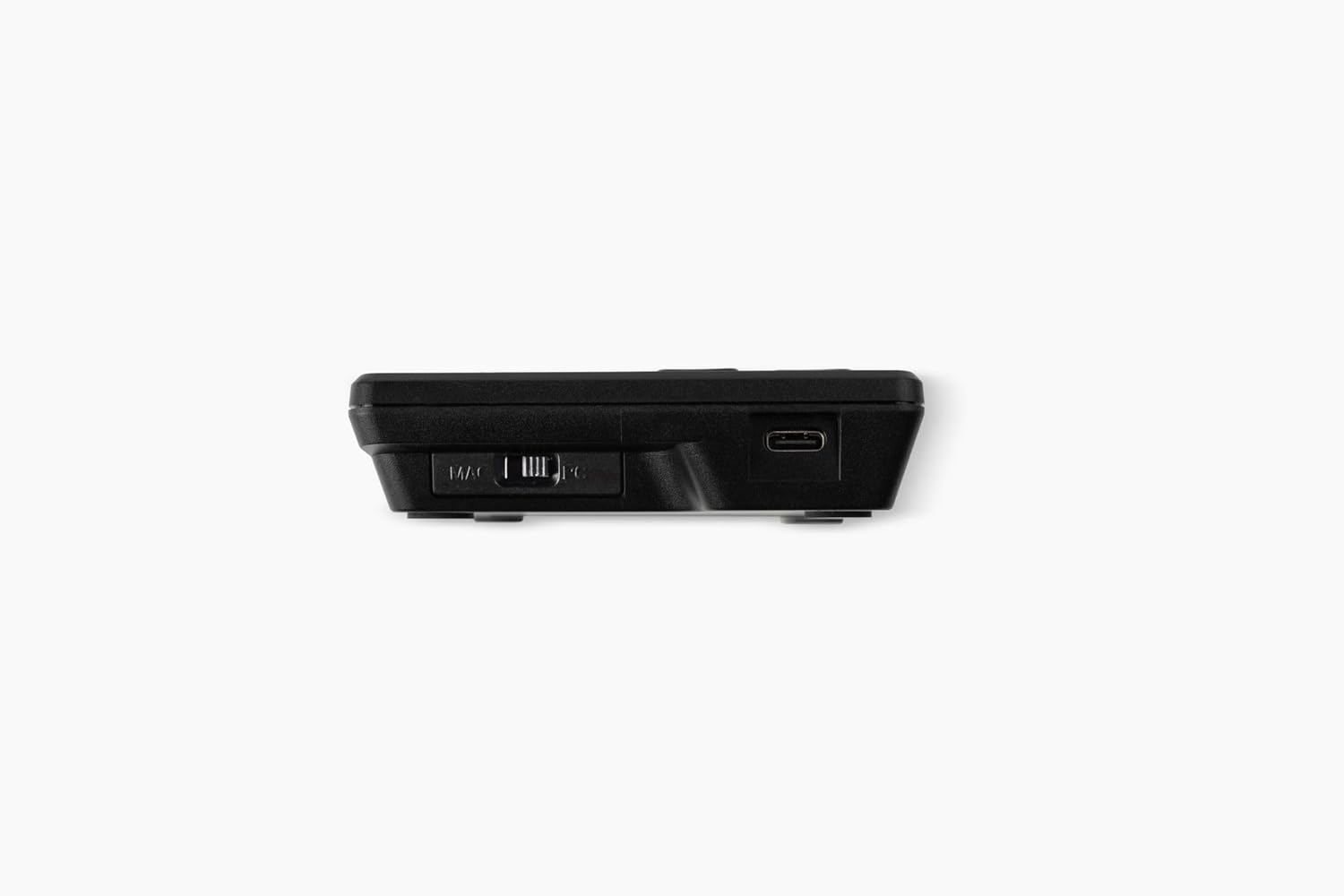
Слика 3: Страна view illustrating the Mac/PC compatibility switch and the USB-C port for connection.
Your operating system should automatically detect the keypad, and it will be ready for use.
Упутство за употребу
The Goldtouch Elite Numeric Keypad functions as a standard numeric input device, compatible with most applications requiring numerical data entry.
Основне функције тастатуре
- Нумерички унос: Користите нумеричке тастере (0-9) за унос нумеричких података.
- Аритметичке операције: Utilize the +, -, *, / keys for calculations.
- Типка на тастатури: Functions as a standard Enter key for confirming input or moving to the next field.
- Нум Лоцк: The 'NUM' key toggles the numeric lock function, enabling or disabling the numeric input. An indicator light on the keypad will show its status.
- Специјални кључеви: Keys like 'ESC', 'TAB', 'DEL', 'INS', 'HOME', 'END', 'PGUP', 'PGDN' provide additional functionality commonly found on full-size keyboards.
Компатибилност са рачунаром и Mac рачунарима
The keypad includes a physical switch to optimize its functionality for either PC or Mac operating systems. Ensure this switch is set correctly for your system to ensure proper key mapping and performance.

Figure 4: The Goldtouch Elite Numeric Keypad positioned for use alongside an ergonomic keyboard, demonstrating its integration into a workspace.
Одржавање
Proper maintenance will extend the lifespan of your Goldtouch Elite Numeric Keypad.
- Чишћење: Користите меку крпу која не оставља длачицеampened with water or a mild cleaning solution to wipe the surface of the keypad. Avoid harsh chemicals, abrasive cleaners, or excessive moisture.
- Уклањање прашине: Користите компримовани ваздух да уклоните прашину и остатке између тастера.
- Складиштење: When not in use for extended periods, store the keypad in a clean, dry environment away from extreme temperatures.
- Нега каблова: Avoid sharp bends or kinks in the USB cable to prevent internal damage.
Решавање проблема
If you encounter issues with your Goldtouch Elite Numeric Keypad, refer to the following common troubleshooting steps:
| Проблем | Могући узрок | Решење |
|---|---|---|
| Keypad not recognized by computer. | Loose USB connection, incorrect Mac/PC switch setting, faulty USB port. |
|
| Тастери не реагују или куцају погрешне знакове. | Num Lock is off, software conflict, debris under keys. |
|
| Keypad disconnects intermittently. | Loose cable, power management settings, faulty cable. |
|
Спецификације
Detailed technical specifications for the Goldtouch Elite Numeric Keypad:
| Број модела | GTC-ELITE |
| Димензије производа | 5.75" Д x 3.5" Ш x 1" В (14.6 цм x 8.9 цм x 2.5 цм) |
| Тежина артикла | 8 унце (226.8 грама) |
| Технологија повезивања | Wired USB-A (via USB-C port on keypad) |
| Тип кључа | Cherry MX Red Mechanical Keys |
| Компатибилни уређаји | Laptop, PC (Windows), Mac |
| Боја | Црно |
| Материјал | Пластика |
| Укључене компоненте | УСБ-А на УСБ-Ц кабл |

Figure 5: Dimensional diagram of the Goldtouch Elite Numeric Keypad, including width, depth, height, weight, and cable length.
Гаранција и подршка
Goldtouch products are designed for durability and performance. For information regarding product warranty, please refer to the warranty card included with your purchase or visit the official Goldtouch webсајту.
For technical support, troubleshooting assistance beyond this manual, or to inquire about replacement parts, please contact Goldtouch customer service through their official support channels. Contact information can typically be found on the Goldtouch webсајту или на паковању производа.
Онлине ресурси:
Ask a question about this manual
Ask about setup, troubleshooting, compatibility, parts, safety, or missing instructions. Manuals+ will review the question and use this page’s manual context to help answer it.