
Увод
The Kipcush K8 White Noise Machine is designed to create a calming environment for improved sleep and relaxation. It features a variety of soothing sounds, a soft night light, and customizable settings to suit individual preferences. This manual provides detailed instructions for the safe and effective use of your device.
Безбедносне информације
- Do not use near water to prevent electric shock.
- Избегавајте високе нивое јачине звука да бисте заштитили слух.
- Није намењен за употребу од стране деце без надзора одраслих.
- Use only with a compatible 5V power adapter and the provided USB-A to coaxial connector cable.
Садржај пакета
Молимо вас да проверите пакет за следеће ставке:
- Kipcush K8 White Noise Machine
- USB-A to Coaxial Connector Cable
- Упутство за употребу
Напомена: A power adapter is not included and must be supplied by the user (5V recommended).
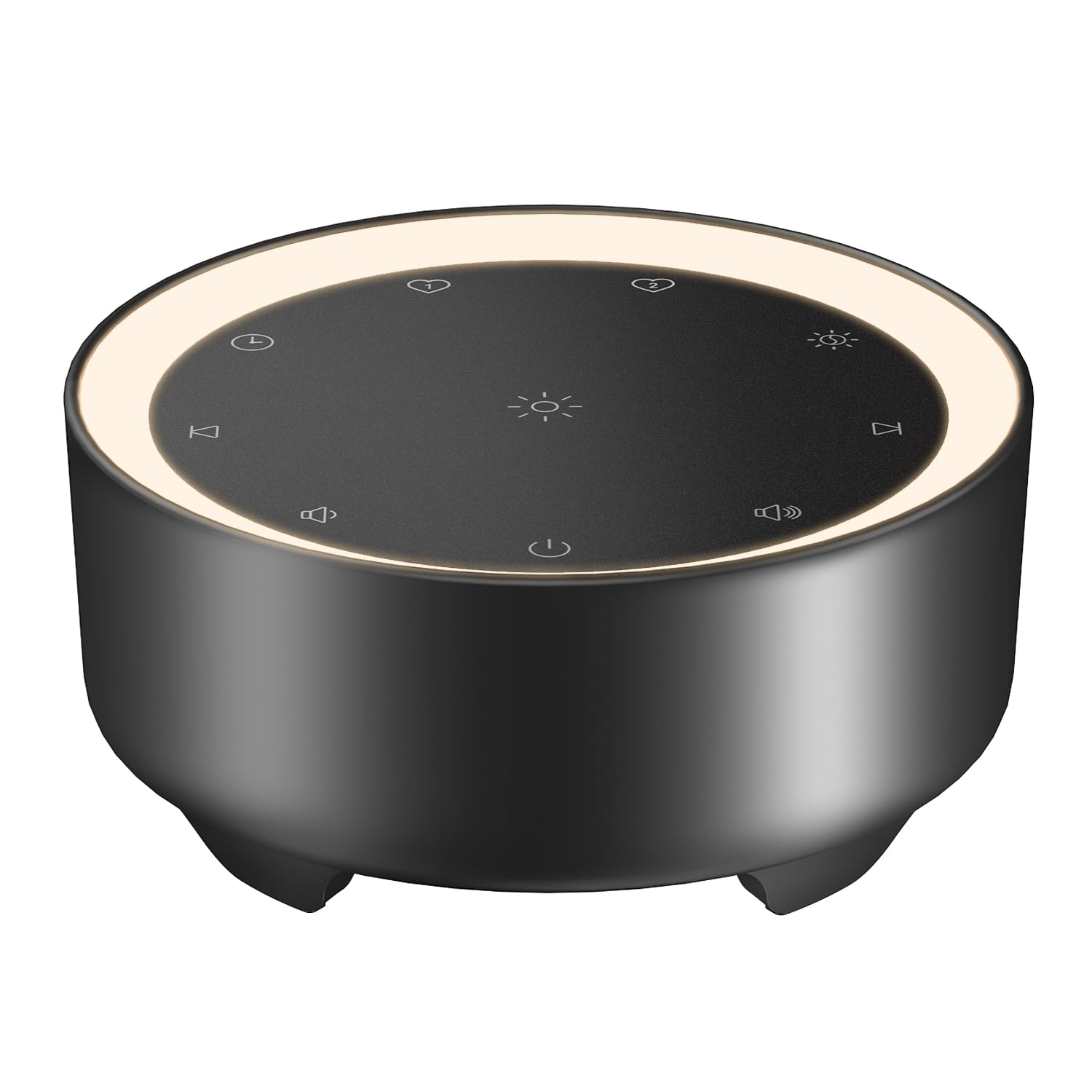
Image: Kipcush K8 White Noise Machine with its USB cable, illustrating the compact design and power connection.
Карактеристике производа
- 20 умирујућих звукова: Includes white noise, fan sounds, nature recordings, and lullabies.
- 2 Customizable Shortcuts: Save your favorite sounds for instant playback.
- Soft Glow Night Light: Three adjustable brightness levels for a calm environment.
- Више опција тајмера: 15, 30, 60, 90, 120 minutes, or continuous 8-hour playback.
- Функција меморије: Automatically saves last sound, volume, and light settings.
- УСБ напајање: Flexible use with power banks, laptops, wall chargers, or car USB ports.
- Компактан и преносив: Small size for easy travel and placement.

Image: A visual representation of the 20 distinct sound options, including various white noises, fan sounds, nature sounds like rain and ocean, and lullabies.

Image: The device highlighting its timer functions, offering various durations from 15 minutes to 8 hours for automatic shut-off.
Сетуп
- Прикључак за напајање: Connect the provided USB-A to coaxial connector cable to the device. Plug the USB-A end into a compatible 5V power adapter (not included), power bank, laptop, or car USB port.
- Пласман: Place the device on a stable, flat surface away from water or excessive heat.
Video: An official Kipcush video demonstrating the white noise sound machine in various usage scenarios, including setup and operation.
Упутство за употребу

Слика: Детаљна view of the touch-sensitive control panel with labels for each function.
- Укључивање/искључивање: Додирните Дугме за напајање (circle with vertical line) to turn the device on or off.
- Избор звука: Додирните Нект Трацк (right arrow) or Превиоус Трацк (left arrow) buttons to cycle through the 20 available sounds.
- Подешавање јачине звука: Додирните Волуме + (speaker with plus) or Волуме - (speaker with minus) buttons to adjust the sound level.
- Контрола ноћног светла: Додирните Нигхт Лигхт (sun icon) button to turn the light on/off and cycle through three brightness levels.
- Подешавање тајмера: Додирните Тајмер (clock icon) button to select a desired duration (15, 30, 60, 90, 120 minutes, or 8 hours continuous play). The device will automatically turn off after the selected time.
- Customizable Shortcuts (Favorite Sounds):
- To save a favorite sound: While a sound is playing, long-press either Фаворит 1 (heart icon 1) or Фаворит 2 (heart icon 2) button until you hear a confirmation tone.
- To play a favorite sound: Tap the corresponding Фаворит 1 or Фаворит 2 button for instant playback.
- Функција меморије: The device automatically remembers your last sound, volume, and light settings when powered off and will resume these settings upon restart.

Слика: Приказ уређајаasing the unique Favorite Button feature for quick sound recall.
Одржавање
- Чишћење: Обришите уређај меком, сувом крпом. Не користите течна средства за чишћење или абразивне материјале.
- Складиштење: Чувајте уређај на хладном и сувом месту када се не користи.
- Нега каблова: Avoid bending or twisting the power cable excessively to prevent damage.
Решавање проблема
| Проблем | Могући узрок | Решење |
|---|---|---|
| Уређај се не укључује. | Нема струје или је веза лабава. | Ensure the USB cable is securely connected to both the device and a working 5V power source. Try a different power adapter or USB port. |
| Нема звука. | Јачина звука је прениска или искључена. | Increase the volume using the Volume + button. Ensure a sound is selected. |
| Ноћно светло не ради. | Light is off or at lowest setting. | Tap the Night Light button to cycle through brightness levels or turn it on. |
| Уређај се неочекивано искључује. | Timer activated. | Check the timer setting. If continuous play is desired, ensure the 8-hour option is selected or no timer is set. |
Спецификације
- Назив модела: K8
- Бренд: Кипцусх
- Извор напајања: Corded Electric (USB-powered, 5V)
- Материјал: Пластика
- Боја: Црна (према варијанти производа)
- Димензије пакета: 4.37 к 4.29 к 2.99 инча
- Тежина артикла: 9.14 унци
- Опције звука: 20 (White Noise, Fan, Nature, Lullabies)
- Опције тајмера: 15, 30, 60, 90, 120 minutes, 8 hours continuous
- Ноћно светло: 3 подесива нивоа осветљености
Гаранција и подршка
The Kipcush K8 White Noise Machine comes with a 24-месечна гаранција from the date of purchase. This warranty covers manufacturing defects and ensures long-term reliability.
For professional customer support, please contact Kipcush directly through their official channels. Refer to the product packaging or the Kipcush webсајт за контакт информације.