
SUVCON M02
SUVCON M02 4K Dash Cam User Manual
Модел: М02
Увод
Thank you for choosing the SUVCON M02 4K Dash Cam. This manual provides detailed instructions for the installation, operation, and maintenance of your dash cam. Please read this manual thoroughly before using the product to ensure proper functionality and safety.
Важне информације о безбедности
- Не користите камеру у аутомобилу током вожње. Подешавања вршите само када је возило безбедно паркирано.
- Уверите се да је камера на аутомобилу безбедно постављена и да не омета возачев поглед view или активирање ваздушног јастука.
- Use only the original power cable provided to prevent damage to the device or vehicle.
- Avoid exposing the dash cam to extreme temperatures, direct sunlight for prolonged periods, or excessive moisture.
- Не покушавајте сами да растављате или поправљате камеру у аутомобилу. За помоћ контактирајте корисничку подршку.
- Format the memory card regularly to ensure optimal performance and prevent data corruption.
Садржај пакета
Молимо вас да проверите пакет за следеће ставке:
- SUVCON M02 4K Dash Cam (Front Camera)
- Rear Camera (if included in your package)
- Car Charger with Power Cable
- Носач усисне чаше
- Цабле Цлипс
- Упутство за употребу
- 32GB MicroSD Card (if included in your package)
Производ је завршенview
Familiarize yourself with the components of your SUVCON M02 Dash Cam.
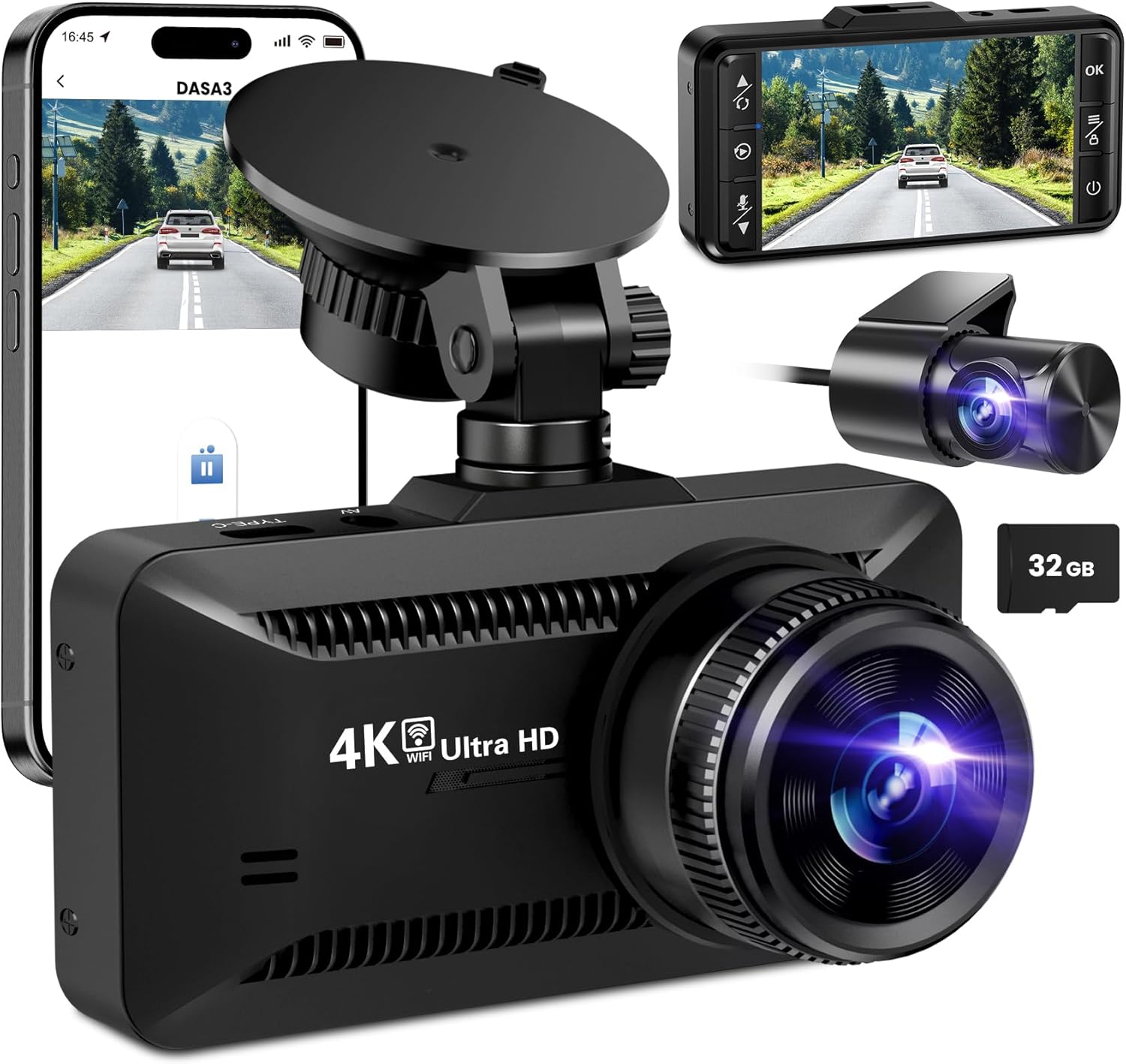
слика: The SUVCON M02 4K Dash Cam is shown with its main front camera unit, a separate rear camera, a smartphone displaying the dash cam's app interface, and a 32GB microSD card. The main unit features a prominent lens, a display screen on the back (not fully visible in this angle), and a suction cup mount. The rear camera is compact with its own lens. The smartphone screen shows a live view from the dash cam, indicating Wi-Fi connectivity.
Предња камера
- Објектив: Captures 4K video.
- Екран: За viewинг ливе фооtagе, репродукција и навигација кроз мени.
- Контролна дугмад: Power, Menu, Up, Down, OK.
- Утор за мицроСД картицу: За уметање меморијске картице.
- USB Power Port (Type-C): За повезивање ауто пуњача.
- Rear Camera Port: За повезивање кабла задње камере.
- Звучник/микрофон: За снимање и репродукцију звука.
Rear Camera Unit
- Објектив: Captures rear view видео.
- Кабл: Connects to the main dash cam unit.
Подешавање и инсталација
1. Уметање МицроСД картице
- Уверите се да је камера у аутомобилу искључена.
- Пронађите слот за MicroSD картицу са стране камере за аутомобил.
- Insert the MicroSD card with the gold contacts facing the back of the dash cam until it clicks into place.
- To remove, gently push the card in until it clicks, then release.
Напомена: A Class 10 or higher MicroSD card (up to 128GB recommended) is required. Format the card in the dash cam's settings before first use.
2. Монтажа камере
- Очистите подручје ветробранског стакла где намеравате да монтирате камеру за аутомобил.
- Причврстите носач вакуумске чашице на камеру на инструмент табли.
- Press the suction cup firmly against the windshield, ideally behind the rearview огледало и окрените ручицу да бисте га осигурали.
- Adjust the angle of the dash cam lens to ensure it captures the road ahead clearly, avoiding obstruction from the hood or dashboard.
3. Повезивање напајања
- Connect the small end of the car charger cable to the USB Type-C port on the dash cam.
- Plug the larger end of the car charger into your vehicle's 12V power outlet (cigarette lighter socket).
- Route the power cable neatly along the edge of the windshield and dashboard using the provided cable clips to avoid obstructing your view.
4. Инсталирање задње камере (опционо)
- Connect the rear camera cable to the dedicated rear camera port on the main dash cam unit.
- Route the cable from the front unit to the rear of the vehicle, typically along the headliner and side panels.
- Mount the rear camera on the rear windshield using its adhesive or screws, ensuring a clear view пута иза.
- Connect the red wire of the rear camera cable to the vehicle's reverse light positive wire if you wish to enable parking assist lines when reversing.
Упутство за употребу
Укључивање/искључивање
- аутоматски: The dash cam will automatically power on and begin recording when connected to power and the vehicle engine starts. It will power off automatically when the engine is turned off.
- Упутство: Press and hold the Power button to manually turn the dash cam on or off.
Режими снимања
- Лооп Рецординг: The dash cam records video in continuous loops (e.g., 1, 3, or 5 minutes). When the memory card is full, the oldest unlocked fileс ће бити замењено.
- Г-сензор (снимање у хитним случајевима): Уграђени Г-сензор детектује изненадне ударце или сударе. Када се активира, тренутни видео сегмент се аутоматски закључава и чува како би се спречило његово пребрисавање снимањем у петљи.
- Паркинг монитор: With a hardwire kit (sold separately) or continuous power, the dash cam can monitor your vehicle while parked. If a vibration or impact is detected, it will automatically record a short video.
Навигација кроз мени
Use the control buttons on the dash cam to navigate the menu:
- Дугме менија: Press to enter the settings menu. Press again to switch between video settings, system settings, and playback mode.
- Дугмад за горе/доле: Крећите се кроз опције менија.
- Дугме ОК: Confirm selection or start/stop recording in recording mode.
Wi-Fi повезивање и коришћење апликација
The SUVCON M02 features Wi-Fi connectivity for easy access to recordings and settings via a smartphone app.
- Download the recommended app (e.g., "DASA3" or similar, check packaging for exact app name) from your smartphone's app store.
- On the dash cam, enable Wi-Fi from the system settings. The dash cam's Wi-Fi SSID and password will be displayed on the screen.
- On your smartphone, go to Wi-Fi settings and connect to the dash cam's Wi-Fi network using the provided password.
- Open the app. You can now view ливе фооtage, download recorded videos, change settings, and format the SD card directly from your phone.
Репродукција
- На камери у аутомобилу: In recording mode, press the Menu button twice to enter playback mode. Use Up/Down buttons to select files and OK to play.
- Преко апликације: Connect your smartphone via Wi-Fi and use the app's playback feature to view и преузимање видео записа.
- On Computer: Remove the MicroSD card from the dash cam and insert it into a computer's card reader. Videos can be played using standard media players.
Одржавање
Чишћење камере у аутомобилу
- Користите меку, суву крпу за чишћење кућишта камере у аутомобилу.
- За сочиво користите крпу за чишћење сочива и специјализовано средство за чишћење сочива како бисте избегли огреботине.
- Немојте користити абразивна средства за чишћење или раствараче.
Форматирање MicroSD картице
It is recommended to format the MicroSD card every 2-4 weeks to maintain optimal recording performance and prevent data corruption. This can be done through the dash cam's menu settings or via the smartphone app.
Ажурирања фирмвера
Periodically check the SUVCON official website for available firmware updates. Firmware updates can improve performance, add new features, or fix bugs. Follow the instructions provided with the firmware file пажљиво.
Решавање проблема
| Проблем | Могуће решење |
|---|---|
| Камера у аутомобилу се не укључује. |
|
| Dash cam stops recording or freezes. |
|
| Видео фооtagе је замућено или нејасно. |
|
| Проблеми са Wi-Fi везом. |
|
Спецификације
| Феатуре | Детаљ |
|---|---|
| Модел | М02 |
| Бранд | СУВЦОН |
| Резолуција снимања видео записа | 4K (Front), 1080P (Rear, if applicable) |
| Посебне карактеристике | G-Sensor, Loop Recording, Parking Monitor, Wi-Fi Connectivity |
| Технологија повезивања | Ви-Фи |
| Тип монтаже | Dashboard Mount (Suction Cup) |
| Складиштење | MicroSD Card (Class 10 or higher, up to 128GB recommended) |
| Извор напајања | Car Charger (12V) |
| Димензије производа | 2.54 x 2.54 x 2.54 цм (приближно, према подацима о производу) |
Гаранција и корисничка подршка
For warranty information, technical support, or any inquiries regarding your SUVCON M02 Dash Cam, please refer to the warranty card included in your package or visit the official SUVCON website. Please have your model number (M02) and purchase details ready when contacting support.
Webсајт: www.suvcon.com (Прample URL, please refer to actual product documentation)
Емаил: support@suvcon.com (Прample Email, please refer to actual product documentation)
Ask a question about this manual
Ask about setup, troubleshooting, compatibility, parts, safety, or missing instructions. Manuals+ will review the question and use this page’s manual context to help answer it.