
Увод
Thank you for choosing the Phomemo M221 Bluetooth Thermal Label Printer. This manual provides essential information for the safe and efficient operation of your device. Please read it thoroughly before use and retain it for future reference. The Phomemo M221 is designed for fast, clear, and smart label printing, supporting various label types and applications for small businesses, home, and school use.
Безбедносне информације
Да бисте осигурали безбедан рад и спречили оштећења, придржавајте се следећих мера предострожности:
- Do not disassemble, repair, or modify the printer.
- Keep the printer away from water, moisture, and direct sunlight.
- Use only Phomemo-approved power adapters and accessories.
- Избегавајте додиривање главе за штампање одмах након штампања, јер може бити врућа.
- Store the printer and labels in a cool, dry place.
Садржај пакета
Проверите да ли су све ставке присутне у вашем пакету:
- Пхомемо М221 штампач етикета
- УСБ кабл за пуњење типа Ц
- 1 roll of 40 x 30 mm thermal labels
- 1 roll of 50 x 80 mm thermal labels
- 1 roll of 70 x 80 mm thermal labels
- Преносива торбица за ношење
- Кориснички приручник (овај документ)
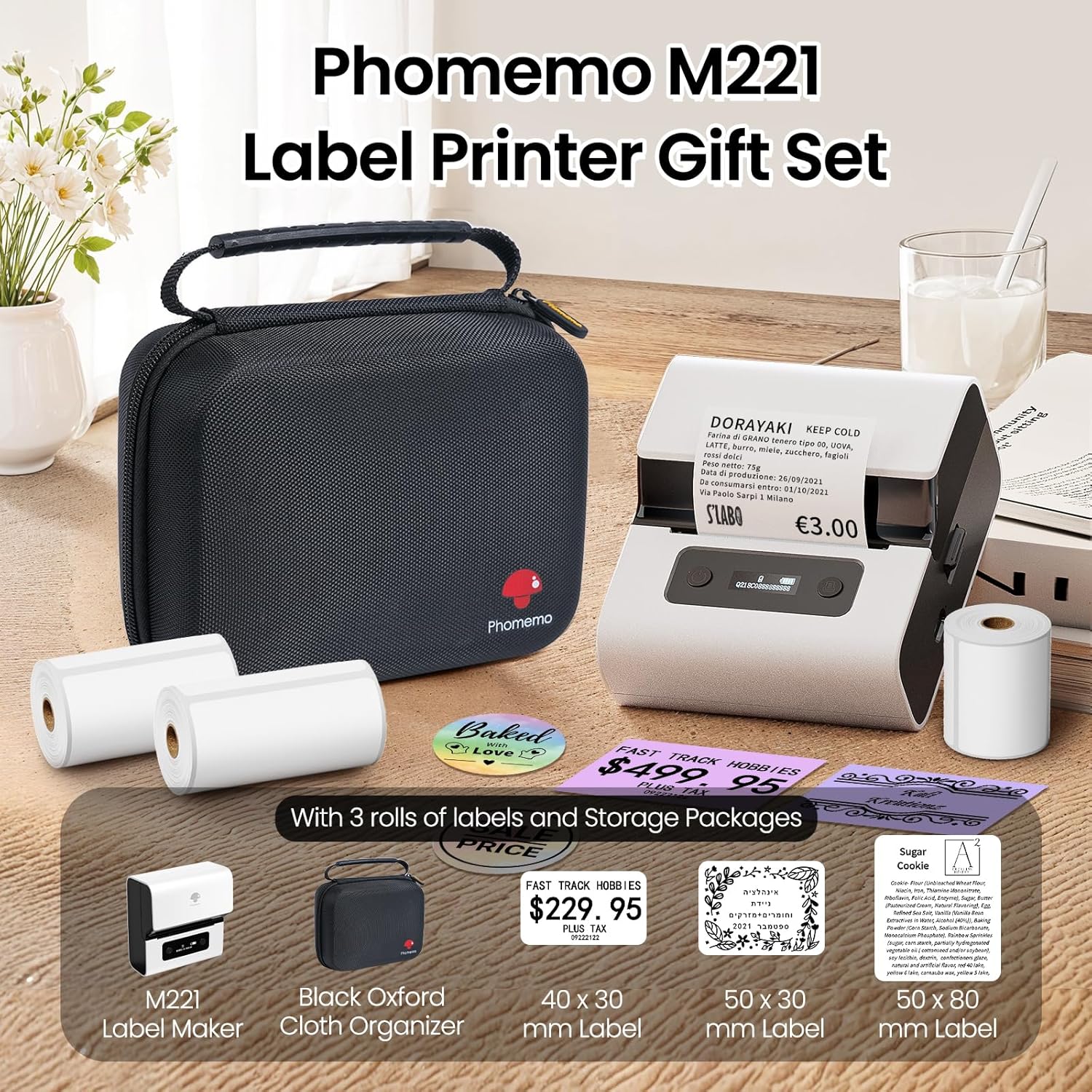
Image: Phomemo M221 Label Printer Gift Set, showing the printer, a black carrying case, and three rolls of white thermal labels.
Производ је завршенview
The Phomemo M221 is a compact and efficient thermal label printer. Key features include:
- Технологија термичке штампе: No ink or toner required.
- Компатибилност широке етикете: Supports labels from 20mm to 80mm (0.78" to 3.14") wide, including rectangular, round, transparent, and colored types.
- Повезивање: Bluetooth for iOS/Android smartphones and tablets, USB for Windows PCs.
- Батерија великог капацитета: 2200 mAh battery with Type-C fast charging.
- Fast and Quiet Operation: Prints at 50 mm/s with reduced noise.
- Дизајн прилагођен кориснику: Easy label loading and automatic gap detection.

Image: Phomemo M221 Label Maker Set, illustrating its features such as no ink requirement, large battery capacity, Bluetooth wireless printing, and its suitability as a gift.
Сетуп
1. Пуњење штампача
Before first use, fully charge the Phomemo M221 printer.
- Connect the provided USB Type-C cable to the printer's charging port.
- Connect the other end of the cable to a 5V USB power adapter (not included) or a computer's USB port.
- The indicator light will show charging status. A full charge typically takes several hours. The 2200 mAh battery supports extended use.
2. Учитавање налепница
The M221 features an integrated label fixing structure for easy loading.
- Отворите поклопац штампача.
- Insert the label roll into the compartment, ensuring the printing side faces upwards and the labels feed smoothly.
- Adjust the side guide plates to secure the label roll in place.
- Close the printer cover. The printer will automatically detect and calibrate the label gap.
3. Повезивање са вашим уређајем
The Phomemo M221 supports both Bluetooth and USB connections.
Bluetooth Connection (Smartphones/Tablets)
- Ensure Bluetooth is enabled on your iOS or Android device.
- Download and install the "Print Master" application from your device's app store.
- Open the "Print Master" app and follow the on-screen instructions to search for and connect to your M221 printer.

Image: Phomemo M221 printer demonstrating Bluetooth wireless connection with a tablet and a smartphone.
USB Connection (Windows PC)
- Connect the USB Type-C cable from the printer to an available USB port on your Windows PC.
- Download and install the "Labelife" software and printer drivers from the official Phomemo webсајту.
- Follow the software installation prompts. Once installed, you can select the M221 as your printer.

Image: Phomemo M221 printer connected to a laptop using a USB cable, indicating wired connectivity.
Упутство за употребу
1. Basic Printing with "Print Master" App (Mobile)
- Ensure your M221 printer is connected via Bluetooth to your mobile device.
- Open the "Print Master" app.
- Select a template or create a new label design. The app offers various templates for text, images, barcodes, QR codes, and more.
- Customize your label content.
- Tap the print icon. Confirm print settings such as quantity.
- The printer will begin printing your labels.
2. Printing with "Labelife" Software (PC)
- Ensure your M221 printer is connected via USB to your Windows PC.
- Open the "Labelife" software.
- Design your label using the software's features, including text, images, barcodes, and QR codes.
- Go to "File" > "Print" or click the print icon.
- Select the Phomemo M221 from the list of available printers and adjust any necessary print settings.
- Click "Print" to start printing.
3. Batch Printing
Both "Print Master" and "Labelife" support batch printing for efficiency.
- In the print dialogue, specify the desired number of copies.
- The printer will automatically print multiple labels consecutively.

Image: Phomemo M221 printer demonstrating its versatility with examples of address labels, price tags, ingredient labels, and gift tags.

Image: Phomemo M221 printer showcasing its compatibility with over 50 types of thermal labels, including various shapes and designs.
Одржавање
1. Чишћење главе за штампање
Regular cleaning of the print head ensures optimal print quality.
- Turn off the printer and disconnect the power cable.
- Отворите поклопац штампача.
- Пажљиво обришите главу за штампање памучним штапићемampнапуњен изопропил алкохолом.
- Allow the print head to dry completely before closing the cover and turning on the printer.
2. Складиштење
Store the printer in a clean, dry environment, away from extreme temperatures and direct sunlight. When not in use for extended periods, ensure the printer is fully charged and then powered off.

Image: A man holding the Phomemo M221 printer's carrying case, illustrating its portable design.
Решавање проблема
Printer Does Not Turn On or Charge
- Проверите везу за напајање: Ensure the USB Type-C cable is securely connected to both the printer and a working power source (5V adapter or PC USB port).
- Проверите адаптер за напајање: Use a reliable 5V USB power adapter.
- Трајање пуњења: Allow sufficient time for charging. The battery indicator should show charging status.
No Printing or Blank Output
- Check Label Orientation: Ensure the thermal labels are loaded correctly with the printing side facing upwards.
- Тип етикете: Confirm you are using thermal labels. The M221 does not use ink.
- Print Head Cleanliness: A dirty print head can cause blank lines or poor print quality. Refer to the Maintenance section for cleaning instructions.
- Поравнање ознака: Ensure the label roll is properly seated and aligned by the side guide plates to prevent misalignment errors.
Проблеми са Блуетоотх везом
- Printer On: Ensure the printer is powered on and within Bluetooth range of your device.
- Блуетоотх омогућен: Verify Bluetooth is active on your smartphone or tablet.
- Веза са апликацијом: Connect through the "Print Master" app, not directly through your device's Bluetooth settings.
- Поново покрените уређаје: Try restarting both the printer and your mobile device.
Лош квалитет штампе
- Print Head Cleanliness: Очистите главу за штампање као што је описано у одељку Одржавање.
- Квалитет етикете: Use high-quality thermal labels.
- Print Density Settings: Adjust print density settings within the "Print Master" app or "Labelife" software if available.
Спецификације
| Феатуре | Детаљ |
|---|---|
| Број модела | М221 |
| Бранд | Пхомемо |
| Технологија повезивања | Блутут, УСБ типа Ц |
| Технологија штампе | Тхермал |
| Штампани излаз | Моноцхроме |
| Максимална брзина штампања (монохроматско) | 15.0 pages per minute (50 mm/s) |
| Максимална резолуција штампања (монохроматска) | 203 дпи |
| Подржана ширина налепнице | 20mm - 80mm (0.78" - 3.14") |
| Батерија | 2200 mAh (1 D - included) |
| Тежина артикла | 820 грама |
| Димензије производа (Д к Ш к В) | 12.9 к 6.7 к 11.9 центиметара |
| Control Device Type | Smartphone/PC |
| Медиа Типе | Етикете |
Гаранција и подршка
For warranty information and technical support, please refer to the official Phomemo webсајт или директно контактирајте њихову корисничку службу. Сачувајте рачун као доказ о куповини.
Онлине ресурси: Посетите Phomemo Store on Amazon for product updates and FAQs.