
1. Увод
The RedThunder K95 is a versatile wireless mechanical keyboard designed for various uses, including gaming, business, and everyday tasks. It features a 90% compact layout, a 1.14-inch TFT screen, a CNC knob, tri-mode connectivity (wired, 2.4G wireless, Bluetooth), hot-swappable switches, RGB backlighting, and PBT keycaps.
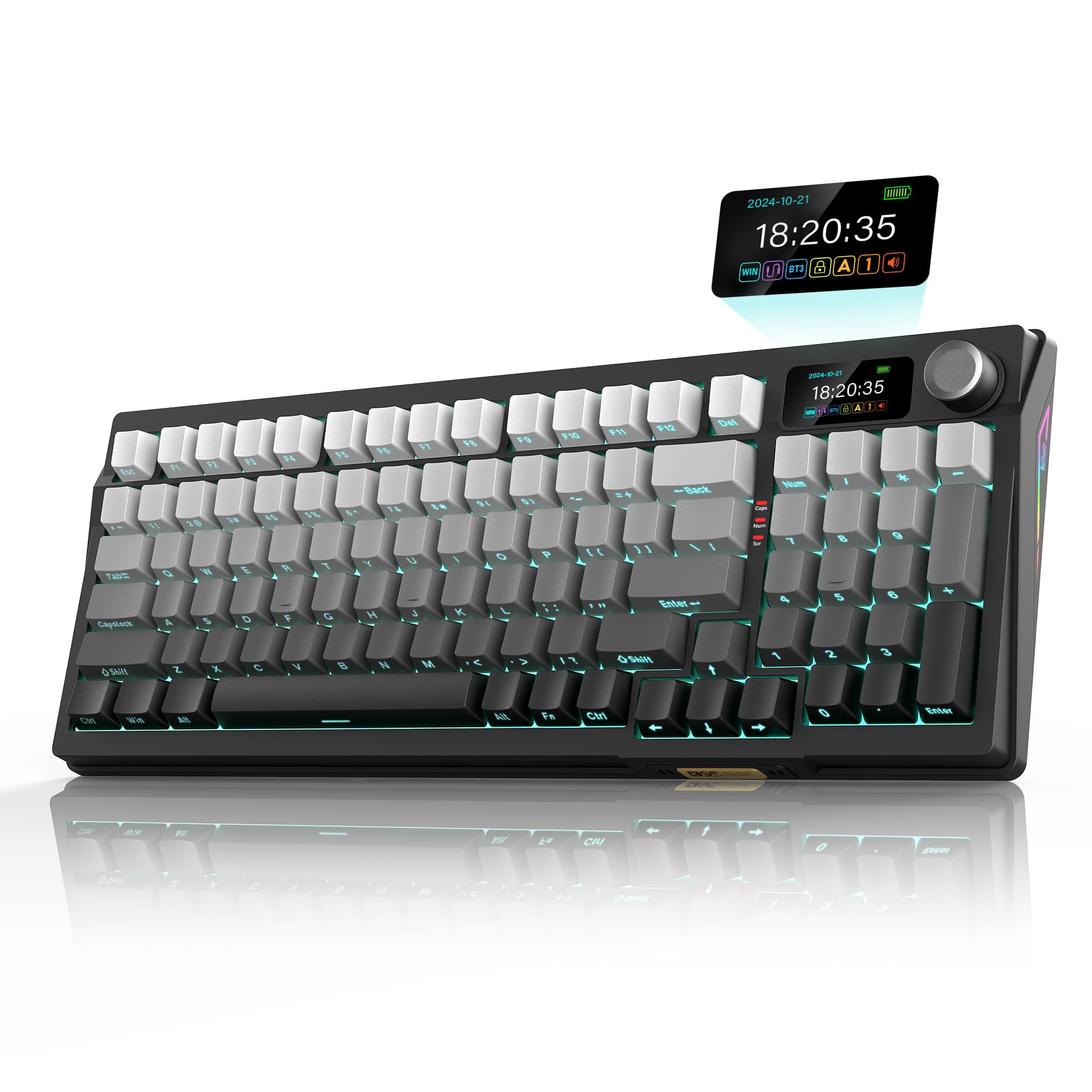
Производ је завршенview Видео
Video 1: K95 Mechanical Keyboard Product Introduction. This video provides a general overview of the RedThunder K95 keyboard's features and design.
2. Шта је у кутији
Upon unboxing your RedThunder K95 keyboard, ensure all the following items are present:
- RedThunder K95 Wireless Mechanical Keyboard
- УСБ кабл (тип-Ц)
- Кеицап Пуллер
- Spare Switches (for hot-swapping)
- USB Receiver (2.4G wireless dongle)
- Transparent Dust Cover
- Упутство за употребу

Unboxing and Connectivity Video
Video 2: K95 Unboxing and Tri-Mode Dual System. This video demonstrates the unboxing process and highlights the keyboard's tri-mode connectivity options.
3. Подешавање
3.1 Физичко подешавање
The K95 keyboard features two-stage foot support, allowing you to adjust the typing angle for optimal comfort. Simply flip out the feet located on the underside of the keyboard to select your preferred height.
3.2 Connectivity (Tri-Mode)
The RedThunder K95 supports three connection modes: wired (USB-C), 2.4G wireless, and Bluetooth. It is compatible with both Windows and macOS operating systems.

3.2.1 Жични режим
- Connect the provided USB-C cable to the keyboard's port and the other end to your computer's USB port.
- Slide the mode switch on the back of the keyboard to 'CABLE'.
- Set the system switch (Win/Mac) to your operating system.
- The keyboard will automatically connect and be ready for use.
3.2.2 2.4G бежични режим
- Locate the USB receiver (dongle) stored in the back of the keyboard.
- Укључите УСБ пријемник у слободан УСБ порт на рачунару.
- Померите прекидач за режим на полеђини тастатуре на „2.4G“.
- Set the system switch (Win/Mac) to your operating system.
- The keyboard will automatically connect. The TFT screen will display "2.4G Success" upon successful connection.
3.2.3 Блуетоотх режим
The K95 keyboard supports up to three Bluetooth devices (BT1, BT2, BT3).
- Померите прекидач за режим на полеђини тастатуре на „BT“.
- Set the system switch (Win/Mac) to your operating system.
- To initiate pairing, long-press Фн + К (за БТ1), Фн + В (за БТ2), или Фн + Е (for BT3). The TFT screen will display "BT1/BT2/BT3 Linking".
- On your device (computer, tablet, phone), search for Bluetooth devices and select "K95-5.0" to connect.
- Upon successful connection, the TFT screen will show "BT1/BT2/BT3 Success".
- To switch between paired Bluetooth devices, short-press Fn + Q/W/E.
4. Управљање тастатуром
4.1 TFT Screen and CNC Knob
The 1.14-inch TFT screen displays various information and settings, which can be navigated and adjusted using the CNC metal knob.
- Rotate Knob: Adjust time, volume, RGB lighting, language, and screen images.
- Press Knob: Enter/select menu options.
- Custom Images: Supported only on Windows via the K95-US driver.

4.2 РГБ позадинско осветљење
The K95 features 16.8 million RGB colors with various lighting modes. You can customize the backlight using FN combinations, the knob, the screen, or the programmable software.
- FN + \: Adjust lighting effects.
- ФН + Делете: Switch light color.
- FN + стрелица горе/доле: Повећајте/смањите осветљеност.
- FN + стрелица лево/десно: Adjust light speed.
- ФН + ТАБ: Adjust 8 side lighting modes.
- ЛЕД диоде окренуте ка југу: Designed to meet most keycap lighting requirements, including side-engraved keycaps.

4.3 Прекидачи са могућношћу замене током рада
The hot-swappable PCB allows you to replace 3-pin or 5-pin switches without soldering. The keyboard comes with pre-lubricated linear switches and spare switches for customization.
- Use the keycap puller to remove the desired keycap.
- Use the switch puller end of the tool to carefully remove the switch.
- Align the pins of the new switch perpendicular to the holes on the PCB and gently press it into place until it clicks. Ensure pins are not bent.
- Замените поклопац тастера.

4.4 PBT Keycaps and Ergonomics
The K95 features dual-color side-printed PBT keycaps, which are durable and resistant to fading. The stepped keycap design and two-stage foot support contribute to a comfortable and less fatiguing typing experience.

4.5 Gasket Structure
The gasket-mounted design incorporates five-layer shock absorption and a single-key positioning plate. This construction provides a more even keystroke feel, reduces noise, and enables full-key anti-ghosting for a softer and more comfortable typing experience.

4.6 Програмабилни софтвер
The K95 offers programmable software for deep customization of keyboard functions. The K95-US driver (available for Windows 10, in 2.4G wireless or wired mode only) allows for:
- Key mapping
- Макро дефиниција
- Adjusting key sensitivity and debounce
- Подешавање времена за спавање
- Customizing screen GIF images
- Adjusting backlight effects, including music rhythm backlight.

4.7 FN Key Combinations
The keyboard features various FN key combinations for quick access to functions:

5. Одржавање
5.1 Чишћење
Да бисте одржали перформансе и изглед тастатуре:
- Користите меку, суву крпу да обришете површину тастатуре.
- For deeper cleaning, use the provided keycap puller to remove keycaps and clean dust or debris with compressed air or a small brush.
- Избегавајте употребу јаких хемикалија или абразивних материјала.
5.2 Информације о батерији
The K95 keyboard is equipped with an 8000mAh rechargeable battery, ensuring extended usage:
- Approximately 48 hours of continuous usage with backlight on.
- Approximately 266 hours of continuous usage with backlight off.
- Charge the keyboard using the provided USB-C cable connected to a computer's USB port (DC: 5V).

КСНУМКС. Решавање проблема
6.1 Driver Software Download Issues
If you encounter issues downloading the K95-US driver software on Windows, it might be due to system protection settings. Follow these steps to adjust settings and download the driver:
- Притисните Win + I to open computer settings.
- Click on "Privacy & security".
- Click on "Windows Security".
- Click on "Virus & threat protection".
- Under "Virus & threat protection settings", click "Manage settings".
- Temporarily turn off "Real-time protection".
- Proceed with the driver download from the official RedThunder website. Remember to re-enable "Real-time protection" after installation.
6.2 General Connectivity Issues
- Жични режим: Ensure the USB-C cable is securely connected to both the keyboard and the computer, and the mode switch is set to 'CABLE'.
- 2.4Г бежични режим: Verify the USB receiver is properly inserted into a computer's USB port and the mode switch is set to '2.4G'. Try a different USB port if issues persist.
- Блуетоотх режим: Ensure the keyboard is in pairing mode (long-press Fn + Q/W/E) and visible on your device's Bluetooth settings. If already paired, try unpairing and re-pairing the device.
- Системски прекидач: Always ensure the Win/Mac system switch on the back of the keyboard matches your operating system.
7. Спецификације
| Феатуре | Детаљ |
|---|---|
| Бранд | РедТхундер |
| Број модела | К95 |
| Назив модела | K95 Gasket Wireless Custom Mechanical Keyboard |
| Технологија повезивања | 2.4G Wireless, Bluetooth (Tri-mode), USB-A (Wired) |
| Компатибилни уређаји | Gaming Console, Laptop, MAC, PC, Tablet |
| Опис тастатуре | Гаминг |
| Посебна карактеристика | Backlit, Customizable Display Keys, Ergonomic, Hot-Swappable, Rechargeable |
| Боја | Gradient Gray |
| Подршка бојама позадинског осветљења тастатуре | RGB (16.8 милиона боја) |
| Димензије производа | 15.35 cm D x 5.71 cm Š x 1.85 cm V |
| Материјал | Metal, Plastic, Rubber, Silicone |
| Капацитет батерије | 8000мАх |
| Тип прекидача | Линеарно (претходно подмазано) |
| Распоред тастатуре | QWERTY (95 Keys) |
| Тежина артикла | 980 грама |
8. Гаранција и подршка
8.1 Информације о гаранцији
The RedThunder K95 Wireless Mechanical Keyboard comes with a 1-годишња гаранција од датума куповине. Ова гаранција покрива производне недостатке и кварове при нормалној употреби. Молимо вас да сачувате доказ о куповини за потребе подношења захтева за гаранцију.
For detailed information regarding returns and replacements, please refer to the retailer's return policy, which typically allows for returns within 30 days of purchase.
8.2 Корисничка подршка
If you encounter any issues or have questions regarding your RedThunder K95 keyboard, please contact RedThunder customer support through the official website or the retailer where the product was purchased. Our support team is dedicated to assisting you with any product-related inquiries.