
Увод
This manual provides essential information for the proper setup, operation, and maintenance of your CNAPXAIA Electronic Drum Set. Please read this manual thoroughly before using the product to ensure optimal performance and longevity.
Садржај пакета
Проверите да ли су све ставке присутне у пакету:
- Electronic Drum Kit (main unit with 9 pads)
- Drumsticks (1 pair)
- Foot Pedals (2 units)
- Кориснички приручник (овај документ)
Карактеристике производа
The CNAPXAIA Electronic Drum Set offers the following key features:
- 9 Professional Drum Pads: Includes various drum and cymbal sounds for a comprehensive drumming experience.
- Уграђени стерео звучник: Delivers clear audio with adjustable volume levels (0 to 10).
- Слушалице: Allows for private practice without disturbing others (3.5mm).
- Portable and Roll-Up Design: Made with flexible silicone, making it lightweight and easy to transport and store.
- Разноврсна употреба: Suitable for beginners and experienced drummers, and an engaging musical toy for children aged 3 and above.
Сетуп
- Raspakujte: Пажљиво уклоните све компоненте из паковања.
- Unroll the Drum Pad: Place the electronic drum pad on a flat, stable surface. The silicone material allows it to unroll easily.
- Connect Foot Pedals: Locate the pedal input jacks on the drum pad unit. Insert the cables from the two foot pedals into their respective jacks. These pedals control the bass drum and hi-hat sounds.
- Укључено: Connect the drum set to a power source using the provided cable. The unit is powered by an internal Lithium Polymer battery (included). Ensure the battery is charged for optimal performance.
- Подесите јачину звука: Use the volume controls on the main unit to set a comfortable listening level.
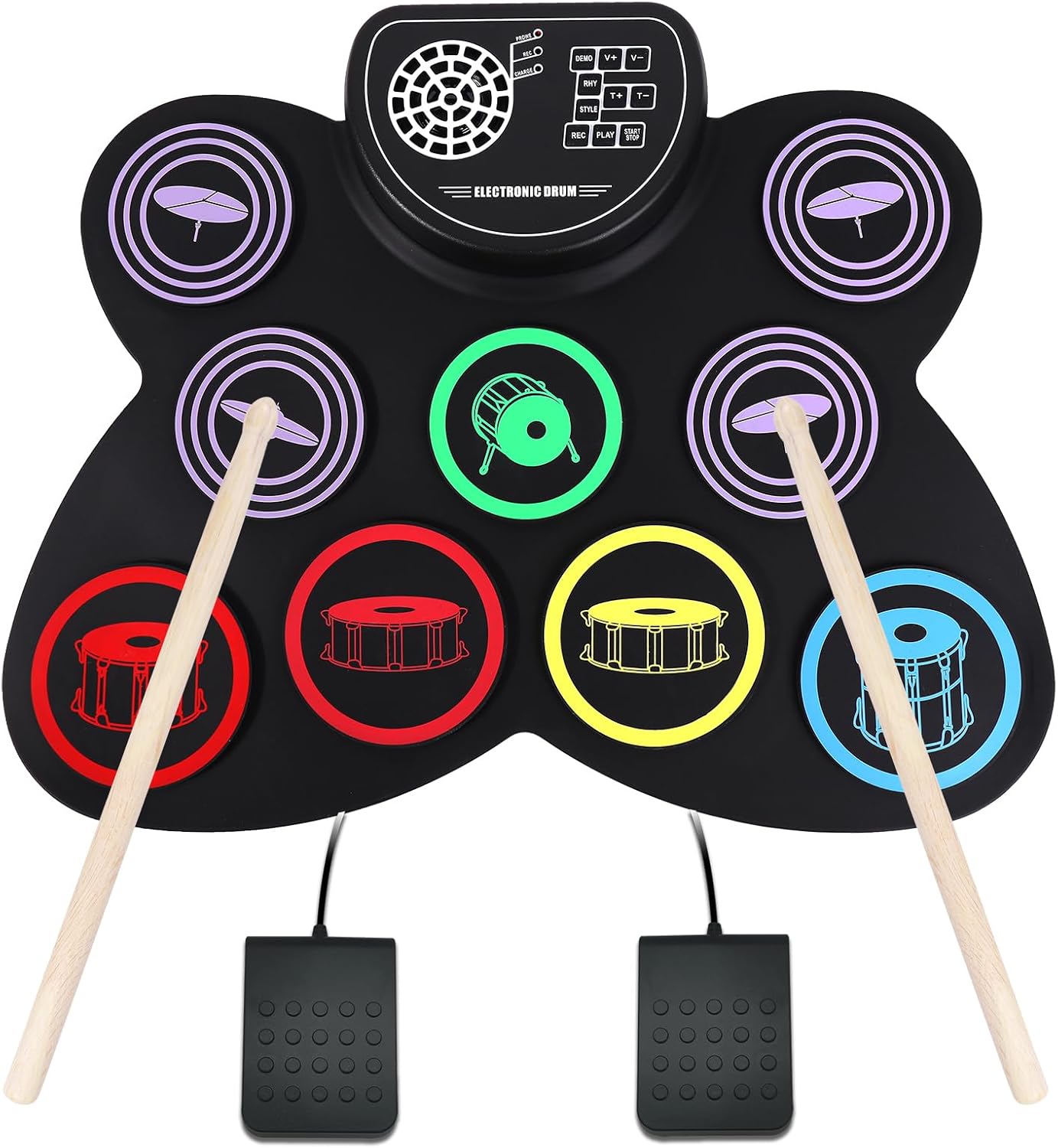
Image: The CNAPXAIA Electronic Drum Set, showing the 9 drum pads, central control panel, drumsticks, and foot pedals. The pads are color-coded for different drum sounds, and the control panel features buttons for various functions.
Упутство за употребу
Друм Падс
The drum set features 9 sensitive pads that respond to touch from the drumsticks. Each pad is assigned a specific drum or cymbal sound. Experiment with different pads to discover the full range of sounds.
Функције контролне табле
The central control panel provides various functions to enhance your drumming experience:
- ДЕМО: Plays pre-recorded demo songs. Press to cycle through available demos.
- В+ / В-: Adjusts the main volume of the drum set. V+ increases volume, V- decreases volume.
- РХИ: Selects different rhythm patterns. Press to cycle through available rhythms.
- T+ / T-: Adjusts the tempo (speed) of the rhythm patterns. T+ increases tempo, T- decreases tempo.
- СТИЛ: Changes the drum kit sound style (e.g., rock, pop, jazz). Press to cycle through different styles.
- РЕЦ: Initiates recording mode. Press once to start recording your drumming.
- ИГРА: Plays back your recorded drumming.
- СТАРТ СТОП: Starts or stops the selected demo song or rhythm pattern.
Употреба слушалица
To practice silently, connect standard 3.5mm headphones to the headphone jack located on the control panel. The internal speaker will automatically mute when headphones are connected.
Одржавање
- Чишћење: Use a soft, dry cloth to wipe down the drum pad and control panel. Do not use abrasive cleaners or solvents.
- Складиштење: When not in use, roll up the drum pad gently and store it in a cool, dry place away from direct sunlight and extreme temperatures.
- Одржавање батерије: If the unit will not be used for an extended period, ensure the battery is fully charged before storage. Recharge periodically to maintain battery health.
- Избегавајте пукотине: The silicone material is durable but can be damaged by sharp objects. Handle with care.
Решавање проблема
| Проблем | Могући узрок | Решење |
|---|---|---|
| Нема звука из звучника. | Јачина звука је прениска или искључена. Слушалице су повезане. | Increase volume using V+ button. Disconnect headphones. |
| Јединица се не укључује. | Battery is depleted. Power cable not connected properly. | Charge the battery. Ensure power cable is securely connected. |
| Foot pedals not working. | Pedals not connected properly. | Check that pedal cables are fully inserted into their respective jacks. |
| Pads are unresponsive. | Unit may be in an incorrect mode or power issue. | Ensure unit is powered on. Try restarting the unit. |
Спецификације
| Феатуре | Детаљ |
|---|---|
| Назив модела | Електронски бубањ |
| Број модела | CNKD001 |
| Бранд | ЦНАПКСАИА |
| Број јастучића | 9 |
| Материјал тела | Силицоне |
| Топ Материал | Пластика |
| Димензије (Д к Ш к В) | 15.75 к 12.2 к 1.18 инча |
| Тежина артикла | 1.76 фунти (800 грама) |
| Тип батерије | 1 литијум полимер (укључен) |
| Волtage | 5 волти (ДЦ) |
| Ватtage | 2 вати |
| Тип конектора | Помоћни (3.5 мм прикључак за слушалице) |
Гаранција и подршка
Specific warranty details for the CNAPXAIA Electronic Drum Set are not provided in this manual. For information regarding warranty coverage, technical support, or service inquiries, please refer to the manufacturer's official webсајт или директно контактирајте њихову корисничку службу. Сачувајте рачун као доказ о куповини за евентуалне рекламације по гаранцији.