
CHESONA iPad Pro 11 (M4) 2024 Keyboard Case
CHESONA Rugged Keyboard Case for iPad Pro 11 (M4) 2024 User Manual
Model: iPad Pro 11 (M4) 2024 Keyboard Case

Image: The CHESONA Rugged Keyboard Case for iPad Pro 11 (M4) 2024, shown with an iPad inserted, highlighting its keyboard, trackpad, and adjustable stand features.
1. Компатибилност
This keyboard case is specifically designed for the iPad Pro 11-inch (M4) 2024. To ensure proper fit, verify your iPad's model numbers. Compatible model numbers include А2836, А2837 и А3006. This case is није компатибилан with the iPad Air 11-inch (M2) 2024 or any other iPad models.

Image: A visual guide illustrating the compatible iPad Pro 11 (M4) 2024 model and its corresponding model numbers (A2836, A2837, A3006), alongside an incompatible iPad Air 11 (M2) 2024 model.
2. Шта је у кутији
Приликом отварања пакета, молимо вас да се уверите да су присутни сви следећи елементи:
- 1 x CHESONA Rugged Case for iPad Pro 11 (M4) (Tablet NOT included)
- 1 к бежична тастатура
- 1 x USB Charging Cable (No Charger)
- 1 к Упутство за употребу

Слика: Изнад главе view displaying the CHESONA keyboard, magnetic case, USB charging cable, user manual, and product packaging box.
3. Водич за подешавање
Follow these steps to set up your CHESONA Rugged Keyboard Case:
3.1. Step 1: Adjust the Kickstand
Bend the integrated kickstand to achieve your desired viewing angle. The stand is designed to be adjustable from 15° to 180° for optimal comfort.
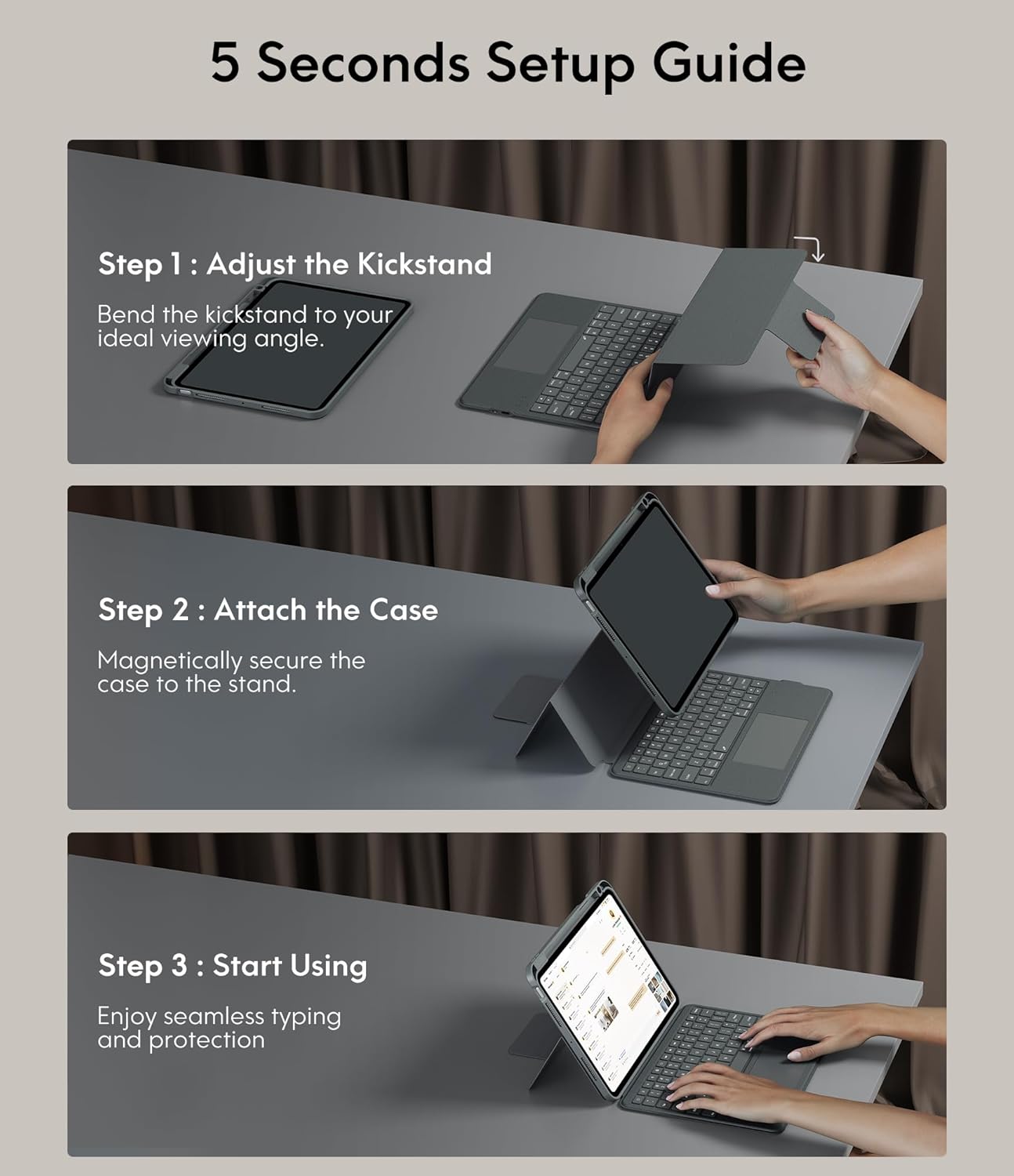
Image: A three-step visual guide showing how to adjust the kickstand, attach the iPad to the magnetic case, and begin using the keyboard.
3.2. Step 2: Attach the Case
Securely place your iPad into the protective case. The case features strong magnets that will hold the iPad firmly in place on the stand.
3.3. Step 3: Start Using
Once the iPad is securely attached and the kickstand is adjusted, you can begin using your keyboard case for typing and protection.
3.4. Блуетоотх упаривање
- Уверите се да је тастатура напуњена.
- Укључите тастатуру помоћу прекидача за напајање.
- На вашем iPad-у идите на Подешавања > Блуетоотх и укључите Блутут.
- Select the keyboard from the list of available devices (it may appear as 'CHESONA Keyboard' or similar).
- Confirm the pairing code if prompted. The keyboard will now be connected.
4. Упутство за употребу
4.1. Magnetic Detachable Keyboard
The keyboard is magnetically attached to the case, allowing for easy detachment. This feature enables you to switch between a laptop-like setup and a standalone tablet experience. Simply pull the keyboard away from the case when not needed, or reattach it when typing is required.

Image: A hand detaching the magnetic keyboard from the iPad case, illustrating the strong magnetic connection.
4.2. Adjustable Stand and Viewинг Модес
The case offers a wide range of adjustable angles (15°-180°) and supports multiple placement modes for various activities:
- Режим куцања: Use with the keyboard for productivity.
- Drawing Mode: Lay the iPad flat or at a low angle for creative tasks.
- Режим читања: Detach the keyboard and hold the iPad comfortably.
- ViewРежим рада: Adjust the stand for watching videos or video calls.

Image: A visual representation of five different usage modes: Video Call, Draw, To Read, Writing Documents, and Watch Movies, demonstrating the case's versatility.
4.3. Контрола позадинског осветљења тастатуре
The keyboard features 7-color backlighting and 3 levels of brightness, enhancing visibility in various lighting conditions.
- Да бисте променили боју позадинског светла: Притисните Shift + Return.
- Да бисте подесили осветљеност: Притисните Схифт + Схифт (or dedicated brightness keys if available).

Image: The keyboard illuminated with various backlight colors, demonstrating the 7-color options and the keys used to adjust brightness and color.
4.4. Trackpad Functionality
The integrated multi-touch trackpad provides precise navigation and supports various gestures for enhanced productivity:
- Превлачење: Tap and hold an item, then drag to move it.
- Превуците: Use two fingers to scroll up/down or left/right.
- Увећавање/умањивање: Pinch with two fingers to zoom.
- App Publication (App Switcher): Swipe up with three fingers to reveal open applications.
- Swipe between full screen apps: Swipe left or right with three fingers to switch between full-screen applications.

Image: A close-up of the trackpad with illustrations of common multi-touch gestures like drag, swipe, zoom in/out, app publication, and switching between full-screen apps.
4.5. Function Keys and Shortcuts
The keyboard includes a dedicated row of function keys for quick access to common iPad features:
- Почетна: Вратите се на почетни екран.
- Претрага: Activate iPad search.
- Контрола осветљења: Подесите осветљеност екрана.
- Контроле медија: Репродукција/пауза, претходна нумера, следећа нумера.
- Контрола јачине звука: Искључивање звука, смањивање јачине звука, појачавање звука.
- Закључавање екрана: Закључајте свој iPad.

Слика: Детаљна view of the keyboard's top row, highlighting the function keys for media control, volume, brightness, and other shortcuts.
5. Заштитне карактеристике
The CHESONA Rugged Keyboard Case provides comprehensive protection for your iPad Pro 11 (M4) 2024:
- Hard-Shell Design: The premium hard-shell design protects all sides of your tablet.
- Заштита од 360°: The included compatible camera case ensures 360° protection against accidental drops, scratches, and dust.
- Pen Slot: A dedicated pen slot securely holds your Apple Pencil, preventing loss and allowing for convenient charging.
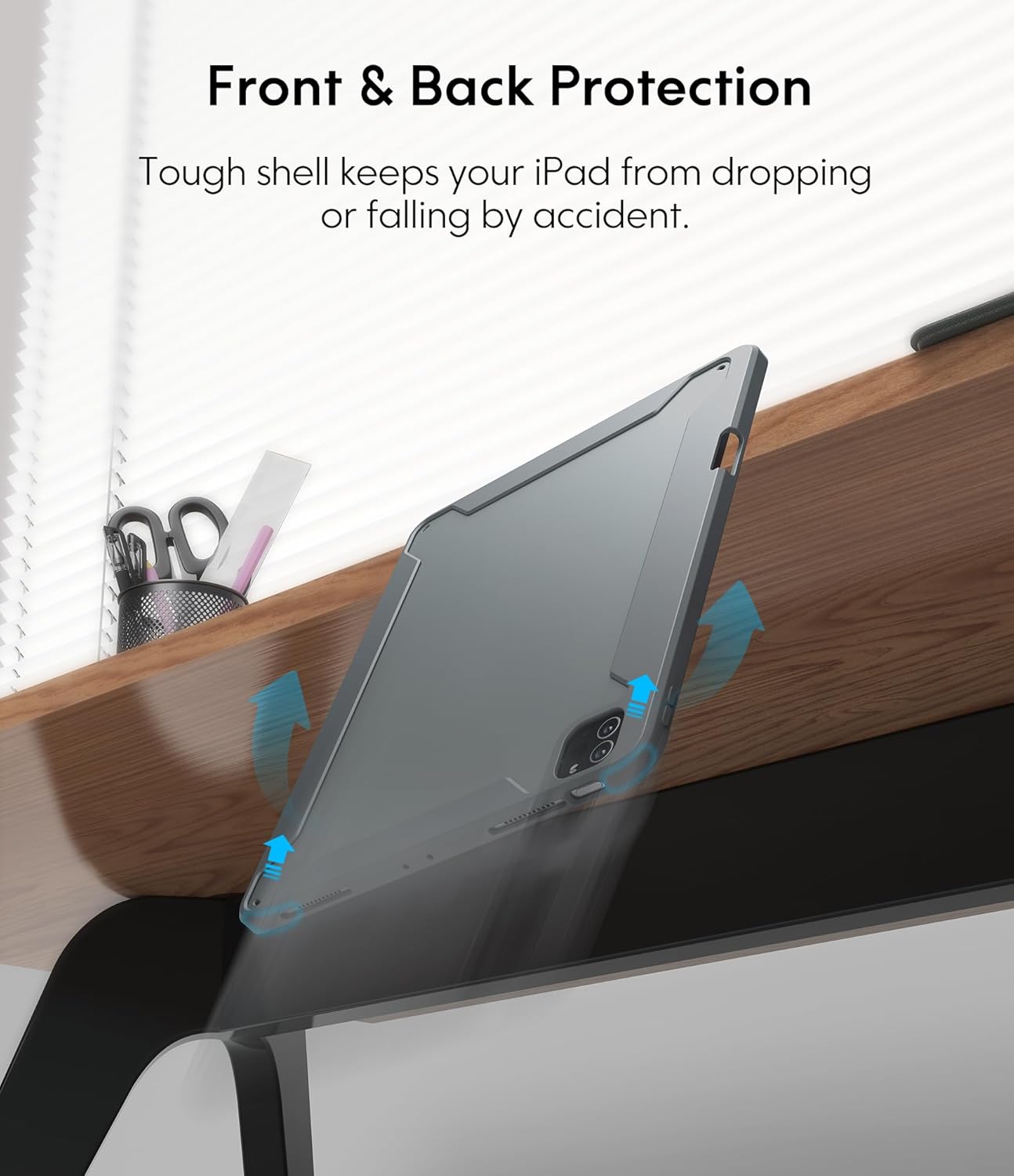
Image: An illustration showing the iPad case protecting the device from a fall, emphasizing its tough shell and front and back protection.
6. Управљање батеријом и напајањем
The keyboard features a built-in rechargeable battery designed for extended use:
- Трајање батерије: A full charge provides over 50 hours of working time.
- Време пуњења: Approximately 2-3 hours for a full charge using the provided USB charging cable.
- Режим спавања: If the keyboard is inactive for 10 minutes, it will enter sleep mode and disconnect from your iPad to conserve power. Press any key to wake it up and automatically reconnect.
7. Одржавање
To ensure the longevity and optimal performance of your keyboard case, follow these maintenance guidelines:
- Чишћење: Користите меку, дamp крпу за брисање спољашњости кућишта и тастатуре. Избегавајте јаке хемикалије или абразивне материјале.
- Складиштење: Када се не користи дуже време, чувајте футролу за тастатуру на хладном и сувом месту.
- Избегавајте течности: Држите тастатуру даље од течности како бисте спречили оштећење електронских компоненти.
КСНУМКС. Решавање проблема
If you encounter any issues, refer to the following troubleshooting tips:
- Тастатура се не повезује:
- Уверите се да је тастатура напуњена и укључена.
- Проверите да ли је Bluetooth омогућен на вашем iPad-у.
- Заборавите уређај у Блутут подешавањима вашег iPad-а и покушајте поново да га упарите.
- Поново покрените и iPad и тастатуру.
- Трекпед не реагује:
- Уверите се да је тастатура повезана путем Блутут-а.
- Check if the trackpad is enabled in your iPad's settings (Settings > Accessibility > Touch > AssistiveTouch).
- Clean the trackpad surface for any debris.
- Позадинско осветљење не ради:
- Уверите се да је батерија тастатуре довољно напуњена.
- Press the backlight adjustment keys (Shift + Shift or dedicated keys) to cycle through brightness levels.
- Тастери не реагују:
- Проверите Блутут везу.
- Ensure the keyboard is not in sleep mode.
- Напуните тастатуру.
9. Спецификације производа
| Димензије производа | 10.04 к 7.68 к 0.83 инча |
| Тежина артикла | 1.72 фунти |
| Бранд | ЦХЕСОНА |
| Компатибилни уређаји | iPad Pro 11 (M4) 2024 |
| Технологија повезивања | бежични (Блуетоотх) |
| Опис тастатуре | Вишенаменски |
| Посебна карактеристика | Позадинско осветљење, Тракпед |
| Боја | Греи |
| Извор напајања | Баттери Поверед |
| Батерије | 1 P76 батерија (укључена) |
10. Гаранција и подршка
CHESONA products are designed for durability and performance. For information regarding warranty coverage, product support, or to report any issues, please refer to the contact information provided with your purchase or visit the official CHESONA webсајт. Молимо вас да сачувате доказ о куповини за потребе гаранције.