
Kalobee SK38
Упутство за употребу паметног сата Kalobee Watch 4 PRO+
Модел: СК38
Brand: Kalobee
Увод
Welcome to the user manual for your new Kalobee Watch 4 PRO+ Smart Watch. This guide provides essential information on setting up, operating, maintaining, and troubleshooting your device. Please read this manual thoroughly to ensure optimal performance and longevity of your smartwatch.
The Kalobee Watch 4 PRO+ features a vibrant AMOLED display, versatile interchangeable straps, and convenient wireless charging, designed to seamlessly integrate into your daily life.
Садржај пакета
Upon opening your Kalobee Watch 4 PRO+ package, please verify that all the following items are included:
- Kalobee Watch 4 PRO+ Smart Watch (Model SK38)
- Three (3) Interchangeable Straps (e.g., leather, silicone, metal)
- Доцк за бежично пуњење
- Кориснички приручник (овај документ)

Image: The Kalobee Watch 4 PRO+ packaging, displaying the smartwatch alongside its three distinct interchangeable straps, highlighting the complete package contents.
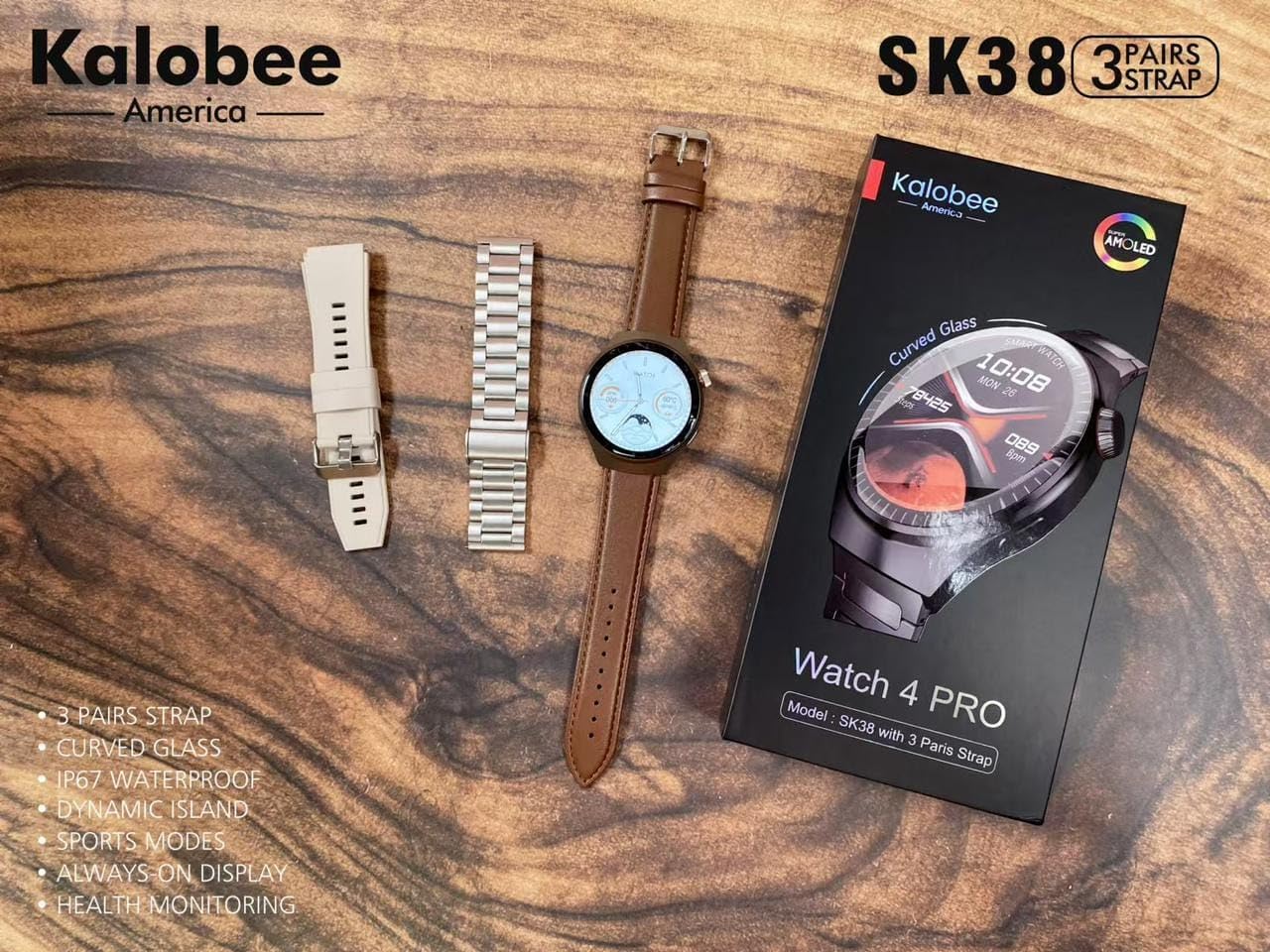
Image: A flat lay of the Kalobee Watch 4 PRO+ components, including the smartwatch, its retail box, and the three different strap options (leather, silicone, and metal), ready for assembly.
Сетуп
1. Почетно пуњење
Before first use, fully charge your Kalobee Watch 4 PRO+. This ensures optimal battery calibration and performance.
- Connect the wireless charging dock to a USB power adapter (not included) and plug it into a power outlet.
- Place your Kalobee Watch 4 PRO+ onto the charging dock. Ensure the watch is properly aligned for charging to begin.
- Екран сата ће приказивати статус пуњења. Потпуно пуњење обично траје отприлике 2-3 сата.
2. Постављање каиша
The Kalobee Watch 4 PRO+ comes with interchangeable straps, allowing you to customize its appearance. To install or change a strap:
- Locate the quick-release pins on the back of each strap.
- Slide the pin inwards to detach or attach the strap to the watch lugs.
- Ensure the pin clicks securely into place, indicating the strap is properly fastened.

Слика: Страна А view of the Kalobee Watch 4 PRO+ featuring a sleek metal strap, demonstrating one of the interchangeable strap options.
3. Упаривање са вашим уређајем (Bluetooth)
To unlock the full smart features of your watch, pair it with your smartphone via Bluetooth.
- Download the official Kalobee companion app from your smartphone's app store (iOS App Store or Google Play Store).
- Уверите се да је Блуетоотх омогућен на вашем паметном телефону.
- Open the Kalobee app and follow the on-screen instructions to add a new device.
- On your watch, navigate to the Bluetooth settings (refer to "Basic Navigation" section if needed).
- Select your watch from the list of available devices in the app. Confirm the pairing request on both your phone and watch.
- Once paired, the watch will synchronize data and notifications with your smartphone.
Упутство за употребу
1. Основна навигација
The Kalobee Watch 4 PRO+ features an intuitive touch screen and physical buttons for navigation.
- Екран на додир: Swipe left/right, up/down to navigate through menus and widgets. Tap to select an item.
- Crown Button: Typically used to return to the home screen, scroll through lists, or zoom in/out. Press and hold for power options.
- Бочно дугме: Often customizable, it can be set to quickly access a specific app or feature.

Image: The Kalobee Watch 4 PRO+ displaying its main watch face, showing time, date, steps, and calories, illustrating the primary user interface.
2. Прилагођавање изгледа сата
Personalize your watch by changing the watch face:
- From the home screen, press and hold the watch face.
- Swipe left or right to browse available watch faces.
- Tap on a watch face to select it. Some watch faces may offer further customization options (e.g., complications, colors) which can be adjusted by tapping the "Customize" option.
- Additional watch faces can be downloaded and managed via the Kalobee companion app.
3. Функције праћења здравља
Your Kalobee Watch 4 PRO+ is equipped with various health monitoring capabilities:
- Мониторинг срчане фреквенције: Access the heart rate app on your watch to measure your current heart rate. Continuous monitoring can be enabled in the app settings.
- Праћење активности: Tracks steps, distance, and calories burned throughout the day. View daily summaries on the watch or in the companion app.
- Праћење спавања: Wears the watch to bed to monitor sleep patterns, including deep sleep, light sleep, and awake times. Data is available in the app.
- Спортски режими: Select from various sports modes (e.g., running, cycling) to track specific workout data.
4. Обавештења
Receive notifications from your paired smartphone directly on your watch:
- Ensure notifications are enabled in the Kalobee companion app for desired applications.
- When a notification arrives, the watch will vibrate and display the content.
- Превуците прстом надоле од врха сата да бисте view ваша историја обавештења.
Одржавање
1. Чишћење сата
Редовно чишћење помаже у одржавању изгледа и функционалности вашег сата.
- Тело сата: Wipe the watch body with a soft, lint-free cloth. If necessary, slightly dampИсперите крпу водом. Избегавајте употребу јаких хемикалија или абразивних материјала.
- траке: Clean silicone straps with mild soap and water. Leather straps should be wiped with a dry or slightly damp cloth and allowed to air dry. Metal straps can be cleaned with a soft brush and mild soapy water, then rinsed and dried thoroughly.
- Уверите се да је сат потпуно сув пре пуњења или ношења.
2. Брига о батерији
Да бисте продужили век трајања батерије:
- Избегавајте често потпуно пражњење батерије.
- Charge the watch regularly, ideally before the battery level drops below 20%.
- Do not expose the watch to extreme temperatures (hot or cold) for extended periods.
3. Складиштење
When not in use for an extended period, store your watch in a cool, dry place. It is recommended to charge the watch to about 50% before long-term storage.
Решавање проблема
If you encounter issues with your Kalobee Watch 4 PRO+, refer to the following common solutions:
| Проблем | Могуће решење |
|---|---|
| Сат се не укључује | Ensure the watch is fully charged. Connect it to the charging dock for at least 30 minutes. If still unresponsive, perform a forced restart (refer to "Basic Navigation" for button functions). |
| Не може се упарити са паметним телефоном | Ensure Bluetooth is enabled on both devices. Make sure the watch is in pairing mode. Restart both the watch and smartphone. Clear previous Bluetooth connections on your phone if necessary. |
| Нетачни здравствени подаци | Ensure the watch is worn snugly on your wrist, not too loose or too tight. Clean the sensors on the back of the watch. Update the watch firmware via the companion app. |
| Обавештења се не појављују | Check notification settings in the Kalobee companion app and your smartphone's system settings. Ensure the watch is connected via Bluetooth. |
| Кратко трајање батерије | Reduce screen brightness, disable always-on display, limit background app refresh, and turn off unnecessary features like continuous heart rate monitoring if not needed. |
Спецификације
- Модел: СК38
- Приказ: АМОЛЕД екран
- Оперативни систем: АстероидОС
- Повезивање: Блуетоотх
- Капацитет батерије: 449 Amp Сати
- Пуњење: Бежично пуњење
- Укључене компоненте: Watch Band (3 pairs), Wireless Charging Dock
- Произвођач: HUAYING COMMUNICATION CO.,LTD
- Земља порекла: Кина
Гаранција и подршка
Information regarding product warranty and customer support is not available in this manual. Please refer to the product packaging or the official Kalobee website for details on warranty coverage and how to contact customer support for service or inquiries.
Ask a question about this manual
Ask about setup, troubleshooting, compatibility, parts, safety, or missing instructions. Manuals+ will review the question and use this page’s manual context to help answer it.