
RAINPOINT HIC801W
RAINPOINT Sprinkler Controller 8 Zone User Manual
Model: HIC801W
1. Увод
This manual provides comprehensive instructions for the installation, operation, and maintenance of your RAINPOINT 8-Zone Smart Irrigation Controller (Model HIC801W). This smart controller is designed to optimize your watering schedule based on local weather conditions, helping you maintain a healthy lawn and garden while conserving water.
Please read this manual thoroughly before installation and use to ensure proper functionality and to maximize the benefits of your new smart sprinkler system.
2. Садржај пакета
Проверите да ли су све ставке присутне у пакету:
- Sprinkler controller x1
- Брзи водич к1
- User manual x1 (this document)
- Screws and expansion bolts x3
- Трансформер к1
- Шаблон за монтажу к1
- Label sticker x1
3. Производ је готовview
The RAINPOINT HIC801W Smart Sprinkler Controller features a user-friendly design with both physical controls and comprehensive app integration. It supports up to 8 watering zones.

Image: The RAINPOINT 8-Zone Sprinkler Controller (left) shown alongside its corresponding smartphone application interface (right). The controller features indicator lights for power, Wi-Fi, and 8 zones, along with manual control buttons. The app displays zone status, watering schedules, and manual trigger options.
The controller is designed for easy integration with existing 24VAC sprinkler systems and offers remote management capabilities via the RAINPOINT SMART+APP.

Image: An aerial perspective illustrating a property divided into 8 distinct watering zones, demonstrating the controller's capacity to manage large or complex irrigation layouts. Each zone is labeled with its number and an example of its next scheduled irrigation time.
4. Инсталација
Installation of the RAINPOINT HIC801W is designed to be straightforward, typically taking 15-30 minutes. No special tools are required.
- Prepare for Replacement: Before removing your old controller, use the provided label stickers to clearly tag each wire according to its zone or common connection. This will simplify the wiring process for the new controller.
- Монтирајте контролер: Use the mounting template to mark the desired location on the wall. Secure the controller using the included screws and expansion bolts. Ensure the location is suitable for a 24VAC device and within Wi-Fi range.
- Повежите ожичење:
- Connect the common wire(s) to the "C" terminal.
- Connect each zone wire to its corresponding numbered terminal (1-8).
- Connect the 24VAC power adapter to the "24V AC" terminals.
- Укључено: Plug the transformer into a power outlet. The controller will power on, and the Wi-Fi indicator will begin to flash, indicating it's ready for app setup.
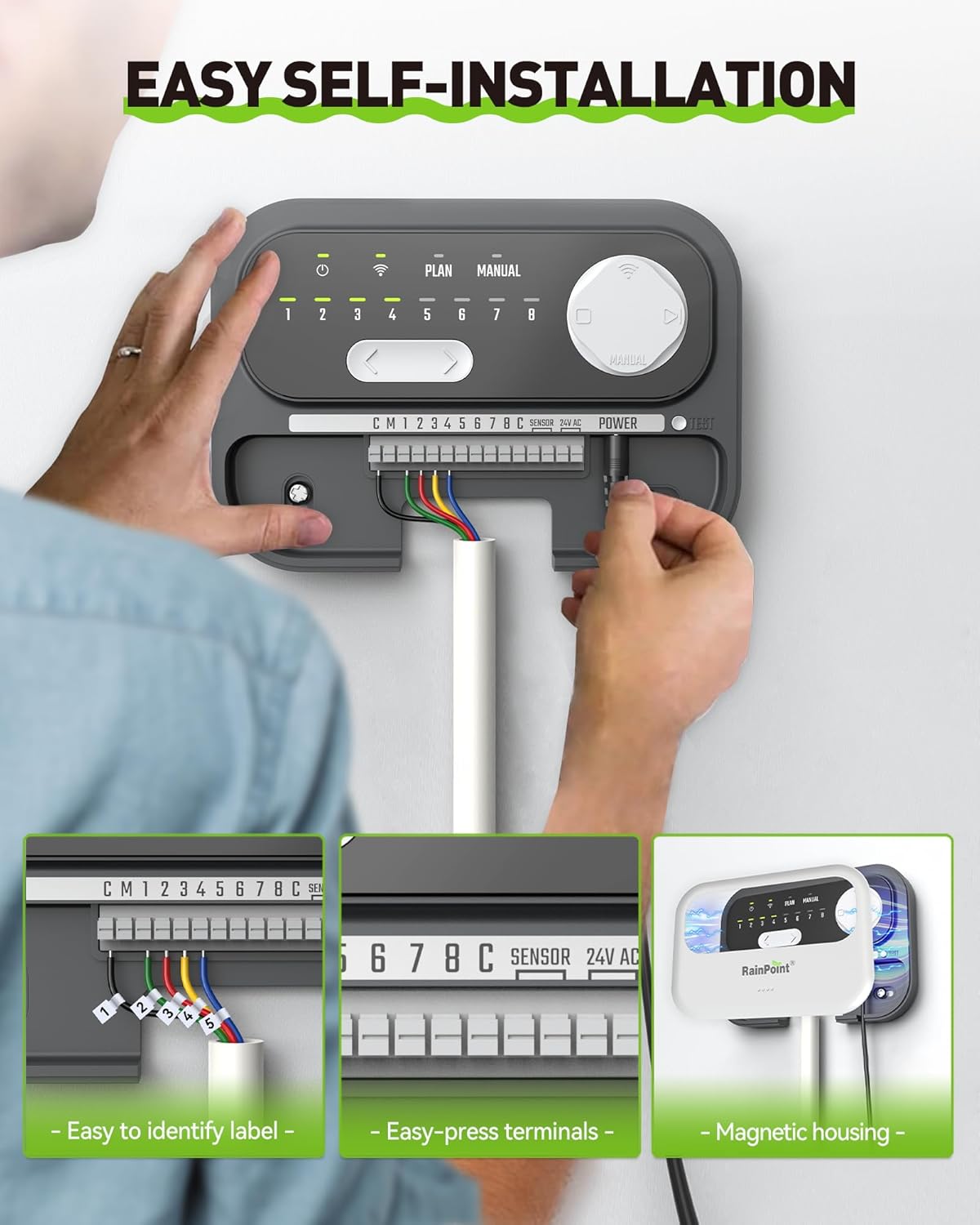
Image: A visual guide demonstrating the three key steps for self-installation: labeling and replacing the old controller, plugging in existing wires into the new controller's easy-press terminals, and setting up the device via the smartphone app.

Image: A detailed three-step illustration of the installation process: 1. Replacing the old controller with the new unit, emphasizing the use of label stickers for wire identification. 2. Plugging existing wires into the new controller's easy-press terminals. 3. Setting up the device and customizing watering schedules using the mobile application.
5. Подешавање и повезивање апликације
The RAINPOINT HIC801W requires connection to a 2.4GHz Wi-Fi network for smart functionality.
- Преузмите апликацију: Download the "RAINPOINT SMART+" app from your smartphone's app store (iOS or Android).
- Креирајте налог: Отворите апликацију и направите нови налог или се пријавите ако га већ имате.
- Додај уређај: Follow the in-app instructions to add your new sprinkler controller. Ensure your phone is connected to a 2.4GHz Wi-Fi network during the pairing process.
- Ви-Фи упаривање: The app will guide you through connecting the controller to your home Wi-Fi network. The Wi-Fi indicator on the controller will become solid once successfully connected.

Image: A series of smartphone screenshots showcasing the RAINPOINT SMART+ app's interface for setting up and managing watering programs, including rain delay, seasonal adjustment, and individual zone control.
6. Операција
6.1. Scheduling and Smart Watering
The RAINPOINT HIC801W offers flexible scheduling options and smart watering features to optimize water usage.
- Прилагођени распореди: Create up to 8 custom watering schedules for each zone. You can define cycle and interval frequencies to match your landscape's specific needs.
- Weather-Based Watering: The controller utilizes local weather intelligence to automatically adjust watering. It can skip watering on rainy days to prevent overwatering and adjust duration based on seasonal changes (e.g., extending watering in hot summer months).
- Сезонско прилагођавање: Manually adjust watering duration for different months to ensure optimal hydration throughout the year.
- Soil Moisture Integration: (Optional, requires separate soil sensor) When a compatible RAINPOINT soil sensor (HC5021FRF) is connected, the system can water based on actual soil moisture levels, further reducing water waste.

Image: An illustration depicting the smart weather-based watering system, showing how it integrates data such as temperature, moisture percentage, sunny conditions, wind direction, and rainfall probability to create an optimized watering schedule.

Image: A graphic overlaying a weather forecast (temperature, cloud cover, rain probability) onto a green lawn being watered, demonstrating the controller's ability to adjust watering based on upcoming weather conditions.

Image: A visual representation of soil moisture-based watering, showing a graph of humidity levels over time and a RAINPOINT soil moisture sensor in the ground. This feature helps save up to 50% water by watering only when needed.
6.2. Ручна контрола
You can manually trigger watering cycles directly from the controller or through the app.
- App Manual Control: Use the "Manual" tab in the RAINPOINT SMART+ app to select specific zones and set custom watering durations for immediate irrigation.
- Controller Manual Control: The physical buttons on the controller allow for basic manual operation of zones.

Image: A woman on a couch using her smartphone to control the sprinkler system, with a voice assistant speaker nearby, illustrating the convenience of Wi-Fi and voice control from anywhere.

Слика: прamples of instant watering scenarios, such as expelling animals or for cooling and dust removal, demonstrating the flexibility of manual control via the app.
6.3. Notifications and History
The app provides real-time notifications and allows you to monitor irrigation history.
- Обавештења у реалном времену: Receive alerts for important events, such as valve abnormalities, directly on your smartphone.
- Irrigation History: Review past watering activities to refine future schedules and track water usage.
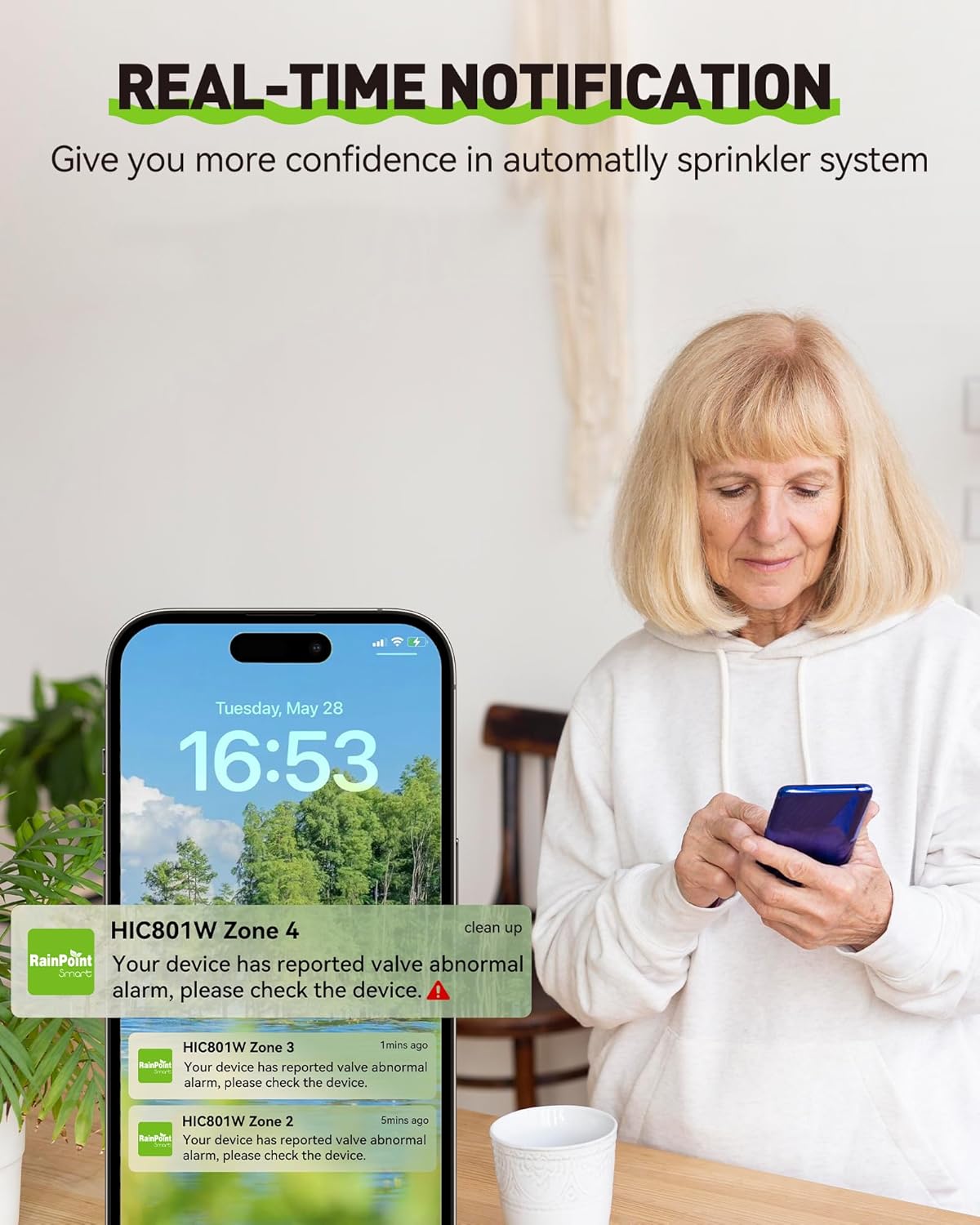
Image: A smartphone screen showing real-time notifications from the RAINPOINT app, indicating a reported valve abnormal alarm for Zone 4, providing confidence in the automated sprinkler system.

Image: A monthly irrigation plan calendar alongside the app interface, illustrating how users can record and review past irrigation activities to help refine future watering schedules.
7. Одржавање
The RAINPOINT HIC801W is designed for minimal maintenance. Follow these guidelines to ensure longevity and optimal performance:
- Одржавати уредним одржавати чистим: Regularly wipe the exterior of the controller with a soft, dry cloth to remove dust and debris. Avoid using harsh chemicals or abrasive cleaners.
- Услови животне средине: While the unit is robust, it is primarily designed for indoor use or protected outdoor locations. Avoid direct exposure to extreme weather conditions unless specifically housed in a weather-proof enclosure.
- Стабилност Wi-Fi мреже: Ensure your 2.4GHz Wi-Fi network is stable and the controller remains within good signal range for uninterrupted smart functionality.
- Провера ожичења: Periodically inspect the wiring connections to ensure they are secure and free from corrosion.
КСНУМКС. Решавање проблема
If you encounter issues with your RAINPOINT HIC801W, refer to the following common problems and solutions:
| Проблем | Могући узрок | Решење |
|---|---|---|
| Контролер се не укључује. | No power to the outlet; faulty transformer; loose wiring. | Check the power outlet with another device. Ensure the transformer is securely plugged in. Verify 24VAC wiring connections to the controller. |
| Wi-Fi indicator flashing or off. | Not connected to Wi-Fi; weak Wi-Fi signal; incorrect Wi-Fi password. | Ensure your router is on and broadcasting a 2.4GHz network. Move the controller closer to the router. Re-attempt Wi-Fi pairing through the app, ensuring the correct password is entered. |
| Зоне које се не заливају. | Loose zone wiring; faulty solenoid; water supply off; rain delay active; schedule not set. | Check individual zone wiring connections. Verify water supply is on. Check the app for active rain delays or if a schedule is properly configured for the zone. Test the solenoid manually if possible. |
| App not connecting to controller. | Controller offline; app outdated; phone not on 2.4GHz Wi-Fi during initial setup. | Ensure the controller's Wi-Fi indicator is solid. Update the RAINPOINT SMART+ app to the latest version. For initial setup, ensure your phone is connected to a 2.4GHz Wi-Fi network. |
| Overwatering or underwatering. | Incorrect schedule settings; weather intelligence not enabled; soil sensor issues (if applicable). | Review and adjust your watering schedules in the app. Ensure weather-based watering and seasonal adjustment features are enabled. If using a soil sensor, check its functionality and placement. |
If the problem persists, please contact RAINPOINT customer support for further assistance.
9. Спецификације
| Феатуре | Детаљ |
|---|---|
| Модел | HIC801W |
| Зоне | 8 |
| Компатибилност | Standard 24VAC sprinkler systems (99% compatible) |
| Ви-Фи повезивање | Само Ви-Фи на 2.4 ГХз |
| Контролни метод | RAINPOINT SMART+ App, On-device manual controls |
| Смарт Феатурес | Weather-based watering (rain skip, seasonal adjust), Optional soil moisture integration (sensor sold separately) |
| Повер Суппли | 24 волти (АЦ) |
| Тежина артикла | 2.29 фунти |
| Димензије пакета | 8.19 к 5.63 к 4.41 инча |
| Радна температура | 37 Degrees Fahrenheit (minimum, likely refers to freeze skip threshold) |
10. Гаранција и подршка
RAINPOINT is committed to providing high-quality products and excellent customer service. For warranty information, please refer to the warranty card included with your product or visit the official RAINPOINT webсајту.
For technical support, troubleshooting assistance, or any inquiries regarding your RAINPOINT Sprinkler Controller, please contact our customer service team:
- Ћаскање уживо: Available on the RAINPOINT official webсајту.
- Подршка путем е-поште: Refer to the quick guide or official webсајт за контакт имејл.
- Онлине ресурси: Visit the RAINPOINT store on Amazon or their official webсајт за често постављана питања и додатне ресурсе.

Image: An image illustrating the available customer service options from RAINPOINT, including live chat, email support, and local business presence, with customer service representatives shown in the background.
Ask a question about this manual
Ask about setup, troubleshooting, compatibility, parts, safety, or missing instructions. Manuals+ will review the question and use this page’s manual context to help answer it.