
1. Увод
Thank you for choosing the HUANUO HNSS48B Monitor Arm. This mechanical spring monitor arm is designed to provide ergonomic positioning for your display, supporting monitors from 17 to 49 inches and weighing up to 20kg. It features multi-angle adjustment, VESA compatibility, and integrated cable management to optimize your workspace. Please read this manual carefully before installation and use to ensure safe and correct operation.
2. Безбедносне информације
- Ensure all components are present and undamaged before installation. Do not use if any parts are missing or faulty.
- Овај производ је намењен само за унутрашњу употребу.
- Do not exceed the maximum weight capacity of 20kg (44 lbs).
- Ensure the mounting surface (desk) is strong enough to support the combined weight of the monitor arm and your monitor.
- Always adjust the tension после mounting the monitor to prevent sudden movement.
- Држите децу и кућне љубимце подаље током инсталације.
- Use appropriate tools and follow all instructions carefully. If you are unsure about any part of the installation, seek professional assistance.
3. Садржај пакета
Please verify that all parts are included in your package:
- Склоп ручице монитора
- Деск Цлamp Base (Dual Clamp Дизајн)
- Grommet Mount Option
- ВЕСА плоча
- Прибор за монтажу (шрафови, подлошке, одстојници)
- Hex Keys for Adjustment
- Cable Management Clips/Covers
4. Спецификације
| Феатуре | Спецификација |
|---|---|
| Број модела | ХНСС48Б |
| Бранд | ХУАНУО |
| Компатибилност величине монитора | 17-49 инча |
| Тежина Капацитет | Up to 20kg (44 lbs) |
| ВЕСА компатибилност | 75к75мм, 100к100мм |
| Тип монтаже | Носач за сто (CLamp или ушушка) |
| Мовемент Типе | Tilt, Rotate, Swivel |
| Материјал | легирани челик |
| Боја | Црно |
| Гаранција | 5-годишња гаранција произвођача |
5. Водич за инсталацију
Follow these steps to install your HUANUO monitor arm. You can choose between clamp mounting or grommet mounting.
5.1. Изаберите начин монтаже
The monitor arm supports both C-clamp and grommet installation. The C-clamp method is suitable for desk edges, while the grommet method uses an existing hole in your desk.
Ц-Цлamp Installation (Desk Thickness 2-9cm)
- Attach the dual clamp base to the bottom of the main pole.
- Поставите цлamp базу на ивици вашег стола.
- Затегните завртње на цлamp until the base is securely fastened to the desk. The dual clamp design provides enhanced stability.
Grommet Installation (Desk Thickness 2-9cm)
- Disassemble the C-clamp from the base and attach the grommet plate.
- Уметните главни стуб кроз отвор за ушице на вашем столу.
- Secure the base from underneath the desk using the provided plate and tightening knob.
5.2. Assemble the Arm and Attach Monitor
- Insert the lower arm section into the base pole.
- Insert the upper arm section into the lower arm section.
- Attach the VESA plate to the back of your monitor using the appropriate screws. Ensure the VESA plate is securely fastened.
- Slide the monitor (with VESA plate attached) onto the VESA head of the arm.
- Secure the monitor by engaging the VESA lock lever. This one-click fixation ensures your monitor is safely attached.
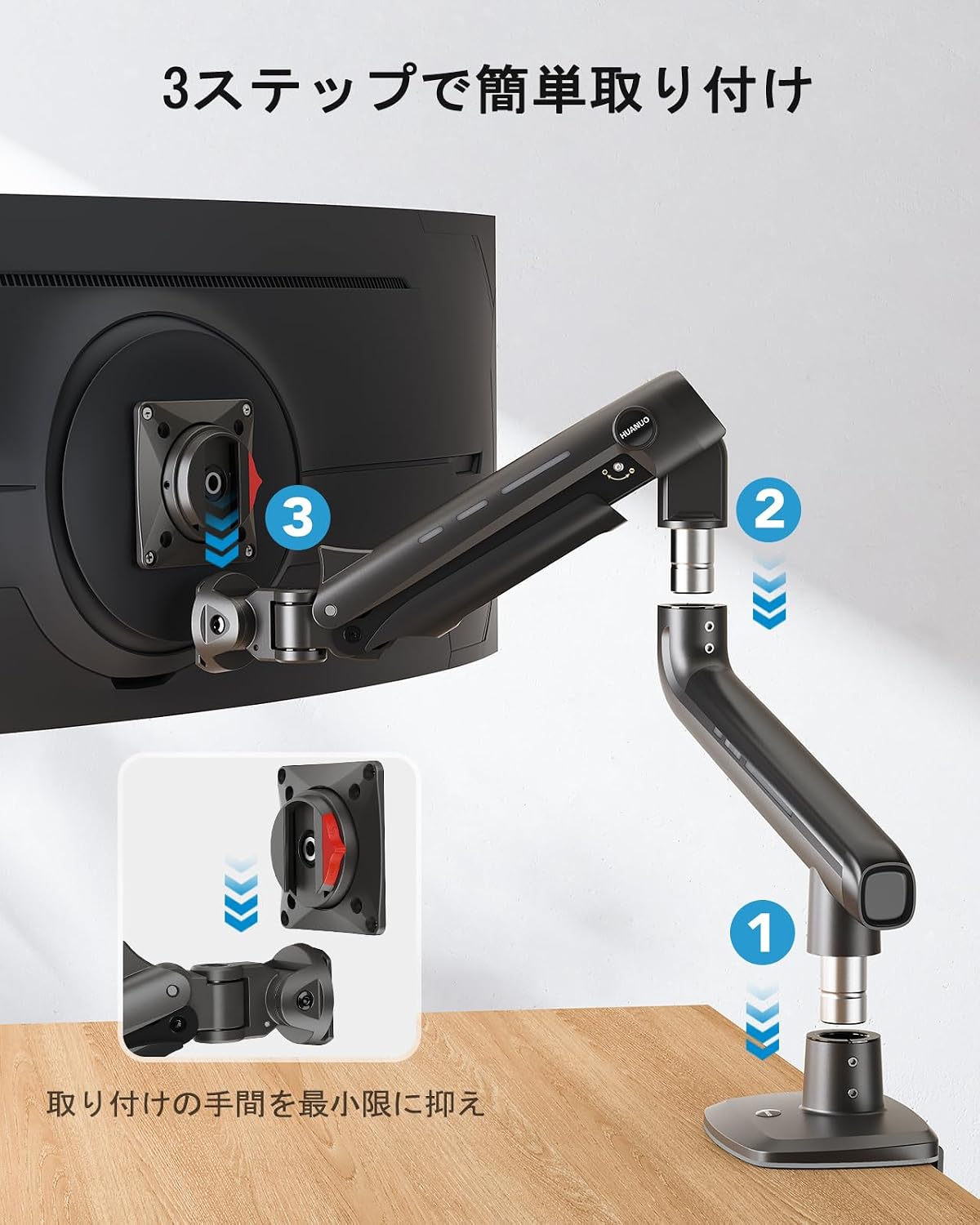
Image: Simplified 3-step installation process for the monitor arm, showing assembly of arm sections and VESA plate attachment.

Image: Illustration of the monitor arm's high load design, highlighting the thicker aluminum alloy arm and double clamp base for stability.
6. Упутства за употребу и подешавања
The HUANUO monitor arm offers extensive adjustability to achieve your ideal viewинг положај.
6.1. Подешавање висине
The arm allows for vertical movement up to 50cm. Simply grasp the monitor and move it up or down to your desired height. The mechanical spring will hold it in place.

Image: A person adjusting a monitor on the arm, illustrating the maximum height of 50cm, 360-degree rotation, and +/-90 degree swivel.
6.2. Подешавање нагиба
The monitor can be tilted +/- 50 degrees to reduce glare and optimize viewing angles. Gently push or pull the top or bottom of your monitor to adjust the tilt.

Image: A user engaged in gaming with their monitor tilted at +/- 50 degrees, demonstrating the ergonomic benefit for immersive experiences.
6.3. Swivel and Rotation
The arm allows for +/- 90 degrees of swivel (left/right movement) and 360 degrees of rotation at the VESA plate, enabling portrait or landscape orientation.

Image: A monitor arm displaying a large monitor in both horizontal (up to 49 inches) and vertical (up to 35 inches) orientations, demonstrating flexibility.
6.4. Подешавање затезања
The arm's tension needs to be adjusted to match the weight of your monitor. This ensures the monitor stays in place and moves smoothly.
Important: Adjust tension тек после the monitor is mounted.
- Locate the tension adjustment screw on the arm's joint.
- If the monitor sags or drops, lift the arm to a horizontal position and turn the screw супротном смеру казаљке на сату (towards the '+' sign) to increase tension.
- If the monitor rises or is difficult to push down, push the arm down to a horizontal position and turn the screw у смеру казаљке на сату (towards the '-' sign) to decrease tension.
- Adjust gradually and test the arm's movement until the monitor stays at your desired height with minimal effort.
Video: A demonstration of adjusting the monitor arm's tension to prevent sagging or rising, ensuring the monitor stays in position.
7. Менаџмент каблова
The monitor arm features integrated cable management to keep your workspace tidy. Route your monitor and power cables along the underside of the arm and secure them with the provided clips or covers. This helps prevent cable clutter and protects cables from damage.
8. Одржавање
- Редовно проверавајте све завртње и спојеве како бисте били сигурни да су чврсто затегнути и безбедно причвршћени.
- Clean the monitor arm with a soft, damp крпу. Избегавајте абразивна средства за чишћење или раствараче.
- Do not lubricate the mechanical spring mechanism unless specifically instructed by the manufacturer.
КСНУМКС. Решавање проблема
9.1. Monitor Sags or Drops
решење: The tension is too low for your monitor's weight. Increase the tension by turning the adjustment screw супротном смеру казаљке на сату (towards '+') with the monitor arm in a horizontal position. Refer to Section 6.4 for detailed instructions.
9.2. Monitor Rises or is Difficult to Push Down
решење: The tension is too high for your monitor's weight. Decrease the tension by turning the adjustment screw у смеру казаљке на сату (towards '-') with the monitor arm in a horizontal position. Refer to Section 6.4 for detailed instructions.
9.3. Monitor Does Not Tilt Properly
решење: Check the tightness of the tilt mechanism screws on the VESA head. Tighten them if they are loose. Ensure your monitor's weight is within the specified range.
9.4. Arm Feels Loose on the Desk
решење: Поново затегните C-clamp or grommet mount screws. Ensure the desk thickness is within the supported range (2-9cm).
10. Гаранција и подршка
This HUANUO monitor arm comes with a 5-year manufacturer warranty. For warranty claims, technical support, or any questions regarding your product, please contact HUANUO customer service through your retailer or the official HUANUO website. Please have your model number (HNSS48B) and proof of purchase ready.