
1. Увод
Thank you for choosing the XLEADER SoundAngel Mate Pro (2nd Gen) Shower Speaker. This manual provides essential information for the safe and efficient operation of your new device. This certified IPX7 waterproof Bluetooth speaker delivers 8W crystal sound with rich bass, offering up to 12 hours of playtime. It features a strong suction cup and a silicone lanyard for versatile placement, making it ideal for use in showers, by the pool, at the beach, or during kayaking activities.

Image 1: XLEADER SoundAngel Mate Pro speaker in a bathtub.
2. Садржај пакета
Молимо вас да проверите пакет за следеће ставке:
- 1x XLEADER SoundAngel Mate Shower Speaker
- 1x Suction Cup (pre-attached or separate)
- 1к УСБ-Ц кабл за пуњење
- 1x Hook Clip
- 1x Multilingual User Manual
- 1к Гарантни лист

Image 2: Contents of the XLEADER SoundAngel Mate Pro package.
3. Производ је готовview
The XLEADER SoundAngel Mate Pro features an intuitive control panel and a robust design for various environments.
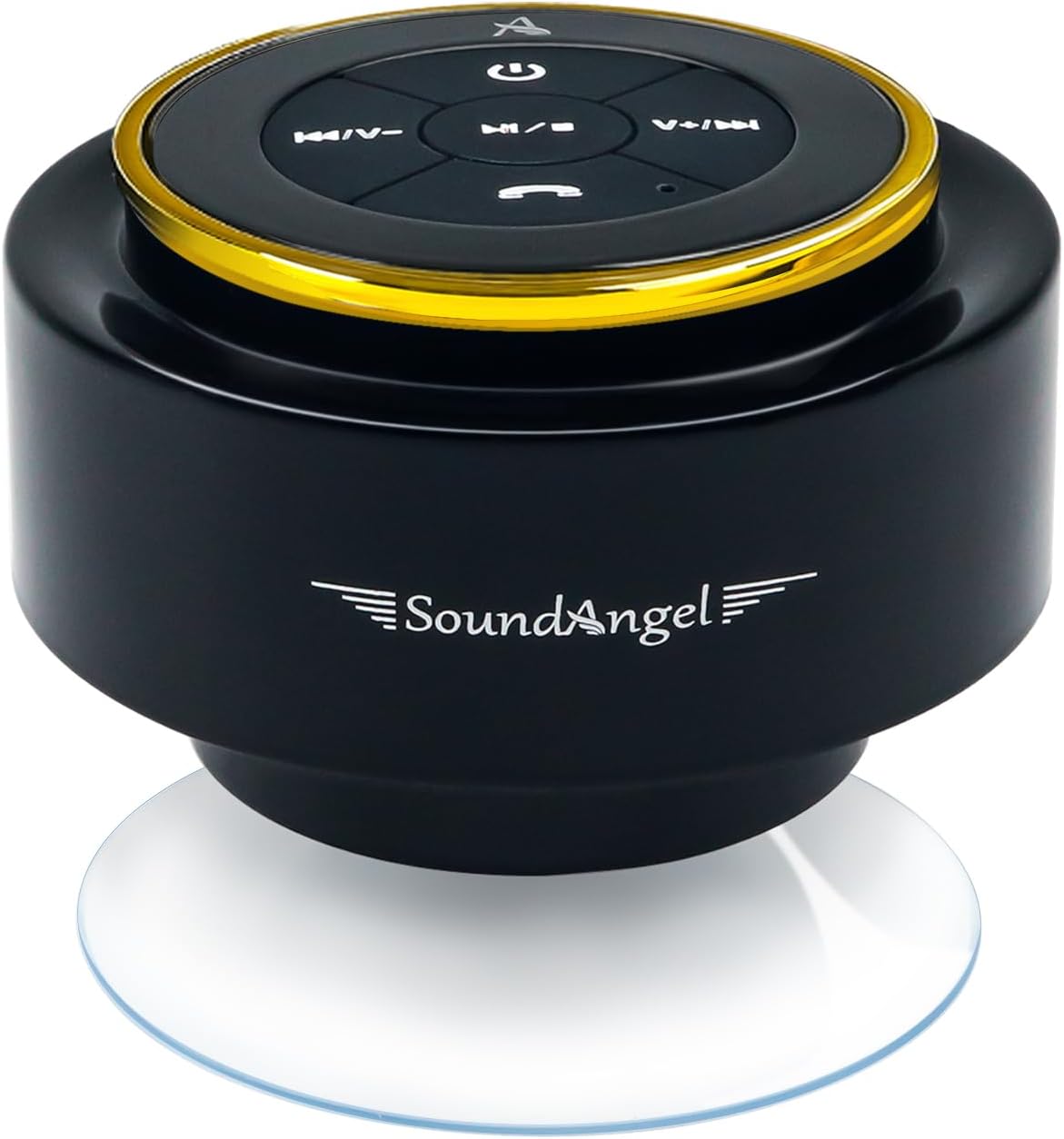
Image 3: XLEADER SoundAngel Mate Pro speaker with control buttons.
Контролна дугмад:
- Дугме за укључивање (
 ): Притисните и држите за укључивање/искључивање.
 - Дугме за репродукцију/паузу (
 ): Притисните за репродукцију или паузирање музике.
 - Volume Up / Next Track Button (
 ): Кратак притисак за следећу нумеру, дуг притисак за појачавање јачине звука.
 - Volume Down / Previous Track Button (
 ): Кратак притисак за претходну нумеру, дуг притисак за смањивање јачине звука.
 - Дугме за позив (
 ): Press to answer/end calls, press and hold to reject calls.
Портови:
- УСБ-Ц прикључак за пуњење: Located under a waterproof flap.

Слика 4: Бочна страна view with charging port and dimensions.
4. Подешавање
4.1 Пуњење звучника
Before first use, fully charge the speaker. Open the waterproof flap on the side of the speaker and connect the provided USB-C charging cable to the charging port. Connect the other end to a USB power adapter (not included). The charging indicator light will illuminate. A full charge takes approximately 3 hours and provides 8-12 hours of playtime at 50-80% volume.
4.2 Монтажа звучника
The speaker comes with a strong suction cup and a silicone lanyard for flexible mounting options.
- Using the Suction Cup: Ensure the surface (e.g., shower wall, glass, tile) is clean and smooth. Press the suction cup firmly against the surface until it adheres securely.
- Using the Silicone Lanyard: Attach the silicone lanyard to the designated loop on the speaker. Use the lanyard to hang the speaker from a hook or secure it to other objects like a kayak or backpack.

Image 5: Silicone lanyard for hanging the speaker.

Image 6: Speaker mounted in a shower using the suction cup.
4.3 Блуетоотх упаривање
- Укључено: Press and hold the Power Button until you hear an audible prompt and the LED indicator flashes blue, indicating it's in pairing mode.
- Активирајте Блуетоотх: На паметном телефону или другом уређају који подржава Bluetooth, идите на подешавања Bluetooth-а и укључите Bluetooth.
- Изаберите уређај: Look for "SoundAngel Mate Pro" in the list of available devices and select it.
- Потврдите везу: Once successfully paired, you will hear a confirmation sound, and the LED indicator will turn solid blue. The speaker will automatically reconnect to the last paired device when powered on.

Image 7: Bluetooth 5.3 connectivity and features.
Video 1: Demonstration of XLEADER SoundAngel Mate Pro speaker features and pairing.
5. Упутство за употребу
5.1 Укључивање/искључивање
- За укључивање: Притисните и држите дугме за напајање 2-3 секунде.
- За искључивање: Притисните и држите дугме за напајање 2-3 секунде.
5.2 Репродукција музике
- Пусти/паузирај: Press the Play/Pause Button.
- Следећа нумера: Short press the Volume Up / Next Track Button.
- Претходни запис: Short press the Volume Down / Previous Track Button.
- Појачавање звука: Long press the Volume Up / Next Track Button.
- Смањивање јачине звука: Long press the Volume Down / Previous Track Button.
5.3 Управљање позивима
Уграђени микрофон омогућава позиве без употребе руку.
- Одговори/заврши позив: Притисните дугме за позив.
- Одбиј позив: Press and hold the Call Button.
Video 2: Demonstration of the speaker's waterproof capabilities and call management.
5.4 Упаривање са правим бежичним стерео (TWS) системом
For an enhanced audio experience, you can pair two XLEADER SoundAngel Mate Pro speakers together for True Wireless Stereo sound.
- Ensure both speakers are powered off and not connected to any other Bluetooth devices.
- Power on both speakers. They will automatically enter pairing mode.
- On one of the speakers (this will be your primary speaker), double-press the Play/Pause button. The speakers will attempt to pair with each other.
- Once successfully paired, you will hear a confirmation tone, and the LED indicator on the primary speaker will flash blue, while the secondary speaker's LED will remain solid blue.
- Now, connect your device to the primary speaker via Bluetooth as described in section 4.3. Both speakers will play music synchronously.
6. Нега и одржавање
- After use in saltwater or chlorinated water, rinse the speaker with fresh water to prevent corrosion.
- Ensure the charging port's waterproof flap is securely closed before exposing the speaker to water.
- Очистите звучник меком, дamp тканина. Немојте користити јаке хемикалије или абразивна средства за чишћење.
- Чувајте звучник на хладном и сувом месту када се не користи.
- Avoid extreme temperatures and direct sunlight for prolonged periods.

Image 8: Speaker demonstrating IPX7 waterproof capability.
КСНУМКС. Решавање проблема
| Проблем | Могући узрок | Решење |
|---|---|---|
| Звучник се не укључује. | Ниска батерија. | Потпуно напуните звучник. |
| Упаривање са уређајем није могуће. | Bluetooth not enabled on device, speaker not in pairing mode, or too far from device. | Ensure Bluetooth is on, speaker is in pairing mode (flashing blue LED), and device is within 66ft. Try restarting both devices. |
| Нема звука или је јачина звука ниска. | Volume too low on speaker or device, or speaker not connected. | Increase volume on both speaker and device. Re-pair the speaker if necessary. |
| Звук је изобличен. | Volume too high, or device is too far from speaker. | Lower the volume. Move the device closer to the speaker. |
8. Спецификације
| Феатуре | Детаљ |
|---|---|
| Назив модела | USMATEG-A |
| Спеакер Типе | Сховер Спеакер |
| Водоотпорна оцена | IPX7 (fully immersible up to 1 meter for 30 minutes) |
| Блуетоотх верзија | 5.3 |
| Домет | До 66 стопа |
| Излазна снага звучника | 8 Ваттс |
| Капацитет батерије | КСНУМКСмАх полимер батерија |
| Плаитиме | 8-12 hours (at 50-80% volume) |
| Време пуњења | 3 сата |
| Порт за пуњење | УСБ-Ц |
| Посебне карактеристике | Built-in Microphone, True Wireless Stereo (TWS) support |
| Тип монтаже | Suction Cup, Silicone Lanyard |
| Димензије производа | 3.15"Д к 3.15"Ш к 2.76"В |
| Тежина артикла | 4.9 унци (138 грама) |

Image 9: Speaker dimensions and available colors.
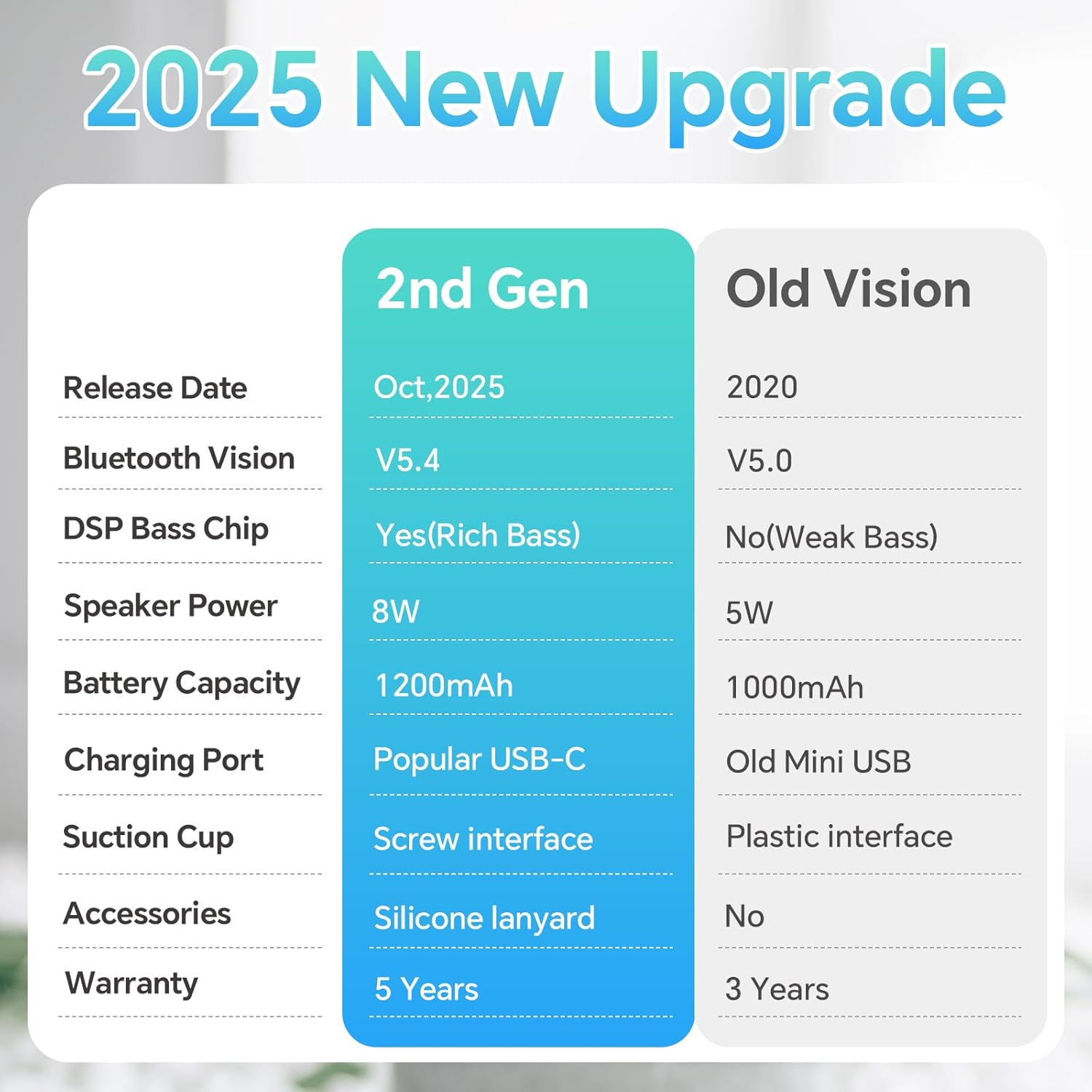
Image 10: Feature comparison: 2nd Gen vs. Old Version.
9. Гаранција и подршка
The XLEADER SoundAngel Mate Pro (2nd Gen) Shower Speaker comes with a 3 година гаранције. For any support inquiries, troubleshooting assistance, or warranty claims, please refer to the contact information provided on the warranty card included in your package or visit the official XLEADER webсајту.