
GODIYMODULES BTL-100WFYY-002
TPA3116D2 Digital Power Ampлифиер Боард Усер Мануал
Model: BTL-100WFYY-002
Увод
This manual provides detailed instructions for the GODIYMODULES TPA3116D2 Digital Power Amplifier Board. Designed for ease of use and high performance, this compact mono amplifier board features a TPA3116 digital power amplifier chip and an integrated volume potentiometer, making it suitable for a wide range of audio applications. Please read this manual thoroughly before operation to ensure proper setup and optimal performance.
Карактеристике
- Utilizes the TPA3116 digital power amplifier chip for efficient audio ampосвешћење.
- Compact design, ideal for space-constrained projects.
- Integrated volume potentiometer for convenient audio level adjustment.
- Supports a wide working voltagОпсег ДЦ 5В до 24В.
- Delivers a maximum output power of 100W in mono configuration.
Спецификације
| Параметар | Валуе |
|---|---|
| Воркинг Волtage | ДЦ 5В-24В |
| Board Dimensions (L x W) | 45 мм x 33 мм (1.77 x 1.30 инча) |
| Укупна висина (приближно) | 22 мм (0.87 инча) |
| Максимална излазна снага | 100В (моно) |
| Чипсет | ТПА3116Д2 |
| Тип монтаже | Сурфаце Моунт |
| Број модела ставке | BTL-100WFYY-002 |
Сетуп
Follow these steps to set up your TPA3116D2 Digital Power AmpЛифиер Боард:
- Прикључак за напајање: Connect a DC power supply within the 5V-24V range to the VCC and GND terminals. Ensure correct polarity to prevent damage.
- Аудио улаз: Connect your audio source (e.g., smartphone, MP3 player) to the IN+ and IN- terminals.
- Излаз звучника: Connect your mono speaker to the OUT+ and OUT- terminals. Ensure the speaker impedance is compatible with the ampлифиер.

Слика: Врх view оф тхе amplifier board, highlighting the input (IN), output (OUT), and power (VCC) connection points.

Image: A pair of TPA3116D2 amplifier boards, showcasing their compact size and integrated volume control.
Упутство за употребу
Once the board is correctly wired and powered on, you can begin operation:
- Подешавање јачине звука: Use the integrated potentiometer knob to adjust the output volume. Rotate clockwise to increase volume and counter-clockwise to decrease it.
- Аудио репродукција: Start playing audio from your connected source. The amplifier will output the sound through the connected speaker.
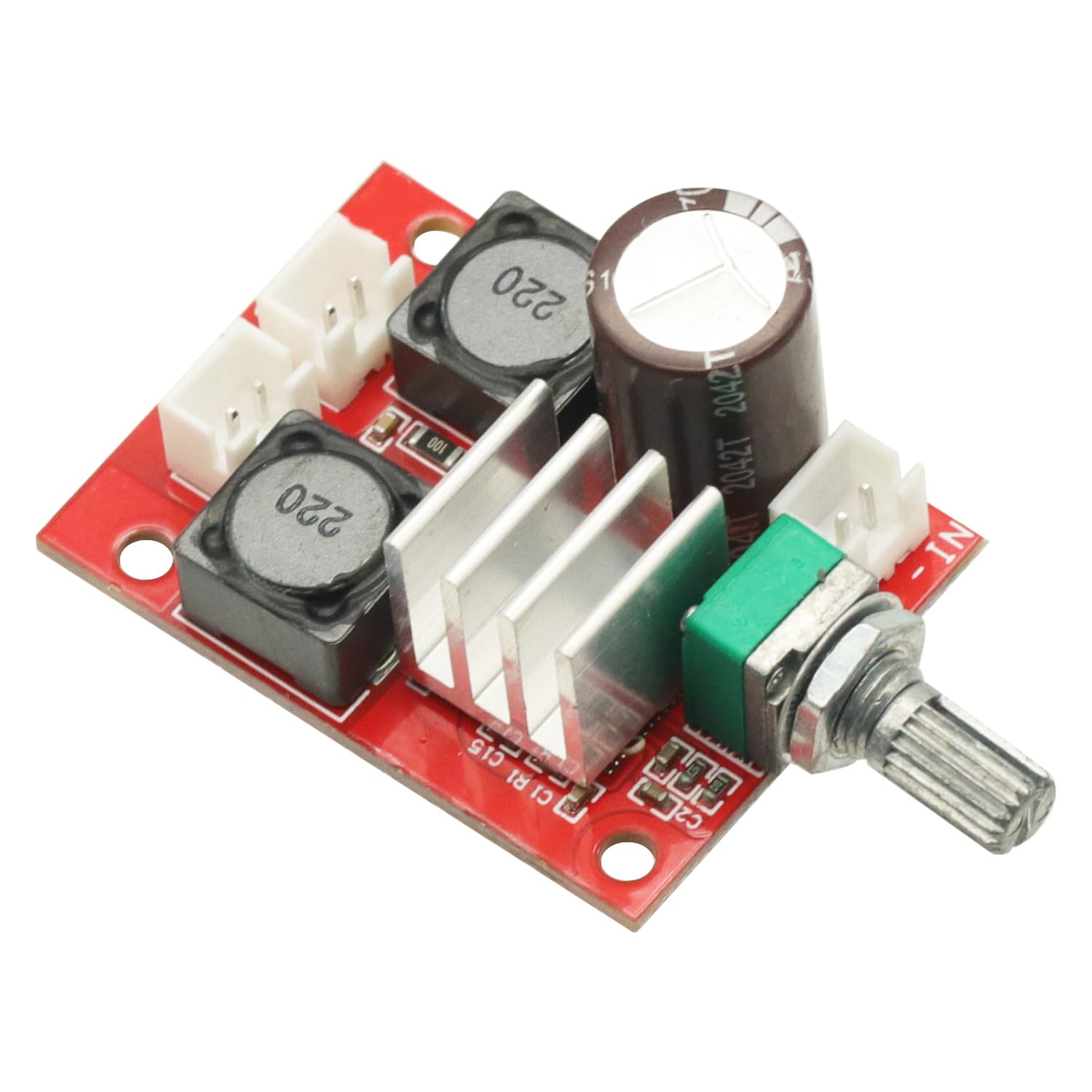
Слика: Под углом view оф тхе amplifier board, clearly showing the volume adjustment potentiometer.
Одржавање
Да бисте обезбедили дуговечност и оптималне перформансе вашег amplifier board, follow these maintenance guidelines:
- Одржавајте суво: Avoid exposing the board to moisture or liquids, which can cause short circuits and damage.
- Очистите нежно: Ако је чишћење потребно, користите меку, суву крпу. Не користите јаке хемикалије или абразивне материјале.
- Пажљиво рукујте: Avoid dropping or subjecting the board to strong impacts. When handling, minimize contact with electronic components to prevent static discharge.
- вентилација: Ensure adequate airflow around the board, especially during extended operation, to prevent overheating.
Решавање проблема
Ако наиђете на проблеме са својим amplifier board, refer to the following common problems and solutions:
- Нема напајања:
- Check if the DC power supply is connected correctly and providing voltagе у опсегу од 5V-24V.
- Verify power supply polarity.
- Нема излаза звука:
- Ensure the audio input source is active and connected properly to IN+ and IN-.
- Check speaker connections to OUT+ and OUT-.
- Confirm the volume potentiometer is not set to minimum.
- Изобличен звук:
- Verify that the input audio signal is not too strong, causing clipping.
- Check the power supply for stability; insufficient current can cause distortion.
- Уверите се да импеданса звучника одговара ampзахтеви спасиоца.
Гаранција и подршка
This product is covered by a standard return policy. If you are not satisfied with your purchase, you may be eligible for a return or replacement within 30 days of receipt, subject to the seller's terms and conditions.
For technical support, troubleshooting assistance beyond this manual, or warranty inquiries, please contact the seller directly through the platform where the product was purchased. Provide your order details and a clear description of the issue for prompt assistance.
Повезани документи - BTL-100WFYY-002
 |
BTL-6000 TR-Therapy: Targeted Radiofrequency Therapy System Готовоview and technical specifications of the BTL-6000 TR-Therapy system, a medical device for targeted radiofrequency therapy, featuring dynamic impedance control and advanced applicator technology. |
 |
Ленцо БТЛ-030 Блуетоотх звучник упутство за употребу Comprehensive user manual for the Lenco BTL-030 Bluetooth speaker, featuring a built-in light, rechargeable battery, and wireless connectivity instructions. |
 |
Упутство за употребу и безбедносне информације о блутут звучнику Denver BTL-330 Свеобухватни водич за Denver BTL-330 Bluetooth звучник, који обухвата безбедносна упутства, производ и више...view, техничке спецификације, пуњење, рад и контакт информације. |
 |
Денвер БТЛ-330 : Мануелно коришћење Хаут-парлеур Блуетоотх Портабле Децоуврез ле хаут-парлеур Денвер БТЛ-330. Овај приручник користи детаљније функције, сигурност, технике спецификације и упутства за повезивање Блуетоотх, УСБ и ТФ картице. |
 |
Denver BTL-65MK2 Bluetooth Speaker User Manual User manual for the Denver BTL-65MK2 portable Bluetooth speaker, detailing setup, operation, and features. |
 |
Denver BTL-330 Portable Bluetooth Speaker - User Manual and Product Information Comprehensive guide for the Denver BTL-330 portable Bluetooth speaker, covering safety, features, technical specifications, and contact information. Learn how to use and care for your device. |
Ask a question about this manual
Ask about setup, troubleshooting, compatibility, parts, safety, or missing instructions. Manuals+ will review the question and use this page’s manual context to help answer it.