
1. Увод
This manual provides essential information for the safe and efficient use of the APEX HD100 Forklift Heavy Duty Self-Dumping Hopper. Please read this manual thoroughly before operating the equipment. Proper understanding and adherence to these instructions will ensure safe operation and prolong the life of your hopper.
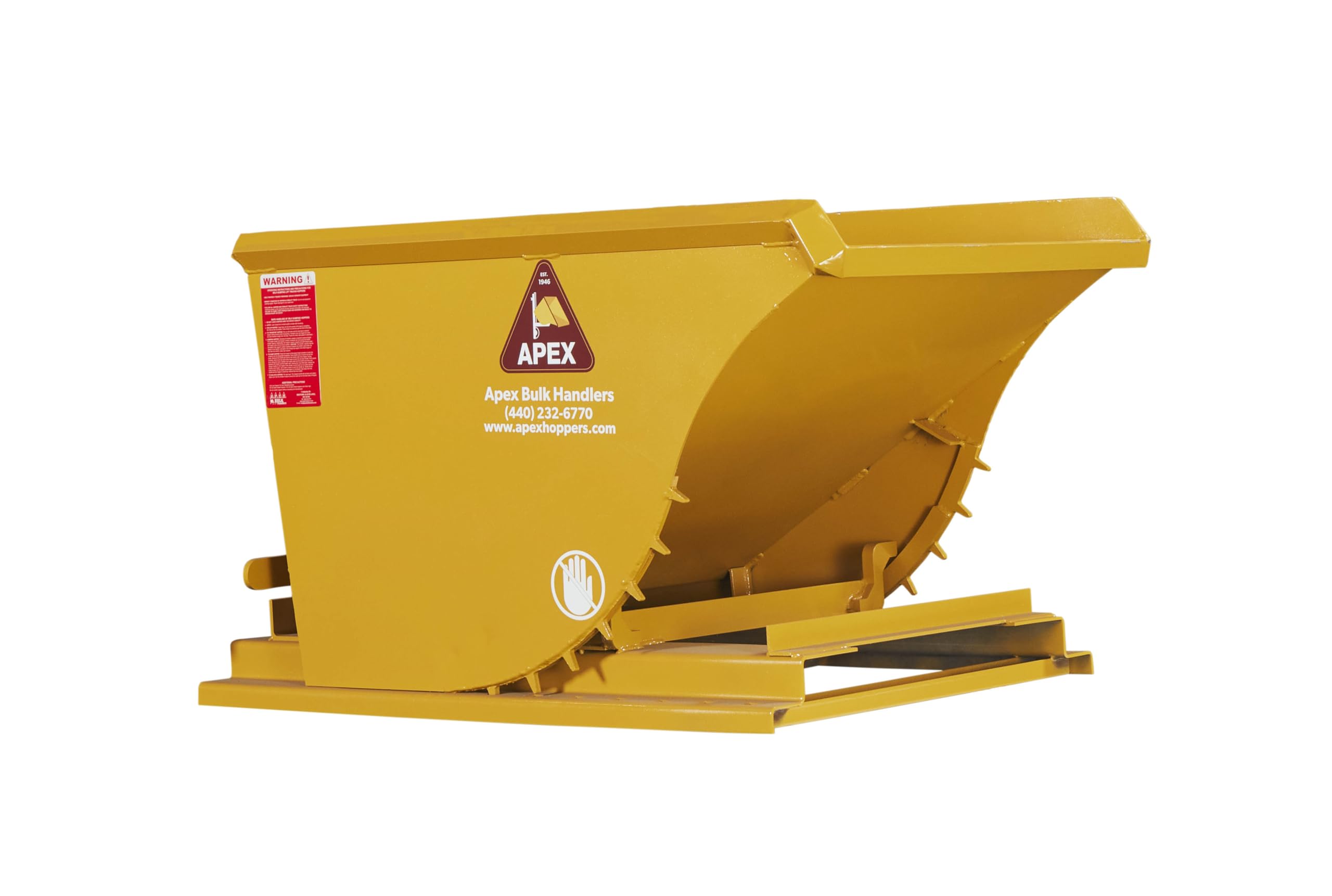
Figure 1: APEX HD100 Self-Dumping Hopper with key dimensions (62.5"L x 39.5"W x 37.75"H).
2. Безбедносне информације
Operating heavy equipment requires strict adherence to safety protocols. Failure to follow these guidelines can result in serious injury or property damage.
- Обука оператера: Only trained and authorized personnel should operate the forklift and the self-dumping hopper.
- Forklift Compatibility: Ensure your forklift has the appropriate load capacity and fork dimensions to safely handle the HD100 hopper, which has a 6000 lb capacity.
- E-Z Release Latch: The hopper features a single-motion, self-locking E-Z Release latch designed to keep the operator out of danger between the hopper and the forklift. Always ensure the latch is engaged before transport and disengaged only when ready to dump.
- Ограничења оптерећења: Do not exceed the 6000 lb (1 cubic yard) load capacity. Overloading can lead to instability and equipment failure.
- Дистрибуција тежине: Distribute the load evenly within the hopper to maintain stability during transport and dumping.
- Одобрење: Maintain adequate clearance from personnel, structures, and other equipment during operation, especially when raising or dumping the hopper.
- Лична заштитна опрема (ЛЗО): Always wear appropriate PPE, including safety glasses, hard hat, and safety footwear.
- инспекција: Before each use, inspect the hopper for any signs of damage, wear, or loose components. Do not use damaged equipment.
3. Карактеристике производа
The APEX HD100 Self-Dumping Hopper is constructed for durability and reliability in industrial environments.
- Робусна конструкција: Built with 7-gauge steel for the body, 1/4" thick formed base rails, 3/8" thick cross braces, and a 1/2" thick flame-cut handle.
- Reinforced Top Edge: Features a reinforced 3/16" structural angle iron top edge for added durability and structural integrity.
- Single-Piece Rocker Design: Incorporates a single-piece, 5/8" flame-cut solid steel rocker with 1" S-stops, designed to eliminate the risk of loose or broken pins and rivets.
- Watertight Interior: 100% MIG-welded construction ensures watertight interiors, suitable for various material types.
- E-Z Release Latch: An exclusive one-handed autolocking handle mechanism for safe and efficient dumping.
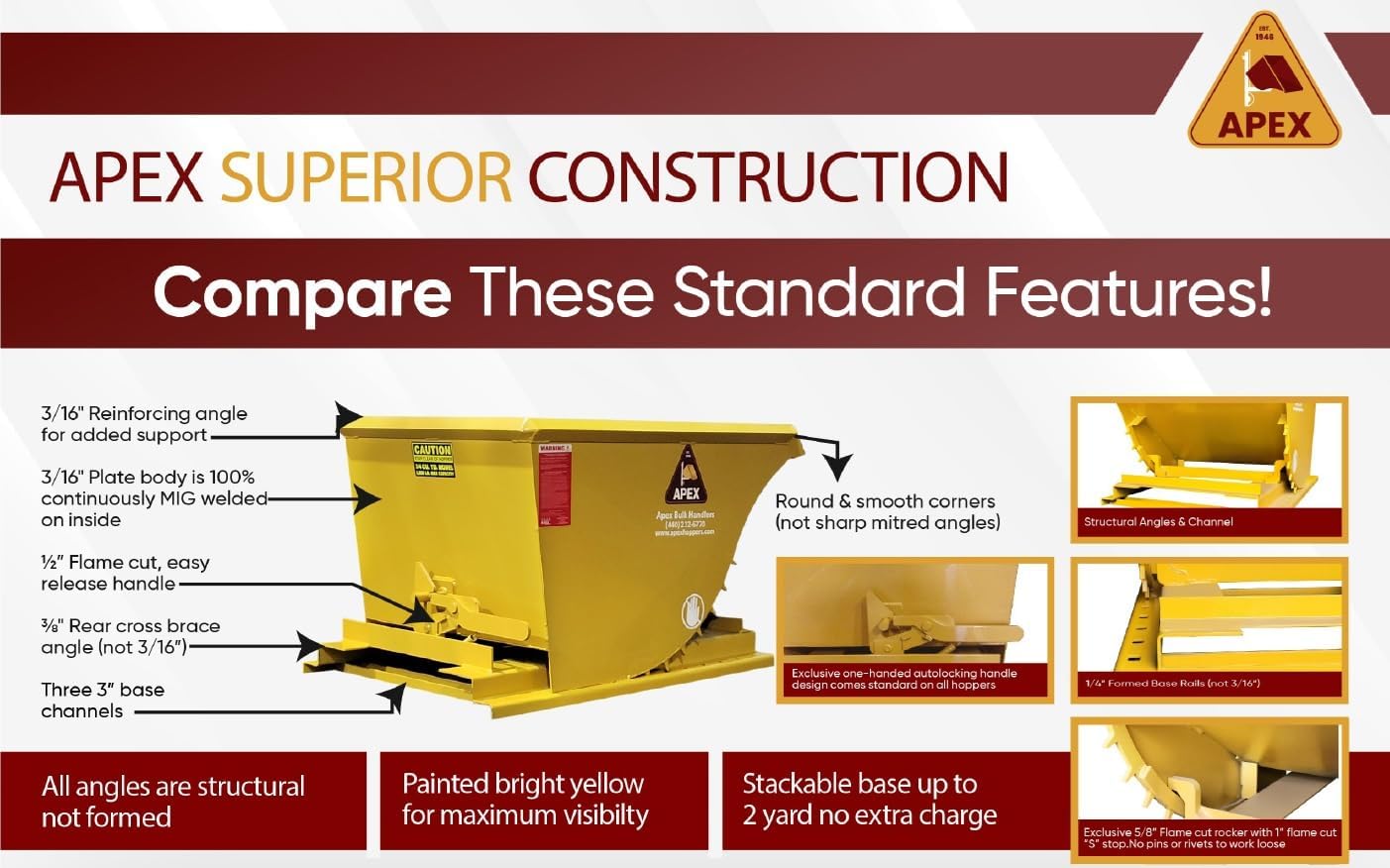
Слика 2: Детаљно view of APEX Superior Construction features, including reinforcing angles, MIG-welded body, and flame-cut components.
4. Подешавање
The APEX HD100 hopper is designed for immediate use upon delivery. No complex assembly is required. However, a pre-operational check is crucial.
- Распакивање: Carefully remove all packaging materials. Inspect the hopper for any shipping damage. Report any damage to the carrier immediately.
- Први преглед: Before first use, visually inspect all welds, structural components, the E-Z Release latch, and the rocker mechanism for any signs of damage, cracks, or loose parts.
- Forklift Preparation: Ensure the forklift is in good working order, with forks correctly spaced and capable of handling the hopper's dimensions and maximum loaded weight.
5. Упутство за употребу
Follow these steps for safe and effective operation of your self-dumping hopper.
- Loading the Hopper: Fill the hopper with material, ensuring the load does not exceed the 1 cubic yard or 6000 lb capacity. Distribute the material as evenly as possible to prevent imbalance.
- Engaging with Forklift: Carefully approach the hopper with the forklift. Insert the forklift tines fully into the hopper's fork pockets. Ensure the hopper is securely seated on the forks.
- Транспорт: Lift the hopper slightly off the ground and tilt it back slightly for stability during transport. Drive slowly and cautiously, especially over uneven surfaces.
- Positioning for Dumping: Transport the hopper to the desired dumping location. Position the forklift and hopper over the collection bin or area.
- Dumping the Hopper:
- Ensure the area below and around the hopper is clear of personnel and obstructions.
- Raise the hopper to the appropriate height for dumping.
- Pull the E-Z Release latch. The hopper will automatically tilt forward, emptying its contents. The self-locking mechanism prevents accidental dumping.
- Returning to Upright Position: After dumping, slowly lower the hopper. As it lowers, the hopper will automatically return to its upright, locked position. Confirm the E-Z Release latch has re-engaged.
- Disengaging from Forklift: Once the hopper is upright and locked, carefully back the forklift away, withdrawing the tines from the fork pockets.

Figure 3: APEX HD100 Self-Dumping Hopper securely attached to a forklift, ready for operation.
6. Одржавање
Regular maintenance ensures the longevity and safe operation of your APEX HD100 hopper.
- Чишћење: Clean the hopper regularly, especially after handling corrosive or sticky materials. This prevents material buildup and corrosion.
- инспекција: Conduct daily or pre-shift inspections for any signs of wear, damage, or fatigue, particularly on welds, the rocker mechanism, and the E-Z Release latch.
- подмазивање: Periodically check and lubricate moving parts of the E-Z Release latch and rocker mechanism as needed to ensure smooth operation. Use a suitable industrial lubricant.
- Складиштење: Store the hopper in a dry area to prevent rust and corrosion when not in use for extended periods.
КСНУМКС. Решавање проблема
This section addresses common issues you might encounter with your self-dumping hopper.
- Hopper Not Dumping:
- Ensure the E-Z Release latch is fully disengaged.
- Check for material buildup or obstructions preventing the hopper from tilting.
- Verify the load is not stuck or bridging within the hopper.
- Hopper Not Returning to Upright Position:
- Ensure the hopper is fully lowered. The return mechanism relies on gravity and the lowering action of the forklift.
- Check for obstructions around the rocker mechanism.
- Inspect the rocker and latch for damage or excessive wear.
- Unusual Noises or Movement: Immediately cease operation. Inspect the hopper for loose bolts, damaged welds, or structural fatigue. Do not resume operation until the issue is identified and resolved.
For issues not covered here, or if you require assistance, please contact APEX customer support.
8. Спецификације
| Атрибут | Детаљ |
|---|---|
| Број модела | ХД100 |
| Бранд | АПЕКС |
| Капацитет | 1 Cubic Yard |
| Капацитет оптерећења | 6000 фунти |
| Материјал | легирани челик |
| Боја | Жута |
| Тежина артикла | 436 фунти |
| Димензије производа (Д к Ш к В) | 62.5 cm x 39.5 cm x 37.75 cm |
| УПЦ | 850071488036 |
| Произвођач | АПЕКС |
9. Информације о гаранцији
APEX stands behind the quality of its products. The APEX HD100 Self-Dumping Hopper comes with a Доживотна гаранција against manufacturing defects. This warranty covers defects in materials and workmanship for the life of the product, provided it is used and maintained according to the instructions in this manual.
For warranty claims or questions, please contact APEX customer support.
10. Подршка
For technical assistance, parts, or any inquiries regarding your APEX HD100 Self-Dumping Hopper, please contact APEX Bulk Handlers, INC.
- Компанија: APEX Bulk Handlers, INC
- Телефон: (440) 232-6770
- Webсајт: www.apexhoppers.com