
1. Увод
Thank you for choosing the ORIA Kids Alarm Clock Model 8825. This device is designed to assist with sleep training for children, featuring an 'OK to Wake' function, customizable RGB night lights, dual alarms, and various adjustable settings for brightness and volume. Please read this manual carefully to ensure proper use and to fully utilize all features.

Слика: Фронт view of the ORIA Kids Alarm Clock displaying time and colorful ambient light.
2. Производ је готовview
Familiarize yourself with the clock's buttons and display icons.

Image: Diagram showing the control buttons and display indicators on the ORIA Kids Alarm Clock.
- ВРЕМЕНСКИ СКЛОП: Притисните и држите да уђете у режим подешавања времена.
- SUN/MOON ON/OFF: Activates/deactivates the sleep reminder and wake-up light function.
- TUNES: Short press to cycle through music tracks. Long press to activate/deactivate child lock.
- ПРИКАЗ: Подешава осветљеност екрана.
- ГОРЕ (+): Increases values, adjusts ambient light brightness.
- ДОЉЕ (-): Decreases values, adjusts ring level.
- Alarm 1/Alarm 2 Icons: Indicate active alarms.
- Икона браве за децу: Означава да је дечја блокада активна.
- Sun/Moon Icon: Indicates sleep/wake light function is active.
3. Подешавање
3.1 Прикључак за напајање
The ORIA Kids Alarm Clock operates via a Type-C charging cable (included). Connect the cable to the clock and plug the other end into a suitable USB power adapter (not included). The clock must be plugged in for full functionality.
A button battery (not included) can be installed to retain time settings during power outages, but it will not power the screen or other functions.
3.2 Подешавање времена
- Дуго притисните ВРЕМЕНСКИ СКЛОП button until the digits on the display start flashing.
- Користите ГОРЕ (+) or ДОЛЕ (-) дугмад за подешавање вредности.
- Кратак притисак ВРЕМЕНСКИ СКЛОП to move to the next setting. The setting order is: 12/24H format > Year > Month > Day > Hour > Minute.
- Када су сва подешавања завршена, притисните ВРЕМЕНСКИ СКЛОП again to exit, or wait a few seconds for it to exit automatically.

Image: Visual guide for setting the time, date, and 12/24H format.
4. Упутство за употребу
4.1 Sleep Reminder & Wake-up Function (OK to Wake)
This function uses light cues to help children understand when it's time to sleep and wake up.
- Притисните тастер SUN/MOON ON/OFF button to activate this feature. The Sun/Moon icon will appear on the display.
- време за спавање: At the set sleep time, the ambient light will turn red (default) and automatically turn off after one hour, signaling bedtime.
- Pre-Wake: 20 minutes before the set alarm time, the ambient light will turn yellow (default).
- Пробудити: When the alarm sounds, the ambient light will turn green (fixed color), indicating it's time to wake up.
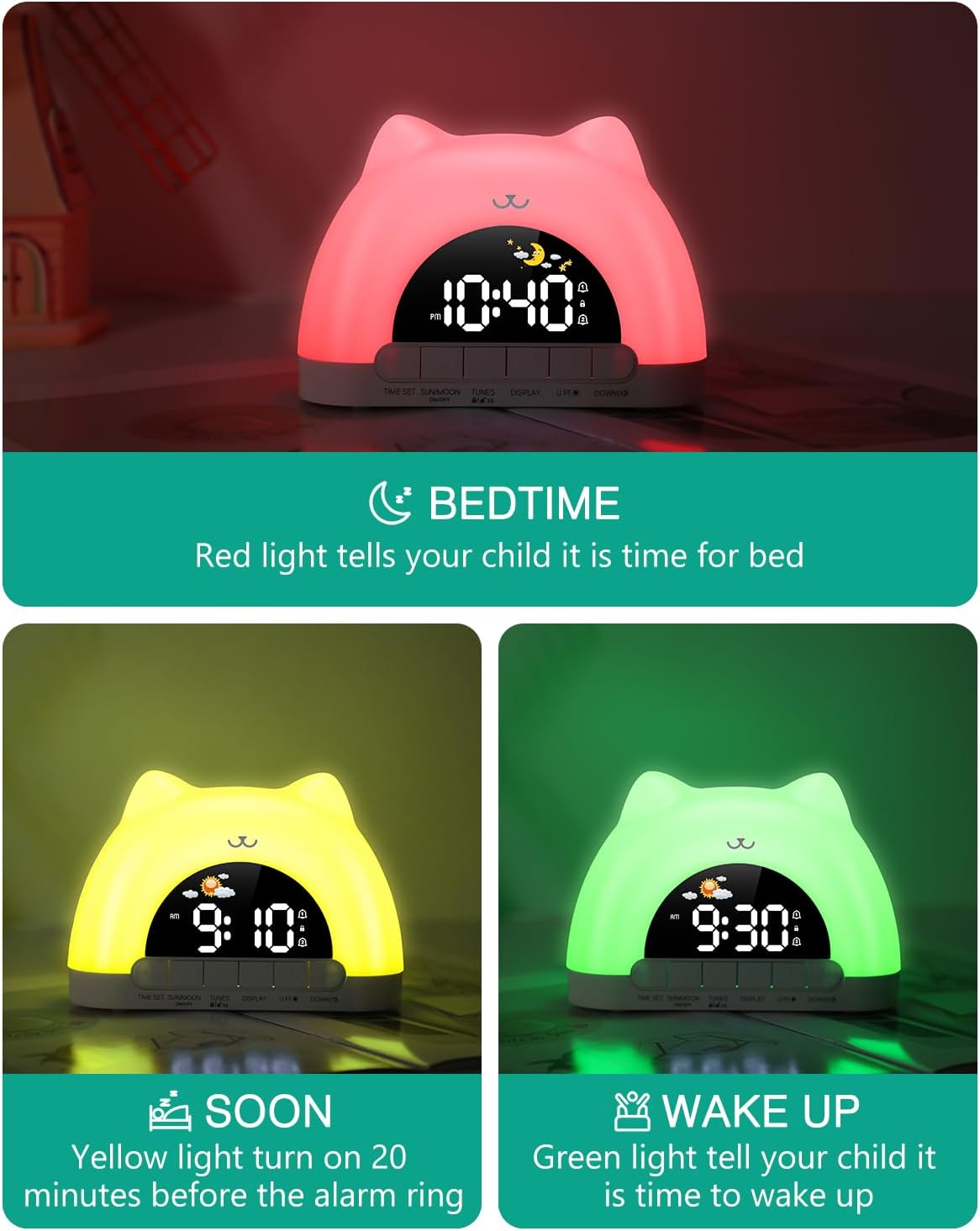
Image: Visual representation of the sleep reminder and wake-up light sequence.
4.2 Функција ноћног светла
The clock features an ambient night light with multiple color and brightness options.
- Активација: In time display mode, simply touch the top of the clock to turn on the ambient light.
- Режими боја: The clock offers 11 color modes, including 7 solid colors (White, Red, Yellow, Green, Cyan, Blue, Purple) and 4 dynamic RGB changing modes.
- Подешавање осветљености: The ambient light has 3 brightness levels (high, medium, low). Use the ГОРЕ (+) or ДОЛЕ (-) дугмад за подешавање.
- Искључивање: To turn off the ambient light, press and hold the top of the product for 3 seconds.
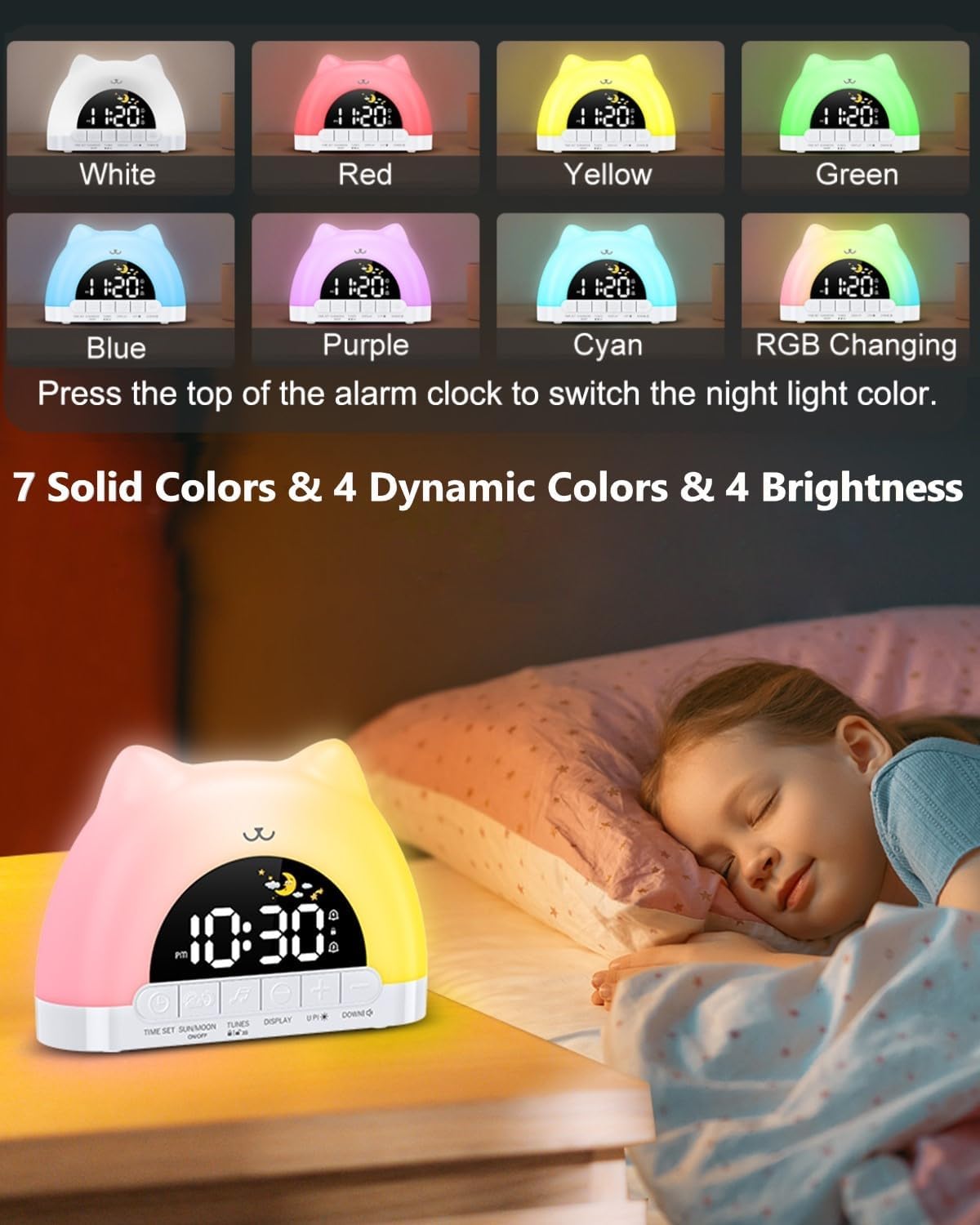
Слика: прamples of the 11 available night light colors.
Video: Demonstration of the smart clock's night light and dual alarm features.
4.3 Подешавања аларма (дуални аларми)
The clock supports two independent alarms with customizable settings.
- Активирај аларм: Кратко притисните на ВРЕМЕНСКИ СКЛОП button to turn on/off Alarm 1 or Alarm 2. The corresponding alarm icon will appear/disappear on the screen.
- Подесите време аларма: Дуго притисните ВРЕМЕНСКИ СКЛОП дугме за улазак у режим подешавања аларма. Цифре за сате ће трептати.
- Користите ГОРЕ (+) or ДОЛЕ (-) buttons to adjust the hour, then short press ВРЕМЕНСКИ СКЛОП да пређе на минуте.
- Weekday Alarm Settings: After setting the time, you can choose from 4 weekday alarm settings: Single day (1-1), Monday to Friday (1-5), Monday to Sunday (1-7), and Saturday to Sunday (6-7).
- Wake-up Sounds: Select from 12 different wake-up sounds.
- Нивои јачине звука: Adjust the alarm volume with 4 levels using the ДОЛЕ (-) дугме.
- Одгода функција: When an alarm sounds, press the top of the clock to activate a 5-minute snooze.

Image: Display showing dual alarm settings and the snooze feature.

Image: Visual guide to selecting from 12 wake-up sounds and 4 volume levels.
4.4 Функција браве за децу
The child lock prevents accidental changes to important settings.
- Активација/Деактивација: Дуго притисните TUNES button to turn the child lock on or off. A lock icon will appear on the display when active.
- Locked Buttons: When child lock is on, all buttons except the snooze button are locked.
- Allowed Functions: Children can still control the snooze button, switch between 10 music tracks, and adjust the ambient light color.

Image: The child lock function in use, showing the lock icon on the display.
4.5 Осветљеност екрана
Adjust the screen brightness to your preference.
- The display has 5 brightness levels. Press the ДИСПЛАИ дугме за прелазак кроз њих.
- The final brightness level turns off the screen for a resting state.
- Night Brightness Function: The clock features automatic brightness adjustment at night for optimal viewинг.

Image: Illustration of the 5-level screen brightness and automatic night brightness adjustment.
4.6 Репродукција музике
Enjoy 10 different music tracks for relaxation or as part of the sleep routine.
- Кратко притисните на TUNES button to cycle through the 10 available music tracks.
- Подесите јачину звука помоћу ДОЛЕ (-) дугме.

Image: The clock displaying its music enjoyment feature.
4.7 УСБ излазни порт
The built-in USB output port allows you to charge other small electronic devices.
- Locate the USB output port on the back of the clock.
- Connect your device's charging cable to this port to begin charging.

Image: The clock featuring both Type-C input and a standard USB output port for charging.
5. Одржавање
To ensure the longevity and optimal performance of your ORIA Kids Alarm Clock, follow these maintenance guidelines:
- Чишћење: Wipe the clock with a soft, dry cloth. Do not use abrasive cleaners, solvents, or strong chemicals, as these may damage the surface.
- Пласман: Place the clock on a stable, flat surface away from direct sunlight, excessive heat, and moisture.
- Избегавајте воду: This device is not waterproof. Avoid contact with water or other liquids.
- Пажљиво рукујте: Избегавајте испуштање или излагање сата јаким ударцима.
КСНУМКС. Решавање проблема
If you encounter any issues with your ORIA Kids Alarm Clock, please refer to the following common problems and solutions:
- Уређај се не укључује:
Ensure the Type-C charging cable is securely connected to both the clock and a working USB power adapter. Verify the power outlet is functional. - Alarm Not Sounding/Inconsistent:
Check that the alarm is activated (Alarm 1 or Alarm 2 icon visible). Verify the alarm time and weekday settings are correct. Ensure the volume level is not set to zero. If the ambient light function is active, ensure it is not interfering with the alarm's operation; try deactivating the ambient light temporarily to test the alarm. - Difficulty Setting Time/Alarms:
Refer to Section 3.2 (Time Setting) and Section 4.3 (Alarm Settings) for detailed, step-by-step instructions. Ensure you long-press the TIME SET button to enter setting mode and short-press to confirm each step. - Ambient Light Not Turning Off:
To turn off the ambient light, press and hold the top of the product for 3 seconds. If the sleep reminder function is active, the light will turn off automatically after one hour at bedtime. - Дугмад не реагују:
Check if the Child Lock function is active (lock icon on display). If so, long-press the TUNES button to deactivate it. Only the snooze button, music selection, and ambient light color adjustment are available when child lock is on.
7. Спецификације
| Бранд | ОРИА |
| Број модела | 8825 |
| Дисплаи Типе | ЛЕД |
| Извор напајања | Каблирани електрични (USB-C) |
| Димензије производа | 6.63" Ш x 4.1" В |
| Материјал | Пластика |
| Посебне карактеристике | Adjustable Brightness, Adjustable Volume, OK to Wake, RGB Night Lights, Snooze, Dual Alarms, Child Lock, Music Playback, USB Output Port |
| Тип собе | Bedroom, Kid's Room |
8. Гаранција и подршка
ORIA is committed to providing high-quality products and excellent customer service.
- 1-годишња гаранција: Your ORIA Kids Alarm Clock is covered by a 1-year warranty from the date of purchase.
- 90-Day Free Replacements: Enjoy free replacements for eligible issues within 90 days of purchase.
- Бесплатни повраћај у року од 30 дана: You may return the product for free within 30 days of purchase.
- 24/7 корисничка подршка: Our customer support team is available 24 hours a day, 7 days a week to assist you.
- Доживотна техничка подршка: Receive lifetime technical support for your ORIA product.
For further assistance, please contact ORIA customer service through your purchase platform or visit the official ORIA webсајту.