
1. Увод
This manual provides detailed instructions for the setup, operation, maintenance, and troubleshooting of your Keychron Q6 HE QMK Wireless Custom Mechanical Keyboard. Please read this guide thoroughly to ensure optimal performance and longevity of your device.
The Keychron Q6 HE is a full-size layout wireless QMK custom keyboard featuring Hall Effect Gateron 2.0 magnetic switches, offering advanced customization and a premium typing experience.
2. Садржај пакета
Проверите да ли су све ставке присутне у вашем пакету:
- Keychron Q6 HE Keyboard
- Keyboard PCB
- Случај
- Алуминијумска плоча
- Keycaps (Mac & Windows compatible)
- УСБ-Ц на УСБ-Ц кабл
- УСБ-А на УСБ-Ц адаптер
- Свитцх Пуллер
- Кеицап Пуллер
- Упутство за употребу

Image: Keychron Q6 HE keyboard with included accessories, showcasing the full package contents.
3. Подешавање
3.1 Почетно повезивање
The Keychron Q6 HE supports three connection modes: 2.4 GHz Wireless, Bluetooth 5.1, and Wired (USB-C).
3.1.1 Жична веза
- Повежите приложени USB-C кабл са USB-C портом тастатуре.
- Повежите други крај кабла са УСБ портом вашег рачунара.
- Ensure the mode switch on the back of the keyboard is set to 'Cable' mode.
- Ваш оперативни систем ће аутоматски препознати тастатуру.
3.1.2 Бежична веза од 2.4 GHz
- Locate the 2.4 GHz receiver (dongle) included with your keyboard.
- Plug the 2.4 GHz receiver into an available USB port on your computer.
- Set the mode switch on the back of the keyboard to '2.4G' mode.
- The keyboard should automatically connect to the receiver. If not, press and hold the 'Fn' + '4' keys for 4 seconds to initiate pairing.
3.1.3 Блуетоотх веза
- Set the mode switch on the back of the keyboard to 'Bluetooth' mode.
- To enter pairing mode, press and hold 'Fn' + '1' (for device 1), 'Fn' + '2' (for device 2), or 'Fn' + '3' (for device 3) for 4 seconds until the indicator light flashes rapidly.
- On your computer, smartphone, or tablet, enable Bluetooth and search for 'Keychron Q6 HE'.
- Изаберите тастатуру за упаривање. Индикаторска лампица ће престати да трепери када се повеже.
- You can switch between paired Bluetooth devices by pressing 'Fn' + '1', 'Fn' + '2', or 'Fn' + '3' briefly.
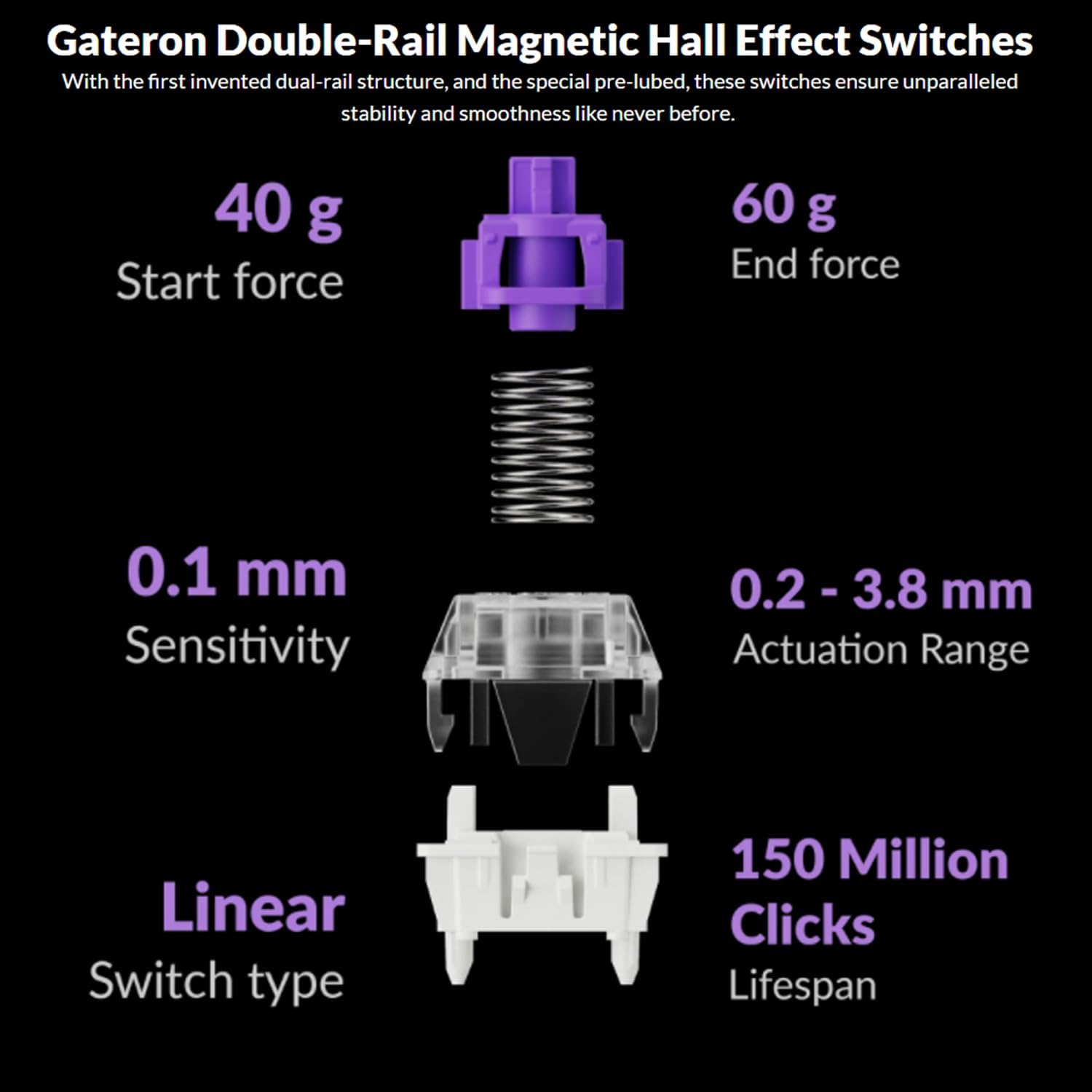
Image: The Keychron Q6 HE keyboard connected to a computer and a tablet, demonstrating its multi-device connectivity.
3.2 Промена оперативног система
The keyboard has a switch to toggle between Mac and Windows layouts. Ensure this switch, located on the back of the keyboard, is set to your current operating system for correct key mapping.
3.3 Пуњење батерије
The keyboard is equipped with a 4000 mAh Lithium Ion battery. Connect the USB-C cable to the keyboard and a power source (computer USB port or USB wall adapter) to charge. The charging indicator light will show the charging status.
4. Упутство за употребу
4.1 Основне функције тастера
The Q6 HE features a standard 100% layout. All keys function as labeled. Use the 'Fn' key in combination with other keys for secondary functions (e.g., media controls, backlight adjustments).
4.2 Programmable Knob
The rotary knob on the top right of the keyboard is programmable. By default, it controls volume (rotate) and media play/pause (press). Its functions can be customized using the Keychron Launcher web апп.
4.3 Gateron Magnetic Hall Effect Switches
The Q6 HE utilizes Gateron Double-Rail Magnetic Hall Effect Switches, which allow for dynamic customization of key behavior.

Image: Diagram illustrating the adjustable actuation points of the magnetic switches, ranging from 0.5mm to 3.5mm.
4.3.1 Adjustable Actuation Points
The actuation point (the distance a key needs to travel to register a press) can be adjusted from 0.1 mm to 3.8 mm using the Keychron Launcher web app. This allows for personalized typing and gaming sensitivity.
4.3.2 Брзо окидање
Rapid Trigger functionality allows a key to reactivate instantly upon reset, without needing to return to its original position. This feature is highly beneficial for competitive gaming and can be configured via the Keychron Launcher.

Image: Detailed breakdown of Gateron Double-Rail Magnetic Hall Effect Switches, showing components and specifications like start force, end force, sensitivity, actuation range, switch type, and lifespan.
4.4 РГБ позадинско осветљење
The keyboard features south-facing RGB LED lights. You can cycle through various lighting effects and adjust brightness using 'Fn' key combinations or through the Keychron Launcher web апп.
4.5 Keychron Launcher Web Апп
The Keychron Launcher is a web-based application for advanced customization. It allows you to:
- Ремап кључева
- Adjust actuation points for magnetic switches
- Create personalized macro commands
- Set shortcuts and key combinations
- Прилагодите RGB светлосне ефекте

Image: Screenshot of the Keychron Launcher web app interface, showing options for key remapping, actuation point adjustment, and macro creation.
5. Одржавање
5.1 Чишћење тастатуре
Да бисте очистили тастатуру:
- Искључите тастатуру из свих извора напајања и уређаја.
- Користите меку крпу која не оставља длачицеampводом или благим раствором за чишћење да бисте обрисали капице тастера и кућиште.
- За дубље чишћење, користите приложени алат за извлачење капица тастера да бисте уклонили капице тастера и очистили доњу страну компримованим ваздухом или малом четком.
- Избегавајте прскање течности директно на тастатуру.
5.2 Прекидачи са могућношћу замене током рада
The Q6 HE features hot-swappable magnetic switches, allowing you to replace individual switches without soldering.

Слика: Крупни план view of the Keychron Q6 HE keyboard with several keycaps and switches removed, highlighting the hot-swappable magnetic switch design.
5.2.1 Замена прекидача
- Use the switch puller to carefully remove the desired switch. Grip the switch firmly and pull straight up.
- Поравнајте пинове новог прекидача са рупама на штампаној плочи.
- Gently press the new switch into place until it clicks. Ensure it is seated correctly and not bent.
5.3 Одржавање батерије
Да бисте продужили век трајања батерије:
- Избегавајте често потпуно пражњење батерије.
- Чувајте тастатуру на хладном и сувом месту када је не користите дуже време.
- Не излажите тастатуру екстремним температурама.
КСНУМКС. Решавање проблема
6.1 Тастатура не реагује
- Жични режим: Уверите се да је USB-C кабл безбедно повезан и са тастатуром и са рачунаром. Покушајте са другим USB портом или каблом.
- Режим од 2.4 GHz: Verify the 2.4 GHz receiver is plugged in and the keyboard is set to '2.4G' mode. Re-pair by holding 'Fn' + '4' for 4 seconds.
- Блуетоотх режим: Check if Bluetooth is enabled on your device and the keyboard is paired. Re-pair if necessary by holding 'Fn' + '1/2/3' for 4 seconds.
- батерија: Ensure the keyboard battery is charged. Connect it to a power source.
6.2 Keys Not Registering or Double Typing
- Тачка активирања: Adjust the actuation point for the affected keys using the Keychron Launcher. A higher actuation point (e.g., 2.0mm or 3.0mm) can help prevent accidental presses or double typing.
- Switch Issue: If a specific key consistently malfunctions, the magnetic switch might be faulty. Consider replacing the hot-swappable switch.
- Фирмвер: Ensure your keyboard firmware is up to date via the Keychron Launcher.
6.3 RGB Backlight Issues
- Осветљеност: Adjust backlight brightness using 'Fn' key combinations.
- Ефекти: Cycle through different RGB effects using 'Fn' key combinations.
- софтвер: Use the Keychron Launcher to customize and troubleshoot RGB settings.
7. Спецификације
| Број модела | Q6H-P1 |
| Бранд | Кеицхрон |
| Технологија повезивања | 2.4 GHz Wireless, Bluetooth 5.1, USB-C Wired |
| Опис тастатуре | Full-size, Ergonomic |
| Посебне карактеристике | Hall Effect Magnetic Switches, Programmable Knob, Large Battery Capacity, Hot-Swappable |
| Компатибилни уређаји | PC, Mac, Smartphone, Tablet, Gaming Console |
| Позадинско осветљење тастатуре | RGB (окренут ка југу) |
| Материјал | 6063 Aluminum (Case) |
| Батерија | Литијум-јонска батерија од 4000 mAh (укључена) |
| Тежина артикла | 6.49 фунти (приближно 2.94 кг) |
| Димензије пакета | 19 к 8.5 к 3 инча |

Image: An exploded diagram showing the internal layers and components of the Keychron Q6 HE keyboard, including keycaps, knob, magnetic switches, top case, sound absorbing foam, gaskets, plate, PCB, latex bottom pad, bottom case PET film, bottom case acoustic foam, battery, and silicone gaskets.
8. Информације о гаранцији
Keychron products typically come with a limited manufacturer's warranty. For specific warranty terms, conditions, and duration, please refer to the official Keychron webсајт или гарантни лист који сте добили уз производ. Сачувајте доказ о куповини за потребе подношења захтева за гаранцију.
9. Подршка
For further assistance, technical support, or to download the latest firmware and software, please visit the official Keychron webсајт:
You can also visit the Keychron store on Amazon for product information and customer service: